Rpcs3: DX12/GL/Vulkan: Turbo: Super Stunt Squad black textures
Turbo Super Stunt Squad :

{PPU[0x9] Thread (main_thread) [0x008ab518]} sys_io TODO: cellPadPeriphGetInfo(info=*0xd00bf8bc)
{PPU[0x9] Thread (main_thread) [0x008ab518]} sys_io TODO: cellPadPeriphGetInfo(info=*0xd00b324c)
{PPU[0x9] Thread (main_thread) [0x008ab518]} sys_io TODO: cellPadPeriphGetInfo(info=*0xd00b31ac)
{PPU[0x9] Thread (main_thread) [0x008ab518]} sys_io TODO: cellPadPeriphGetInfo(info=*0xd00befcc)
{PPU[0x9] Thread (main_thread) [0x008ab518]} sys_io TODO: cellPadPeriphGetInfo(info=*0xd00c61fc)
With lib_io
{PPU[0xa] Thread (main_thread) [0x00ba263c]} HLE TODO: Unimplemented syscall syscall_510 -> CELL_OK
{PPU[0xa] Thread (main_thread) [0x00ba2680]} HLE TODO: Unimplemented syscall syscall_512 -> CELL_OK
{PPU[0xa] Thread (main_thread) [0x00ba27f4]} HLE TODO: Unimplemented syscall syscall_514 -> CELL_OK
Log : https://gist.github.com/SakataGintokiYT/d3ed35f625a7d71ff52673dc9617b0a8
Shaderlog : https://mega.nz/#!JRwnXIxb!IGrNiC5Sn2JsOmMSlwZ57kIr98wfegT-C4AJchb_TjQ
Pac-Man and the Ghostly Adventures

{PPU[0x9] Thread (main_thread) [0x008bff10]} sys_io TODO: cellPadPeriphGetInfo(info=*0xd00bf8ac)
{PPU[0xb] Thread (main_thread) [0x008ab518]} sys_io TODO: cellPadPeriphGetInfo(info=*0xd00bf8bc)
{PPU[0xb] Thread (main_thread) [0x008bff10]} sys_io TODO: cellPadPeriphGetInfo(info=*0xd00c61fc)
{PPU[0x9] Thread (main_thread) [0x008bff10]} sys_io TODO: cellPadPeriphGetInfo(info=*0xd00befbc)
{PPU[0xb] Thread (main_thread) [0x008bff10]} sys_io TODO: cellPadPeriphGetInfo(info=*0xd00befbc)
With lib_io
{PPU[0xa] Thread (main_thread) [0x00bb263c]} HLE TODO: Unimplemented syscall syscall_510 -> CELL_OK
{PPU[0xa] Thread (main_thread) [0x00bb2680]} HLE TODO: Unimplemented syscall syscall_512 -> CELL_OK
{PPU[0xa] Thread (main_thread) [0x00bb967c]} HLE TODO: Unimplemented syscall syscall_514 -> CELL_OK
Log : https://gist.github.com/SakataGintokiYT/089dbfcf99f934e0f746f77c0f0fd5ce
Shaderlog : https://mega.nz/#!cQg0gQjJ!lz8Zv_Djx8ng1leXlGlOT68yDJxkzKFPxZs7STi39BY
 SakataGintokiYT
All 65 comments
How about Vulkan?
 raven02
on 6 Jul 2016
raven02
on 6 Jul 2016
@raven02
The same issue on Og l/ vulkan ;}
SakataGintokiYT
on 6 Jul 2016
i see. thanks @SakataGintokiYT
raven02
on 6 Jul 2016
{Vulkan}
Pac-Man and the Ghostly Adventures: {RenderDoc}

{Vulkan}
Turbo Super Stunt Squad : {RenderDoc}

SakataGintokiYT
on 21 Sep 2016
@kd-11
Do you know how to fix this issue with black textures in these games ?
SakataGintokiYT
on 29 Sep 2016
I'll investigate when I have some time
 kd-11
on 29 Sep 2016
kd-11
on 29 Sep 2016
@SakataGintokiYT could you upload the ogl trace? Its much easier to debug
kd-11
on 29 Sep 2016
@kd-11
[debug] Read data from cell when initializing RTVs]
[5a46560d]
SakataGintokiYT
on 3 Feb 2017
@SakataGintokiYT Does enabling read/write color buffers make a difference with opengl? The misses I'm seeing would be affected by that I think.
kd-11
on 4 Feb 2017
@kd-11
with: read/write color buffers

SakataGintokiYT
on 4 Feb 2017
@kd-11
Cache views of fbo data in pinned PBOs
[4ccb9799]
Fatal error
Unhandled Win32 exception 0xC0000005.
Segfault reading location 0000000000000000 at 00007ffd91cfca20.
Instruction address: 00007ffd91cfca20.
Function address: 00007ffd91cfc830 (base+0xc830).
Module name: 'VCRUNTIME140.dll'.
Module base: 00007ffd91cf0000.
RPCS3 image base: 0000000000010000.
Yea, that's what I feared. However, it does confirm that this game is trying to read data from a locked section view. Will add more info to the log and try to figure this one out.
kd-11
on 5 Feb 2017
https://ci.appveyor.com/project/kd-11/rpcs3/build/0.0.1-398
I forgot that vm::protect actually does modify page properties. Also, remember to disable r/w buffers since I dont want anything to interfere with this test.
kd-11
on 5 Feb 2017
@kd-11
[debug] Fix rtt surface dimensions
[47334cfc]
Fatal error
Unhandled Win32 exception 0xC0000005.
Segfault reading location 0000000000000000 at 00007ff82a04ca20.
Instruction address: 00007ff82a04ca20.
Function address: 00007ff82a04c830 (base+0xc830).
Module name: 'VCRUNTIME140.dll'.
Module base: 00007ff82a040000.
RPCS3 image base: 0000000000010000.
Looks like a failed map operation.
kd-11
on 5 Feb 2017
https://ci.appveyor.com/project/kd-11/rpcs3/build/0.0.1-400
If it fails to run, enable debug output and attach log.
kd-11
on 5 Feb 2017
@kd-11
[Initialize pbo target 5c1fee42]
Unhandled Win32 exception 0xC0000005.
Segfault reading location 0000000007231000 at 00007ff83179cb7c.
Instruction address: 00007ff83179cb7c.
Function address: 00007ff83179c830 (base+0xc830).
Module name: 'VCRUNTIME140.dll'.
Module base: 00007ff831790000.
RPCS3 image base: 0000000000010000.
with enable debug output
Log:
SakataGintokiYT
on 5 Feb 2017
Looks like map succeeded, but something else failed.
https://ci.appveyor.com/project/kd-11/rpcs3/build/0.0.1-401 dumps info to log file. I still expect the crash, but hopefully this will give me enough information.
kd-11
on 5 Feb 2017
@kd-11
[debug] Dump more info from texture cache [ a886e058 ]
Fatal error
Unhandled Win32 exception 0xC0000005.
Segfault reading location 000000000ae01000 at 00007ffbc414cb7c.
Instruction address: 00007ffbc414cb7c.
Function address: 00007ffbc414c830 (base+0xc830).
Module name: 'VCRUNTIME140.dll'.
Module base: 00007ffbc4140000.
RPCS3 image base: 0000000000010000.
Looks like it needs more work. Will update soon.
kd-11
on 5 Feb 2017
https://ci.appveyor.com/project/kd-11/rpcs3/build/0.0.1-402
Expect very poor performance with this one until I get around to cleaning and optimizing the code.
kd-11
on 5 Feb 2017
I know there may be some missing drawings, this is due to odd pitch handling.
I'll have to run more tests to determine correct behavior for these double-pitch textures (MSAA?). I believe the same issue affects catherine half-width sampling.
kd-11
on 5 Feb 2017
 SakataGintokiYT
on 5 Feb 2017
SakataGintokiYT
on 5 Feb 2017
@kd-11
Very nice progress in Bakugan: Battle Brawlers ^_^

SakataGintokiYT
on 5 Feb 2017
Looks like super stunt squad menu is trying to perform some kind of blend operation. Blending is set to off, but once can clearly see the shader is attempting to overwrite the render with the background image and sets the alpha component to a computed variable. That might actually be unrelated to this bug.
As for bakugan, its the wierd pitch issue again it seems.
kd-11
on 5 Feb 2017
Retry with https://ci.appveyor.com/project/kd-11/rpcs3/build/0.0.1-408
Doesn't fix the wrong background for super squad, but maybe it could help bakugan a bit?
If not, that means pitch is used differently than we assume and we ought to modify how we upload textures to the GPU.
Hopefully fixes crashing with games like persona 4. Requires ARB_direct_state_access/opengl 4.5 but I'll water it down before merging.
kd-11
on 8 Feb 2017
If you by crashing in Persona 4 mean black screen but otherwise running in Persona 4 Arena then it makes no (visible) difference.
 al0xf
on 8 Feb 2017
al0xf
on 8 Feb 2017
For persona 4, yes, the crash is what I'm interested in right now.
kd-11
on 8 Feb 2017
@kd-11
[ogl] Minor adjustments to buffer cache
[Bakugan: Battle Brawlers]

Log:
ShaderLog:
OpenGL-Render-Doc:
[ Turbo: Super Stunt Squad]

SakataGintokiYT
on 8 Feb 2017
@kd-11 Persona 5 is slightly improved too
Master build
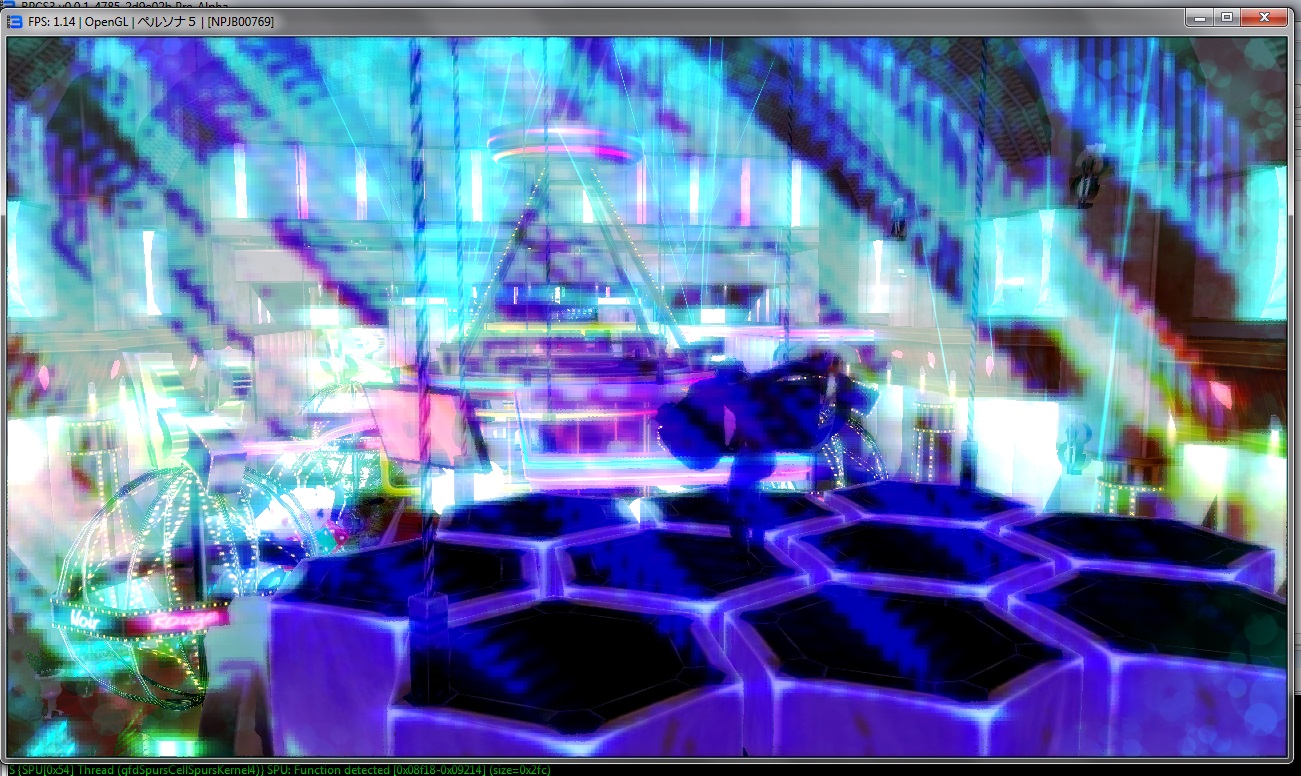
Your build

 AniLeo
on 8 Feb 2017
AniLeo
on 8 Feb 2017
The broken graphics in bakugan are a regression I inadvertently introduced while rewriting the texture cache. I'm hunting down which part of the changes causes the misalignment with the fragment constants buffer. Some other titles are also affected.
kd-11
on 10 Feb 2017
https://ci.appveyor.com/project/kd-11/rpcs3/build/0.0.1-421 fixes the regression. Please retest.
kd-11
on 13 Feb 2017
@kd-11 Can you fix framebuffer copying in Vulkan? It's blackscreen in some homebrews when the frame is "rendered" on the Cell side.
 Nekotekina
on 13 Feb 2017
Nekotekina
on 13 Feb 2017
@Nekotekina Will do so as soon as I've confirmed that GL works properly. Same goes for DX12, although DX12 has the basics done.
kd-11
on 13 Feb 2017
@kd-11

SakataGintokiYT
on 13 Feb 2017
SplatterHouse have exactly same issue render, look my issue for see detail ^^

 Zangetsu38
on 13 Feb 2017
Zangetsu38
on 13 Feb 2017
Ok. I'll have to do software "scaling" to get around this. Will push an update using nearest scaling and we can see what happens.
kd-11
on 13 Feb 2017
https://ci.appveyor.com/project/kd-11/rpcs3/build/0.0.1-422 adds software scaling for upto 2 and 4 samples per pixel. It implements the inverse of the fix we committed for catherine, but this time for programs that copy the data and re-use it.
kd-11
on 13 Feb 2017
@kd-11

SakataGintokiYT
on 13 Feb 2017
Lol. That seems worse somehow. Not sure what is going on there; looks like I've made a wrong assumption about byte order somehow.
kd-11
on 13 Feb 2017
@kd-11 Very good, just very pixelize lol and oh i just see with picture, but in OGL, have polyghon line, same Catherine.
For pizelize maybe caused by OGL, Vulkan and DX12 maybe don't have this, but actually I have only black screen with this.
But strange, Splatterhouse very good result, or Bakugan eu very buged lol

Zangetsu38
on 13 Feb 2017
I'm using nearest mode scaling for this test. I'll have to figure out why it didn't work for bakugan. Will update to use the GPU to perform the scaling which might be faster and at least better quality. Vulkan and DX12 are still unimplemented because I'm using GL as a test platform right now. Its just easier that way.
kd-11
on 14 Feb 2017
Ah ok I understand, it is like for catherine so, once it is good for ogl you apply it on the other two ^^
Zangetsu38
on 14 Feb 2017
https://ci.appveyor.com/project/kd-11/rpcs3/build/0.0.1-424 Should fix CPU scaling for Bakugan. I can work on GPU accelerated scaling from there.
kd-11
on 14 Feb 2017
@kd-11

shaderlog:
Log:
OpenGL-RenderDoc:
SakataGintokiYT
on 14 Feb 2017
Looks like the framebuffer does not divide evenly by the pitch. This will be fixed using GPU scaling as it will be too slow to do on the CPU.
kd-11
on 14 Feb 2017
I think No change for Splatterhouse
RenderDoc+Log

Zangetsu38
on 14 Feb 2017
https://github.com/RPCS3/rpcs3/pull/2391
GPU scaling is not yet implemented, but hopefully bakugan is not misaligned.
kd-11
on 15 Feb 2017
@kd-11
[Bakugan: Battle Brawlers]
F {rsx::thread} class std::system_error thrown: device or resource busy: device or resource busy
SakataGintokiYT
on 15 Feb 2017
I've pushed a fix for overflow when padding rows. Should hopefully fix the bakugan crash
kd-11
on 15 Feb 2017
@kd-11
[a2e1688e]

SakataGintokiYT
on 15 Feb 2017
@SakataGintokiYT you use wat setting ? for me not works, i don't understand :/
I use build appeveyor for sure, but i don't iknow with impossible acces ingame
You have Nvidia drivers 378.66 ?
Zangetsu38
on 15 Feb 2017
@kd-11
@Zangetsu38

I use Nvidia Vulkan Beta Driver 376.71
Log:
SakataGintokiYT
on 15 Feb 2017
@SakataGintokiYT I don't knwo why, i have set exactly same setting, with same build, and don't works, after show loading, rpcs3 show nothing more and log don't change
Blocked here.

Zangetsu38
on 15 Feb 2017
@Zangetsu38
Retested on latest driver [378.66]

SakataGintokiYT
on 15 Feb 2017
very strange :/ hmm I have GTX 1080 and insider build 15.031, and after instaled this new drivers my pc have a very bugged, crash explorer random, rpcs3 crash.
Probably need uniçnstall all drivers, and reinstalle this drivers
Zangetsu38
on 15 Feb 2017
@Zangetsu38
I use old build 10.00.10586.0000 and RedStone 2 is sucks ^_^
SakataGintokiYT
on 15 Feb 2017
@SakataGintokiYT xD i see
Zangetsu38
on 15 Feb 2017
I have discovered a corner case that was not handled within the shared surface store.
This issue I consider to be fixed with latest update to the PR; please retest other games. You do not need to enable "Write Color Buffers" for this to work. Please test if this affects other games (You should see alot of errors about overlapping surfaces if that is the case).

kd-11
on 20 Feb 2017
@kd-11
I have a memory overflow in Turbo: Super Stunt Squad

Pac-Man and the Ghostly Adventures
F {rsx::thread} class std::runtime_error thrown: Verification failed:
(in file c:\rpcs3\rpcs3\emu\rsx\gl\GLTextureCache.h:571)
Bakugan: Battle Brawlers / Jet Set Radio have a black screen with / without Write Color Buffers
Log:
SakataGintokiYT
on 20 Feb 2017
Overflow should be fixed now. Will look into the other issues.
kd-11
on 20 Feb 2017
Ben 10: Omniverse 2 [Fixed black screen]

Madagascar 3: The Video Game [Fixed black screen]

SakataGintokiYT
on 20 Feb 2017
@kd-11
[aab9759b]
Pac-Man and the Ghostly Adventures

SakataGintokiYT
on 22 Feb 2017
@kd-11
Bayonetta: First Climax -Demo
[Write color buffer is required]

SakataGintokiYT
on 22 Feb 2017
Closing this issue since most games listed here are fixed on current master.
kd-11
on 11 Mar 2017
Related issues
 kurosh10000
·
3Comments
kurosh10000
·
3Comments
 xddxd
·
3Comments
xddxd
·
3Comments
 LokiGrants
·
3Comments
LokiGrants
·
3Comments
 JohnGodgames
·
3Comments
JohnGodgames
·
3Comments
 altiereslima
·
3Comments
altiereslima
·
3Comments
Most helpful comment
https://ci.appveyor.com/project/kd-11/rpcs3/build/0.0.1-424 Should fix CPU scaling for Bakugan. I can work on GPU accelerated scaling from there.