Router: navigate isn't working as intended with LocationProvider
I am trying to navigate my react application after a form submit. The url gets updated but the linked component doesn't render and application stays on the same page. I'm using LocationProvider inside the router, when I remove that it works fine but I need LocationProvider since I have to build an Electron app.
This is the relavant code snippet:
import { Router, createMemorySource, createHistory, LocationProvider } from '@reach/router';
let source = createMemorySource(window);
let history = createHistory(window);
<Provider store={STORE}>
    <Main>
      <LocationProvider history={history}>
        <Router>
            <Home path="/" />
            <MainLayout path="dashboard/*" />
            <Login path="login" />
      </Router>
    </LocationProvider>
  </Main>
</Provider>
Url gets updated to /dashboard/something but MainLayout doesn't get rendered.
 aliahsan07
All 31 comments
@aliahsan07 I am also having this problem, did you find a fix?
 balaclark
on 22 Jan 2019
balaclark
on 22 Jan 2019
I didn't. I somehow worked around by calling the API call from another place and it worked like a charm. Very peculiar to my case, so I don't have a general response to this problem.
aliahsan07
on 22 Jan 2019
Ah, too bad. I've ended up going back to react-router :(
balaclark
on 23 Jan 2019
I am having the same issue, any workarounds?
 pitops
on 25 Jan 2019
pitops
on 25 Jan 2019
Running into this as well as I started implementing Reach Router with LocationProvider and Electron.
 TreTuna
on 30 Jan 2019
TreTuna
on 30 Jan 2019
Quick note: It seems the promise that navigate returns after React has rendered the next screen is never being resolved. If I run navigate with async/await and a console.log right after, the log never runs.
TreTuna
on 30 Jan 2019
I don't like it, but the workaround I've found for right now is to use state and the Redirect component in order to conditionally render <Redirect to="/route" noThrow /> when my button is pressed.
TreTuna
on 30 Jan 2019
@TreTuna that would work when you're inside the react context right. I wasn't so I couldn't use JSX inside the function.
aliahsan07
on 31 Jan 2019
@aliahsan07 Yeah, gotta be within the React context where you can use JSX. I'm desperately trying to figure out something else because I'm running into more spots I really need to navigate programmatically from and can't due to this issue right now.
TreTuna
on 31 Jan 2019
One thing I did figure out... Since every component that is a Route gets a navigate prop, I tried using that version of the function instead of importing it and it worked fine.
TreTuna
on 31 Jan 2019
@TreTuna hmm thats interesting. Might work for my case
pitops
on 31 Jan 2019
@ryanflorence Would you have any tips on this at the moment? I can use the workarounds that I have found for many use cases, however, it only covers about 70% of my use case and I'm having trouble figuring out the last 30%. I've been trying to look through the code to see if it's something I could debug and even contribute a fix for, but haven't figured it out quite yet.
TreTuna
on 31 Jan 2019
@pitops @aliahsan07
Ok, I figured out a better solution that is working everywhere for me so far!
createHistory() returns a history object that has it's own navigate() function, use this instead of importing the default navigate function from @reach/router!
What I did is create a routerHistory.js file which includes the following:
import { createMemorySource, createHistory } from "@reach/router";

const source = createMemorySource("/keyboard-select");
export const history = createHistory(source);
export const navigate = history.navigate;
Import the history to wherever your LocationProvider is:
import { LocationProvider, Router } from "@reach/router";
import { history } from './routerHistory'

function App(props){
return (
<LocationProvider history={history}>
  <Router>
    <Route1 path='/' />
    <Route2 path='/2' />
    <Route3 path='/3' />
  </Router>
</LocationProvider>
Then in any file that needs the navigate function, you import it from there instead!
import { navigate } from './routerHistory';
Let me know if this works for all of your use cases. I think this is the best solution right now without really digging in and changing the library.
TreTuna
on 1 Feb 2019
@ryanflorence would really love to hear what you interpret of this issue.
aliahsan07
on 7 Feb 2019
Not sure if this is helpful or not -- but I too am running into the issue, and would love to know the best work around.
@TreTuna can you put a snipit on how you used the navigate prop? That might do it for me.
Any other tips would be appreciated.
 jtushman
on 4 Mar 2019
jtushman
on 4 Mar 2019
@jtushman I would much more recommend the solution I wrote out above before this one right now as this only solves some of the issues while that solution solves them all. However, to answer your question.
Any "Route Component" has a navigate function added to its props. You can use that function to effectively route around this bug. You can find this example in the docs for Route Components https://reach.tech/router/api/RouteComponent . However, it seems there is a typo because it doesn't call navigate from props, it just calls it, I have written out the proper version below.
const App = () => (
<Router>
<NewInvoice path="invoices/new" />
</Router>
)
const NewInvoice = props => (
<form
onSubmit={event => {
event.preventDefault()
// do stuff w/ the form
props.navigate("somewhere-relative")
}}
>
{/* ... */}
</form>
)
Same issue here to use with Google Analytics. I created a custom Link component that uses the exported navigate().
//@flow
import React from 'react'
import { Link as ReachLink } from '@reach/router'
import { navigate } from './'
type Props = {
to: string
}
export default function Link({ to, ...restParams }: Props) {
return (
<ReachLink
onClick={() => navigate(to)}
to={to} // to attribute is a requirement of the ReachLink component
{...restParams}
/>
)
 BrunoQuaresma
on 12 Mar 2019
BrunoQuaresma
on 12 Mar 2019
Issue is here https://github.com/reach/router/blob/master/src/lib/history.js#L114
If you are using a hardcoded entrypoint url to your createMemorySource you can go with @TreTuna answer.
Otherwise you can use the Location consumer component as a HOC to send in navigate. Unfortunately the Location context is not exported in @reach/router so we can't useContext yet.
 marcneander
on 19 Mar 2019
marcneander
on 19 Mar 2019
@jtushman I would much more recommend the solution I wrote out above before this one right now as this only solves some of the issues while that solution solves them all. However, to answer your question.
Any "Route Component" has a _navigate_ function added to its props. You can use that function to effectively route around this bug. You can find this example in the docs for Route Components https://reach.tech/router/api/RouteComponent . However, it seems there is a typo because it doesn't call navigate from props, it just calls it, I have written out the proper version below.
const App = () => ( <Router> <NewInvoice path="invoices/new" /> </Router> ) const NewInvoice = props => ( <form onSubmit={event => { event.preventDefault() // do stuff w/ the form props.navigate("somewhere-relative") }} > {/* ... */} </form> )
Works like a charm but passing props to every component is really a pain.
Looking for a better solution!
I tried to use your routerHistory method but Its throwing some error
can't read path of undefined and I don't know what I did wrong!
I passed window in createMemorySource() as defined in docs. I think that's the problem.
I would really appreciate if you elaborate what it is!
Props method is working fine for now.
Thanks ❤
 abhagsain
on 13 Apr 2019
abhagsain
on 13 Apr 2019
I used the same approach used by @TreTuna and it works perfectly.
My purpose was to make it available also in the Epics and these solutions worked perfectly.
import { createHistory } from '@reach/router';
export const history = createHistory(window);
// We are exporting the navigate method to use it arbitrary in the app
// @see https://reach.tech/router/api/LocationProvider
export const { navigate } = history;
And then I was able to use it as:
import { history } from './utils/routerHistory';
ReactDOM.render(
<StoreProvider store={store}>
<ErrorBoundary>
<LocationProvider history={history}>
{({ location }) => (
<Router basepath={BASE_URL} location={location}>
<App path="*" location={location} baseUrl={BASE_URL} />
</Router>
)}
</LocationProvider>
</ErrorBoundary>
</StoreProvider>,
document.getElementById('root'),
);
and in Epics as:
...
import { navigate } from './utils/routerHistory';
const rootEpic = combineEpics(...epics);
const epicMiddleware = createEpicMiddleware({
dependencies: {
navigate,
},
});
...
 DavideBruner
on 9 May 2019
DavideBruner
on 9 May 2019
Unfortunately neither @TreTuna's history navigate nor using the navigate from props work for me, I still get an empty white page when I try to programmatically navigate.
I didn't use LocationProvider prior to trying the above solution, but it doesn't work with or without it regardless.
May be worth noting that doing something like TreTuna's other solution to conditionally render a component _does_ work, but feels very hacky.
 iamtmrobinson
on 27 Aug 2019
iamtmrobinson
on 27 Aug 2019
@pitops @aliahsan07
Ok, I figured out a better solution that is working everywhere for me so far!
createHistory()returns ahistoryobject that has it's ownnavigate()function, use this instead of importing the defaultnavigatefunction from @reach/router!What I did is create a
routerHistory.jsfile which includes the following:import { createMemorySource, createHistory } from "@reach/router"; const source = createMemorySource("/keyboard-select"); export const history = createHistory(source); export const navigate = history.navigate;Import the history to wherever your LocationProvider is:
import { LocationProvider, Router } from "@reach/router";
import { history } from './routerHistory'

function App(props){
return (
<LocationProvider history={history}>
  <Router>
    <Route1 path='/' />
    <Route2 path='/2' />
    <Route3 path='/3' />
  </Router>
</LocationProvider>
Then in any file that needs the
navigatefunction, you import it from there instead!import { navigate } from './routerHistory';Let me know if this works for all of your use cases. I think this is the best solution right now without really digging in and changing the library.
Yes. It actually works fine. Thanks a lot
 mrhm-dev
on 7 Sep 2019
mrhm-dev
on 7 Sep 2019
@TreTuna is correct that the recommended approach to navigating after a form submits is to use the promise returned from navigate. Usually, in an event handler, this would be done with async/await
side note, TreTuna is also right that the docs aren't calling navigate from props in the last example, but navigate can also be brought in as a named import at the top of a file.
The comments suggest the issue has been resolved and a few workarounds have been found 🎉
Gonna go ahead and close, but thank you you all for using reach router and helping to improve it along the way!👋🏽
 mtliendo
on 12 Sep 2019
mtliendo
on 12 Sep 2019
This feels hacky. I have the exact same use case with memory history.
Why the following does not work? How could it be fixed (like in the package itself)?
import { navigate } from '@reach/router'

// also, when I try to await promise, it hangs 4ever
// somewhere on onClick
await navigate('/foo')
 mrceperka
on 23 Sep 2019
mrceperka
on 23 Sep 2019
@mrceperka mind providing a sandbox showcasing your issue?
mtliendo
on 23 Sep 2019
@mrceperka While I haven't looked at this in a while, I _believe_ the issue that you have here is that the navigate function you are importing does not have the context of the memory history, therefor cannot update your routing. This is why I had to export and use navigate in the manner described here https://github.com/reach/router/issues/225#issuecomment-459894048
TreTuna
on 23 Sep 2019
@TreTuna your solution works (I am using it). I am just wondering why the example in docs does not work with memory history.
@mtliendo Code sandbox here: https://codesandbox.io/s/charming-mestorf-s5y7z
Also, thanks for replies.
mrceperka
on 24 Sep 2019
Please help me to solve the issue here I have the Login page and when onClick on the Login button it should trigger to home page,
but currently not happening
PLEASE HELP!!!!!! BELOW THE CODE.....
import React from 'react';
import '../../assets/css/login.css';
import Icons from '../../assets/img/icons-02.jpg';
import Settingsimg from '../../assets/img/setting.svg';
import { Link,Route, Router} from "@reach/router";
import Home from '../Shared/Home'
class Login extends React.Component {
constructor(props) {
super(props);
}
// login = () => {
// this.props.history.push('/home');
// }
render() {
return (
  <div>
    <div className="container mt-5">
<div className="row">
    <div className="col-md-9 mt-4">
        <div className="row loginContainer">
            <div className="col-md-4">
            <img src={Icons} className="imgClass" />
            </div>
            <div className="col-md-8">
                <strong>emids QA Portal</strong><span> is a QLorem ipsum dolor sit amet, consectetuer adipiscing elit, sed
                    diam nonummy nibh euismod tincidunt ut laoreet dolore magna aliquam erat volutpat. Ut wisi enim ad minim veniam, quis nostrud exerci tation ullamcorper suscipit
                    lobortis nisl ut aliquip ex ea commodo consequat. Duis autem vel eum iriure dolor in
                    hendrerit in vulputate velit esse molestie consequat, </span>
            </div>
        </div>
        <div className="row">
            <div className="col-md-12">
                <div className="justify-content-center highlightContainer">
                    <img src={Settingsimg} className="svgIconLogin"/>
                    <span className="mt-1 ml-2 qa"> emids QA AUTOMATION PORTAL</span>
                </div>
            </div>
        </div>
    </div>

    <div className="col-md-3 mt-4 boxShadow" id="logIn">
        <div className="loginScreen boxShadow">
            <div className="col-md-12">
                <span className="titleText">Login</span><br/>
                <span className="smallText">Signin to your Account</span>
            </div>

            <form  name="myForm" method="post">
                <div className="form-group mt-3">
                    <div className="input-group">
                        <div className="input-group-prepend">
                            <span className="input-group-text rounded-0 "><i className="fa fa-user"></i></span>
                        </div>
                        <input type="text" className="form-control" placeholder="username"  name="txtusername" required/>
                    </div>
                </div>

                <div className="form-group">
                    <div className="input-group">
                        <div className="input-group-prepend">
                            <span className="input-group-text rounded-0"><i className="fa fa-lock"></i></span></div>
                        <input type="password" className="form-control" placeholder="password" name="txtpassword" required/>
                    </div>
                </div>
                <div className="col text-center">

                <Router>
                     <Route path="/Home"><Home/></Route> </Router>
                </div>
                <p className="d-flex justify-content-center mt-2 forgot">Forgot Password</p>
                <p className="d-flex justify-content-center newUser">New User?</p>
            </form>
        </div>
    </div>
</div>
  </div>
);
}
}
export default Login;
 nithintel
on 30 Sep 2019
nithintel
on 30 Sep 2019
@BrunoQuaresma you can try this solution for Google Analytics: https://stackoverflow.com/a/58757929/775246
 hjr3
on 7 Nov 2019
hjr3
on 7 Nov 2019
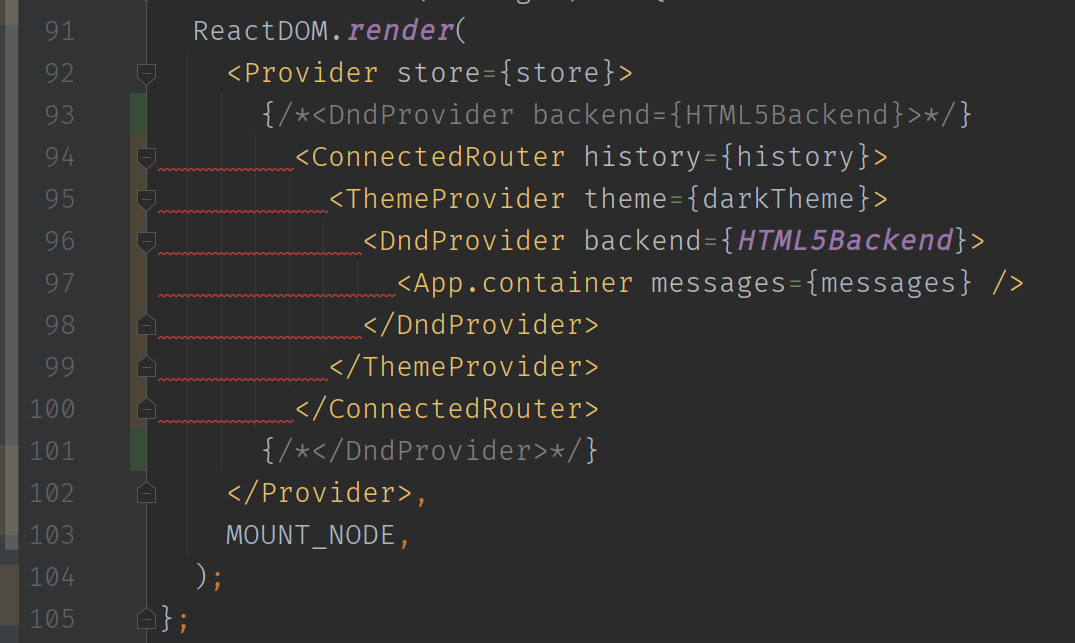
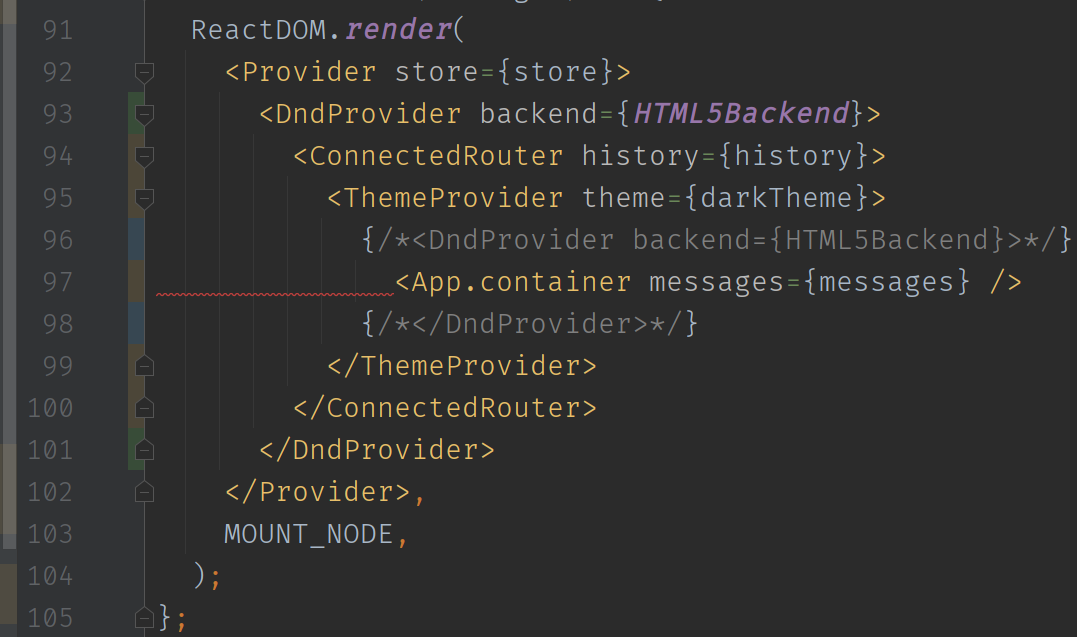
I've faced a similar issue today. I have context providers at the top level which wrap the App component. IDK why, but putting context provider outside from ConnectedReactRouter solves the problem:
Doesn't work:
Works:
 goodwin64
on 28 Jul 2020
goodwin64
on 28 Jul 2020
reopen this. what kind of maintenance is this supposed to be: "workarounds have been found, kthxbye"?
 mendrik
on 5 Nov 2020
mendrik
on 5 Nov 2020
Related issues
 alexluong
·
3Comments
alexluong
·
3Comments
 alexandernanberg
·
3Comments
alexandernanberg
·
3Comments
 danoc
·
3Comments
danoc
·
3Comments
 magnusarinell
·
3Comments
magnusarinell
·
3Comments
 MarioKrstevski
·
3Comments
MarioKrstevski
·
3Comments
Most helpful comment
@pitops @aliahsan07
Ok, I figured out a better solution that is working everywhere for me so far!
createHistory()returns ahistoryobject that has it's ownnavigate()function, use this instead of importing the defaultnavigatefunction from @reach/router!What I did is create a
routerHistory.jsfile which includes the following:Import the history to wherever your LocationProvider is:
Then in any file that needs the
navigatefunction, you import it from there instead!Let me know if this works for all of your use cases. I think this is the best solution right now without really digging in and changing the library.