Roslyn: Class Name Not Updating After Renaming and Copying/Pasting File
Version Used: Visual Studio 2019 16.8 Preview 1
Steps to Reproduce:
- Create a new .NET Core Class Library project.
- Click Class1.cs file in Solution Explorer and rename to Class2.cs. Should get a prompt to say renaming file. Click Yes and the
class Class1gets renamed toclass Class2in code. - Copy and paste Class2.cs file (I did at same level in solution). Should have the Class2 - Copy. cs at this point.
- Double click Class2.cs file to see code. The Class name in code is still
class Class1.
Expected Behavior:
I believe Class2 - Copy.cs should also be class Class2 since I made a copy of it after changing the name.
Actual Behavior:
The copied file contains the Class name before the original file was renamed, copied and pasted.
Hope this helps.
 shaggygi
All 10 comments
I wasn't able to reproduce this in Version 16.8.0 Preview 5.0
@shaggygi I'm going to close, but feel free to reopen if you're still having issues. If this does still happen, can you check that the contents of Class2.cs get updated before your copy?
 ryzngard
on 24 Oct 2020
ryzngard
on 24 Oct 2020
@ryzngard Thanks for reviewing this, but I'm still seeing in 16.8.0 Preview 5.0. I did however notice I made some bad wording in initial steps. Sorry.
"4. Double click Class2.cs file to see code. The Class name in code is still class Class1."
Should have been the copied file name...
"4. Double click Class2 - Copy.cs file to see code. The Class name in code is still class Class1."
In addition, I also tried an additional step that appears to update to expected results. However, if you don't do step 4 (save before opening), I still see Class1.
- Create a new .NET Core Class Library project.
- Click Class1.cs file in Solution Explorer and rename to Class2.cs. Should get a prompt to say renaming file. Click Yes and the class Class1 gets renamed to class Class2 in code.
- Copy and paste Class2.cs file (I did at same level in solution). Should have the Class2 - Copy. cs at this point.
- Click Save to save solution. NOTE: This step will make the copied file update. If you skip this, it will show Class1.
- Double click Class2 - Copy.cs file to see code. You now will see Class name in code as class Class2.
shaggygi
on 24 Oct 2020
@shaggygi is Class2.cs open in the editor when you do this? If possible, could you get a gif recording or use "Submit Feedback" to record the steps?
ryzngard
on 24 Oct 2020
@ryzngard does this help?
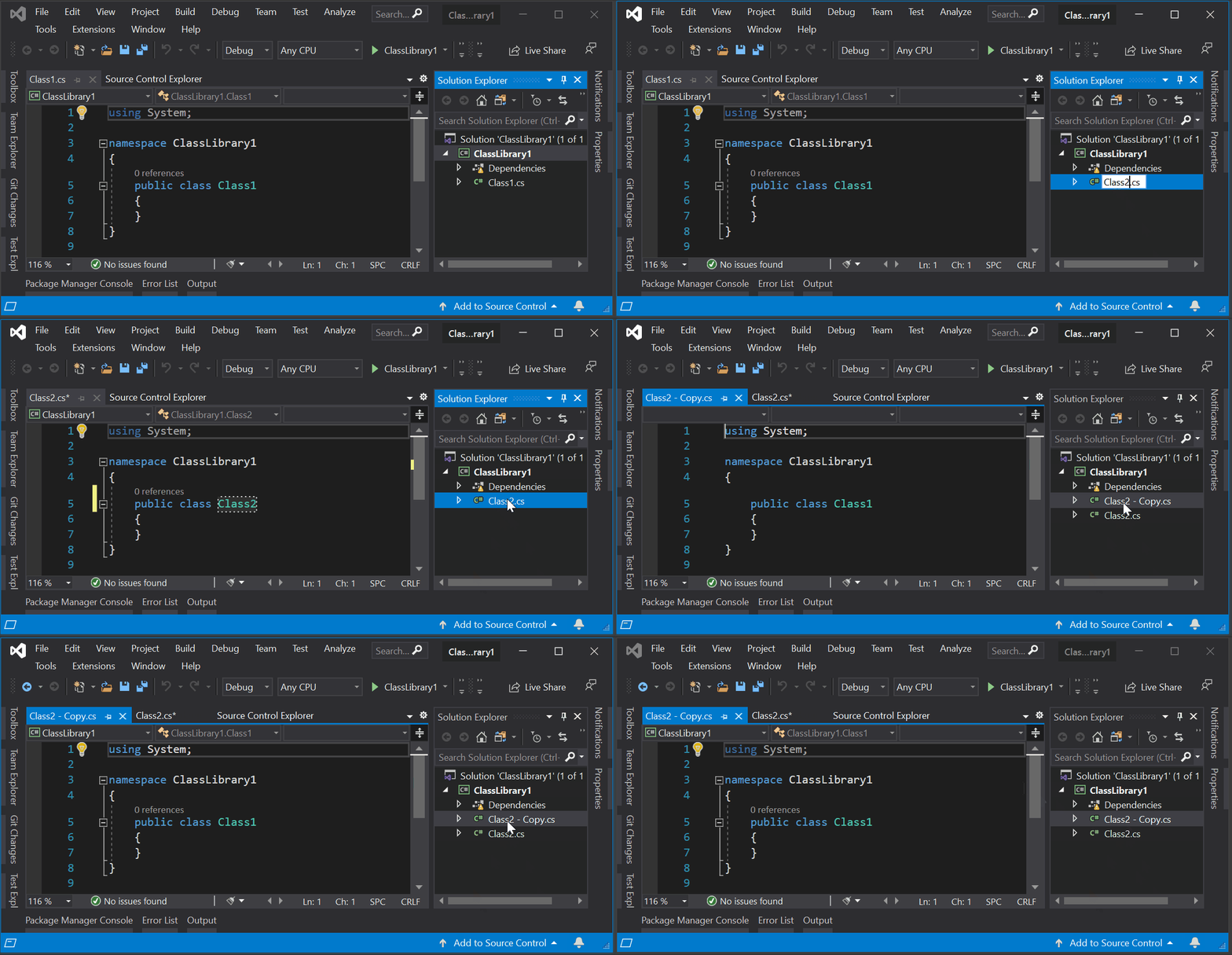
shaggygi
on 24 Oct 2020
Perfect, I have a repro now. Thanks!
ryzngard
on 24 Oct 2020
@ryzngard thank you. sorry for the confusion. have a good weekend :)
shaggygi
on 24 Oct 2020
@davkean @ocallesp From investigation it looks like if the editor window is open, we're not automatically saving the contents after the name change. Since we're copying the on disk contents and not the unsaved changes, Class1 is still showing. This doesn't happen if the editor window for the file is closed. This does happen if the active editor window is not the file being modified, as long as there is an open editor window for the file being renamed.
ryzngard
on 24 Oct 2020
@ryzngard This has nothing to do with rename. You can repro this just by manually changing the contents of the file. This is a limitation in the project-system's implementation of copy and paste, where it will only copy the on-disk version of the file.
You should not move to saving the file, we should just do better on the project-system side for this.
 davkean
on 27 Oct 2020
davkean
on 27 Oct 2020
@davkean Thanks for the explanation. Should we move this to an AzDo bug? Is there already one?
ryzngard
on 27 Oct 2020
There isn't one.
davkean
on 27 Oct 2020
Related issues
 SolalPirelli
·
3Comments
SolalPirelli
·
3Comments
 NikChao
·
3Comments
NikChao
·
3Comments
 DavidArno
·
3Comments
DavidArno
·
3Comments
 nlwolf
·
3Comments
nlwolf
·
3Comments
 dpoeschl
·
3Comments
dpoeschl
·
3Comments