Roslyn: File rename refactor notifies for .razor files and can yellow bars VS
Originally reported by our CTI: https://github.com/aspnet/AspNetCore-ManualTests/issues/111
Version Used:

Steps to Reproduce:
Create a new "Razor Class Library":

Open
Component1.razor- Rename it to
MyComponent.razor
Expected Behavior:
Nothing, this refactoring is a C# refactoring 😄.
Actual Behavior:

Extra:
If you click "Yes" you get a yellow bar with an "unexpected error" dialog. I'm assuming the OOP host is rightfully falling over on this. /cc @tmat
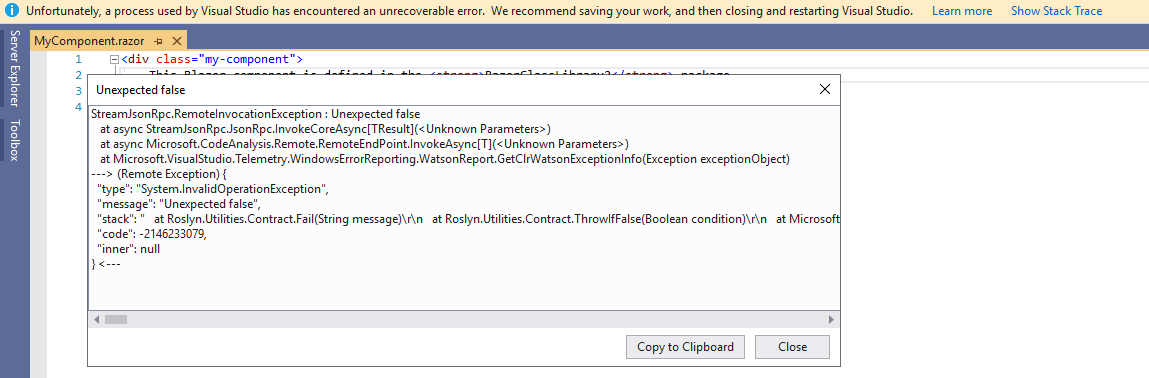
Note: We would eventually want to hook into this feature to properly rename components but we have not done any of that work "yet". Razor would be all ears on ways to "prevent" this by us hooking into the feature and no-oping until we can properly light it up.
 NTaylorMullen
All 10 comments
@NTaylorMullen I think this no longer repros in the latest preview or int preview. I tried the steps in the images and got no prompt. We recently made changes to this area, so it may have been that but I'm not 100% sure.
 ryzngard
on 29 Jul 2020
ryzngard
on 29 Jul 2020
@NTaylorMullen , This issue still repro on 16.8 Preview 2 [Master.30403.161], this issue fix on which build version?
 jinzhao1127
on 4 Aug 2020
jinzhao1127
on 4 Aug 2020
@ryzngard ?
NTaylorMullen
on 4 Aug 2020
Looking. If it's in that build then it's not fixed
ryzngard
on 4 Aug 2020
Ah, I think I found the discrepancy. I tested with the file closed. With it open it repros. Thanks for following up @jinzhao1127 @NTaylorMullen
ryzngard
on 4 Aug 2020
Moving to project system. From understanding this is because the projection buffer used with razor is being passed as the document. In Roslyn we don't have a good way to filter those out to do anything, and we don't want to remove this action for all generated code.
ryzngard
on 6 Aug 2020
@ryzngard I looked into this, we're asking if you can rename this item and you're answering with "yes":

Roslyn should say "no" if its doesn't support renaming them.
 davkean
on 6 Aug 2020
davkean
on 6 Aug 2020
Roslyn should detect that this is a dynamic file, and filter them out from being renamed - we know nothing about these files, other than Roslyn is saying it can rename them.
davkean
on 6 Aug 2020
So I was surprised the project system is even trying to do a rename handling when it's not a Compile item to start with. If I'm renaming a text file, why are we trying to fetch compilations from Roslyn and spending the performance cost of that? I'm also worried if there's cases where a rename might get triggered for generated files we don't recognize as special (like a Compile item being added as a part of build) where we can't practically rename that either, and we have no way to know.
 jasonmalinowski
on 6 Aug 2020
jasonmalinowski
on 6 Aug 2020
Pulling out callstack to track easier:
at Roslyn.Utilities.Contract.Fail(String message)
   at Roslyn.Utilities.Contract.ThrowIfFalse(Boolean condition)
   at Microsoft.CodeAnalysis.Remote.SolutionCreator.<UpdateDocumentInfoAsync>d__13.MoveNext()
--- End of stack trace from previous location where exception was thrown ---
   at System.Runtime.CompilerServices.TaskAwaiter.ThrowForNonSuccess(Task task)
   at System.Runtime.CompilerServices.TaskAwaiter.HandleNonSuccessAndDebuggerNotification(Task task)
   at Microsoft.CodeAnalysis.Remote.SolutionCreator.<UpdateDocumentAsync>d__12.MoveNext()
--- End of stack trace from previous location where exception was thrown ---
   at System.Runtime.CompilerServices.TaskAwaiter.ThrowForNonSuccess(Task task)
   at System.Runtime.CompilerServices.TaskAwaiter.HandleNonSuccessAndDebuggerNotification(Task task)
   at System.Runtime.CompilerServices.TaskAwaiter.ValidateEnd(Task task)
   at Microsoft.CodeAnalysis.Remote.SolutionCreator.<UpdateDocumentsAsync>d__11.MoveNext()
--- End of stack trace from previous location where exception was thrown ---
   at System.Runtime.CompilerServices.TaskAwaiter.ThrowForNonSuccess(Task task)
   at System.Runtime.CompilerServices.TaskAwaiter.HandleNonSuccessAndDebuggerNotification(Task task)
   at System.Runtime.CompilerServices.TaskAwaiter.ValidateEnd(Task task)
   at Microsoft.CodeAnalysis.Remote.SolutionCreator.<UpdateProjectAsync>d__9.MoveNext()
--- End of stack trace from previous location where exception was thrown ---
   at System.Runtime.CompilerServices.TaskAwaiter.ThrowForNonSuccess(Task task)
   at System.Runtime.CompilerServices.TaskAwaiter.HandleNonSuccessAndDebuggerNotification(Task task)
   at System.Runtime.CompilerServices.TaskAwaiter.ValidateEnd(Task task)
   at Microsoft.CodeAnalysis.Remote.SolutionCreator.<UpdateProjectsAsync>d__7.MoveNext()
--- End of stack trace from previous location where exception was thrown ---
   at System.Runtime.CompilerServices.TaskAwaiter.ThrowForNonSuccess(Task task)
   at System.Runtime.CompilerServices.TaskAwaiter.HandleNonSuccessAndDebuggerNotification(Task task)
   at Microsoft.CodeAnalysis.Remote.SolutionCreator.<UpdateProjectsAsync>d__6.MoveNext()
--- End of stack trace from previous location where exception was thrown ---
   at System.Runtime.CompilerServices.TaskAwaiter.ThrowForNonSuccess(Task task)
   at System.Runtime.CompilerServices.TaskAwaiter.HandleNonSuccessAndDebuggerNotification(Task task)
   at System.Runtime.CompilerServices.TaskAwaiter.ValidateEnd(Task task)
   at Microsoft.CodeAnalysis.Remote.SolutionCreator.<CreateSolutionAsync>d__5.MoveNext()
--- End of stack trace from previous location where exception was thrown ---
   at Microsoft.VisualStudio.Telemetry.WindowsErrorReporting.WatsonReport.GetClrWatsonExceptionInfo(Exception exceptionObject)
--- End of stack trace from previous location where exception was thrown ---
   at System.Runtime.CompilerServices.TaskAwaiter.ThrowForNonSuccess(Task task)
   at System.Runtime.CompilerServices.TaskAwaiter.HandleNonSuccessAndDebuggerNotification(Task task)
   at Microsoft.CodeAnalysis.Remote.SolutionService.<CreateSolution_NoLockAsync>d__14.MoveNext()
--- End of stack trace from previous location where exception was thrown ---
   at System.Runtime.CompilerServices.TaskAwaiter.ThrowForNonSuccess(Task task)
   at System.Runtime.CompilerServices.TaskAwaiter.HandleNonSuccessAndDebuggerNotification(Task task)
   at Microsoft.CodeAnalysis.Remote.SolutionService.<GetSolutionAsync>d__13.MoveNext()
--- End of stack trace from previous location where exception was thrown ---
   at System.Runtime.CompilerServices.TaskAwaiter.ThrowForNonSuccess(Task task)
   at System.Runtime.CompilerServices.TaskAwaiter.HandleNonSuccessAndDebuggerNotification(Task task)
   at Microsoft.CodeAnalysis.Remote.CodeAnalysisService.<>c__DisplayClass31_0.<<RenameSymbolAsync>b__0>d.MoveNext()
--- End of stack trace from previous location where exception was thrown ---
   at System.Runtime.CompilerServices.TaskAwaiter.ThrowForNonSuccess(Task task)
   at System.Runtime.CompilerServices.TaskAwaiter.HandleNonSuccessAndDebuggerNotification(Task task)
   at Microsoft.CodeAnalysis.Remote.ServiceBase.<RunServiceAsync>d__15`1.MoveNext()"
Related issues
 ashmind
·
3Comments
ashmind
·
3Comments
 SolalPirelli
·
3Comments
SolalPirelli
·
3Comments
 glennblock
·
3Comments
glennblock
·
3Comments
 dpoeschl
·
3Comments
dpoeschl
·
3Comments
 AdamSpeight2008
·
3Comments
AdamSpeight2008
·
3Comments