Roslyn: "Show items from unimported namespaces" breaks members suggestions
_This issue has been moved from a ticket on Developer Community._
[regression] [worked-in:16.4]
After upgrading to version 16.6.0, if "Show items from unimported namespaces" is enabled, the members suggestions stop working. To reproduce, type the following code,
string str = "hello";
str.
After '.', the members suggestion list doesn't appear.
 vsfeedback
All 10 comments
To repro this issue, just create a console app and added a nuget reference to Accord.Math package. We will spend a lot of time trying to filter out symbols for unimported extension methods.
 genlu
on 10 Jun 2020
genlu
on 10 Jun 2020
The problem will also be seen in the project which imports any other projects (library) which import Accord.
 programatix
on 11 Jun 2020
programatix
on 11 Jun 2020
I think the regression is introduced here: https://github.com/dotnet/roslyn/pull/42585
genlu
on 11 Jun 2020
yeah i confirm, we are using accord in one of ours most basic sdk. so all solutions that consume are affected....
 jmecosta
on 12 Jun 2020
jmecosta
on 12 Jun 2020
What's the core issue here @genlu ?
 CyrusNajmabadi
on 12 Jun 2020
CyrusNajmabadi
on 12 Jun 2020
What's the core issue here @genlu ?
I'll add what I know:
After upgrading to Visual Studio 16.6.1 (from 16.4 something) I started having three closely related problems, and they are still present for me in the 16.6.2 version.
I reported them as three separate issues, in the Developer Community:
- IntelliSense closes itself during typing
- IntelliSense does not automatically open
- IntelliSense is slow to open
The second point was closed as a duplicate of this issue ("Show items from unimported namespaces" breaks members suggestions) that is now this #45042.
members suggestion list doesn't appear
This is the core of this issue, as I see it.
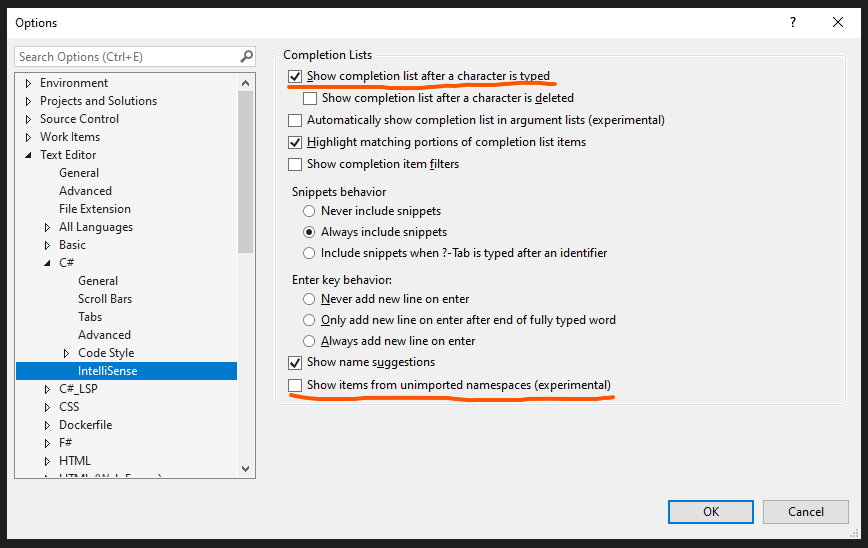
The "Show completion list after a character is typed" setting is enabled (which is the default) but does no longer function, as of the update. Hitting Ctrl+Space shows the completion list, though.
On my side, I have tried disabling most things (including the option to "Show items from unimported namespaces") in IntelliSense settings, and I still experience these problems (in a new C# .NET Core console application). Reproducing points 2 and 3 just now, I'm also experiencing a fourth issue which is that the IntelliSense widget stays open on input but it hangs partially (arrow keys do nothing, and it doesn't narrow down results on further typing, but mouse click works).
 Pikeman
on 12 Jun 2020
Pikeman
on 12 Jun 2020
Thanks for the info. I was more along gen what it was about this library that was breaking things. Thanks though for the great info!
CyrusNajmabadi
on 12 Jun 2020
Even if I disable "Show items from unimported namespaces (experimental)", then my completion list still does not work. Is this expected, given the framing of this issue?
I have uninstalled Visual Studio, re-installed an older version (16.4.6) from before the above mentioned pull request was merged, and reset all settings (devenv /resetsettings CSharp). Still the code completion list does not open automatically, and it hangs after opening.
It seems to me like my environment/settings broke as part of the update to 16.6, and I don't see how I can clean it more. I would sooner use a different code editor than format my hard drive, but I would really like to use IntelliSense (IntelliCode is awesome too by the way). Please let me know if I can provide some more input. Also, if you have an idea of a workaround for this, please share your thoughts.
Thanks for your time.
Pikeman
on 16 Jun 2020
Even if I disable "Show items from unimported namespaces (experimental)", then my completion list still does not work. Is this expected, given the framing of this issue?
@Pikeman No, the issue described here is caused by "Show items from unimported namespaces", so it would go away after disabling it or with older version of VS. Is it possible to share your code so we can repro the issue? If you want to do it privately, you can use VS feedback tool ("Send Feedback" at top right corner of VS) and upload it as an attachment. Thanks!
genlu
on 16 Jun 2020
@Pikeman Ah, I just realized you are the one who created this feedback.
So, I closed the feedback "IntelliSense is slow to open", and create a new issue https://github.com/dotnet/roslyn/issues/45235 to track "IntelliSense does not automatically open", since it doesn't seems to be the same one described here.
genlu
on 16 Jun 2020
Related issues
 JesperTreetop
·
3Comments
JesperTreetop
·
3Comments
 OndrejPetrzilka
·
3Comments
OndrejPetrzilka
·
3Comments
 codingonHP
·
3Comments
codingonHP
·
3Comments
 nlwolf
·
3Comments
nlwolf
·
3Comments
 marler8997
·
3Comments
marler8997
·
3Comments
Most helpful comment
@Pikeman Ah, I just realized you are the one who created this feedback.
So, I closed the feedback "IntelliSense is slow to open", and create a new issue https://github.com/dotnet/roslyn/issues/45235 to track "IntelliSense does not automatically open", since it doesn't seems to be the same one described here.