Roslyn: OpenProjectAsync: The SDK 'Microsoft.NET.Sdk' specified could not be found.
Version Used:
Roslyn: 3.6.0-4.final

.NET Core SDK (reflecting any global.json):
 Version:   3.1.201
 Commit:    b1768b4ae7

Runtime Environment:
 OS Name:     Windows
 OS Version:  10.0.18362
 OS Platform: Windows
 RID:         win10-x64
 Base Path:   C:\Program Files\dotnet\sdk\3.1.201\

Host (useful for support):
  Version: 3.1.3
  Commit:  4a9f85e9f8

.NET Core SDKs installed:
  3.1.101 [C:\Program Files\dotnet\sdk]
  3.1.102 [C:\Program Files\dotnet\sdk]
  3.1.201 [C:\Program Files\dotnet\sdk]

.NET Core runtimes installed:
  Microsoft.AspNetCore.All 2.1.15 [C:\Program Files\dotnet\shared\Microsoft.AspNetCore.All]
  Microsoft.AspNetCore.App 2.1.15 [C:\Program Files\dotnet\shared\Microsoft.AspNetCore.App]
  Microsoft.AspNetCore.App 3.1.1 [C:\Program Files\dotnet\shared\Microsoft.AspNetCore.App]
  Microsoft.AspNetCore.App 3.1.2 [C:\Program Files\dotnet\shared\Microsoft.AspNetCore.App]
  Microsoft.AspNetCore.App 3.1.3 [C:\Program Files\dotnet\shared\Microsoft.AspNetCore.App]
  Microsoft.NETCore.App 2.1.15 [C:\Program Files\dotnet\shared\Microsoft.NETCore.App]
  Microsoft.NETCore.App 3.1.1 [C:\Program Files\dotnet\shared\Microsoft.NETCore.App]
  Microsoft.NETCore.App 3.1.2 [C:\Program Files\dotnet\shared\Microsoft.NETCore.App]
  Microsoft.NETCore.App 3.1.3 [C:\Program Files\dotnet\shared\Microsoft.NETCore.App]
  Microsoft.WindowsDesktop.App 3.1.1 [C:\Program Files\dotnet\shared\Microsoft.WindowsDesktop.App]
  Microsoft.WindowsDesktop.App 3.1.2 [C:\Program Files\dotnet\shared\Microsoft.WindowsDesktop.App]
  Microsoft.WindowsDesktop.App 3.1.3 [C:\Program Files\dotnet\shared\Microsoft.WindowsDesktop.App]
Steps to Reproduce:
I created a simple console application via dotnet new console
<Project Sdk="Microsoft.NET.Sdk">

  <PropertyGroup>
    <OutputType>Exe</OutputType>
    <TargetFramework>netcoreapp3.1</TargetFramework>
  </PropertyGroup>

</Project>
Then I wrote a block of code in another application to get the compilation result by Roslyn
<Project Sdk="Microsoft.NET.Sdk">

  <PropertyGroup>
    <OutputType>Exe</OutputType>
    <TargetFramework>netcoreapp3.1</TargetFramework>
  </PropertyGroup>

  <ItemGroup>
    <PackageReference Include="CommandLineParser" Version="2.8.0" />
    <PackageReference Include="McMaster.Extensions.CommandLineUtils" Version="3.0.0" />
    <PackageReference Include="Microsoft.CodeAnalysis.Workspaces.Common" Version="3.6.0-4.final" />
    <PackageReference Include="Microsoft.CodeAnalysis.Workspaces.MSBuild" Version="3.6.0-4.final" />
    <PackageReference Include="Microsoft.CodeAnalysis.CSharp.Workspaces" Version="3.6.0-4.final" />
    <PackageReference Include="Microsoft.Build" Version="16.5.0" />
    <PackageReference Include="PowerArgs" Version="3.6.0" />
  </ItemGroup>

</Project>
var workspace = MSBuildWorkspace.Create();
workspace.LoadMetadataForReferencedProjects = true;
var project = workspace.OpenProjectAsync(@"C:\...\Desktop\sample\sample.csproj").Result;
var compilation = project.GetCompilationAsync().Result;
Expected Behavior:
Load all projects without error.
Actual Behavior:
The length of Documents is 0 so I wrote another block of code to find out what was the problem
var diagnostics = workspace.Diagnostics;
foreach (var diagnostic in diagnostics)
{
    Console.WriteLine(diagnostic.Message);
}
The error is (VS):
Msbuild failed when processing the file 'C:\...\Desktop\sample\sample.csproj' with message: The SDK 'Microsoft.NET.Sdk' specified could not be found. C:\...\Desktop\sample\sample.csproj
and in Rider:
Msbuild failed when processing the file 'C:\...\Desktop\sample\sample.csproj' with message: MSB0001: Internal MSBuild Error: Type information for Microsoft.Build.Utilities.ToolLocationHelper was present in the whitelist cache as Microsoft.Build.Utilities.ToolLocationHelper, Microsoft.Build.Utilities.Core, Version=15.1.0.0, Culture=neutral, PublicKeyToken=b03f5f7f11d50a3a but the type could not be loaded. unexpectedly null
How to fix this issue?
 HamedFathi
All 12 comments
cc @jmarolf
 jinujoseph
on 27 May 2020
jinujoseph
on 27 May 2020
This is related to https://github.com/microsoft/MSBuildLocator/issues/88. There is a dependency that is not being re-directed by the msbuild locator. In dotnet format the dependency that caused this was Newtonsoft.Json
 jmarolf
on 28 May 2020
jmarolf
on 28 May 2020
@jmarolf
How can I fix this issue? (Wait for a fix in MSBuildLocator or ...)
HamedFathi
on 28 May 2020
@HamedFathi microsoft/MSBuildLocator#88 applies to projects using custom SDKs, but does not apply to Microsoft.NET.Sdk. It looks like your code above is not installing the MSBuild Locator. You will need to update your project to use it. See the following for details:
https://docs.microsoft.com/en-us/visualstudio/msbuild/updating-an-existing-application?view=vs-2019#use-microsoftbuildlocator
 sharwell
on 28 May 2020
sharwell
on 28 May 2020
@sharwell
Thanks, Based on your guidance I added these
<PackageReference Include="Microsoft.Build.Locator" Version="1.2.6" />
<PackageReference Include="Microsoft.Build.Tasks.Core" Version="16.5.0" ExcludeAssets="runtime" />
<PackageReference Include="Microsoft.Build.Framework" Version="16.5.0" ExcludeAssets="runtime" />
<PackageReference Include="Microsoft.Build" Version="16.5.0" ExcludeAssets="runtime" />
<PackageReference Include="Microsoft.Build.Utilities.Core" Version="16.5.0" ExcludeAssets="runtime" />
And
MSBuildLocator.RegisterDefaults(); // HERE
var workspace = MSBuildWorkspace.Create();
It seems that problem fixed! but I got another error
Msbuild failed when processing the file 'C:\...\Desktop\sample\sample.csproj' with message: C:\Program Files\dotnet\sdk\3.1.300\Sdks\Microsoft.NET.Sdk\targets\Microsoft.NET.Sdk.FrameworkReferenceResolution.targets: (59, 5): The "ProcessFrameworkReferences" task failed unexpectedly.
System.IO.FileNotFoundException: Could not load file or assembly 'NuGet.Frameworks, Version=5.6.0.5, Culture=neutral, PublicKeyToken=31bf3856ad364e35'. The system cannot find the file specified.
File name: 'NuGet.Frameworks, Version=5.6.0.5, Culture=neutral, PublicKeyToken=31bf3856ad364e35'
at System.Linq.Enumerable.WhereEnumerableIterator`1.ToList()
at System.Linq.Enumerable.ToList[TSource](IEnumerable`1 source)
at Microsoft.NET.Build.Tasks.ProcessFrameworkReferences.ExecuteCore()
at Microsoft.NET.Build.Tasks.TaskBase.Execute()
at Microsoft.Build.BackEnd.TaskExecutionHost.Microsoft.Build.BackEnd.ITaskExecutionHost.Execute()
at Microsoft.Build.BackEnd.TaskBuilder.ExecuteInstantiatedTask(ITaskExecutionHost taskExecutionHost, TaskLoggingContext taskLoggingContext, TaskHost taskHost, ItemBucket bucket, TaskExecutionMode howToExecuteTask)
Did I miss something else?
HamedFathi
on 28 May 2020
I haven't seen that error before. @jmarolf ?
sharwell
on 29 May 2020
@jmarolf Any help?!
HamedFathi
on 1 Jul 2020
Basically MSBuild is trying to load the dll that contains your tasks and is unable to. The reason it gives is that it cannot find a NuGet.Frameworks dll with the correct version. _A workaround_ would be to add a nuget reference to NuGet.Frameworks in the .NET Core app that is trying to load this project.
Though it could be that the msbuild target that you are trying to load is fundamentally incompatible with .NET Core.
jmarolf
on 6 Jul 2020
@jmarolf
Sorry, Actually, I am looking for a simple console-based project to read/analyze another (class-based) project by Roslyn.
Can you share a working sample with .NET Core? I did not reach a conclusion.
HamedFathi
on 6 Jul 2020
is the project you are analyzer a .NET Core or .NET Standard project?
jmarolf
on 6 Jul 2020
@HamedFathi this is what a simple console based project should look like
LoadSolutionForAnalysis.csproj
<Project Sdk="Microsoft.NET.Sdk">

  <PropertyGroup>
    <OutputType>Exe</OutputType>
    <!--NOTE: If the project you are analyzing is .NET Core then the commandline tool must be as well.
              .NET Framework console apps cannot load .NET Core MSBuild assemblies which is required
              for what we want to do.-->
    <TargetFramework>netcoreapp3.1</TargetFramework>
    <LangVersion>Latest</LangVersion>
  </PropertyGroup>

  <ItemGroup>
    <PackageReference Include="Microsoft.CodeAnalysis.Analyzers"
      Version="3.3.0-beta1.final"
      PrivateAssets="all"
      IncludeAssets="analyzers" />
    <PackageReference Include="Microsoft.Build.Locator" Version="1.2.6" />
    <PackageReference Include="Microsoft.CodeAnalysis.CSharp.Workspaces" Version="3.7.0-3.final" />
    <PackageReference Include="Microsoft.CodeAnalysis.VisualBasic.Workspaces" Version="3.7.0-3.final" />
    <PackageReference Include="Microsoft.CodeAnalysis.Workspaces.MSBuild" Version="3.7.0-3.final" />
    <!-- NOTE: A lot of MSBuild tasks that we are going to load in order to analyze a project file will implicitly
               load build tasks that will require Newtonsoft.Json version 9. Since there is no way for us to ambiently
               pick these dependencies up like with MSBuild assemblies we explicitly reference it here. -->
    <PackageReference Include="Newtonsoft.Json" Version="9.0.1" />
    <!-- NOTE: The project that you are trying to load apparently has a requirement on this assembly so we also include
               it in the output directory so it can be picked up. -->
    <PackageReference Include="NuGet.Frameworks" Version="5.6.0" />
    <PackageReference Include="NuGet.Versioning" Version="5.6.0" />
    <PackageReference Include="NuGet.ProjectModel" Version="5.6.0" />
  </ItemGroup>

</Project>
Program.cs
using System;
using System.Collections.Generic;
using System.IO;
using System.Linq;
using System.Text;
using System.Threading.Tasks;

using Microsoft.Build.Locator;
using Microsoft.CodeAnalysis;
using Microsoft.CodeAnalysis.CSharp;
using Microsoft.CodeAnalysis.CSharp.Symbols;
using Microsoft.CodeAnalysis.CSharp.Syntax;
using Microsoft.CodeAnalysis.MSBuild;
using Microsoft.CodeAnalysis.Text;

using static System.Console;

namespace LoadSolutionForAnalysis {
    class Program {
        static async Task Main(string[] args) {
            // Attempt to set the version of MSBuild.
            VisualStudioInstance[] visualStudioInstances = MSBuildLocator.QueryVisualStudioInstances().ToArray();
            VisualStudioInstance instance = visualStudioInstances.Length == 1
                // If there is only one instance of MSBuild on this machine, set that as the one to use.
                ? visualStudioInstances[0]
                // Handle selecting the version of MSBuild you want to use.
                : SelectVisualStudioInstance(visualStudioInstances);

            WriteLine($"Using MSBuild at '{instance.MSBuildPath}' to load projects.");

            // NOTE: Be sure to register an instance with the MSBuildLocator
            //       before calling MSBuildWorkspace.Create()
            //       otherwise, MSBuildWorkspace won't MEF compose.
            MSBuildLocator.RegisterInstance(instance);

            using MSBuildWorkspace workspace = MSBuildWorkspace.Create();
            // Print message for WorkspaceFailed event to help diagnosing project load failures.
            workspace.WorkspaceFailed += (o, e) => WriteLine(e.Diagnostic.Message);

            string solutionPath = args[0];
            WriteLine($"Loading solution '{solutionPath}'");

            // Attach progress reporter so we print projects as they are loaded.
            Solution solution = await workspace.OpenSolutionAsync(solutionPath, new ConsoleProgressReporter());
            WriteLine($"Finished loading solution '{solutionPath}'");

            // TODO: Do analysis on the projects in the loaded solution
            foreach (Project project in solution.Projects) {
                WriteLine($"Project: {project.Name}");
                foreach (Document document in project.Documents) {
                    WriteLine($"  - {document.Name}");
                }
            }
        }

        private static VisualStudioInstance SelectVisualStudioInstance(VisualStudioInstance[] visualStudioInstances) {
            WriteLine("Multiple installs of MSBuild detected please select one:");
            for (int i = 0; i < visualStudioInstances.Length; i++) {
                WriteLine($"Instance {i + 1}");
                WriteLine($"    Name: {visualStudioInstances[i].Name}");
                WriteLine($"    Version: {visualStudioInstances[i].Version}");
                WriteLine($"    MSBuild Path: {visualStudioInstances[i].MSBuildPath}");
            }

            while (true) {
                var userResponse = ReadLine();
                if (int.TryParse(userResponse, out int instanceNumber) &&
                    instanceNumber > 0 &&
                    instanceNumber <= visualStudioInstances.Length) {
                    return visualStudioInstances[instanceNumber - 1];
                }
                WriteLine("Input not accepted, try again.");
            }
        }

        private class ConsoleProgressReporter : IProgress<ProjectLoadProgress> {
            public void Report(ProjectLoadProgress loadProgress) {
                var projectDisplay = Path.GetFileName(loadProgress.FilePath);
                if (loadProgress.TargetFramework != null) {
                    projectDisplay += $" ({loadProgress.TargetFramework})";
                }

                WriteLine($"{loadProgress.Operation,-15} {loadProgress.ElapsedTime,-15:m\\:ss\\.fffffff} {projectDisplay}");
            }
        }
    }
}
@jmarolf
Thanks for the amazing answer, but I got another error! (based on your snippet)
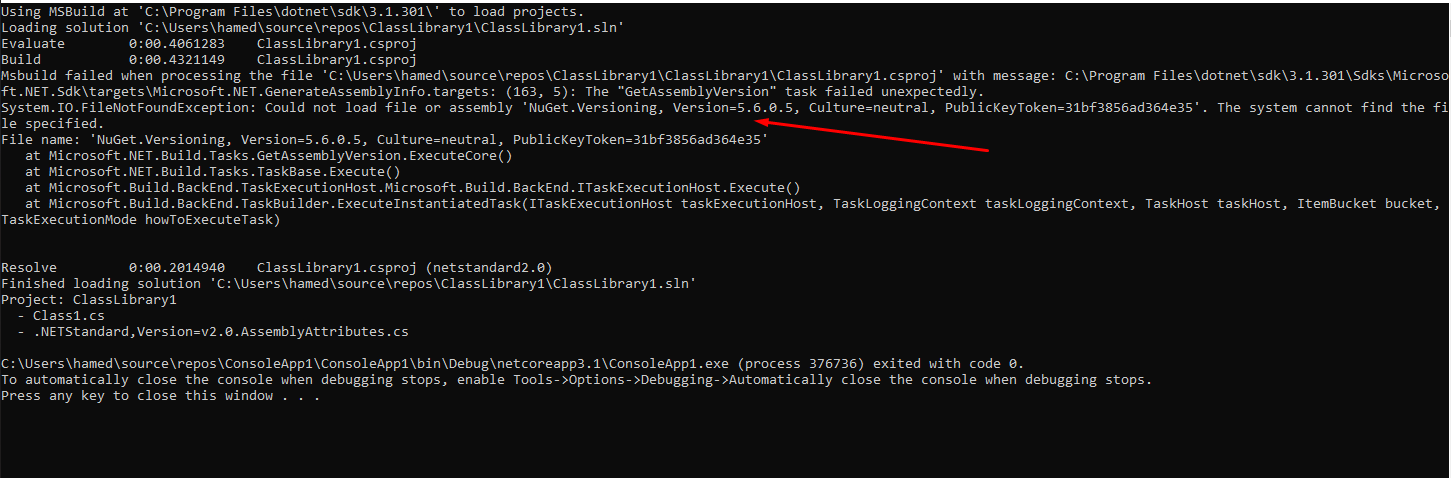
so I added the following packages too
<PackageReference Include="NuGet.Versioning" Version="5.6.0" />
<PackageReference Include="NuGet.ProjectModel" Version="5.6.0" />
Works perfectly, Thanks
HamedFathi
on 6 Jul 2020
Related issues
 vbcodec
·
3Comments
vbcodec
·
3Comments
 orthoxerox
·
3Comments
orthoxerox
·
3Comments
 OndrejPetrzilka
·
3Comments
OndrejPetrzilka
·
3Comments
 glennblock
·
3Comments
glennblock
·
3Comments
 JesperTreetop
·
3Comments
JesperTreetop
·
3Comments
Most helpful comment
@HamedFathi this is what a simple console based project should look like
LoadSolutionForAnalysis.csprojProgram.cs