Roslyn: Black punctuation in dark theme caused by exception during color scheme initialization
I'm seeing black punctuation in the dark theme after deleting my RoslynDev hive. Stepping through the ColorSchemeApplier results in an ArgumentException with the stack below.
Stack Trace
at System.Enum.ToObject(Type enumType, Object value) in f:\dd\ndp\clr\src\BCL\system\enum.cs:line 590
at Microsoft.VisualStudio.LanguageServices.Implementation.Options.RoamingVisualStudioProfileOptionPersister.TryFetch(OptionKey optionKey, Object& value) in C:\src\ros\src\VisualStudio\Core\Def\Implementation\Options\RoamingVisualStudioProfileOptionPersister.cs:line 158
at Microsoft.CodeAnalysis.Options.GlobalOptionService.LoadOptionFromSerializerOrGetDefault(OptionKey optionKey) in C:\src\ros\src\Workspaces\Core\Portable\Options\GlobalOptionService.cs:line 96
at Microsoft.CodeAnalysis.Options.GlobalOptionService.GetOption_NoLock(OptionKey optionKey) in C:\src\ros\src\Workspaces\Core\Portable\Options\GlobalOptionService.cs:line 283
at Microsoft.CodeAnalysis.Options.GlobalOptionService.GetOption(OptionKey optionKey) in C:\src\ros\src\Workspaces\Core\Portable\Options\GlobalOptionService.cs:line 272
at Microsoft.CodeAnalysis.Options.OptionServiceFactory.OptionService.GetOption(OptionKey optionKey) in C:\src\ros\src\Workspaces\Core\Portable\Options\OptionServiceFactory.cs:line 124
at Microsoft.CodeAnalysis.Options.SerializableOptionSet.WorkspaceOptionSet.GetOption(OptionKey optionKey) in C:\src\ros\src\Workspaces\Core\Portable\Options\SerializableOptionSet.WorkspaceOptionSet.cs:line 47
at Microsoft.CodeAnalysis.Options.SerializableOptionSet.GetOption(OptionKey optionKey) in C:\src\ros\src\Workspaces\Core\Portable\Options\SerializableOptionSet.cs:line 116
at Microsoft.CodeAnalysis.Options.SerializableOptionSet.WithChangedOption(OptionKey optionKey, Object value) in C:\src\ros\src\Workspaces\Core\Portable\Options\SerializableOptionSet.cs:line 126
at Microsoft.CodeAnalysis.Options.OptionSet.WithChangedOptionT in Q:\cmd\d\src\env\shell\UIInternal\Packages\TaskScheduler\VsTask.cs:line 1140
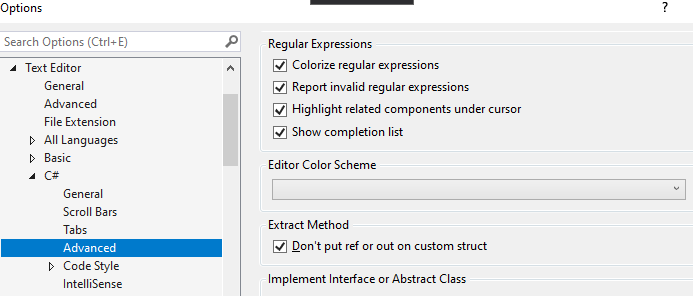
Also, the "Editor Color Scheme" dropdown in Tools | Options | Text Editor | C# | Advanced is blank, and switching to one of the themes (2017 or 2019) has no effect:
 dpoeschl
All 5 comments
Troubleshot offline and this was a local configuration issue with the dev hive.
 JoeRobich
on 30 Mar 2020
JoeRobich
on 30 Mar 2020
I'm also seeing this whne a project loads initially. Then the actual colors seem to take effect, and things turn white. It's not a good experience. Do we know what's up here?
 CyrusNajmabadi
on 30 Mar 2020
CyrusNajmabadi
on 30 Mar 2020
Repros 100% of the time for me.
CyrusNajmabadi
on 30 Mar 2020
Should be resolved with https://github.com/dotnet/roslyn/pull/43200
JoeRobich
on 9 Apr 2020
Closing for now. Please reopen if you still see issues in builds with this change.
JoeRobich
on 9 Apr 2020
Related issues
 nlwolf
·
3Comments
nlwolf
·
3Comments
 codingonHP
·
3Comments
codingonHP
·
3Comments
 SolalPirelli
·
3Comments
SolalPirelli
·
3Comments
 orthoxerox
·
3Comments
orthoxerox
·
3Comments
 glennblock
·
3Comments
glennblock
·
3Comments
Most helpful comment
Repros 100% of the time for me.