Roslyn: Simplify interpolation does the wrong thing 16.5.0 preview 2
_This issue has been moved from a ticket on Developer Community._
Looking at https://docs.microsoft.com/en-us/visualstudio/releases/2019/release-notes-preview#16.5.0-pre.2.0
"You can now simplify string interpolations when possible. Place your cursor on the string interpolation. Press (Ctrl+.) to trigger the Quick Actions and Refactorings menu. Select Simplify interpolation."
The example given is:
D d = new D();
var s = $"... {0.ToString("bar"). PadLeft(3)}...";
To be refactored to:
var s = $"... {0,-3:bar}...";
So Visual Studio Simply Refactoring is changing the PadLeft to a PadRight???
$"... {0.ToString("bar"). PadLeft(5)}..." => ...  bar...
$"... {0,-5:bar}..." => ... bar  ...
(Why one would use Int32.ToString(IFormatProvider) to get the string "bar" is another question)
Original Comments
Visual Studio Feedback System on 2/16/2020, 04:17 PM:
We have directed your feedback to the appropriate engineering team for further evaluation. The team will review the feedback and notify you about the next steps.
Original Solutions
(no solutions)
 vsfeedback
All 3 comments
@martinstenhoff also initially commented at https://github.com/dotnet/roslyn/issues/40066#issuecomment-588979537. The fix is at https://github.com/dotnet/roslyn/pull/41845.
(Why one would use Int32.ToString(IFormatProvider) to get the string "bar" is another question)
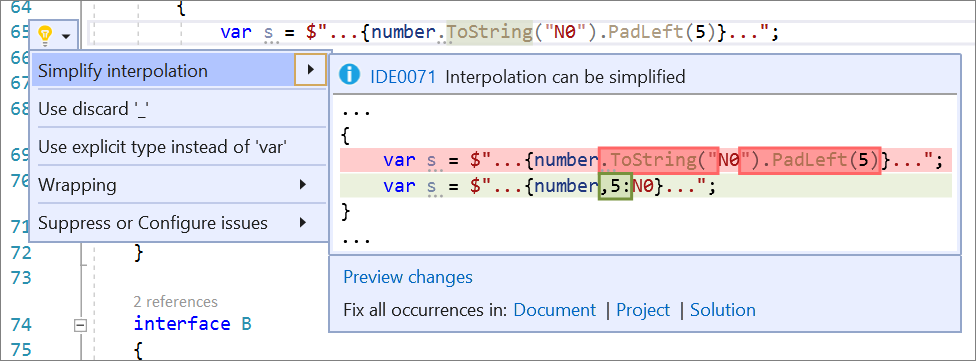
I think Martin meant Int32.ToString(string), but the point is that I used meaningless format codes in my examples. What are the chances that the screenshot on https://docs.microsoft.com/en-us/visualstudio/releases/2019/release-notes-preview#details-of-whats-new-in-visual-studio-version-165-preview-2 could be replaced with a new screenshot after the fix is merged and with a format code like N0?
(@CyrusNajmabadi do you know who I should ping for this question?)
 jnm2
on 21 Feb 2020
jnm2
on 21 Feb 2020
@mikadumont or @kendrahavens may be able to help fix up that screenshot :) can you supply them with a more appropriate one?
 CyrusNajmabadi
on 23 Feb 2020
CyrusNajmabadi
on 23 Feb 2020
Good idea, here's a new screenshot (150 dpi like the other one):
jnm2
on 24 Feb 2020
Related issues
 joshua-mng
·
3Comments
joshua-mng
·
3Comments
 OndrejPetrzilka
·
3Comments
OndrejPetrzilka
·
3Comments
 DavidArno
·
3Comments
DavidArno
·
3Comments
 johndog
·
3Comments
johndog
·
3Comments
 nlwolf
·
3Comments
nlwolf
·
3Comments