Roslyn: how to multiple edit document in a CodeFixProvider
Analyzer package
Microsoft.CodeAnalysis.Analyzers
Package Version
v2.6.2
Repro steps
I create a CodeFixProvider to move Message.Show() text to another *.cs file
Now I can add the property to the current file;it looks like this:
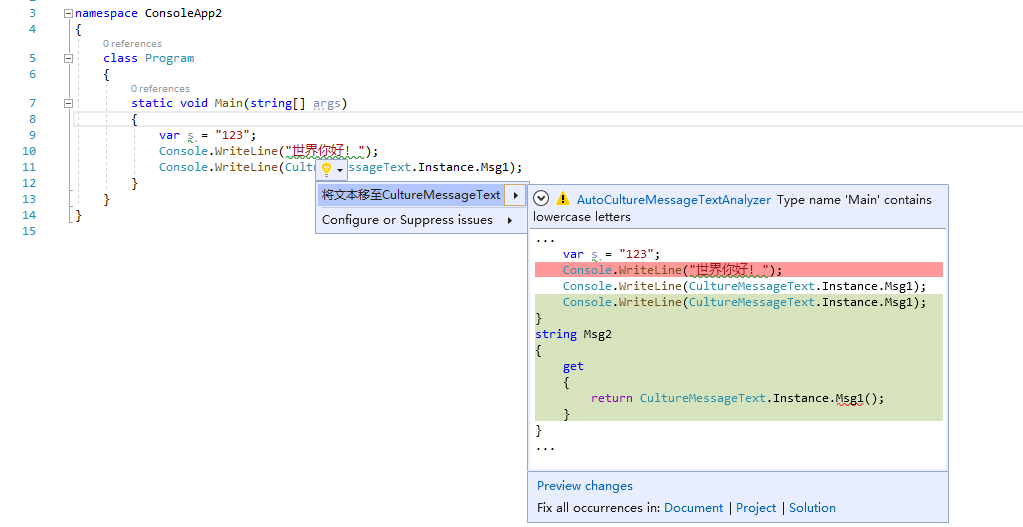
follow this guid applying-multiple-changes-to-a-solution-in-roslyn,I try to use Workspace.TryApplyChanges(), but I got TryApplyChanges cannot be called from a background thread error ,then I know It is normal for fix this error Calling TryApplyChanges from a background thread explodes in hard-to-understand ways #17782
And Now,I want to know,is there a way to edit another *.cs file in a CodeFixProvider?
I wish the preview changes can show all the changes
Expected behavior
Actual behavior
 wangshuai-007
All 7 comments
@vatsalyaagrawal can we port this issue to Roslyn repo?
 mavasani
on 24 Dec 2019
mavasani
on 24 Dec 2019
@w371987114 workspace.TryApplyChanges is not meant to be called from a CodeFixProvider. You instead want to use a SyntaxEditor, apply multiple edits using this editor and then invoke editor.GetChangedDocumentAsync() to get the new document with multiple edits.
mavasani
on 8 Jan 2020
I think they want to edit multiple files. In which case, you should return a properly updated Solution from the code action instead of just updating a Document.
 CyrusNajmabadi
on 8 Jan 2020
CyrusNajmabadi
on 8 Jan 2020
Ah thanks @CyrusNajmabadi - I misread the question as multiple edits to the same document.
mavasani
on 8 Jan 2020
CyrusNajmabadi is right
So, is there a way to edit another Document in a CodeFixProvider?
and the Preview changes form can see all the changes of Document in the project
wangshuai-007
on 12 Jan 2020
@w371987114 When you register the code fix, have it return a Solution instead of a Document. The updated solution may contain changes to any number of documents. The automatic preview will only show the changes to the first document, but if you click Preview changes it will show all changes.
 sharwell
on 13 Jan 2020
sharwell
on 13 Jan 2020
@w371987114 When you register the code fix, have it return a
Solutioninstead of aDocument. The updated solution may contain changes to any number of documents. The automatic preview will only show the changes to the first document, but if you click Preview changes it will show all changes.
sharwell gave me a right answer,CodeAction.Create has a overload method with Func<CancellationToken,Task<Solution>> parameter, It can register solution CodeFix.
my code is like this:
```c#
public class MyAnalyzerCodeFixProvider : CodeFixProvider
{
public sealed override async Task RegisterCodeFixesAsync(CodeFixContext context)
{
....
context.RegisterCodeFix(
CodeAction.Create(title, c =>
FixRegexAsync(context.Document, variableDeclare, c), equivalenceKey: title), diagnostic);
    }
    private async Task<Solution> FixRegexAsync(Document document,
        InvocationExpressionSyntax invocationExpr,
        CancellationToken cancellationToken)
    {
        ....
        var solution = document.Project.Solution;
        var cultureDocument =
            document.Project.Documents.FirstOrDefault(c => c.Name == "CultureMessageText.cs");
        if (cultureDocument == null) return document.Project.Solution;
        var cultureRoot = await cultureDocument?.GetSyntaxRootAsync();
        if (cultureRoot == null) return document.Project.Solution;
        ....
        solution = solution.WithDocumentSyntaxRoot(document.Id, newRoot);
        solution = solution.WithDocumentSyntaxRoot(cultureDocument.Id, cultureRoot);

        return solution;
    }
}
```
wangshuai-007
on 14 Jan 2020
Related issues
 AdamSpeight2008
·
3Comments
AdamSpeight2008
·
3Comments
 marler8997
·
3Comments
marler8997
·
3Comments
 SolalPirelli
·
3Comments
SolalPirelli
·
3Comments
 orthoxerox
·
3Comments
orthoxerox
·
3Comments
 dpoeschl
·
3Comments
dpoeschl
·
3Comments
Most helpful comment
@w371987114 When you register the code fix, have it return a
Solutioninstead of aDocument. The updated solution may contain changes to any number of documents. The automatic preview will only show the changes to the first document, but if you click Preview changes it will show all changes.