Roslyn: Automatic indentation issue with tabs
Version Used:
VisualStudio.16.Release/16.3.7+29424.173
Microsoft .NET Framework Version 4.8.03752
C# Tools 3.3.1-beta3-19461-02+2fd12c210e22f7d6245805c60340f6a34af6875b
Steps to Reproduce:
- Create C# project,
- Set C# editor to use the superior and one true setting,
Keep tabs, - Input following code:
namespace CSProjConsole
{
    class Program
    {
        static void Main(string[] args)
        {
            switch (args.Length)
            {|CARET|}
        }
    }
}
As in:
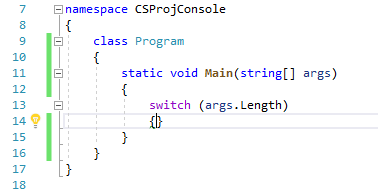
- Press enter
Expected Behavior:

Actual Behavior:

There are 3 spaces in front of the }, which are the number of tabs that should have been inserted.
Notice that this doesn't happen if you choose the inferior setting "Insert spaces"
 jbevain
😄1
All 3 comments
Spaces FTW.
Note: i fixed this here: https://github.com/dotnet/roslyn/pull/38893
Will be in the next VS update. Cheers!
 CyrusNajmabadi
on 30 Oct 2019
CyrusNajmabadi
on 30 Oct 2019
👍2
❤1
🎉1
Beautiful, thanks!
jbevain
on 30 Oct 2019
You're welcome!
CyrusNajmabadi
on 30 Oct 2019
Was this page helpful?
0 / 5 - 0 ratings
Related issues
 DavidArno
·
3Comments
DavidArno
·
3Comments
 vbcodec
·
3Comments
vbcodec
·
3Comments
 MadsTorgersen
·
3Comments
MadsTorgersen
·
3Comments
 JesperTreetop
·
3Comments
JesperTreetop
·
3Comments
 binki
·
3Comments
binki
·
3Comments
Most helpful comment
Spaces FTW.
Note: i fixed this here: https://github.com/dotnet/roslyn/pull/38893
Will be in the next VS update. Cheers!