_This issue has been moved from a ticket on Developer Community._
There is no settings to disable breakpoint LINE highlight. I see ther is one for C++ but not for C#.
The red is too strong, you also lose the context highligting on th eline of you set the colour to black or white.
Original Comments
Jane Wu [MSFT] on 9/17/2019, 07:05 PM:
Thank you for taking the time to provide your suggestion. We will do some preliminary checks to make sure we can proceed further. We’ll provide an update once the issue has been triaged by the product team.
 vsfeedback
All 8 comments
cc @tmat , @JoeRobich (potential adornment for fonts &color)
 jinujoseph
on 8 Oct 2019
jinujoseph
on 8 Oct 2019
The debugger team owns breakpoint visualization.
@r-ramesh
 tmat
on 8 Oct 2019
tmat
on 8 Oct 2019
The breakpoint line gets different hightlights for different segments of texts in the line. I could never figure out how to make this line easy to read because of the bad contrast between background and text color. I am using dark theme. Please fix it. This issue has existed for years in the different versions of Visual Studio.
 abukres
on 19 Nov 2019
abukres
on 19 Nov 2019
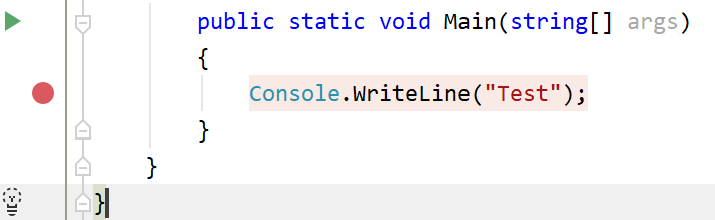
This has been bugging me for years too.. I used Rider while had working machine macbook pro and it'd be great if VS.net had similar debug line highlighting..
 jack0fshad0ws
on 21 Dec 2019
jack0fshad0ws
on 21 Dec 2019
@tmat can you move this to the debugger UI team? i.e. pinging @r-ramesh doesn't seem to have been effective. The bug should just move to them.
 CyrusNajmabadi
on 22 Dec 2019
CyrusNajmabadi
on 22 Dec 2019
@tmat @CyrusNajmabadi Sorry this slipped through my mentions. Yes, you can file a bug and route this over to debugger.
 r-ramesh
on 28 Jan 2020
r-ramesh
on 28 Jan 2020
Not sure if @r-ramesh needs someone to file the bug, or if this (39114) is enough. Has this been taken into the todo-list or should someone file the bug in another place (where?).
My comments:
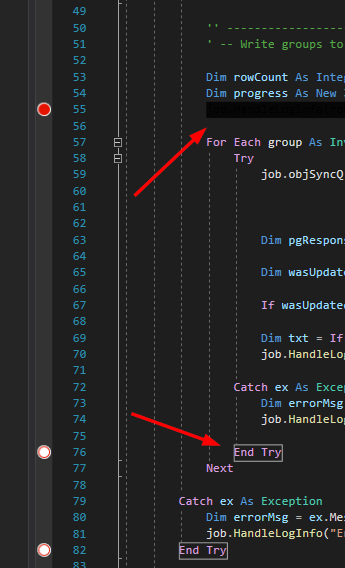
I am (also) trying to remove the red background on active breakpoint lines and the white outline on inactive breakpoint lines, as it is distractive - both the red background and the missing color coding - but it doesn't seem to be possible: the normal text colorings cannot come back and it is a bit burdensome to find the correct colors. And the Options-dialog is -missing an- -Apply-button-.
There should be a way to disable each display item coloring, so it falls back to default text/whatever other coloring that would be applied, if not a breakpoint. And/or the Item foreground and Item background dropdown menus should include (maybe as a collapsible subitem in the dropdown menus) all the other Display items, so you could sync with another display item's coloring.
I hope this is implemented somehow, as it is quite annoying. I'm removing breakpoints just to read my code better :-)
 SvendK
on 25 Feb 2020
SvendK
on 25 Feb 2020
Oh!!! I just figured out a solution to actually getting this to work: Removing the red background on active breakpoint lines and the white outline on inactive breakpoint lines!
The hidden thing is to RESTART VISUAL STUDIO after setting this up!
This works for VS dark theme...
Go to Tools->Options->Environment->Fonts and Colors
Default settings
Plain Text Item foreground: Default (light grey-ish)
Plain Text Item background: N/A - Greyed out
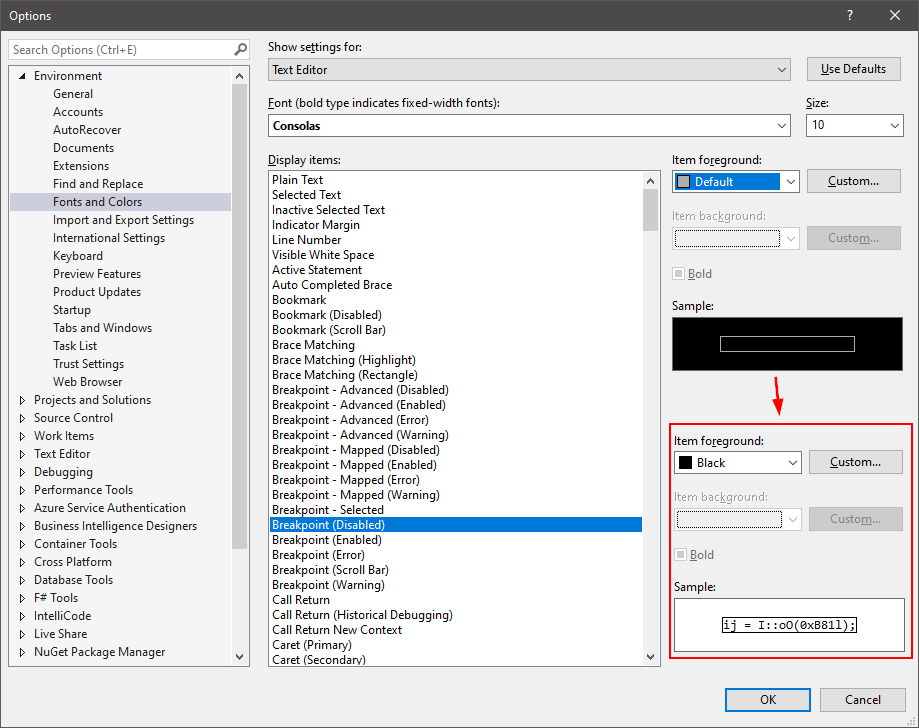
Breakpoint (Disabled) Item foreground: Default (grey-ish)
Breakpoint (Disabled) Item background: N/A - Greyed out
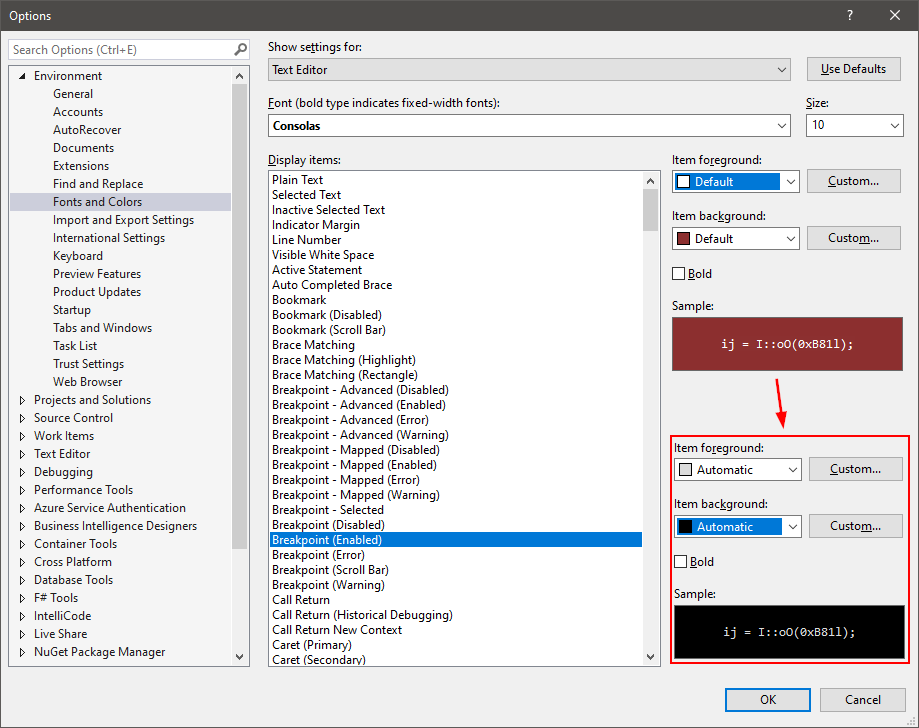
Breakpoint (Enabled) Item foreground: Default (white)
Breakpoint (Enabled) Item background: Default (red)
I changed to
Plain Text Item foreground: Black (this is personal preference - better contrast)
Plain Text Item background: N/A - Greyed out
Breakpoint (Disabled) Item foreground: Same as Plain text background - for me it's black
Breakpoint (Disabled) Item background: N/A - Greyed out
Breakpoint (Enabled) Item foreground: Automatic
Breakpoint (Enabled) Item background: Automatic
(I guess Automatic is "disable this rule, fallback to other rules")
Note:
- Changing the Breakpoint (Disabled) Foreground from Default to Black changes the Sample view from black to white background. This must be a bug?
- Changing the Breakpoint (Disabled) Foreground doesn't take effect in the editor window until restarting VS (outline is still light grey-ish around the line). This must be a bug?
- Changing the Breakpoint (Enabled) Foreground doesnt look right until restarting VS (changing from white/red to automatic/automatic renders both text and background black (unreadable) until reboot). This must be a bug?
So... it is totally possible, but the dialog itself (no apply button), preview bugs and after-close editor view bugs (restart needed) make it hard to actually make this happen. I look forward to your comments for this :)
Update: OK, while redoing this for the sake of this comment and getting the screenshots, I am actually having a hard time reproducing it. I keep having the black-on-black text on the enabled breakpoint. Let me just post this and reboot my computer, maybe that is what did it for VS...
Best regards,
SvendK
SvendK
on 26 Feb 2020
Related issues
 marler8997
·
3Comments
marler8997
·
3Comments
 ashmind
·
3Comments
ashmind
·
3Comments
 JesperTreetop
·
3Comments
JesperTreetop
·
3Comments
 asvishnyakov
·
3Comments
asvishnyakov
·
3Comments
 johndog
·
3Comments
johndog
·
3Comments
Most helpful comment
This has been bugging me for years too.. I used Rider while had working machine macbook pro and it'd be great if VS.net had similar debug line highlighting..