Roslyn: System.InvalidOperationException: 'The project already references the target project.' and `Loading Intellsense` never finished in VS16.4Preview1/16.3.1
Version Used:
VS16.4Preview1
Not sure but I remember that doesn't happen with latest preview version of VS16.3. It not happen with Preview Features/Allow partial loading of projects during solution open disabled.
It's strange that I can also see the same thing happen on VS16.3.1 today, or with partial loading disabled today. Just step 4 and 5 or 4.B is needed.
Not sure it's an issue of roslyn or VS.
Steps to Reproduce:
- Enable
Preview Features/Allow partial loading of projects during solution openin VS16.4Preview1, and restart. Open the attached solutions(All cs files are removed. I tried to rename the projects and folders, but failed)
Solution.zipWait and see whether the task
Loading Intellsensecan finish or not.(sometimes it even failed at the first time)If it finished, click
File/Close Solutions, and reopen the solution again.- Wait and see the task
Loading Intellsensenever finish.
4.B Maybe you can also see the same thing when you edit Server.Core.csproj online(inside VS with the whole solution open), just needed to change the TargetFrameworks from net472;netcoreapp3.0 to net472;netcoreapp2.1, or revert.
Expected Behavior:
Intellsense should always end.
Actual Behavior:

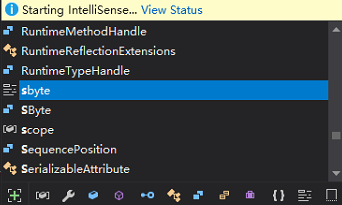
It just never finished, but no CPU is used.
And attach an debugger on VS only show an strange exception throw by roslyn on the 3 projects unable to load.
System.InvalidOperationException: 'The project already references the target project.'
   at Microsoft.CodeAnalysis.SolutionState.CheckNotContainsProjectReference(ProjectId projectId, ProjectReference referencedProject)
   at Microsoft.CodeAnalysis.SolutionState.AddProjectReferences(ProjectId projectId, IEnumerable`1 projectReferences)
   at Microsoft.CodeAnalysis.Solution.AddProjectReferences(ProjectId projectId, IEnumerable`1 projectReferences)
   at Microsoft.VisualStudio.LanguageServices.Implementation.ProjectSystem.VisualStudioProject.<>c__DisplayClass75_0.<OnBatchScopeDisposed>b__0(Solution solution)
   at Microsoft.VisualStudio.LanguageServices.Implementation.ProjectSystem.VisualStudioWorkspaceImpl.ApplyBatchChangeToWorkspace(Func`2 mutation)
   at Microsoft.VisualStudio.LanguageServices.Implementation.ProjectSystem.VisualStudioProject.OnBatchScopeDisposed()
   at Microsoft.VisualStudio.LanguageServices.Implementation.ProjectSystem.VisualStudioProject.BatchScope.Dispose()
   at Microsoft.VisualStudio.LanguageServices.Implementation.ProjectSystem.CPS.CPSProject.EndBatch()
   at Microsoft.VisualStudio.ProjectSystem.LanguageServices.WorkspaceProjectContextHost.WorkspaceProjectContextHostInstance.<ApplyProjectChangesUnderLockAsync>d__19.MoveNext()
   at System.Runtime.CompilerServices.AsyncTaskMethodBuilder.Start[TStateMachine](TStateMachine& stateMachine)
   at Microsoft.VisualStudio.ProjectSystem.LanguageServices.WorkspaceProjectContextHost.WorkspaceProjectContextHostInstance.ApplyProjectChangesUnderLockAsync(IProjectVersionedValue`1 update, Boolean evaluation, CancellationToken cancellationToken)
   at Microsoft.VisualStudio.ProjectSystem.LanguageServices.WorkspaceProjectContextHost.WorkspaceProjectContextHostInstance.<>c__DisplayClass18_0.<OnProjectChangedAsync>b__0(CancellationToken ct)
   at Microsoft.VisualStudio.ProjectSystem.OnceInitializedOnceDisposedUnderLockAsync.<>c__DisplayClass7_0.<ExecuteUnderLockCoreAsync>b__0()
   at Microsoft.VisualStudio.Threading.ReentrantSemaphore.StackSemaphore.<>c__DisplayClass3_0.<<ExecuteAsync>b__0>d.MoveNext()
   at System.Runtime.CompilerServices.AsyncTaskMethodBuilder.Start[TStateMachine](TStateMachine& stateMachine)
   at Microsoft.VisualStudio.Threading.ReentrantSemaphore.StackSemaphore.<>c__DisplayClass3_0.<ExecuteAsync>b__0()
   at Microsoft.VisualStudio.Threading.JoinableTaskFactory.ExecuteJob[T](Func`1 asyncMethod, JoinableTask job)
   at Microsoft.VisualStudio.Threading.ReentrantSemaphore.ExecuteCoreAsync(Func`1 semaphoreUser)
   at Microsoft.VisualStudio.Threading.ReentrantSemaphore.StackSemaphore.<ExecuteAsync>d__3.MoveNext()
   at System.Runtime.CompilerServices.AsyncTaskMethodBuilder.Start[TStateMachine](TStateMachine& stateMachine)
   at Microsoft.VisualStudio.Threading.ReentrantSemaphore.StackSemaphore.ExecuteAsync(Func`1 operation, CancellationToken cancellationToken)
   at Microsoft.VisualStudio.ProjectSystem.OnceInitializedOnceDisposedUnderLockAsync.<ExecuteUnderLockCoreAsync>d__7.MoveNext()
   at System.Runtime.CompilerServices.AsyncTaskMethodBuilder.Start[TStateMachine](TStateMachine& stateMachine)
   at Microsoft.VisualStudio.ProjectSystem.OnceInitializedOnceDisposedUnderLockAsync.ExecuteUnderLockCoreAsync(Func`2 action, CancellationToken cancellationToken)
   at Microsoft.VisualStudio.ProjectSystem.LanguageServices.WorkspaceProjectContextHost.WorkspaceProjectContextHostInstance.OnProjectChangedAsync(IProjectVersionedValue`1 update, Boolean evaluation)
   at Microsoft.VisualStudio.ProjectSystem.LanguageServices.WorkspaceProjectContextHost.WorkspaceProjectContextHostInstance.<InitializeCoreAsync>b__14_1(IProjectVersionedValue`1 e)
   at Microsoft.VisualStudio.ProjectSystem.ActionBlockSlimAsync`1.ProcessInputAsync(TInput input)
   at Microsoft.VisualStudio.ProjectSystem.DataReceivingBlockSlim`1.<ProcessInputQueueAsync>d__5.MoveNext()
   at System.Runtime.CompilerServices.AsyncTaskMethodBuilder.Start[TStateMachine](TStateMachine& stateMachine)
   at Microsoft.VisualStudio.ProjectSystem.DataReceivingBlockSlim`1.ProcessInputQueueAsync(InputDataBuffer inputQueue)
   at Microsoft.VisualStudio.ProjectSystem.DataReceivingBlockSlim`1.<>c.<System.Threading.Tasks.Dataflow.ITargetBlock<TInput>.OfferMessage>b__2_0(Object s)
   at System.Threading.Tasks.Task`1.InnerInvoke()
   at System.Threading.Tasks.Task.Execute()
   at System.Threading.Tasks.Task.ExecutionContextCallback(Object obj)
   at System.Threading.ExecutionContext.RunInternal(ExecutionContext executionContext, ContextCallback callback, Object state, Boolean preserveSyncCtx)
   at System.Threading.ExecutionContext.Run(ExecutionContext executionContext, ContextCallback callback, Object state, Boolean preserveSyncCtx)
   at System.Threading.Tasks.Task.ExecuteWithThreadLocal(Task& currentTaskSlot)
   at System.Threading.Tasks.Task.ExecuteEntry(Boolean bPreventDoubleExecution)
   at System.Threading.Tasks.Task.System.Threading.IThreadPoolWorkItem.ExecuteWorkItem()
   at System.Threading.ThreadPoolWorkQueue.Dispatch()
   at System.Threading._ThreadPoolWaitCallback.PerformWaitCallback()
And then an assert failed.
System.InvalidOperationException: 'Unexpected false'
   at Roslyn.Utilities.Contract.ThrowIfFalse(bool condition, string message)
   at Microsoft.VisualStudio.LanguageServices.Implementation.ProjectSystem.CPS.CPSProject.EndBatch()
 yyjdelete
All 3 comments
@jinujoseph @jasonmalinowski If there's no error via command-line, Roslyn should allow this. THis is a Roslyn bug.
 davkean
on 3 Oct 2019
davkean
on 3 Oct 2019
Something must be happening funky with the metadata to project reference conversion...
 jasonmalinowski
on 3 Oct 2019
jasonmalinowski
on 3 Oct 2019
@yyjdelete Thanks for the repro on this one, that ultimately proved to be very helpful. We saw some telemetry implying this was widespread but I couldn't for the life of me sort it out until this, so thanks!
It looks like the problem is we're mishandling some case insensivity -- you have some projects that are named one way "IoT" but the ProjectReferences say a different way "IOT". We should of course handle this correctly and a fix is now in the pipeline for it, but you may be able to work around the issue if this is still impacting you directly.
jasonmalinowski
on 30 Apr 2020
Related issues
 JesperTreetop
·
3Comments
JesperTreetop
·
3Comments
 joshua-mng
·
3Comments
joshua-mng
·
3Comments
 codingonHP
·
3Comments
codingonHP
·
3Comments
 asvishnyakov
·
3Comments
asvishnyakov
·
3Comments
 AdamSpeight2008
·
3Comments
AdamSpeight2008
·
3Comments
Most helpful comment
@yyjdelete Thanks for the repro on this one, that ultimately proved to be very helpful. We saw some telemetry implying this was widespread but I couldn't for the life of me sort it out until this, so thanks!
It looks like the problem is we're mishandling some case insensivity -- you have some projects that are named one way "IoT" but the ProjectReferences say a different way "IOT". We should of course handle this correctly and a fix is now in the pipeline for it, but you may be able to work around the issue if this is still impacting you directly.