Roslyn: Question: How do I use the "refs" tag?
Alternatively, projects that use .NET SDK can set PreserveCompilationContext build property to true. Publishing such project will copy reference assemblies for the framework the project targets to a refs sub-directory of the publish directory.
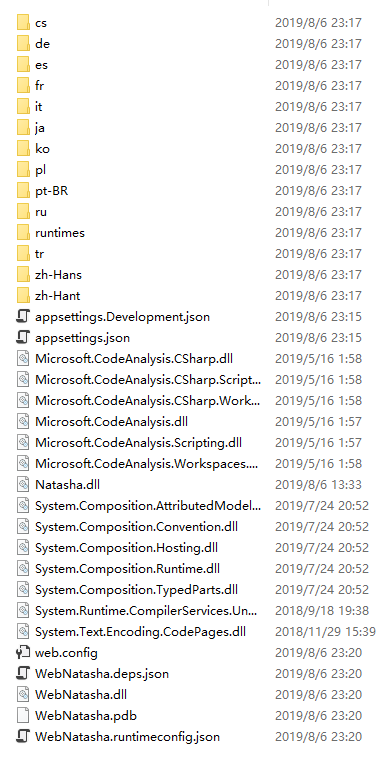
I used < PreserveCompilationContext > true < / PreserveCompilationContext > and published the WEB application, but I didn't see the refs subfolder. How do I use the refs tag?
 NMSAzulX
All 2 comments
A quick trace though the code indicates that you also need to add:
<MvcRazorExcludeRefAssembliesFromPublish>False</MvcRazorExcludeRefAssembliesFromPublish>
By default the web sdk disables the refs folder, because it would otherwise always be generated due to internal details of how razor view pre-compilation works.
Adding that property tells the web that you really do want the refs folder.
This probably does need to be better documented.
 KevinCathcart
on 6 Aug 2019
KevinCathcart
on 6 Aug 2019
@KevinCathcart Thanks, It works .It's so Cool!
NMSAzulX
on 7 Aug 2019
Related issues
 MadsTorgersen
·
3Comments
MadsTorgersen
·
3Comments
 JesperTreetop
·
3Comments
JesperTreetop
·
3Comments
 vbcodec
·
3Comments
vbcodec
·
3Comments
 joshua-mng
·
3Comments
joshua-mng
·
3Comments
 nlwolf
·
3Comments
nlwolf
·
3Comments
Most helpful comment
A quick trace though the code indicates that you also need to add:
By default the web sdk disables the refs folder, because it would otherwise always be generated due to internal details of how razor view pre-compilation works.
Adding that property tells the web that you really do want the refs folder.
This probably does need to be better documented.