Roslyn: Quick Info shouldn't show the null state of non-nullable value types or constants
Version used: 3.3.0-beta1-19354-02
The IDE shows the null-state for this enum member, which doesn't really make sense to me because
- it's a non-nullable value type, and
- it's a constant, so I can already see in Quick Info that its constant value is non-null.

 RikkiGibson
All 7 comments
@jasonmalinowski, apparently rikki agrees with me :). /cc @ryzngard
 333fred
on 11 Jul 2019
333fred
on 11 Jul 2019
This confused me too..
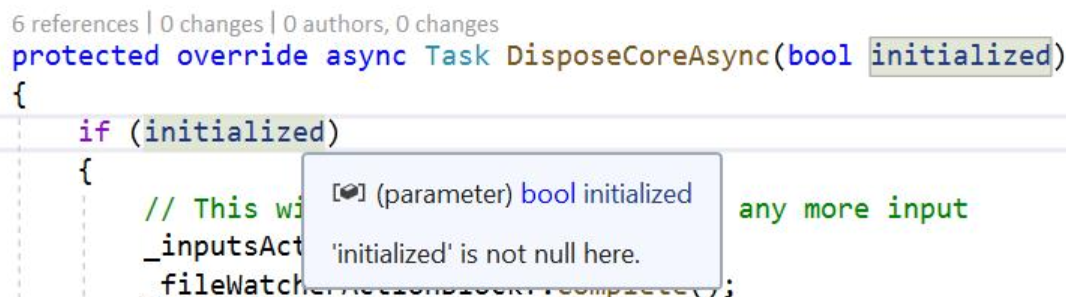
In particular I think the wording of "is not null here" makes it seem like it sayings it could be null elsewhere.
 davidwengier
on 18 Jul 2019
davidwengier
on 18 Jul 2019
I agree too, and find this very confusing. If it must say something, "'x' can never be null" would be clearer, but I'd vote to remove it.
 nguerrera
on 19 Jul 2019
nguerrera
on 19 Jul 2019
After discussion with @cston, I think the appropriate solution here is to standardize value types on a NullableAnnotation.NotApplicable and NullableFlowState.NotApplicable. You cannot have null value types that aren't Nullable.
333fred
on 19 Jul 2019
Leaving @ryzngard assigned as I'm sure there will be some IDE work to react.
333fred
on 19 Jul 2019
@ryzngard, after #34412 is fixed, the annotation from the public API for non-nullable value types will be NotAnnotated always, so value types will need to be special-cased in the IDE to avoid reporting "is not null here".
 cston
on 23 Jul 2019
cston
on 23 Jul 2019
so value types will need to be special-cased in the IDE to avoid reporting "is not null here".
Note: please test nullable value types when you do this to make sure the experience makes sense.
 CyrusNajmabadi
on 23 Jul 2019
CyrusNajmabadi
on 23 Jul 2019
Related issues
 binki
·
3Comments
binki
·
3Comments
 OndrejPetrzilka
·
3Comments
OndrejPetrzilka
·
3Comments
 johndog
·
3Comments
johndog
·
3Comments
 marler8997
·
3Comments
marler8997
·
3Comments
 vbcodec
·
3Comments
vbcodec
·
3Comments