Roslyn: async completion: eats existing code on commit
Version Used:
VS 2019 Preview 3
Steps to Reproduce:
- Create standard Console app
- type
overrideabovestatic void Main..method - create space and press Ctrl+Space to trigger code completion
- type
asdasdasdasdasdasdor any random text - select one of code completion options and press Enter
Expected Behavior:
Nicely inserted new code
Actual Behavior:
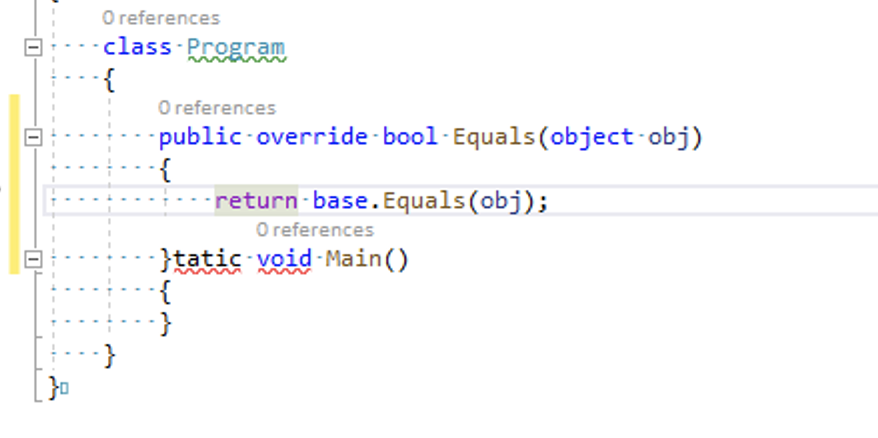
 DavidKarlas
All 11 comments
@jinujoseph @ivanbasov @AmadeusW
 KirillOsenkov
on 23 Feb 2019
KirillOsenkov
on 23 Feb 2019
Just wanted to clarify one thing, this repro steps work on VS Windows and VS Mac.
DavidKarlas
on 23 Feb 2019
Override completion specifically is deleting one preexisting character of code for every character typed during the completion session. So if you invoke override completion and then pick an item from the list manually, it's fine (afaict). If you type to filter/select an overload in the list, then it starts deleting characters on commit.
Min repro + some notes:
- Paste C# in an empty file:
```C#
class C
{
override $$
void M() { }
}
2. Remove the $$ and at that location, trigger completion, and type `GetHashCode`
3. Commit completion (e.g. with <kbd>Tab</kbd>)

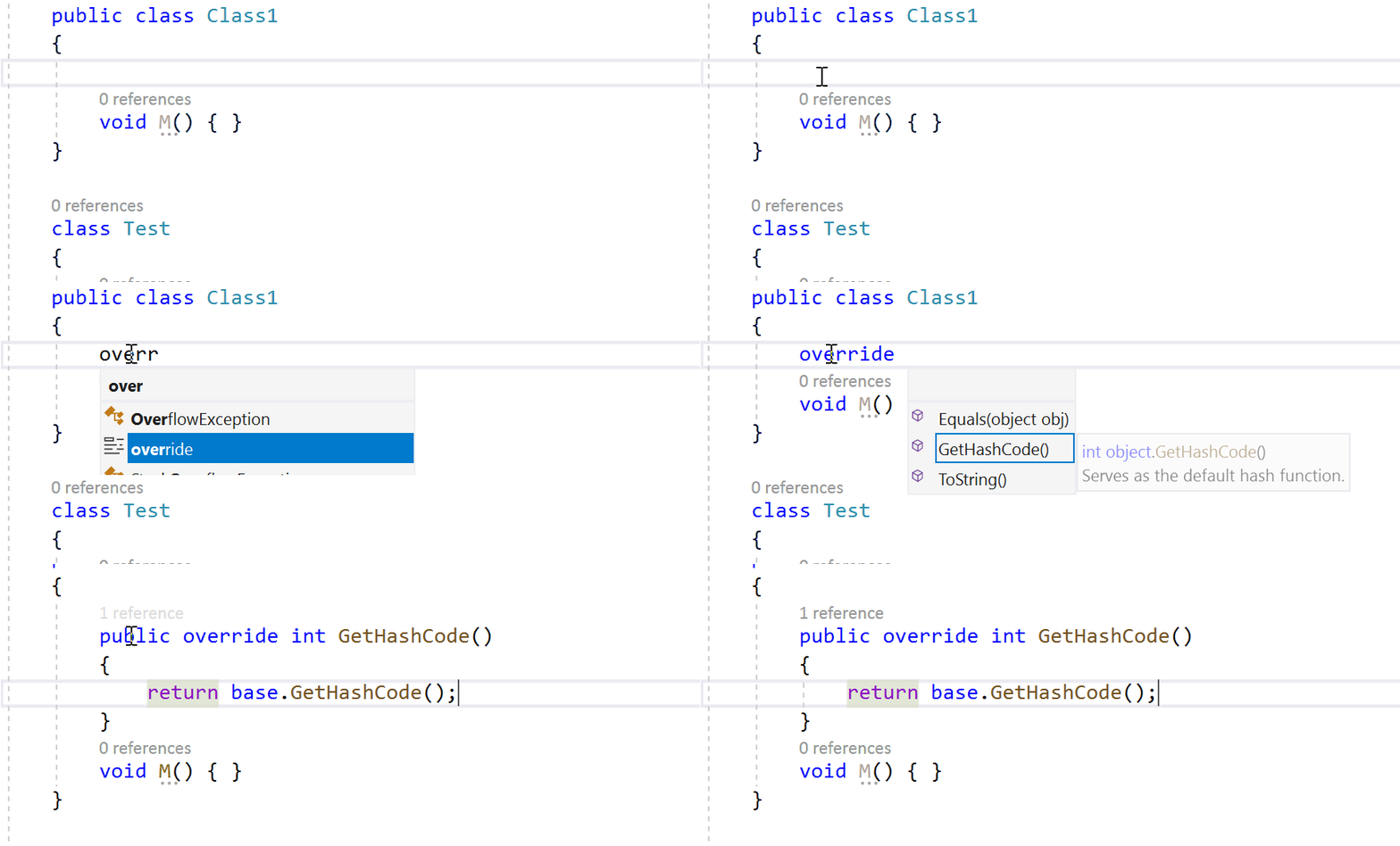
**Result**: The override is inserted, but the subsequent `"GetHashCode".Length` characters are deleted. So in this case, 11 characters get deleted (the more you type, the more it deletes), leaving this:
```C#
class C
{
    public override int GetHashCode()
    {
        return base.GetHashCode();
    }M() { }
}
@ivanbasov I'm confused about this:
https://github.com/dotnet/roslyn/blob/ec366687c8caead948e58704ad61ed644eb91b5b/src/EditorFeatures/Core/Implementation/IntelliSense/AsyncCompletion/CommitManager.cs#L173
Basically, the triggerSnapshot there contains just override, while the textChange was produced a couple lines earlier using the _current_ document which includes override GetHashCode, so things are mismatched and it falls apart.
However, if the above is the problem, then I'm surprised that it isn't also impacting the other CompletionProvider types with custom GetChangeAsync methods, including the doc comment and IVT providers. I tried them both and couldn't repro the problem.
 dpoeschl
on 23 Feb 2019
dpoeschl
on 23 Feb 2019

 jinujoseph
on 23 Feb 2019
jinujoseph
on 23 Feb 2019
@jinujoseph try typing much longer string
DavidKarlas
on 23 Feb 2019
@DavidKarlas , @dpoeschl yes , was able to repro when i try to type longer string like GetHashcode and commit
jinujoseph
on 23 Feb 2019
Hmm....I'm on 16.0 preview 4 (28622.103). Also tried a previous preview 4 version. Both work fine for me:
 ivanbasov
on 25 Feb 2019
ivanbasov
on 25 Feb 2019
@ivanbasov This bug is being caught by integration tests
 sharwell
on 25 Feb 2019
sharwell
on 25 Feb 2019
I found how to reproduce it: need to type move letters before Tab. Looking into it.
ivanbasov
on 25 Feb 2019
I filed an issue on VS for this: https://developercommunity.visualstudio.com/content/problem/466995/auto-complete-is-incorrectly-formatted-for-method.html. Check the internal ticket for it. The repro steps shows a few issues (which I think both are rooted in the same issue).
- If I try completing a method, the method arguments are placed on the next line rather than the same line.
- If I misspell the method (capitalization, for example), auto complete creates an invalid method.
 jkotalik
on 25 Feb 2019
jkotalik
on 25 Feb 2019
addressed via #33666
jinujoseph
on 6 Mar 2019
Related issues
 codingonHP
·
3Comments
codingonHP
·
3Comments
 joshua-mng
·
3Comments
joshua-mng
·
3Comments
 NikChao
·
3Comments
NikChao
·
3Comments
 binki
·
3Comments
binki
·
3Comments
 JesperTreetop
·
3Comments
JesperTreetop
·
3Comments
Most helpful comment
@jinujoseph try typing much longer string