Hi, I have some questions regarding the C# Interactive window in VS 2017.
They're all regarding the same topic so I thought I'd put them into one issue (instead of spamming many individual questions):
How to change font size? There's no setting for it, only F#. The answer here is not relevant anymore, the mentioned setting does not exist in the list.
How can I add a custom script (or modify the default one) to initialize the repl with? (Same goes for
#reset). If not, then is there maybe a way to have something like a "shortcut" or "favorite path" or so that can be used with#r ...without having to type out the full path? Like#r myReplStuff.dllWhat path is
#loadrelative to?Is there some setting to more easily define things? Like for example instead of having to type
IEnumerable<Dictionary<int, Action<int>>> Dictionaries => ..., could I type something likevar Dictionaries => ...orauto Dictionaries => ...? I know this is not something C# usually supports, but then again the REPL is a different thing and already supports some stuff that isn't default C#.
 rikimaru0345
All 5 comments
@tmat
 jmarolf
on 13 Feb 2019
jmarolf
on 13 Feb 2019
Is there a roadmap related to C# Interactive? It would be nice to see thoughts/progress on areas like referencing NuGet packages and debugging (csx files) support.
 shaggygi
on 13 Feb 2019
shaggygi
on 13 Feb 2019
- How to change font size? There's no setting for it, only F#. The answer here is not relevant anymore, the mentioned setting does not exist in the list.
C# interactive uses a regular text editor, so all settings applicable to C# text editor apply to interactive as well:
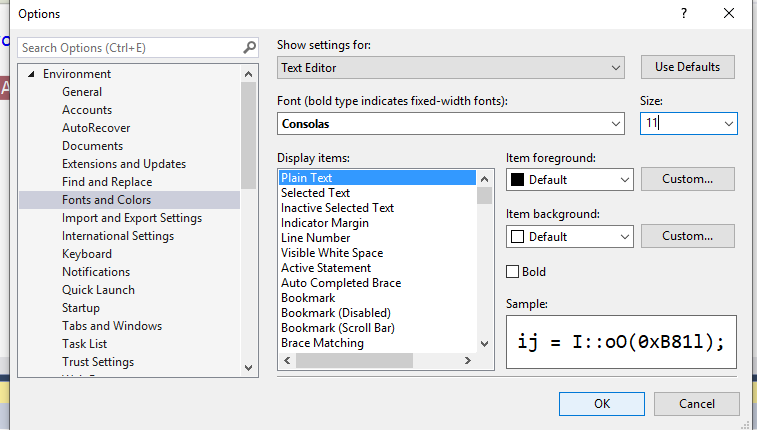
2. How can I add a custom script (or modify the default one) to initialize the repl with? (Same goes for
#reset). If not, then is there maybe a way to have something like a "shortcut" or "favorite path" or so that can be used with#r ...without having to type out the full path? Like#r myReplStuff.dll
The settings used for initialization are loaded from Common7\IDE\CommonExtensions\Microsoft\ManagedLanguages\VBCSharp\InteractiveComponents\CSharpInteractive.rsp under VS install dir. You can update that file.
Issue https://github.com/dotnet/roslyn/issues/5976 is tracking work to allow specifying the configuration in locations that are more convenient to edit - such as user profile directory.
3. What path is
#loadrelative to?
To the script that include the directive. If used directly in the Interactive Window it's relative to the current working directory. You can set it by calling Directory.SetCurrentDirectory(@"c:\dir");.
Relative path, e.g. #load "a.csx" is also searched in SourcePaths.
You can add source paths by calling SourcePaths.Add(@"C:\dir")
4. Is there some setting to more easily define things? Like for example instead of having to type
IEnumerable<Dictionary<int, Action<int>>> Dictionaries => ..., could I type something likevar Dictionaries => ...orauto Dictionaries => ...? I know this is not something C# usually supports, but then again the REPL is a different thing and already supports some stuff that isn't default C#.
You can use var for definition of script variables, like var x = 1;, but not for definition of properties or methods.
 tmat
on 15 Feb 2019
tmat
on 15 Feb 2019
Is there a roadmap related to C# Interactive? It would be nice to see thoughts/progress on areas like referencing NuGet packages and debugging (csx files) support.
There is no roadmap. Progress of features is tracked by individual issues. Interactive and scripting are not areas we currently focus on. We accept contributions though.
tmat
on 15 Feb 2019
@tmat Alright, thanks for the information! The font size thing is pretty unfortunate though, I wish there was a way I could make only the font size in the interactive window smaller. Ctrl+scroll also changed it in both the normal text editor and the interactive window.
rikimaru0345
on 15 Feb 2019
Related issues
 OndrejPetrzilka
·
3Comments
OndrejPetrzilka
·
3Comments
 codingonHP
·
3Comments
codingonHP
·
3Comments
 ashmind
·
3Comments
ashmind
·
3Comments
 NikChao
·
3Comments
NikChao
·
3Comments
 glennblock
·
3Comments
glennblock
·
3Comments
Most helpful comment
There is no roadmap. Progress of features is tracked by individual issues. Interactive and scripting are not areas we currently focus on. We accept contributions though.