Roslyn: VS debugger should stop on the first line of async Main method when the debugging is started with the "Step Into" or "Step Over" command
Version Used: 2.10.0-beta2-63501-03+b9fb1610c87cccc8ceb74a770dba261a58e39c4a
Steps to Reproduce:
- Create a new console app project with async Main() method.
- Build the project and start debugging using F10 (Step Over) or F11 (Step Into).
Expected Behavior: The program starts and the VS debugger stops on the line with the opening brace of the Main() method. Currently, this is the behavior of the debugger when the Main() method is not async.
Actual Behavior: The program starts and runs to completion.
Workaround: Add an explicit breakpoint in the beginning of the Main() method.
 aleksd
All 12 comments
I'm re-opening this issue as I can still repro the problem in 16.2p2.
I'm not sure what happened. I recall validating the end-to-end and documented doing so. The example below shows that the compiler is emitting [DebuggerStepThroughAttribute] on the stub method for Main as we had discussed.
@chuckries @tmat Any thoughts?
```C#
using System.Threading.Tasks;
class Program
{
static async Task Main()
{ // expecting debugger to break here when runing with F11
await Task.Yield();
}
}
```msil
.method private hidebysig static
    class [mscorlib]System.Threading.Tasks.Task Main () cil managed
{
    .custom instance void [mscorlib]System.Runtime.CompilerServices.AsyncStateMachineAttribute::.ctor(class [mscorlib]System.Type) = (
        01 00 12 50 72 6f 67 72 61 6d 2b 3c 4d 61 69 6e
        3e 64 5f 5f 30 00 00
    )
    .custom instance void [mscorlib]System.Diagnostics.DebuggerStepThroughAttribute::.ctor() = (
        01 00 00 00
    )
    // Method begins at RVA 0x2050
    // Code size 52 (0x34)
    .maxstack 2
    .locals init (
        [0] class Program/'<Main>d__0',
        [1] valuetype [mscorlib]System.Runtime.CompilerServices.AsyncTaskMethodBuilder
    )

    // (no C# code)
    IL_0000: newobj instance void Program/'<Main>d__0'::.ctor()
    IL_0005: stloc.0
    IL_0006: ldloc.0
    IL_0007: call valuetype [mscorlib]System.Runtime.CompilerServices.AsyncTaskMethodBuilder [mscorlib]System.Runtime.CompilerServices.AsyncTaskMethodBuilder::Create()
    IL_000c: stfld valuetype [mscorlib]System.Runtime.CompilerServices.AsyncTaskMethodBuilder Program/'<Main>d__0'::'<>t__builder'
    IL_0011: ldloc.0
    IL_0012: ldc.i4.m1
    IL_0013: stfld int32 Program/'<Main>d__0'::'<>1__state'
    IL_0018: ldloc.0
    IL_0019: ldfld valuetype [mscorlib]System.Runtime.CompilerServices.AsyncTaskMethodBuilder Program/'<Main>d__0'::'<>t__builder'
    IL_001e: stloc.1
    IL_001f: ldloca.s 1
    IL_0021: ldloca.s 0
    IL_0023: call instance void [mscorlib]System.Runtime.CompilerServices.AsyncTaskMethodBuilder::Start<class Program/'<Main>d__0'>(!!0&)
    IL_0028: ldloc.0
    IL_0029: ldflda valuetype [mscorlib]System.Runtime.CompilerServices.AsyncTaskMethodBuilder Program/'<Main>d__0'::'<>t__builder'
    IL_002e: call instance class [mscorlib]System.Threading.Tasks.Task [mscorlib]System.Runtime.CompilerServices.AsyncTaskMethodBuilder::get_Task()
    IL_0033: ret
} // end of method Program::Main
 jcouv
on 28 May 2019
jcouv
on 28 May 2019
When closing this issue, please update this feedback ticket
 AArnott
on 28 May 2019
AArnott
on 28 May 2019
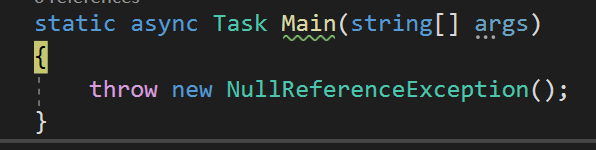
This also causes an issue with first-chance exception catching:
using System;
using System.Threading.Tasks;
namespace Test
{
    class Program
    {
        static async Task Main(string[] args)
        {
            throw new NullReferenceException();
        }
    }
}
Set first-chance for NullReferenceException, and it won't find the source for where the exception was thrown, leading to a very poor debugging experience.
 333fred
on 31 Jul 2019
333fred
on 31 Jul 2019
Both the F11 problem and the exception problem appear to be fixed in 16.4 preview 2.


I'll go ahead and close this issue as well as linked ticket.
jcouv
on 26 Sep 2019
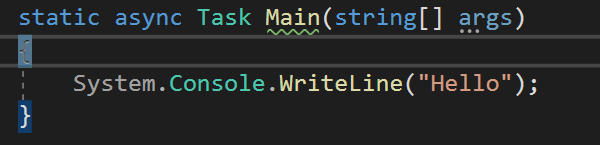
@jcouv, I just tried it on 29325.168.master and it is not fixed. Following the repro steps shows that F10 steps first to the closing brace of the async main method (yet the console window has not yet printed the "Hello World" string that comes with the C# console app template). Pressing F10 just once within the app leads to the app printing the message and terminating.
Can we please get this reactivated?

AArnott
on 26 Sep 2019
@AArnott Something is strange. F10 works fine for me (see screenshot below).
Can you confirm what version of VS you're using? (I'm not familiar with the version number you referenced)
jcouv
on 26 Sep 2019
I suspect there may be some settings involved. That might explain why you and I are observing different behaviors. Here are my settings:

jcouv
on 26 Sep 2019
@AArnott confirmed that everything works fine when Just My Code is enabled.
I'll go ahead and close again.
jcouv
on 26 Sep 2019
Enabling Just My Code is not an acceptable solution here. If we need to move this to the debugger team, fine, but it's not a good experience as it's.
333fred
on 28 Sep 2019
Thanks, @333fred. Another note: it apparently works when targeting net472 and netcoreapp2.1. It only repros on netcoreapp3.0.
AArnott
on 28 Sep 2019
@333fred The linked ticket was already re-opened and assigned to the debugger team.
jcouv
on 28 Sep 2019
Tagging @tmat @chuckries to advise.
jcouv
on 25 Jun 2020
Related issues
 MadsTorgersen
·
3Comments
MadsTorgersen
·
3Comments
 OndrejPetrzilka
·
3Comments
OndrejPetrzilka
·
3Comments
 dpoeschl
·
3Comments
dpoeschl
·
3Comments
 binki
·
3Comments
binki
·
3Comments
 asvishnyakov
·
3Comments
asvishnyakov
·
3Comments
Most helpful comment
Enabling Just My Code is not an acceptable solution here. If we need to move this to the debugger team, fine, but it's not a good experience as it's.