Roslyn: VB: Intellisense should NOT strip square brackets when autocompleting "Enum" type name.
Version Used:
Visual Studio Community 2017 v15.5.6
Steps to Reproduce:
Let's say you want to write code similar to:
    Dim enumVal As AcceptRejectRule

    Dim foo = [Enum].TryParse(Of AcceptRejectRule)("foo", enumVal)
Notice that the type System.Enum uses a reserved keyword (Enum) in VB so you have to escape it by using square brackets to get [Enum]. The trouble is, you can't type it and use Intellisense because when you press Tab to auto-complete, the square brackets are stripped.
You start off like this by typing the square brackets:

Next you start typing the letters of the keyword Enum and Intellisense kicks in offering to autocomplete (note the square brackets are still there):
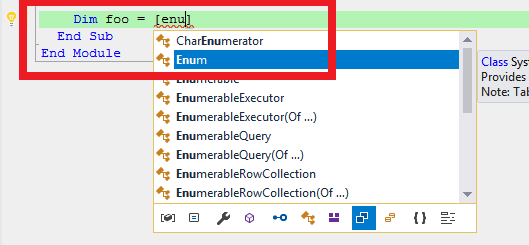
Now if you press Tab to accept the suggestion, it does complete the letters enu to the keyword Enum, but it also strips the square brackets:

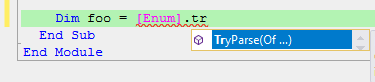
With the square brackets gone, you now have a syntax error, and attempts to press . so you can type TryParse, don't work (the dot just appears but Intellisense is NOT activated):

If you manually type [Enum] complete with square brackets and ignore Intellisense completely, then you can press . to choose members like TryParse:
Expected Behavior:
The square brackets should NOT be removed when you press tab to autocomplete if the resulting code would be a syntax error (as is the case when dealing with Enum). Interestingly enough, the editor is smart enough to handle cases where you have your own type named using a reserved keyword:
Public Module Module1
  Public Class [CDec]
    Public Shared Function DoSomething() As String
    End Function
  End Class

  Public Sub Main()
  End Sub
End Module
In the above code the class CDec uses the reserved keyword CDec for converting values to type Decimal. So if you want to call the shared method DoSomething which must be qualified with type name [CDec], you can type the square brackets, then begin typing cd to bring up Intellisense:
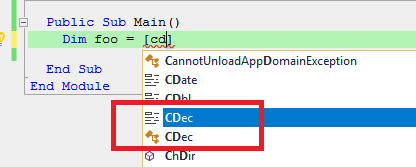
Note the autocomplete list above shows CDec as a keyword and CDec as a type. If you choose to autocomplete with the keyword CDec it correctly strips the brackets as expected. If you choose to autocomplete with the type name CDec it correctly PRESERVES the brackets as expected. This bracket preservation should also work for the Enum type which like the CDec class we defined above just happens to be named after a reserved keyword.
 ericmutta
All 3 comments
The bug for this is here:
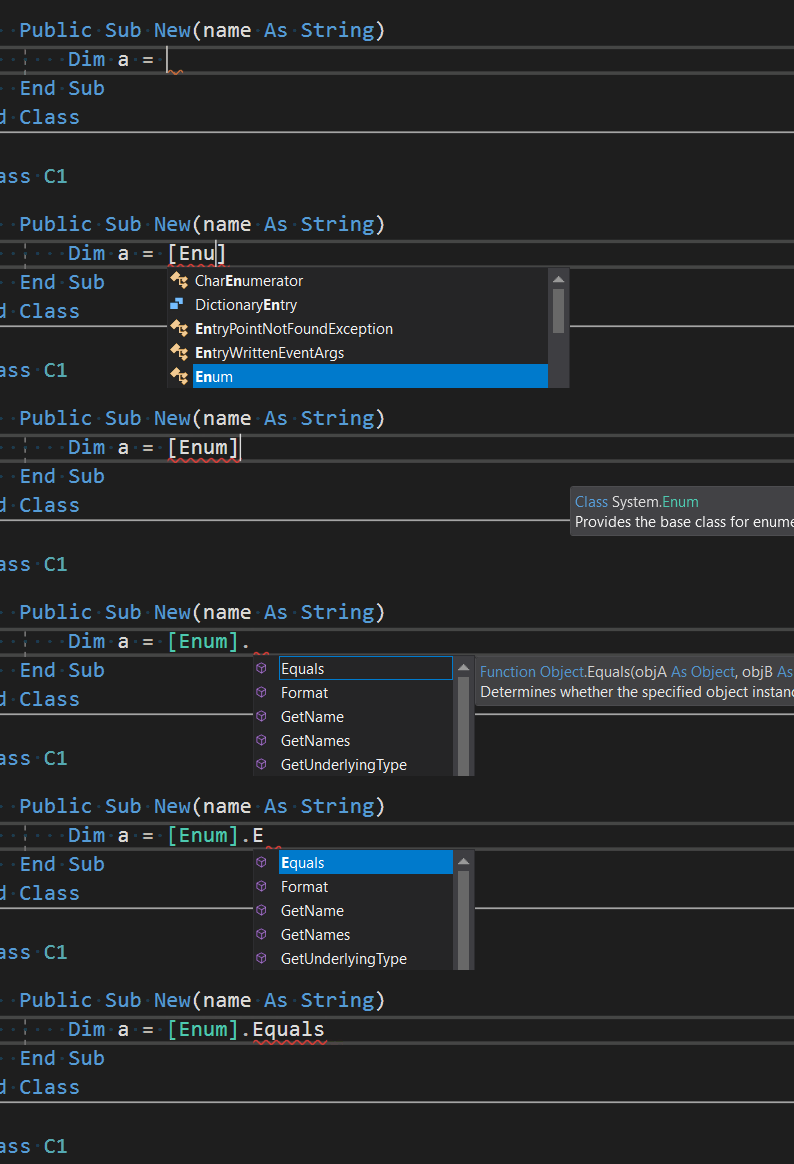
System_Enum should not be in that list. This is causing us to not properly escape this item in the completion list.
With that entry removed, we get the appropriate behavior:
I'm actually surprised this has gone unnoticed for so long.
 CyrusNajmabadi
on 22 Jul 2018
CyrusNajmabadi
on 22 Jul 2018
@CyrusNajmabadi it's really cool how you guys fix bugs even on Sundays! Many thanks for following up as always :+1: :+1:
ericmutta
on 22 Jul 2018
Fixed with https://github.com/dotnet/roslyn/pull/29219
 mavasani
on 13 Oct 2018
mavasani
on 13 Oct 2018
Related issues
 dpoeschl
·
3Comments
dpoeschl
·
3Comments
 marler8997
·
3Comments
marler8997
·
3Comments
 nlwolf
·
3Comments
nlwolf
·
3Comments
 DavidArno
·
3Comments
DavidArno
·
3Comments
 SolalPirelli
·
3Comments
SolalPirelli
·
3Comments