Roslyn: VB: Parameters with same name in unrelated lambda functions are treated as if they were the same symbol.
Version Used:
Visual Studio Community 2017 v15.5.6
Steps to Reproduce:
Type in the following code:
Public Module Module1
  Public Sub Main()
    Dim data = {"a", "b"}

    Dim first = data.All(Function(input) input.Length > 0)

    Dim second = data.All(Function(input) input.Length < 5)
  End Sub
End Module
There are two lambda functions above with a parameter called input. These functions are unrelated, even their bodies are different, but for some reason the editor seems to think the input parameter is the same symbol in all four locations where it appears, which confuses several features driven by this broken symbol resolution.
First, if you right click on input on the line that begins with Dim first ... and choose Find All References, you get this:
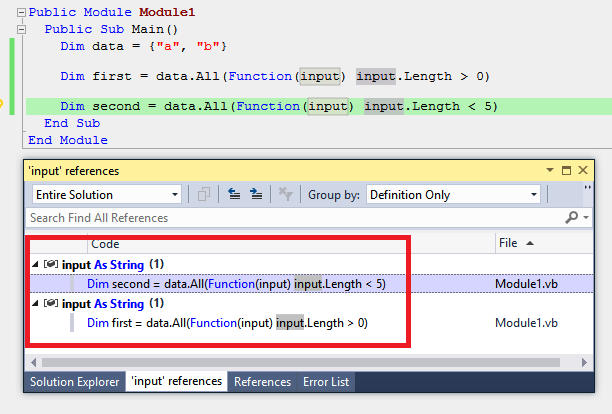
The result above includes the line Dim first ... which is expected, but it also includes the line Dim second ... even though the input parameter on that line is for a different lambda function entirely.
Second, the "highlight references to symbol under cursor" feature also mixes them up. Before putting the cursor on any input parameter, you have this (no highlights):

Then if you put the cursor on input for the line Dim first ..., it highlights ALL four instances of the symbol input even though the instances on the line Dim second ... are unrelated:

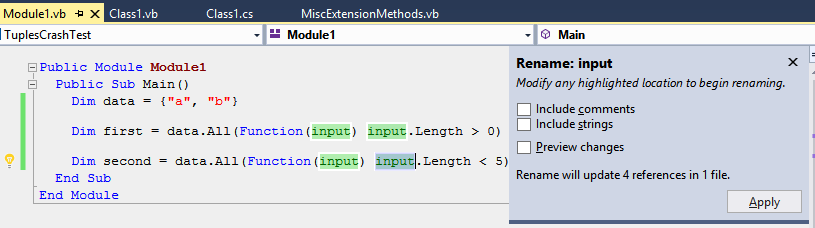
Finally, the Rename operation if done on any instance of the input symbol, will try to change ALL four instances of it, including those in the other lambda function:
Expected Behavior:
Since semantically the parameters declared for a function are scoped to the body of that function, any features driven by the symbol resolver should understand this scoping for parameters declared for lambdas as well. At the moment the resolver seems to treat symbols as the same simply because they have the same name.
PS: there's nothing special about the call to data.All(...) in the code given earlier. All the same problems exist for this simplified code as well:
Public Module Module1
  Public Sub Main()
    Dim first = Function(input As String) input  '<-- this input is NOT the same ...
    Dim second = Function(input As String) input '... as this input.
  End Sub
End Module
 ericmutta
All 6 comments
This is by designe, based on how the VB language works. It's similar to how names are relevant in things like anonymous-types. Here's an example of where this is important:
Class C
    Sub Example()
        Method(Sub(x As Integer) Return, Sub(x As Integer) Return)
    End Sub

    Sub Method(Of T)(x As T, y As T)
    End Sub
End Class
You might think the names of the parameters in those Sub(x As Integer) Return lambdas aren't relevant, but it turns out they are. If, for example, you change the name of one of them to 'y' (and not hte other), you'll get:
Data type(s) of the type parameter(s) in method 'Public Sub Method(Of T)(x As T, y As T)' cannot be inferred from these arguments because more than one type is possible. Specifying the data type(s) explicitly might correct this error.
Here's another example:
    Sub Example(upper As Boolean)
        Dim field = If(upper,
            Function(x As String) x.ToUpper(),
            Function(x As String) x.ToLower())
    End Sub
These make a variable with the anonymous expression type:

If you change one of those names, then you now get:
Cannot infer a common type because more than one type is possible.
Effectively, VB thinks of these having the same type, and because they could be involved in expressions where that matters, all the names are updated. This is very similar to the logic for anonymous types, where you may not want all anonymous types in a method to be treated the same, but they are because their types may end up related.
 CyrusNajmabadi
on 19 Jul 2018
CyrusNajmabadi
on 19 Jul 2018
@CyrusNajmabadi This is by designed, based on how the VB language works. It's similar to how names are relevant in things like anonymous-types.
Many thanks for the clarification Cyrus, this is very interesting!
Is there some reference documentation anywhere I can read to get a full understanding of how anonymous (delegate) types behave? Sadly the VB language spec is a rather neglected document (last version was for VB 11 from SIX YEARS AGO) and the types section doesn't even contain the words anonymous type).
ericmutta
on 19 Jul 2018
@ericmutta Good question. It may be fruitful to look at: https://github.com/dotnet/vblang/blob/master/spec/expressions.md
But i can't guarantee this will be spelled out in there!
CyrusNajmabadi
on 19 Jul 2018
The closest thing i can find is:
expression.md
If the target type is not known, then the lambda method is interpreted as the argument to a delegate instantiation expression of an anonymous delegate type with the same signature of the lambda method.
conversions.md:
Identity/Default conversions:
From an anonymous delegate type generated for a lambda method reclassification to any delegate type with an identical signature.
So, effectively, the compiler considers there to be an identity conversion between the two. If we change one and not the other, then this now applies:
Anonymous Delegate conversions:
From an anonymous delegate type generated for a lambda method reclassification to any wider delegate type.
So, by changing the type, we now have different conversions taking effect. And with different conversions we get code that was previously legal now becoming illegal.
CyrusNajmabadi
on 19 Jul 2018
Note: if you can find anything better in the vblang spec, let me know!
CyrusNajmabadi
on 19 Jul 2018
@CyrusNajmabadi Note: if you can find anything better in the vblang spec, let me know!
Thanks a lot for the pointers to expressions.md I will read it in depth when I get a chance :+1:
I've also seen a section on anonymous delegate conversions which may be related to all of this (but will confirm when I read it fully).
ericmutta
on 20 Jul 2018
Related issues
 NikChao
·
3Comments
NikChao
·
3Comments
 JesperTreetop
·
3Comments
JesperTreetop
·
3Comments
 OndrejPetrzilka
·
3Comments
OndrejPetrzilka
·
3Comments
 MadsTorgersen
·
3Comments
MadsTorgersen
·
3Comments
 orthoxerox
·
3Comments
orthoxerox
·
3Comments