Roslyn: VB: Editor should allow outlining of individual branches in multi-branch statements.
Version Used:
Visual Studio Community 2017 v15.5.6
Steps to Reproduce:
Enable outlining for code-level constructs as follows:
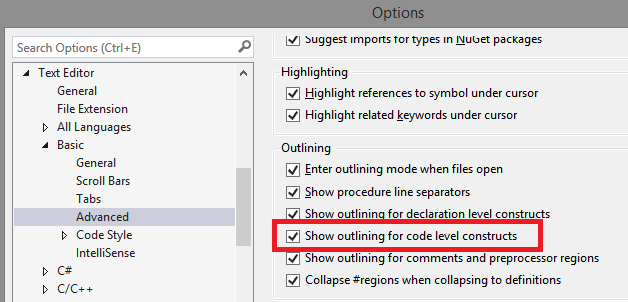
Paste the following code into a VB project:
Public Module Module1
  Public Sub Main()
    Try
      'can't fold just this branch.
    Catch ex As Exception
      'can't fold just this branch.
    Finally
      'can't fold just this branch.
    End Try

    If True Then
      'can't fold just this branch.
    ElseIf True Then
      'can't fold just this branch.
    Else
      'can't fold just this branch.
    End If

    Select Case True
      Case 1 = 1
        'can't fold just this branch.
      Case 0 = 0
        'can't fold just this branch.
      Case Else
        'can't fold just this branch.
    End Select
  End Sub
End Module
As the comments in the code above indicate, you can't collapse individual branches of multi-branch statements such as Try...Catch...Finally...End Try. You are limited to collapsing the entire statement, giving this:
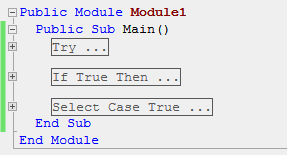
Expected Behavior:
Collapsing for code-level constructs is very useful when reviewing or stepping through complex code and it would be even better if you could collapse individual branches. C# seems to be in the same boat for some statements like try...catch, however it DOES support folding of individual braches of if statements:
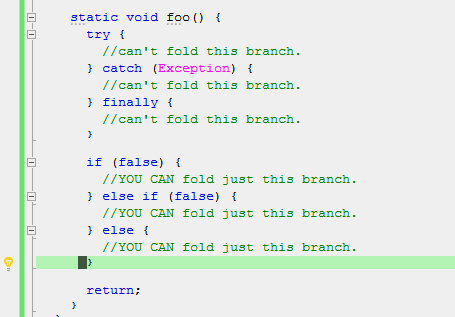
 ericmutta
All 6 comments
As an example of why branch-level folding would be really useful, I decided to snoop around the Rosyln code to find something complex, and found this code:
  Public Overridable Sub Lookup(lookupResult As LookupResult,
                                name As String,
                                arity As Integer,
                                options As LookupOptions,
                                <[In], Out> ByRef useSiteDiagnostics As HashSet(Of DiagnosticInfo))
    Debug.Assert(name IsNot Nothing)

    Dim originalBinder As Binder = Me
    Dim currentBinder As Binder = Me

    Debug.Assert(lookupResult.IsClear)
    options = BinderSpecificLookupOptions(options)

    Dim currentResult As LookupResult = lookupResult.GetInstance()

    Do
      currentResult.Clear()
      currentBinder.LookupInSingleBinder(currentResult, name, arity, options, originalBinder, useSiteDiagnostics)
      lookupResult.MergePrioritized(currentResult)

      If lookupResult.StopFurtherLookup Then
        currentResult.Free()
        Return  ' don't need to look further, we have a viable result.
      ElseIf currentResult.IsWrongArity AndAlso TypeOf currentBinder Is ImportAliasesBinder Then
        ' Since there was a name match among imported aliases, we should not look
        ' in types and namespaces imported on the same level (file or project).
        ' We should skip ImportedTypesAndNamespacesMembersBinder and TypesOfImportedNamespacesMembersBinder
        ' above the currentBinder. Both binders are optional, however either both are present or
        ' both are absent and the precedence order is the following:
        '
        '         <SourceFile or SourceModule binder>
        '                          |
        '                          V
        '       [<TypesOfImportedNamespacesMembersBinder>]
        '                          |
        '                          V
        '       [<ImportedTypesAndNamespacesMembersBinder>]
        '                          |
        '                          V
        '                <ImportAliasesBinder>

        If TypeOf currentBinder.m_containingBinder Is ImportedTypesAndNamespacesMembersBinder Then
          currentBinder = currentBinder.m_containingBinder.m_containingBinder
        End If

        Debug.Assert(TypeOf currentBinder.m_containingBinder Is SourceFileBinder OrElse
                                 TypeOf currentBinder.m_containingBinder Is SourceModuleBinder)

      ElseIf (options And LookupOptions.IgnoreExtensionMethods) = 0 AndAlso
                   TypeOf currentBinder Is NamedTypeBinder Then
        ' Only binder of the most nested type can bind to an extension method.
        options = options Or LookupOptions.IgnoreExtensionMethods
      End If

      ' Continue to containing binders.
      currentBinder = currentBinder.m_containingBinder
    Loop While currentBinder IsNot Nothing

    currentResult.Free()

    ' No good symbols found in any binder. LookupResult has best we found.
    Return
  End Sub
There's an If...End If statement inside that Do...Loop which has a really long ElseIf branch, thanks to the explanatory comments (which by the way should probably be collapsible too). Being able to collapse those branches so you can see the bigger picture ("the forest for the trees") makes a big difference in helping one to understand the code :+1:
ericmutta
on 21 Jun 2018
@ericmutta I believe @AdamSpeight2008 is working on this in: https://github.com/dotnet/roslyn/pull/27617
 CyrusNajmabadi
on 21 Jun 2018
CyrusNajmabadi
on 21 Jun 2018
@CyrusNajmabadi that's exactly what I had in mind. Thanks for helping @AdamSpeight2008 work through it and thank you @AdamSpeight2008 for taking the initiative to implement it :+1: :+1:
@AdamSpeight2008, I see you have If...End If and Select...End Select. Please don't forget about Try...End Try where patterns like this are quite common:
AcquireSomeResource()
Try
 'some very long code here.
Finally
 ReleaseSomeResource()
End Try
When you are reviewing the code to make sure that the right pair of Acquire/Release methods are being called, being able to collapse just the body of the Try statement (where the comment some very long code here appears) is very handy. Right now, if you collapse a Try statement all that remains visible is Try ... and the Finally branch disappears entirely.
ericmutta
on 22 Jun 2018
@ericmutta I'll probably submit Try...Catch...End Try as separate Pull Request.
@CyrusNajmabadi Should we also extended the Advanced Options to include options for these extended out-linings.
[X] Show outlining for Code Level Constructs
 +--[X] Inner Outlining for If ... ElseIf ... Else ...End If
 |
 +--[X] Inner Outlining for Select Case ...Case ... End Case
 |
 +--[X] Inner Outlining for Try ...Catch ... Finally ... End Try
If so, I'll need some pointers on implementation details.
 AdamSpeight2008
on 22 Jun 2018
AdamSpeight2008
on 22 Jun 2018
@CyrusNajmabadi Should we also extended the Advanced Options to include options for these extended out-linings.
I'd prefer not to. W already have:

Which is what this would fall under.
CyrusNajmabadi
on 22 Jun 2018
This came up again in developer feedback.
 kendrahavens
on 28 Jun 2019
kendrahavens
on 28 Jun 2019
Related issues
 NikChao
·
3Comments
NikChao
·
3Comments
 dpoeschl
·
3Comments
dpoeschl
·
3Comments
 vbcodec
·
3Comments
vbcodec
·
3Comments
 DavidArno
·
3Comments
DavidArno
·
3Comments
 asvishnyakov
·
3Comments
asvishnyakov
·
3Comments