Roslyn: How do i debug Compiler Crashes? csc.exe exited with code -2146232797
Hi Guys,
i have already spent 2 days figuring out how to report this bug.
During compilation my compiler Crashes.
I am using the VS 15.7.3

And when i compile my code. This happens:
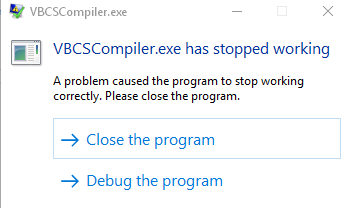
2 seconds later another error pops up:
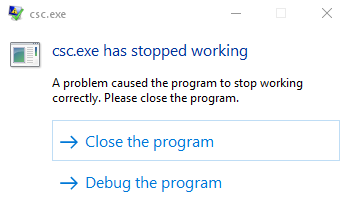
Visual Studio Output:
Microsoft.CSharp.Core.targets(52, 5): [MSB6006] "csc.exe" exited with code -2146232797.
I created a dump and could extract some info:
OnFatalException():19, FailFast (Microsoft.CodeAnalysis)@Microsoft.CodeAnalysis.dll
ReportUnlessCanceled():58, FatalError (Microsoft.CodeAnalysis)@Microsoft.CodeAnalysis.dll
b__0():206, <>c__DisplayClass21_0 (Microsoft.CodeAnalysis.CSharp)@Microsoft.CodeAnalysis.CSharp.dll
HadLambdaConversionError():475, OverloadResolutionResult1 (Microsoft.CodeAnalysis.CSharp)@Microsoft.CodeAnalysis.CSharp.dll ReportDiagnostics():127, OverloadResolutionResult1 (Microsoft.CodeAnalysis.CSharp)@Microsoft.CodeAnalysis.CSharp.dll
ReportDelegateMethodGroupDiagnostics():123, Conversions (Microsoft.CodeAnalysis.CSharp)@Microsoft.CodeAnalysis.CSharp.dll
GenerateImplicitConversionError():16454, Binder (Microsoft.CodeAnalysis.CSharp)@Microsoft.CodeAnalysis.CSharp.dll
CreateReturnConversion():16871, Binder (Microsoft.CodeAnalysis.CSharp)@Microsoft.CodeAnalysis.CSharp.dll
CreateBlockFromExpression():17047, Binder (Microsoft.CodeAnalysis.CSharp)@Microsoft.CodeAnalysis.CSharp.dll
BindLambdaExpressionAsBlock():0, Binder (Microsoft.CodeAnalysis.CSharp)@Microsoft.CodeAnalysis.CSharp.dll
ReallyBind():0, UnboundLambdaState (Microsoft.CodeAnalysis.CSharp)@Microsoft.CodeAnalysis.CSharp.dll
Bind():0, UnboundLambdaState (Microsoft.CodeAnalysis.CSharp)@Microsoft.CodeAnalysis.CSharp.dll
IsAnonymousFunctionCompatibleWithDelegate():0, ConversionsBase (Microsoft.CodeAnalysis.CSharp)@Microsoft.CodeAnalysis.CSharp.dll
IsAnonymousFunctionCompatibleWithExpressionTree():0, ConversionsBase (Microsoft.CodeAnalysis.CSharp)@Microsoft.CodeAnalysis.CSharp.dll
HasAnonymousFunctionConversion():0, ConversionsBase (Microsoft.CodeAnalysis.CSharp)@Microsoft.CodeAnalysis.CSharp.dll
ClassifyImplicitBuiltInConversionFromExpression():0, ConversionsBase (Microsoft.CodeAnalysis.CSharp)@Microsoft.CodeAnalysis.CSharp.dll
ClassifyImplicitConversionFromExpression():0, ConversionsBase (Microsoft.CodeAnalysis.CSharp)@Microsoft.CodeAnalysis.CSharp.dll
IsApplicable():2494, OverloadResolution (Microsoft.CodeAnalysis.CSharp)@Microsoft.CodeAnalysis.CSharp.dll
IsApplicable():0, OverloadResolution (Microsoft.CodeAnalysis.CSharp)@Microsoft.CodeAnalysis.CSharp.dll
IsMemberApplicableInNormalForm():0, OverloadResolution (Microsoft.CodeAnalysis.CSharp)@Microsoft.CodeAnalysis.CSharp.dll
AddMemberToCandidateSet():0, OverloadResolution (Microsoft.CodeAnalysis.CSharp)@Microsoft.CodeAnalysis.CSharp.dll
PerformMemberOverloadResolution():0, OverloadResolution (Microsoft.CodeAnalysis.CSharp)@Microsoft.CodeAnalysis.CSharp.dll
ResolveDefaultMethodGroup():0, Binder (Microsoft.CodeAnalysis.CSharp)@Microsoft.CodeAnalysis.CSharp.dll
ResolveMethodGroupInternal():0, Binder (Microsoft.CodeAnalysis.CSharp)@Microsoft.CodeAnalysis.CSharp.dll
ResolveMethodGroup():0, Binder (Microsoft.CodeAnalysis.CSharp)@Microsoft.CodeAnalysis.CSharp.dll
BindMethodGroupInvocation():0, Binder (Microsoft.CodeAnalysis.CSharp)@Microsoft.CodeAnalysis.CSharp.dll
BindInvocationExpression():0, Binder (Microsoft.CodeAnalysis.CSharp)@Microsoft.CodeAnalysis.CSharp.dll
BindInvocationExpression():0, Binder (Microsoft.CodeAnalysis.CSharp)@Microsoft.CodeAnalysis.CSharp.dll
BindExpressionInternal():0, Binder (Microsoft.CodeAnalysis.CSharp)@Microsoft.CodeAnalysis.CSharp.dll
BindArgumentExpression():0, Binder (Microsoft.CodeAnalysis.CSharp)@Microsoft.CodeAnalysis.CSharp.dll
BindArgumentAndName():0, Binder (Microsoft.CodeAnalysis.CSharp)@Microsoft.CodeAnalysis.CSharp.dll
BindInvocationExpression():0, Binder (Microsoft.CodeAnalysis.CSharp)@Microsoft.CodeAnalysis.CSharp.dll
BindExpressionInternal():0, Binder (Microsoft.CodeAnalysis.CSharp)@Microsoft.CodeAnalysis.CSharp.dll
BindExpression():0, Binder (Microsoft.CodeAnalysis.CSharp)@Microsoft.CodeAnalysis.CSharp.dll
BindReturn():0, Binder (Microsoft.CodeAnalysis.CSharp)@Microsoft.CodeAnalysis.CSharp.dll
BindStatement():0, Binder (Microsoft.CodeAnalysis.CSharp)@Microsoft.CodeAnalysis.CSharp.dll
BindBlockParts():0, Binder (Microsoft.CodeAnalysis.CSharp)@Microsoft.CodeAnalysis.CSharp.dll
BindStatement():0, Binder (Microsoft.CodeAnalysis.CSharp)@Microsoft.CodeAnalysis.CSharp.dll
BindPossibleEmbeddedStatement():0, Binder (Microsoft.CodeAnalysis.CSharp)@Microsoft.CodeAnalysis.CSharp.dll
BindIfStatement():0, Binder (Microsoft.CodeAnalysis.CSharp)@Microsoft.CodeAnalysis.CSharp.dll
BindStatement():0, Binder (Microsoft.CodeAnalysis.CSharp)@Microsoft.CodeAnalysis.CSharp.dll
BindBlockParts():0, Binder (Microsoft.CodeAnalysis.CSharp)@Microsoft.CodeAnalysis.CSharp.dll
BindStatement():0, Binder (Microsoft.CodeAnalysis.CSharp)@Microsoft.CodeAnalysis.CSharp.dll
BindPossibleEmbeddedStatement():0, Binder (Microsoft.CodeAnalysis.CSharp)@Microsoft.CodeAnalysis.CSharp.dll
BindIfStatement():0, Binder (Microsoft.CodeAnalysis.CSharp)@Microsoft.CodeAnalysis.CSharp.dll
BindStatement():0, Binder (Microsoft.CodeAnalysis.CSharp)@Microsoft.CodeAnalysis.CSharp.dll
BindBlockParts():0, Binder (Microsoft.CodeAnalysis.CSharp)@Microsoft.CodeAnalysis.CSharp.dll
BindStatement():0, Binder (Microsoft.CodeAnalysis.CSharp)@Microsoft.CodeAnalysis.CSharp.dll
BindMethodBody():0, Binder (Microsoft.CodeAnalysis.CSharp)@Microsoft.CodeAnalysis.CSharp.dll
BindMethodBody():0, Binder (Microsoft.CodeAnalysis.CSharp)@Microsoft.CodeAnalysis.CSharp.dll
BindMethodBody():0, MethodCompiler (Microsoft.CodeAnalysis.CSharp)@Microsoft.CodeAnalysis.CSharp.dll
CompileMethod():0, MethodCompiler (Microsoft.CodeAnalysis.CSharp)@Microsoft.CodeAnalysis.CSharp.dll
CompileNamedType():0, MethodCompiler (Microsoft.CodeAnalysis.CSharp)@Microsoft.CodeAnalysis.CSharp.dll
b__0():0, <>c__DisplayClass21_0 (Microsoft.CodeAnalysis.CSharp)@Microsoft.CodeAnalysis.CSharp.dll
b__0():0, <>c__DisplayClass5_0 (Roslyn.Utilities)@Microsoft.CodeAnalysis.dll
Execute():0, Task (System.Threading.Tasks)@mscorlib.dll
RunInternal():0, ExecutionContext (System.Threading)@mscorlib.dll
Run():278, ExecutionContext (System.Threading)@mscorlib.dll
ExecuteWithThreadLocal():0, Task (System.Threading.Tasks)@mscorlib.dll
ExecuteEntry():0, Task (System.Threading.Tasks)@mscorlib.dll
Dispatch():0, ThreadPoolWorkQueue (System.Threading)@mscorlib.dll
Native to Managed Transition:0, ()@
I would like to give more info, but it's really hard to get more insight.
Unfortunately, i can't share my code. ( it's enterprise code and it's huge)¨
I would like to report a proper minimal example. But i am unable to do so, because i don't know what exactly it causes.
Do you have any tipps, how i can debug this?
 epoyraz
All 20 comments
@epoyraz Is it possible for you to try the latest VS preview to see if you have the same problem there? The code around where the problem appears to be has changed quite a bit recently.
 gafter
on 8 Jun 2018
gafter
on 8 Jun 2018
@gafter i just tried and i have the same problem :(
But i found out that my code compiles, when i use an older version of roslyn by referencing the Microsoft.Net.Compilers nuget. I am figuring out, between which versions it starts to crash. i hope this helps.
epoyraz
on 9 Jun 2018
@gafter
<PackageReference Include="Microsoft.Net.Compilers" Version="2.6.0-beta3" /> it crashes
<PackageReference Include="Microsoft.Net.Compilers" Version="2.4.0" /> it compiles just fine
So i aussume the Problem is somewhere between:
https://github.com/dotnet/roslyn/commit/ab56a4a6c32268d925014a3e45ddce61fba715cd good
https://github.com/dotnet/roslyn/commit/d3f6b8e7e17ebc52a62150db7bb952daf0dc2c29 bad
changes inbetween:
https://github.com/dotnet/roslyn/compare/master@%7B09-21-17%7D...master@%7B11-09-17%7D
i hope this helps to narrow down the problem
epoyraz
on 9 Jun 2018
Running into the exact same issue... Happened right after upgrading visual studio to 15.7.3.
EDIT: Tried creating a blank .net core project and it works fine. Trying to figure out what are the differences between my setup and the fresh one.
EDIT 2: Can confirm that including the pacakage for 2.4.0 also enables me to compile. At this point the core of my project is setup exactly the same as the template included in the latest visual studio 2017 build, but it still won't compile post 2.4.0.
 ravtakhar
on 9 Jun 2018
ravtakhar
on 9 Jun 2018
@epoyraz I suggest debugging the issue as follows:
- Create a git repository that is a clone of https://github.com/dotnet/roslyn
- In a "Developer Command Prompt for VS 2017", do the following:
a.cd Roslyn(or wherever your git clone of Roslyn is)
b.Restore.cmd - Open
Roslyn.slnin VS 2017 - Hit
F6to Build (or, alternatively, typeMSBuild /m Roslyn.slnin the command prompt) - Set "Visual Studio Setup" as your startup project (in the Solution Explorer, under the
Visual Studiofolder) - hit
F5to Start Visual Studio with your new Roslyn under the debugger - In the new Visual Studio that pops up, open your solution that exhibits the problem.
- Reproduce the problem. You will now be in a position to debug it.
Please let us know if you can do this, and if so what you learn.
gafter
on 10 Jun 2018
This might be obvious to some but you must install donnet-sdk-2.1.200-rtm-00-88-66.. before step 4, and F6 does nothing on my version of VS but I can use VS Menus or Ctrl+Shift+B to build.
 paul1956
on 10 Jun 2018
paul1956
on 10 Jun 2018
After including missing SDK, I can start second version of Visual Studio but when I try to open solution the original VS instance crashes

Microsoft.VisualStudio.Composition.CompositionFailedException
HResult=0x80131500
Message=Expected 1 export(s) with contract name "Microsoft.VisualStudio.LanguageServices.Implementation.ProjectSystem.MiscellaneousFilesWorkspace" but found 0 after applying applicable constraints.
Source=Microsoft.VisualStudio.Composition
StackTrace:
at Microsoft.VisualStudio.Composition.ExportProvider.GetExports(ImportDefinition importDefinition)
at Microsoft.VisualStudio.Composition.ExportProvider.GetExportsT,TMetadataView
at Microsoft.VisualStudio.Composition.ExportProvider.GetExportT,TMetadataView
at Microsoft.VisualStudio.Composition.ExportProvider.GetExportT
at Microsoft.VisualStudio.Composition.ExportProvider.GetExportT
at Microsoft.VisualStudio.Composition.ExportProvider.GetExportedValueT
at Microsoft.VisualStudio.ComponentModelHost.ComponentModel.GetServiceT
at Microsoft.VisualStudio.LanguageServices.Implementation.LanguageService.AbstractPackage2.Initialize() in C:\Users\PaulM\Source\Repos\roslyn-master\src\VisualStudio\Core\Def\Implementation\LanguageService\AbstractPackage2.cs:line 62
at Microsoft.VisualStudio.LanguageServices.CSharp.LanguageService.CSharpPackage.Initialize() in C:\Users\PaulM\Source\Repos\roslyn-master\src\VisualStudio\CSharp\Impl\CSharpPackage.cs:line 78
paul1956
on 11 Jun 2018
@paul1956 Did you try building the whole solution before starting VisualStudioSetup, or at least the Roslyn project? (I think that should be enough)
 Neme12
on 11 Jun 2018
Neme12
on 11 Jun 2018
@paul1956 What version of VS are you using?
Neme12
on 11 Jun 2018
@Neme12 I am running the latest production release 15.7.3 and I built all the Roslyn using VS menu and I started with F5. The new Version of VS opens to startup page, it is only when I open a solution do I get the error.
paul1956
on 12 Jun 2018
The suggestion by @sharwell in #27720 allowed the build to complete but does not change anything with the error above. VS still opens but I can't open a solution.
paul1956
on 12 Jun 2018
My colleague @OmarTawfik suggests
- sync to the commit.
msbuild build\Toolset\Toolset.csproj- Copy
Binaries\Debug\Exes\Toolsetto another location (C:\mycompiler) - And then in the project you want to debug, set this property:
<CscToolPath>c:\mycompiler</CscToolPath>
That will at least let you "Build" and see output in the Output pane.
gafter
on 12 Jun 2018
Experiencing the same result upon updating to the latest version of Visual Studio 2017. Added a reference to the older version of the compiler seems to be the short term fix. I hope you guys are able to work through this.
Thanks!
 gtakhar
on 16 Jun 2018
gtakhar
on 16 Jun 2018
@gtakhar are you referring to the crash I posted above? If so please detail the workaround.
paul1956
on 17 Jun 2018
I believe @gtakhar is referring to "including the packkage for 2.4.0 also enables me to compile"
(woah we have the same name)
ravtakhar
on 19 Jun 2018
Updating the .net compiler to the latest version (2.8.3) resolved the issue for me. I guess it was patched somewhere along the way.
ravtakhar
on 15 Jul 2018
@epoyraz Can you please try updating to 2.8.3 and see if that resolves the issue for you?
gafter
on 15 Jul 2018
@gafter sorry for the late reply. I was on vacation. It seems my coworkers created an issue with a minimal example. See #28419
epoyraz
on 15 Aug 2018
@epoyraz That issue makes the problem clear. Thank you!
gafter
on 15 Aug 2018
Update: this was fixed in #29360
Thanks! 🥇 👍
epoyraz
on 20 Aug 2018
Related issues
 AdamSpeight2008
·
3Comments
AdamSpeight2008
·
3Comments
 NikChao
·
3Comments
NikChao
·
3Comments
 DavidArno
·
3Comments
DavidArno
·
3Comments
 johndog
·
3Comments
johndog
·
3Comments
 dpoeschl
·
3Comments
dpoeschl
·
3Comments