Roslyn: VB: Editor inexplicably resets the "Highlight references/keywords under cursor" settings.
Version Used:
Visual Studio Community 2017 v15.5.6
Steps to Reproduce:
I've been seeing this bug for quite a while now but couldn't report it because I don't know exactly what causes it. Under Tools > Options > Text Editor > Basic > Advanced -> Highlighting we have two settings:
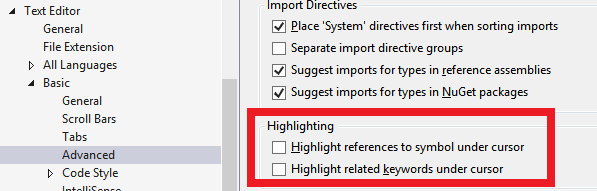
What happens is I tick both options and the editor immediately begins to highlight references as expected. I can close and open the IDE and find the settings exactly as I left them. I can clean the solution, rebuild, run, etc and find the settings exactly as I left them.
However, some undefined period later (typically in the same coding session so we are talking a period of a few hours) I notice that highlighting no longer happens and when I go to the settings I see the options have been unticked. I am the only one who uses this laptop and there are no ghosts (that I know of) in my office, so something is resetting those highlighting settings and for the life of me, I can't figure out what!
And this "ghost reset" only affects those two highlighting settings...everything else that I can notice in the editor (e.g. colour coding, automatic formatting, font sizes, etc) remains as configured.
A quick search in the Rosyln code reveals the AbstractDocumentHighlightsService so I know this feature is powered by Rosyln. In order to file a more actionable bug report, I would like to know how the IDE saves those highlighting settings when I press OK to close the Options window, and also how the editor reads those settings to enable/disable the documenting highlighting service I suspect the bug can be found somewhere between those steps.
CC: @CyrusNajmabadi I note you are one of the contributors to the AbstractDocumentHighlightsService.cs file so perhaps you could help point me in the right direction for further investigation? Many thanks in advance :+1:
 ericmutta
All 8 comments
These options are controlled by FeatureOnOffOptions.ReferenceHighlighting and FeatureOnOffOptions.KeywordHighlighting
You can find this here:
https://github.com/dotnet/roslyn/blob/990fbbbf1e29eca1b7e73aa755c446ce2858446d/src/EditorFeatures/Core/Shared/Options/FeatureOnOffOptions.cs#L25-L29
This stuff is persisted here:
https://github.com/dotnet/roslyn/blob/master/src/VisualStudio/Core/Def/Implementation/Options/RoamingVisualStudioProfileOptionPersister.cs
 CyrusNajmabadi
on 6 May 2018
CyrusNajmabadi
on 6 May 2018
Lightning fast response! Many thanks @CyrusNajmabadi, let me dig into them and see if I can link it back to anything I am doing :+1:
ericmutta
on 6 May 2018
I am still investigating this issue and I noticed an extra detail: when those "highlight references" settings are reset without warning, the editor also stops using the "highlight current line" setting:
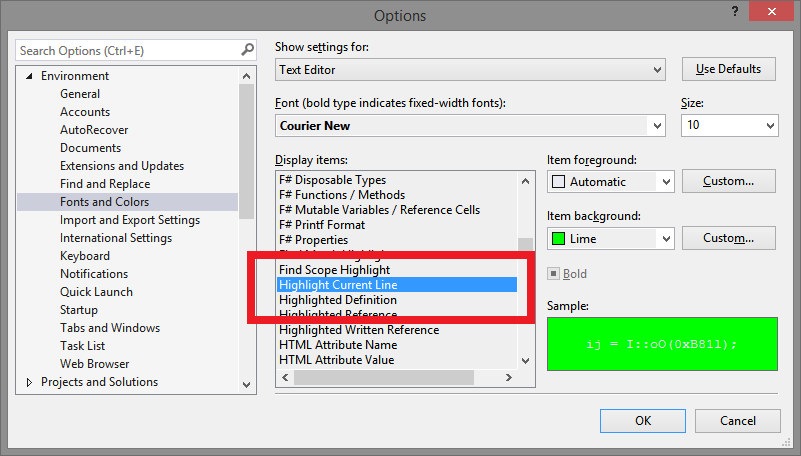
I have mine set to use the Lime colour, but when the problem occurs the current line is not highlighted at all. To bring back the highlight I have to close just that editor window and reopen it (other editor windows are not affected and keep highlighting the lines as configured).
Don't know if the above is any help, but will keep investigating until I crack it (the bug is definitely there).
ericmutta
on 28 May 2018
Hi @CyrusNajmabadi I finally figured out what's causing this issue!
Install the awesome CodeRush extension if you are not already using it.
Type this code into any VB project (the actual code doesn't matter, we just need something to invoke the reorder parameters refactoring on):
Public Class CFoo
  Public Sub Blah(ArgOne As String, ArgTwo As Integer)
  End Sub
End Class
Now make sure the two highlighting options are ticked under Tools > Options > Text Editor > Basic > Advanced -> Highlighting then click on the Blah method name and select the Reorder Parameters refactoring offered by CodeRush:
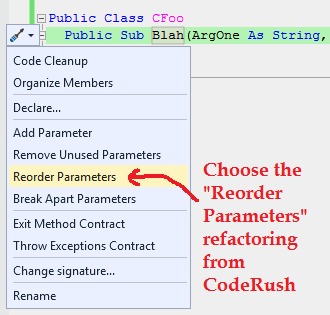
Unlike the built-in Change signature refactoring, CodeRush's implementation has no modal dialog. You can reorder the parameters by using the arrow keys and they draw a blue box around the parameter you want to move then do a nice little animation to show it swapping positions:

While that blue box is active, if you go back to Tools > Options > Text Editor > Basic > Advanced -> Highlighting you will notice that the highlighting options have been unticked.
If you click away anywhere on the editor to cancel the reordering operation, then go back to the options dialog, you will notice the highlighting options have been restored to their original ticked state,
However if you go ahead and swap the parameters around by pressing the right arrow key so ArgOne moves to where ArgTwo was (and vice versa), you get this:

Pressing Enter to accept the change completes the refactoring and if you go to the options dialog you will notice that the highlighting options have been unticked.
In essence, this refactoring seems to disable the highlighting options when it is active and it restores them if canceled, but doesn't restore them if it is executed to completion.
I realise this issue may be outside the scope of Rosyln (perhaps @DustinCampbell who worked on CodeRush can shed some insight) but it may be useful to try this under a debugger and then look at the stack trace leading to the methods that disable the highlighting settings to see if the CodeRush extension is directly responsible :+1:
ericmutta
on 4 Oct 2018
Good to know :) Perhaps this issue coudl be filed with CodeRush?
CyrusNajmabadi
on 4 Oct 2018
@CyrusNajmabadi Good to know :) Perhaps this issue coudl be filed with CodeRush?
Sure thing! Shame they have no github presence, but I guess I can just link back to this issue when using their issue tracker :+1:
PS: the issue is very likely to be caused by the extension itself because attempting the same steps in a C# project produces the same behaviour as in the VB project, making Rosyln probably innocent in all this :)
ericmutta
on 4 Oct 2018
The CodeRush guys have fixed this issue so I am closing this.
ericmutta
on 5 Oct 2018
Glad it was figured out! :)
CyrusNajmabadi
on 5 Oct 2018
Related issues
 NikChao
·
3Comments
NikChao
·
3Comments
 asvishnyakov
·
3Comments
asvishnyakov
·
3Comments
 codingonHP
·
3Comments
codingonHP
·
3Comments
 JesperTreetop
·
3Comments
JesperTreetop
·
3Comments
 DavidArno
·
3Comments
DavidArno
·
3Comments