Roslyn: IDE0044 (add readonly modifier) fires incorrectly for fixed buffers
Version Used: 15.7.0 Preview 4.0
Steps to Reproduce:
- In a new C# project, set "Allow unsafe" to true in the project properties.
- In a new file, type
```C#
unsafe struct Foo
{
private fixed byte _data[8];
}
2. Put caret on the _data field and press Ctrl . (light-bulb)

**Expected Behavior**:
No tip

**Actual Behavior**:
"Add readonly modifier" (IDE0044) is suggested to replace 'fixed' with 'readonly'.
If you take the suggestion, the app fails to compile with:
error CS0650: Bad array declarator: To declare a managed array the rank specifier precedes the variable's identifier. To declare a fixed size buffer field, use the fixed keyword before the field type.
error CS0270: Array size cannot be specified in a variable declaration (try initializing with a 'new' expression)
```
 pharring
All 10 comments
Hello,
I just wanted to indicate that this issue occurs also in Unity when decorating a private variable as [SerializedField]. Roslyn marks the field with IDE0044 , however, no fix it suggested. In fact the tool tip is completely blank and the only "suggested fix" is to suppress it.
 rob8861
on 4 Jun 2018
rob8861
on 4 Jun 2018
@rob8861 I have the suggestion to add a readonly modifier on Unity
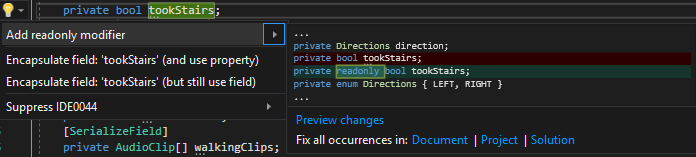
However the description is empty

 Xwilarg
on 16 Jun 2018
Xwilarg
on 16 Jun 2018
@Xwilarg for those of us who are not Unity devs, could you explain what the issue is here? Is this a field that is only ever written in a constructor? Or is it written somewhere else? If so, where?
 CyrusNajmabadi
on 16 Jun 2018
CyrusNajmabadi
on 16 Jun 2018
@Xwilarg the empty description is a duplicate of #26219. If there are other issues, can you describe those in some additional detail by filing a separate bug? I'd like to keep the current bug easy and focused on fixed fields.
 sharwell
on 16 Jun 2018
sharwell
on 16 Jun 2018
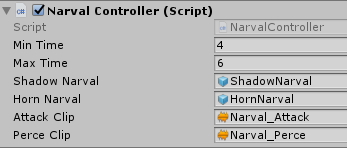
@CyrusNajmabadi I think Unity documentation would explain better than me https://docs.unity3d.com/ScriptReference/SerializeField.html
I used them because they allow you to fill variable's values directly from the Unity editor
Xwilarg
on 17 Jun 2018
@Xwilarg That reference talks about a specific attribute being on certain fields. However, in your post there aren't any attributes on "tookStairs". So i'm a bit confused :)
CyrusNajmabadi
on 17 Jun 2018
@Xwilarg unfortunately that will not work in Unity since private fields decorated with [SerializeField] cannot be read only. They are exposed to the Unity editor and meant to be edited in code.
However, I spoke to the folks at Visual Studio Tools For Unity and apparently this warning can be turned off.
Under the Tools->Options menu, select the TextEditor->C#->Code Style->General tab. Under Field preferences, there is a Prefer readonly option. Set that to No.
rob8861
on 17 Jun 2018
@CyrusNajmabadi Oh sorry, in fact there was a [SerializedField] but it was out of the screenshot.
Xwilarg
on 17 Jun 2018
@Xwilarg this issue is also repaired using public variables instead a [SerializedField], and my question about this is, in a project dev, whit partners and friend in job is so important the hidden info principle?
 PipoSigh
on 26 Jul 2018
PipoSigh
on 26 Jul 2018
Using log4net I get it if i leave the readonly modifier from this line (and other like it) ...
static readonly ILog log = LogManager.GetLogger(typeof(Startup));
... this is just sat in the top of the class in question, not sure why this is an issue as the problem is not well explained.
 TehWardy
on 3 Aug 2018
TehWardy
on 3 Aug 2018
Related issues
 JesperTreetop
·
3Comments
JesperTreetop
·
3Comments
 vbcodec
·
3Comments
vbcodec
·
3Comments
 OndrejPetrzilka
·
3Comments
OndrejPetrzilka
·
3Comments
 ashmind
·
3Comments
ashmind
·
3Comments
 AdamSpeight2008
·
3Comments
AdamSpeight2008
·
3Comments
Most helpful comment
@Xwilarg unfortunately that will not work in Unity since private fields decorated with [SerializeField] cannot be read only. They are exposed to the Unity editor and meant to be edited in code.
However, I spoke to the folks at Visual Studio Tools For Unity and apparently this warning can be turned off.
Under the Tools->Options menu, select the TextEditor->C#->Code Style->General tab. Under Field preferences, there is a Prefer readonly option. Set that to No.