Roslyn: VB: Multiple issues with LIKE operator in portable class libraries.
Version Used:
Visual Studio Community 2017 v15.5.6
Steps to Reproduce:
Create a VB portable class library targeting the .NET Standard 2.0 and type in the following code in the Class1.vb file created by default:
Public Class Class1
  Public Sub New()
    Dim test = "eric" Like "e*c"
  End Sub
End Class
The first problem is that when you build that library the build fails but the Error List window remains completely blank. In fact the only way to know the build has failed is that the Visual Studio status bar says Build failed.
Now in the same solution, add a VB console project and then add a reference to the portable library so you have something like this:

This time when you build, the build fails and the Error List window says could not find library:

The second problem is that the build dependency system should probably NOT attempt to build a project X that depends on a project Y, if said project Y failed to build. In this case the console project depends on the portable library and an attempt was made to build the console project even though the portable library failed to build. In a large solution, this behaviour leads to a large number of cascading failures in the build with the Error List showing many cases of could not find library.
Expected Behavior:
The LIKE operator is VB-specific and as such its implementation lives in Microsoft.VisualBasic.dll (Reflector shows it to be in class Microsoft.VisualBasic.CompilerServices.LikeOperator). When you use it in a non-portable project (e.g. a VB console project) it works just fine so I have a feeling that whatever magic is used to make VB-specific stuff work in portable libraries, has not been applied to the code behind the LIKE operator which is why the build fails (in fact there appear to be tests in the Rosyln code to verify NON-support for this operator).
Naturally, one expects that a fundamental aspect of the language such as an operator would work in all project types so the expected behaviour is to add said support :smile:
In the interim, it would be handy if the error handling related to this issue could be improved. Something to the effect of LIKE operator is not supported for current project type (in fact there appears to be an error handler for this scenario in the VB compiler, as well as a template message with that exact wording. I was able to track this because sometimes, for a brief moment, the Error List does show a message like that, but then it is "pushed out" by those could not find library messages that flood the list in a large solution).
PS: it has been YEARS since I touched the LIKE operator in any real project, but recently I found it handy to implement search patterns similar to those you would pass to functions like DirectoryInfo.EnumerateDirectories. I was attempting to do this in portable class library which is how I came across the problems reported above. Since it's broken for now I think I may have to resort to using regexes (which, though overkill for this use case, are thankfully supported in .NET Standard 2.0).
PPS: many thanks to the people who worked hard to bring support for .NET Standard 2.0 to VB. I realise this is made challenging by VB-isms like the LIKE operator, but given how well it has worked so far, I am super confident minor edge cases like this one will be fixed too :+1: :+1:
 ericmutta
All 10 comments
@ericmutta thanks for the detail here.
Having trouble reproducing the error you saw though. When I create a portable 2.0 project in VB and use the code I get the error
error BC37234: Like operator is not supported in current project type.
That is expected. The Like operator is actually implemented inside the MS.VB.dll and the compiler simply defers to it. In cases where it's not available then the compiler has to issue an error message.
Will wait for IDE to comment on the building the other project. But pretty sure that is by design.
 jaredpar
on 10 Apr 2018
jaredpar
on 10 Apr 2018
@KathleenDollard for context
The version of MS.VB.dll that ships with .NET Standard is the same as the one shipped for portable class libraries. In .NET Standard 2.0 the number of framework APIs may be enough that we could include a version of MS.VB.dll with more features.
 jmarolf
on 10 Apr 2018
jmarolf
on 10 Apr 2018
@jaredpar Having trouble reproducing the error you saw though.
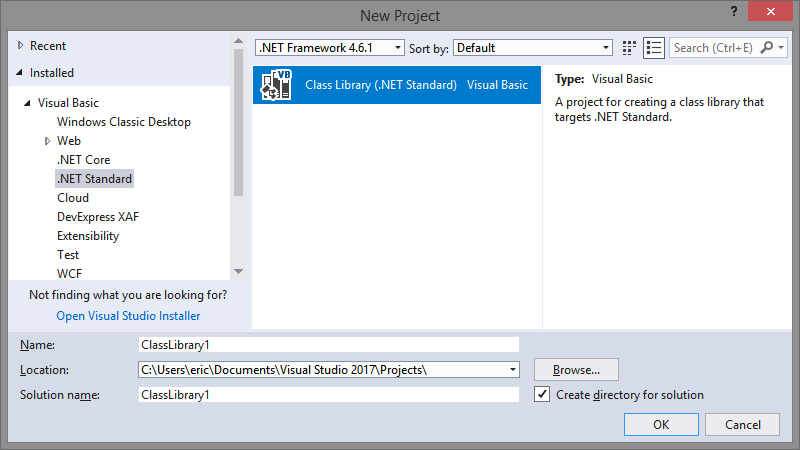
Hi Jared, many thanks for following up on this. I tried it once again by creating just the portable library:
Running the build still fails and the Error List is completely blank:
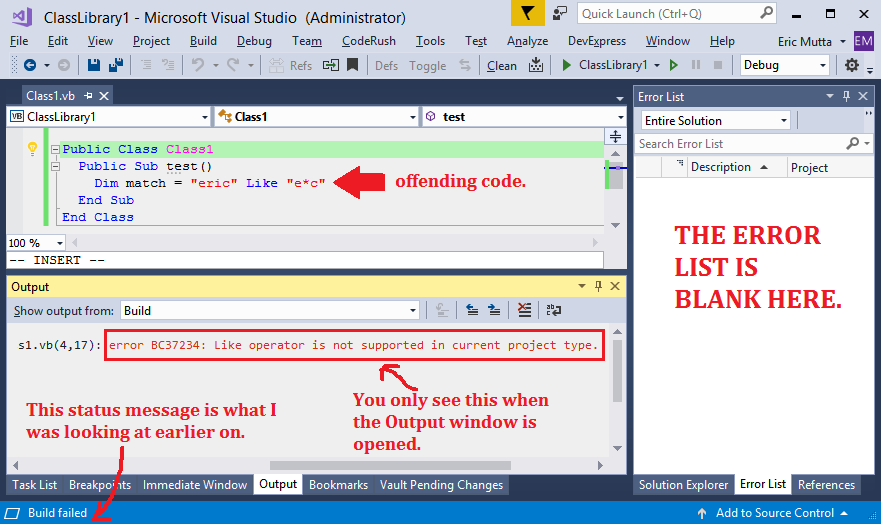
I noticed that the error DOES appear in the Output window when you select the Build output, but my expectation (which may be misplaced?) is that ALL error messages show in the Error List window. Is it by design that a build error would appear in the build output but NOT in the Error List?
ericmutta
on 10 Apr 2018
@jmarolf In .NET Standard 2.0 the number of framework APIs may be enough that we could include a version of MS.VB.dll with more features.
This would be a really big deal :+1: :+1: as it would mean VB could now be available in more platforms/project types because all VB-specific features would now be portable.
I have been writing code against .NET Standard 2.0 and its API surface area is VAST. I am yet to encounter ANYTHING important that is missing from it and I dare say, you could probably drop the source code for the whole MSVB.dll into a portable library and build as is.
PS: while on the topic of MSVB.dll. Is there any reason it isn't open source?
ericmutta
on 10 Apr 2018
@ericmutta
Thank you so much for this detail and bringing this up.
 KathleenDollard
on 10 Apr 2018
KathleenDollard
on 10 Apr 2018
@KathleenDollard What would you like to do with this issue?
For some reason, GitHub doesn't let me assign it to you for follow-up.
 jcouv
on 15 Apr 2018
jcouv
on 15 Apr 2018
I suspect what is going on here is that this error is detected during code generation (not semantic analysis) and therefore not reported by Compilation.GetDiagnostics(). We have special handling for such diagnostics, but I suspect this one fell through the cracks.
 gafter
on 21 Apr 2018
gafter
on 21 Apr 2018
@gafter We have special handling for such diagnostics, but I suspect this one fell through the cracks.
Many thanks for following up. In the interim, (in case anyone else runs into this issue), here is the fully portable code to use in place of the LIKE operator:
    Private Function WildcardMatch(ArgPath As String, ArgPattern As String) As Boolean
      Const conRegexOpt As RegexOptions =
            RegexOptions.IgnoreCase Or RegexOptions.IgnorePatternWhitespace Or
            RegexOptions.Singleline Or RegexOptions.ExplicitCapture

      ArgPattern = $"^{Regex.Escape(ArgPattern).Replace("\*", ".*")}$"

      Return Regex.IsMatch(ArgPath, ArgPattern, conRegexOpt)
    End Function
With that function in place, instead of writing foo LIKE "test*.*", you do WildcardMatch(foo, "test*.*"). TheWildcardMatch` function above doesn't support all the wildcard features, but can be extended to do so with relative ease since all it's doing is converting the wildcard pattern to a regex then handing over to the Regex class which is (thankfully!) available in .NET Standard 2.0.
ericmutta
on 21 Apr 2018
You can even use the Like operator by introducing helper classes. I have been using this to support RegEx expressions with Like for years, but you could also define a class for WildMatch. Given:
Public Class WildMatch
    Private ReadOnly myRegEx As Regex
    Sub New(pat As String)
        pat = $"^{Regex.Escape(pat).Replace("\*", ".*")}$"
        myRegEx = New Regex(pat, RegexOptions.IgnoreCase Or RegexOptions.IgnorePatternWhitespace Or
            RegexOptions.Singleline Or RegexOptions.ExplicitCapture)
    End Sub

    Shared Operator Like(s As String, re As WildMatch) As Boolean
        Return re.myRegEx.IsMatch(s)
    End Operator
End Class
You can create the wildmatch object in a field or variable outside a loop, then call it repeatedly with the like operator.
Dim pattern = new WildMatch("test*.*")
For Each name in nameList
    If name Like pattern Then
        matches.Add(name)
    End If
Next
It's probably possible to write a much faster version that uses an optimized non-recursive algorithm with minimal memory allocation. I wrote a fast custom WildMatch many years ago in Java, but I can't even remember what project or whether it was even open source.
 jdmichel
on 14 Nov 2018
jdmichel
on 14 Nov 2018
@jdmichel You can even use the Like operator by introducing helper classes.
This is pretty cool, it didn't occur to me to overload the Like operator! Doing so not only makes LIKE available in portable libraries, but you also get to keep the natural syntax. Excellent catch :+1:
ericmutta
on 15 Nov 2018
Related issues
 DavidArno
·
3Comments
DavidArno
·
3Comments
 AceHack
·
3Comments
AceHack
·
3Comments
 SolalPirelli
·
3Comments
SolalPirelli
·
3Comments
 MadsTorgersen
·
3Comments
MadsTorgersen
·
3Comments
 OndrejPetrzilka
·
3Comments
OndrejPetrzilka
·
3Comments