Roslyn: VB: IDE0032 "Use auto property" should consider accessibility of setters/getters.
Version Used:
Visual Studio Community 2017 v15.5.6
Steps to Reproduce:
Paste the following code into a VB project:
Public Class Test
  Private mCreatedBy As String
  Private mCreatedOn As Date

  Public Property CreatedBy As String
    Get
      Return Me.mCreatedBy
    End Get
    Protected Set(ArgValue As String)
      Me.mCreatedBy = ArgValue
    End Set
  End Property

  Public Property CreatedOn As Date
    Get
      Return Me.mCreatedOn
    End Get
    Protected Set(ArgValue As Date)
      Me.mCreatedOn = ArgValue
    End Set
  End Property
End Class
The private fields mCreatedBy and mCreatedOn fade out and when you hover over them, the IDE suggests using an auto property:

If you go ahead and do the fix, it produces this code:
Public Class Test
  Public Property CreatedBy As String

  Public Property CreatedOn As Date
End Class
However, the above code is not equivalent to the initial code which had the setter using Protected accessibility. Even the docs say you can't use auto properties if you want different accessibility levels for the getter/setter.
Expected Behavior:
The "use auto property" suggestion should only be offered when the original code uses getters/setters with the same accessibility level.
PS: I've looked really hard around the IDE and there is no obvious way to disable these auto-fixes in cases where they are either broken or disagree with one's coding style. Is there a way to do it?
 ericmutta
All 7 comments
PS: I've looked really hard around the IDE and there is no obvious way to disable these auto-fixes in cases where they are either broken or disagree with one's coding style. Is there a way to do it?
Yes. You can disable:

until this bug is fixed.
 CyrusNajmabadi
on 11 Mar 2018
CyrusNajmabadi
on 11 Mar 2018
PR out for the fix.
CyrusNajmabadi
on 11 Mar 2018
@CyrusNajmabadi PR out for the fix.
I don't know how you guys do it. Superfast bug fixes even on weekends!
Many many thanks for this, I appreciate your efforts :pray:
ericmutta
on 12 Mar 2018
@CyrusNajmabadi Yes. You can disable:
Looking at that screen shot it appears to be C#-related. For VB, I looked under Options > Text Editor > Basic > Code Style but there is no such option.
Also looking at Code Styles for C# as of Visual Studio Community v15.5.6 all I see is this:
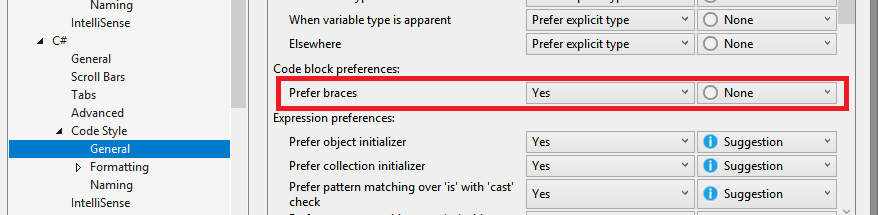
...there is no "Prefer auto properties" option. Is that available in a later version or perhaps just the non-community editions?
ericmutta
on 12 Mar 2018
It's here in VB.
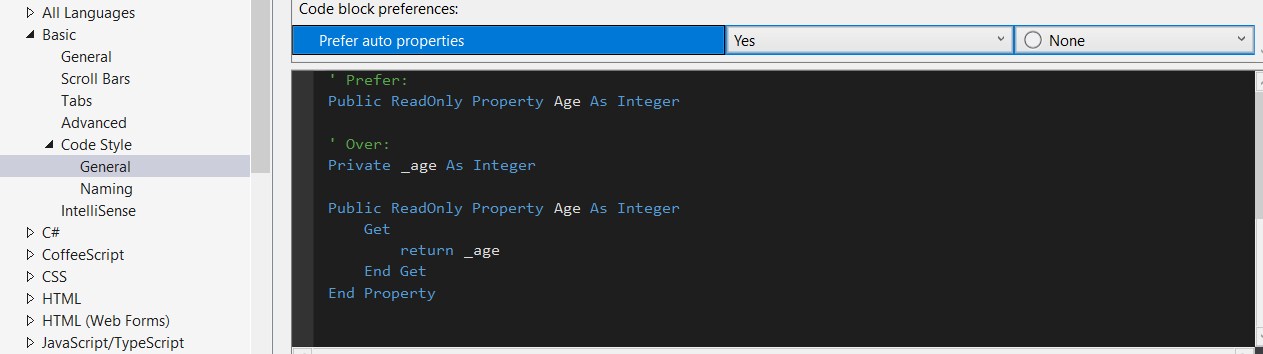
I'm using 15.6. That may have been when we added the user facing option for it.
CyrusNajmabadi
on 12 Mar 2018
@CyrusNajmabadi I'm using 15.6. That may have been when we added the user facing option for it.
Aaaah, I see. Thanks for the pointer, will be upgrading soon so I can access it :+1:
ericmutta
on 12 Mar 2018
Hey dudes if you're using Visual Studio you can check this to redefine snippets
https://github.com/buster95/VisualStudio-Configuration/tree/master/Basic/Redefined%20Snippets
 buster95
on 6 Jun 2020
buster95
on 6 Jun 2020
Related issues
 codingonHP
·
3Comments
codingonHP
·
3Comments
 MadsTorgersen
·
3Comments
MadsTorgersen
·
3Comments
 johndog
·
3Comments
johndog
·
3Comments
 DavidArno
·
3Comments
DavidArno
·
3Comments
 orthoxerox
·
3Comments
orthoxerox
·
3Comments
Most helpful comment
PR out for the fix.