Roslyn: Xml Documentation on Methods shows difference in SyntaxTree structure with VS2017 IDE code analysis in background Vs explicitly triggered msbuild
Version Used:
Roslyn v2.6.0
VS2017 15.5.6
Steps to Reproduce:
I have an analyzer for reading the XML Documentation and analyzing it. We have this analyzer added as an analyzer reference to a project where we have methods documented with XML Documentation.
E.g./// <summary> /// API:Yes /// </summary> public void Method() { }I use below code snippet to read XML Documentation.
var leadingTrivia = methodDeclarationSyntaxNode.GetLeadingTrivia();
var singleLineDocumentation = leadingTrivia.FirstOrDefault(trivia => trivia.Kind() == SyntaxKind.SingleLineDocumentationCommentTrivia);
- This works fine when we do code analysis from VS2017 IDE which is triggered in the background.
The leading trivia list retrieved from the method declaration syntax shows 3 trivias.

Analyzer identifies this as proper XML documentation as it uses SingleLineDocumentationCommentTrivia for identifying XML Documentation.
- When we are building the solution using msbuild (VS2017 IDE Rebuild All) there is no SingleLineDocumentationTrivia, all are SingleLineCommentTrivia.
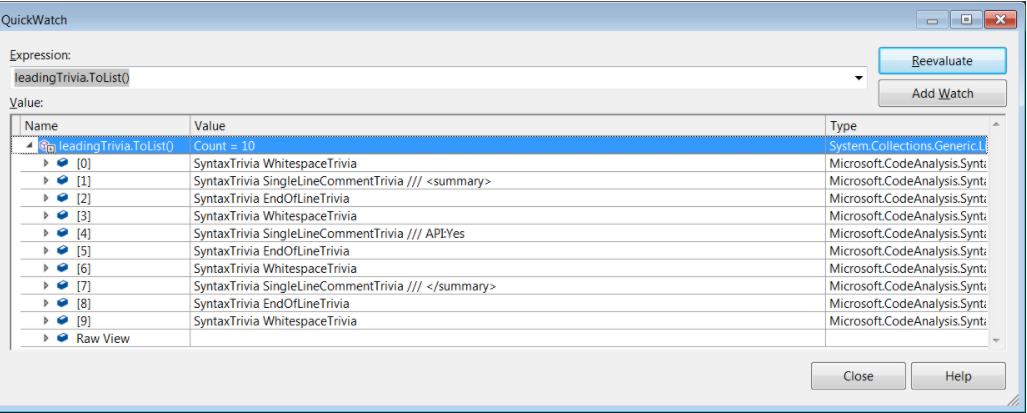
Expected Behavior:
Both VS2017 IDE Code analysis and msbuild compilation which triggers Roslyn analyzers should give same SyntaxTree structure for LeadingTrivia.
Actually, we should get SingleLineDocumentationTrivia as we have XML documentation, not just a comment node.
Actual Behavior:
VS2017 IDE Shows proper SingleLineDocumentationTrivia when we have a proper XML documentation. But msbuild triggered analyzer instance shows different syntax tree where only SingleLineCommentTrivia observed.
Please let me know your comment on this difference in behavior which is affecting one of our XML Documentation related analyzer.
Thanks
Basanth
 msbasanth
All 2 comments
XML documentation output must be enabled, or the compiler will just treat them like normal comments. See #10003, #2773.
We created StyleCop Analyzers rule SA0001 for this scenario. It explains the requirement and provides workarounds for problems people may experience when turning this feature on.
 sharwell
on 9 Feb 2018
sharwell
on 9 Feb 2018
Duplicate of #10003
sharwell
on 9 Feb 2018
Related issues
 NikChao
·
3Comments
NikChao
·
3Comments
 MadsTorgersen
·
3Comments
MadsTorgersen
·
3Comments
 AceHack
·
3Comments
AceHack
·
3Comments
 marler8997
·
3Comments
marler8997
·
3Comments
 vbcodec
·
3Comments
vbcodec
·
3Comments
Most helpful comment
XML documentation output must be enabled, or the compiler will just treat them like normal comments. See #10003, #2773.
We created StyleCop Analyzers rule SA0001 for this scenario. It explains the requirement and provides workarounds for problems people may experience when turning this feature on.