_From @taori on January 16, 2018 19:38_
Recently i figured out that you can configure custom analyzers using ruleset files. This seemed amazing and i utilized it in a project. Oddly enough when i checked out if there are any other built in rules i could utilize they just simply would not work.

The project is NET 4.6.2
Project.csproj contains entries for both debug+release config
<CodeAnalysisRuleSet>ProjectName.ruleset</CodeAnalysisRuleSet>
ProjectName.ruleset content:
<?xml version="1.0" encoding="utf-8"?>
<RuleSet Name="Regeln für ProjectName" Description="ProjectName.csproj." ToolsVersion="15.0">
  <Rules AnalyzerId="Microsoft.Analyzers.ManagedCodeAnalysis" RuleNamespace="Microsoft.Rules.Managed">
    <Rule Id="CA1001" Action="Error" />
    <Rule Id="CA1009" Action="Warning" />
    <Rule Id="CA1016" Action="Warning" />

  </Rules>
</RuleSet>
Test class to verify the rule: (I want this to be an error.)
https://msdn.microsoft.com/en-us/library/ms182172.aspx
public class Test
{
  private  IDisposable test =  new MemoryStream();
}
_Copied from original issue: dotnet/project-system#3150_
 Pilchie
All 14 comments
Tagging @mavasani - this should probably be moved to https://github.com/dotnet/roslyn though?
Also - what build are you on? There was an issue with custom analyzers not working properly in 15.5.0, but it should be fixed in the most recent builds.
Pilchie
on 23 Jan 2018
_From @taori on January 17, 2018 9:34_
@Pilchie i assume you're talking about the VS build - that would be 15.5.4. Mind you that custom analyzers did work for me but built in ones apparently do not respond to ruleset configuration.
Pilchie
on 23 Jan 2018
_From @taori on January 17, 2018 10:45_
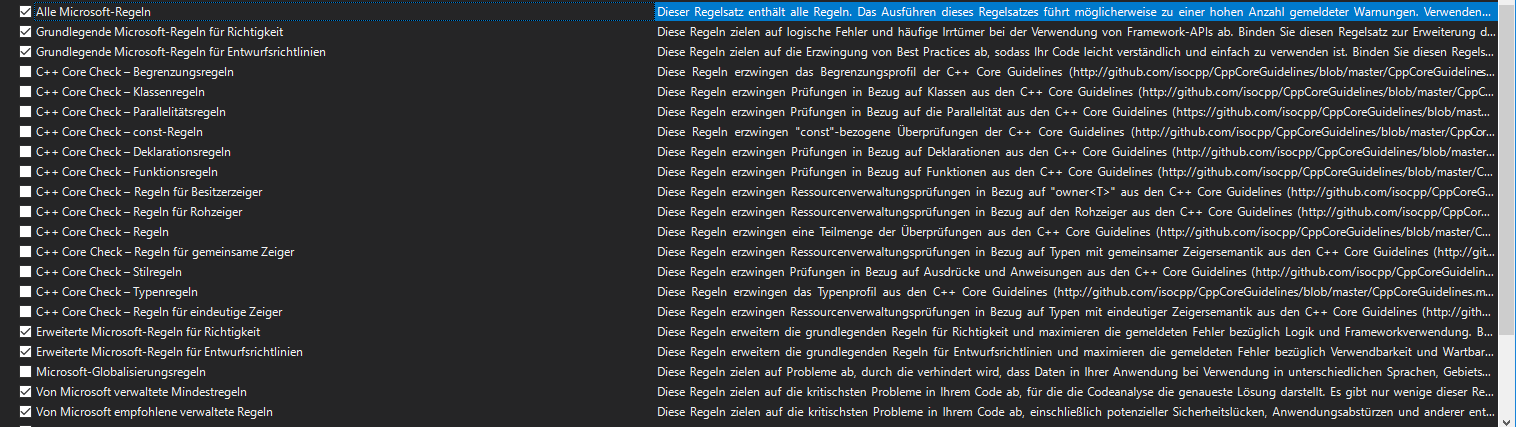
Apparently the VM i was testing this with originally was not on 15.5.4 - The ruleset does look different now, as well as the analyzers list.
Can't select CA 1001 anymore.

Analyzers list used to be empty - now it isn't. While that seems like an improvement it does lack analyzers i would imagine.
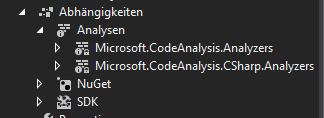
Attempting to add rulesets does not seem to work. At least the previous screenshot did not get more options to select from. I guess something is broken here.
Pilchie
on 23 Jan 2018
How are you installing the custom analzyers? That looks like the default set that VS provides? Maybe you need a reference to the NuGet package or extension for roslyn based static analysis?
Pilchie
on 23 Jan 2018
_From @taori on January 18, 2018 14:25_
This problem isn't about custom analyzers at all - It's about adding VS analyzers not responding to the ruleset configuration (see link of the analyzer which i referenced in my first post). And i can't seem to add them to the screen
after interacting with the screen
This problem seems to be more dominant when using a .netstandard project. Ordinary .netframework projects appear to suffer from this too.
look at this minimal .net class library
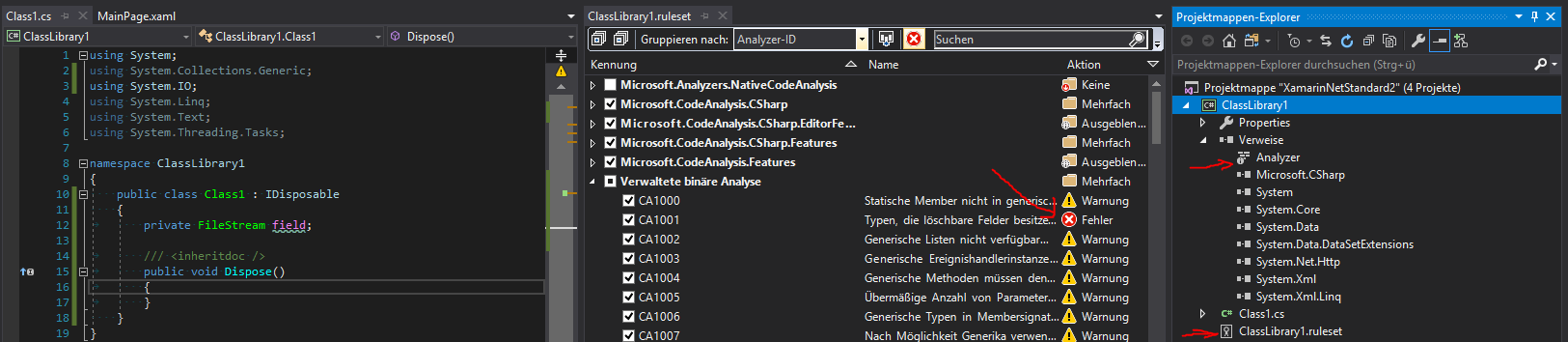
According to the sample for CA1001, this project should not be compiling or am i doing something wrong here?
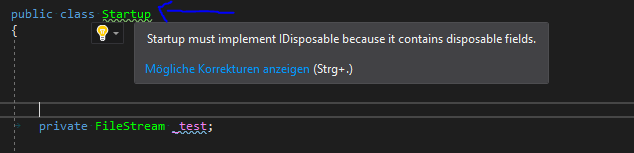
Update: Potentially interesting information: I just opened a production project which is an older Web project using mvc 5.x - While configuration done to make CA1001 an error there, does not seem to make it act like an error either it at least does raise a warning as you can see here:
Pilchie
on 23 Jan 2018
@Pilchie @jinujoseph Will this be fixed? Still having this issue and it appears there is no attention on it.
 taori
on 6 Mar 2019
taori
on 6 Mar 2019
@taori I am unable to repro this on the latest VS2019 RC release: https://devblogs.microsoft.com/visualstudio/visual-studio-2019-release-candidate-rc-now-available/
Steps tried:
- Create a new C# netstandard library and add NuGet package reference to Microsoft.CodeAnalysis.FxCopAnalyzers v2.6.3
- Copy paste the following code:
using System;
using System.IO;

public class Test
{
    private IDisposable test = new MemoryStream();
}
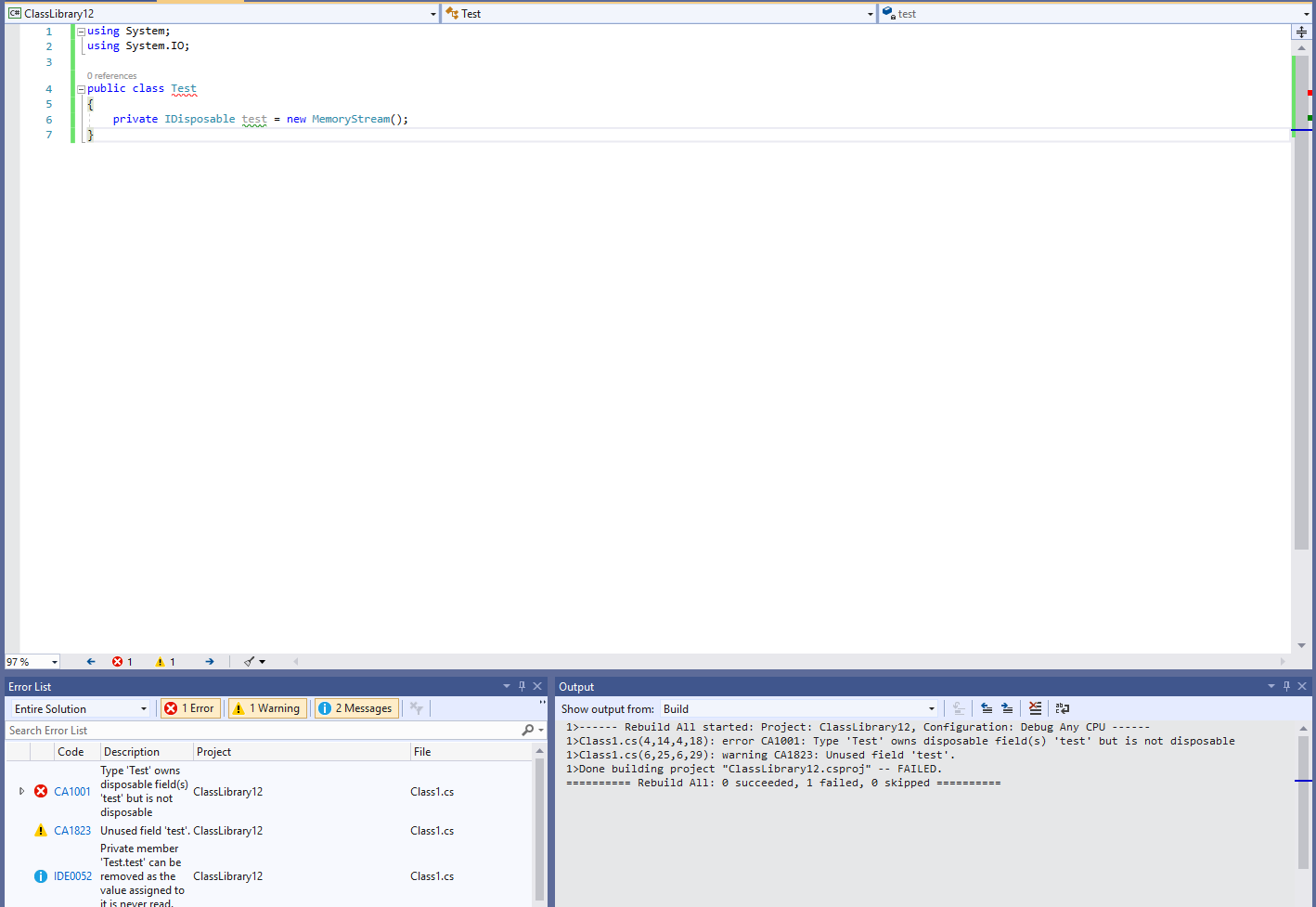
- Verify the following live diagnostics in the IDE:

- Mark CA1001 as _error_ through solution explorer
Set Rule Set Severitycommand:
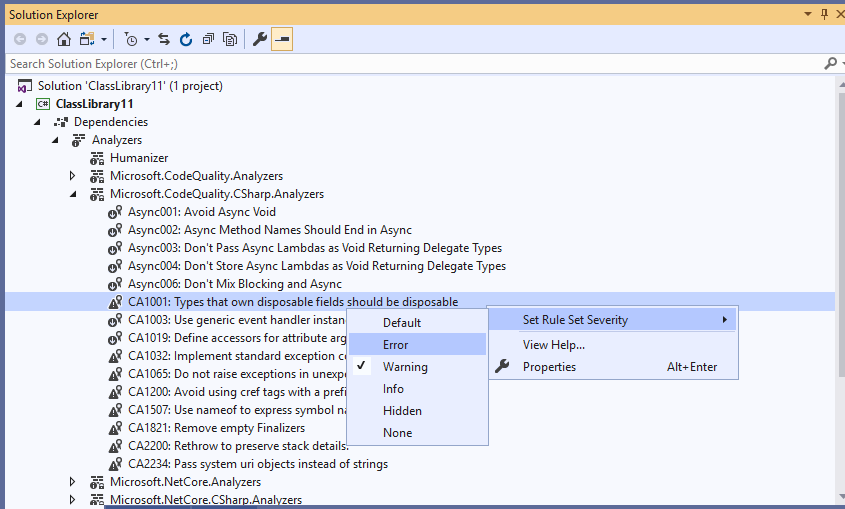
- Notice that immediately the error list diagnostic CA1001 changes to error. Doing an explicit build/rebuild of the project also shows the diagnostic CA1001 as build error that breaks build.
 mavasani
on 11 Mar 2019
mavasani
on 11 Mar 2019
@mavasani I'll confirm (with vs2019) with the project i'm having this issue with and get back to you. thanks for verifying
taori
on 11 Mar 2019
@mavasani didn't confirm the other solution yet, but if you're doing the same procedure you outlined with a netcore 3.0 console app marking CA1001 as error will have no effect.
taori
on 12 Mar 2019
@mavasani Ok - I've confirmed it to be working in the solution i was having issues with. So vs2019 seems to have fixed the bug. However it still didn't work in a netcore application. I assume this is a bug?
taori
on 12 Mar 2019
Can you attach a repro project? I am enable to repro this bug at all for any project kind.
mavasani
on 12 Mar 2019
@mavasani Apparently my IDE at home isn't updated to the latest version. Works fine with Preview 4.1 SVC1 - This issue seems fully resolved. Will this fix be applied to VS 2017 too?
taori
on 12 Mar 2019
Unfortunately, I don’t see it getting applied to VS2017.
mavasani
on 12 Mar 2019
Closing this issue as it does not repro on VS2019
mavasani
on 26 Jun 2019
Related issues
 orthoxerox
·
3Comments
orthoxerox
·
3Comments
 OndrejPetrzilka
·
3Comments
OndrejPetrzilka
·
3Comments
 ashmind
·
3Comments
ashmind
·
3Comments
 codingonHP
·
3Comments
codingonHP
·
3Comments
 joshua-mng
·
3Comments
joshua-mng
·
3Comments
Most helpful comment
_From @taori on January 18, 2018 14:25_
This problem isn't about custom analyzers at all - It's about adding VS analyzers not responding to the ruleset configuration (see link of the analyzer which i referenced in my first post). And i can't seem to add them to the screen
after interacting with the screen
This problem seems to be more dominant when using a .netstandard project. Ordinary .netframework projects appear to suffer from this too.
look at this minimal .net class library

According to the sample for CA1001, this project should not be compiling or am i doing something wrong here?
Update: Potentially interesting information: I just opened a production project which is an older Web project using mvc 5.x - While configuration done to make CA1001 an error there, does not seem to make it act like an error either it at least does raise a warning as you can see here: