Roslyn: Proposal to bring back the "Sort Usings" command
Developer Community: https://developercommunity.visualstudio.com/content/problem/46236/bring-back-sort-usings-command.html
"Please bring back "Sort Usings" command to C# editor context menu.
2017 replaced this command with "Remove and Sort Usings", which is not what I prefer doing: I do not want to remove stock usings from the list, because every time I want to use a feature from those, I have to remember which namespace it's in. Stock usings that New File creates for C# files provides a reasonable list of features available for me, without having me to remember each namespace.
I still want to sort usings, but now the option for doing so, without removing is gone."
 dpoeschl
All 23 comments
+2 more comments in agreement on the Developer Community issue
dpoeschl
on 2 Oct 2017
@kuhlenh This is a good point. Thoughts?
dpoeschl
on 2 Oct 2017
Yeah, we've been hearing this frequently enough that we need to consider bringing it back. I really don't want to add more top-level commands to the Context Menu, so we might have to nest this (though that also doesn't seem ideal). Any other ideas?
 kuhlenh
on 2 Oct 2017
kuhlenh
on 2 Oct 2017
I'd like to propose an alternative solution.
The main problem with Remove and Sort is that it removes the default, stock usings that are included in the default class templates. As the original request says, the reason for avoiding the Remove and Sort command is that it removes these. Most (all?) of these usings are so commonly required that adding them manually later on is annoying (especially things like System.Linq and System.Collections.Generic).
So instead of putting the Sort only command back in the context menu, could Remove and Sort be modified to leave those usings alone, even if they're unused? I am fairly certain that this is what most users wish to achieve, as leaving a ton of unused third party or uncommon usings lying around is typically not very useful. This would make the command vastly more useful and eliminate the need to bring back the old command.
If you want to preserve the existing functionality, a separate Remove All and Sort (the naming of both commands probably needs work in this case) could be added, and the modified version (that leaves the stock usings alone) could replace the one in the context menu as the default choice.
Also, in the mean time, does the Sort only command still exist at all? I haven't been able to find it yet. If it does, it would be nice to document a work around for accessing it. If it doesn't exist at all, bringing back the Sort only command would probably still be wise, but it probably doesn't need to be readily available if the changes I mentioned above are implemented.
 bladeoflight16
on 16 Nov 2017
bladeoflight16
on 16 Nov 2017
So instead of putting the Sort only command back in the context menu, could Remove and Sort be modified to leave those usings alone, even if they're unused?
I would prefer to not do that. If htat happens, then we'll just hear people complaining "i said 'remove unused usings' and the usings weren't removed!" :)
because every time I want to use a feature from those, I have to remember which namespace it's in
This is a very strong reason for us to support intellisense for items outside of hte namespaces in scope :)
--
That said, i think adding back "sort usings" would be fine. I would just not put it in the context menu. Consider the 'Edit | IntelliSense' menu, along with a shortcut.
 CyrusNajmabadi
on 17 Nov 2017
CyrusNajmabadi
on 17 Nov 2017
This is a very strong reason for us to support intellisense for items outside of the namespaces in scope :)
I think this is the real answer. If we suggest items in intellisense irrespective of usings in a file the user no longer misses features if they remove unused usings optimistically.
 jmarolf
on 18 Nov 2017
jmarolf
on 18 Nov 2017
+1 for reintroduction of "Sort Usings". Not all classes require the "System", "System.Linq", etc namespaces that are added by default and I find myself removing them if they are not required.
 framgeld
on 19 Nov 2017
framgeld
on 19 Nov 2017
@CyrusNajmabadi
This is a very strong reason for us to support intellisense for items outside of hte namespaces in scope :)
I'm not sold on this. I could easily see this resulting in a lot of clutter in the auto-complete. There's already typically a ton of classes in there you don't care about, which can sometimes make it harder to get it to pick the one you actually want.
bladeoflight16
on 21 Nov 2017
I'm not sold on this. I could easily see this resulting in a lot of clutter in the auto-complete.
- We could always expose things through a different gesture. "Symbols in scope" and "All symbols"
- We have ways to filter the list already (i.e. filter to classes/properties/locals/etc.) This could tie into that.
- FWIW, the auto-complete list is already OMGHUEG. I did some checks of how large the list was in some of my projects when doing some perf tests for completion, and it was well over 100k items. At that point, the actual list isn't relevant. It's just there to help you speed up typing, and to help you find things once you've typed enough to filter effectively.
IMO, the larger list actually helps you with the last bit. First, it makes typign better, as you're less likely to type something not in the list because you were missing the using. So other items won't cause mistypes against the item you want. Second, filtering should still be effective as names don't generally span that many namespaces. i.e. if i use Xml then that will certainly pull in a few more namespaces with a few elements vs the ones i'm getting already. But not substantially enough to cause the list to be too cluttered.
And, if that's a concern, they can be appropriately grouped such that they are there, but down below the list of actual items in scope.
CyrusNajmabadi
on 22 Nov 2017
My proposal would be to leave Sort Usings out of the Editor Context Menu but add it back as a command so that users can give it a keybinding and use it. (Remove and Sort usings was used by at least an order of magnitude more than Sort Usings, so I can't justify putting Sort Usings back in the menu that we're trying so hard to shorten).
I agree that when we add unimported types to completion that the Sort Usings issue may vanish. However, I don't want these users to have their productivity stifled until then. @dpoeschl is it hard to add Sort Usings back? Could we get it into the next update?
kuhlenh
on 23 Nov 2017
Reviving an old issue thread here - on the VS for Mac product we received some similar feedback with a use case for Sort Usings:
We had this option in the VS for Mac IDE, but removed our custom implementation as we've adopted more of Roslyn to power the editor. I think a command for this, at least, could be useful and something we could consider on the Mac, too.
 jmatthiesen
on 11 Dec 2018
jmatthiesen
on 11 Dec 2018
I'm surprised no one has mentioned conditionally compiled code. (i.e. #if SOME_BUILD_CONFIG) In my experience with Visual Studio for Mac, the "remove" feature removes usings that are not referenced in the currently selected build configuration. So when you select the other build configuration, the build is broken because you no longer have a using that you need. That's why I usually want to just sort, rather than sort and remove.
 nathanielcook
on 11 Dec 2018
nathanielcook
on 11 Dec 2018
Just double checked and yep, it still works that way. For mobile development it is quite common to use conditional compilation ifdefs, so the "Remove and Sort Usings" can be pretty unusable for files that have that.
nathanielcook
on 11 Dec 2018
@nathanielcook The appropriate thing to do in that situation is place the right usings if the right #ifdefd blocks. That way all your code is consistent across all your conditional compilation options.
CyrusNajmabadi
on 11 Dec 2018
@nathanielcook The appropriate thing to do in that situation is place the right usings if the right
#ifdefd blocks. That way all your code is consistent across all your conditional compilation options.
I had a feeling someone might suggest that. Putting ifdefs among the using statements breaks sorting! ("Remove and Sort Usings" removes, but no longer sorts.) Not to mention that it is super ugly, hard to read and unnecessarily lengthens the amount of code at the top of the file. We avoid it wherever we can.
nathanielcook
on 11 Dec 2018
I had a feeling someone might suggest that. Putting ifdefs among the using statements breaks sorting! ("Remove and Sort Usings" removes, but no longer sorts.)
That sounds like something that can be fixed. If you'd like to contribute a fix here, i'd be happy to help you work through it and would definitely review it for you.
Not to mention that it is super ugly, hard to read and unnecessarily lengthens the amount of code at the top of the file.
It doesn't feel unnecessary to me. It feels like it appropriately explains what hte code is doing. You are using that using in certain configurations, but not using it is in others.
--
Note: this has been the position of the IDE team back since I added this feature in VS 2005 :D To prevent usings from being removed in conditional scenarios, they shoudl also be placed in an appropriate conditional that matches their usages.
CyrusNajmabadi
on 11 Dec 2018
The relevant code is here: https://github.com/dotnet/roslyn/blob/def06e4bd7f53ab7989bd0c86505aac6f80d9e95/src/Workspaces/CSharp/Portable/Utilities/UsingsAndExternAliasesOrganizer.cs#L107-L108
We'd just need a PR to fix things up so that within any section of usings inside a pp-directive block, things can still be sorted.
CyrusNajmabadi
on 11 Dec 2018
Our team wants to sort using statements without removing unused ones. We do not want ifdefs among the using statements.
I don't disagree with teams that decide to ifdef their usings; it's certainly a valid approach that has some benefits, as well as some downsides. I do disagree with the notion that everyone has to do it that way; it's a decision that will vary per team/repo. Doing things our way used to be easy with Visual Studio for Mac, until "Sort Usings" was removed recently with the switch to Roslyn for that feature.
nathanielcook
on 11 Dec 2018
I do disagree with the notion that everyone has to do it that way;
You don't have to do it that way. It's simply that that's not a scenario that the IDE is going out of its way to support.
Note: if you sort your usings, the IDE will respect that. Furture usings that are added will be added in a way that respects sorting.
If there is a strong desire to have ths feature, i think it's fine if someone else wants to provide it out-of-band. For now, the decision was made that it was not worth supporting and occupying things like the UI with all these different options.
If you'd like help writing such a feature, i'd be happy to help out with that as well. It could be delivered as per a nuget package for peopl that want this precise feature for this precise scenario. Thanks!
CyrusNajmabadi
on 11 Dec 2018
Design review outcome: the Sort Usings command was intentionally removed from the editor context menu, but it was not intentional to remove the command altogether. We would accept a pull request to add the Sort Usings command back to the Edit → IntelliSense menu.
 sharwell
on 28 Jan 2019
sharwell
on 28 Jan 2019
I probably won't be able to make time to do this myself, but just in case (and just in case someone else is interested): Do you have a reference to the PR where it was removed? That would be super helpful in terms of determining what changes to make in order to restore the command.
nathanielcook
on 29 Jan 2019
PR was here: https://github.com/dotnet/roslyn/pull/12179
CyrusNajmabadi
on 29 Jan 2019
I got internal feedback expecting "Sort usings" to be offered in a lightbulb as opposed to the right-click menu next to the "Remove usings" refactoring.
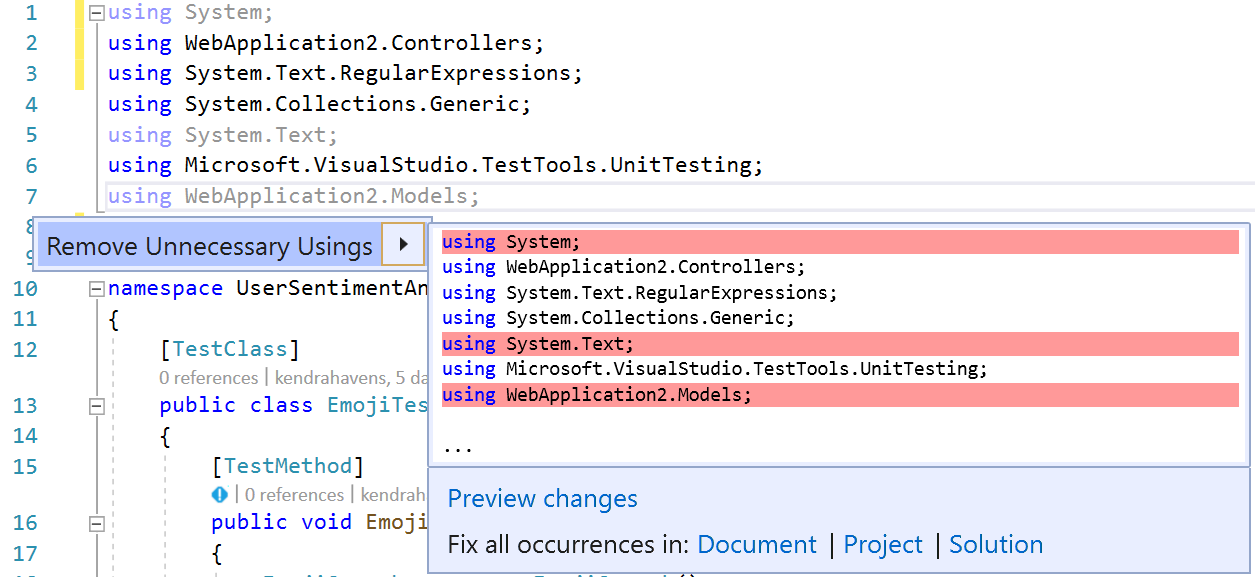
 kendrahavens
on 11 Apr 2019
kendrahavens
on 11 Apr 2019
Related issues
 orthoxerox
·
3Comments
orthoxerox
·
3Comments
 joshua-mng
·
3Comments
joshua-mng
·
3Comments
 johndog
·
3Comments
johndog
·
3Comments
 AceHack
·
3Comments
AceHack
·
3Comments
 DavidArno
·
3Comments
DavidArno
·
3Comments
Most helpful comment
My proposal would be to leave Sort Usings out of the Editor Context Menu but add it back as a command so that users can give it a keybinding and use it. (Remove and Sort usings was used by at least an order of magnitude more than Sort Usings, so I can't justify putting Sort Usings back in the menu that we're trying so hard to shorten).
I agree that when we add unimported types to completion that the Sort Usings issue may vanish. However, I don't want these users to have their productivity stifled until then. @dpoeschl is it hard to add Sort Usings back? Could we get it into the next update?