Roslyn: VB: Multiple providers crash when dealing with variables/expressions typed as an array of tuples.
Version Used:
Visual Studio 2017 Community 15.3.2
Steps to Reproduce:
Type in the following code in a VB project:
Public Module InlineTempCrash
  Public Sub crasher()
    Dim TempToInline = (From v In {1, 2, 3} Select (v, v)).ToArray()
    receiver(TempToInline)
  End Sub

  Private Sub receiver(ArgTuple As (X As Integer, Y As Integer)())
  End Sub
End Module
Click on the variable TempToInline and choose the light-bulb action that offers to inline the temp variable. It will crash:
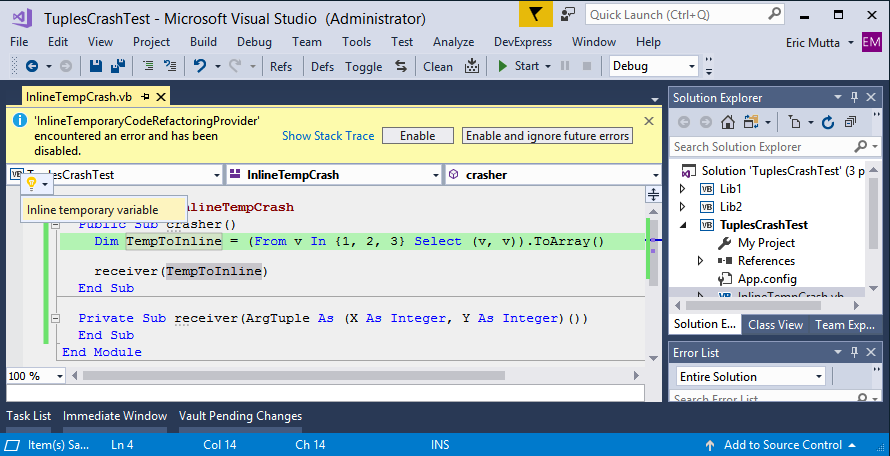
The problem seems to be variables typed as a tuple array. If you change the temp variable to read:
Dim TempToInline = {(1, 1), (2, 3)}
...then try to inline it, it crashes again:

The stack trace produced is:
System.ArgumentException : elementType
   at Microsoft.CodeAnalysis.VisualBasic.SyntaxFactory.ArrayType(TypeSyntax elementType,SyntaxList`1 rankSpecifiers)
   at Microsoft.CodeAnalysis.VisualBasic.Extensions.TypeSyntaxGeneratorVisitor.VisitArrayType(IArrayTypeSymbol symbol)
   at Microsoft.CodeAnalysis.VisualBasic.Symbols.ArrayTypeSymbol.Accept[TResult](SymbolVisitor`1 visitor)
   at Microsoft.CodeAnalysis.VisualBasic.Extensions.INamespaceOrTypeSymbolExtensions.GenerateTypeSyntax(INamespaceOrTypeSymbol symbol,Boolean addGlobal)
   at Microsoft.CodeAnalysis.VisualBasic.Extensions.ExpressionSyntaxExtensions.CastIfPossible(ExpressionSyntax expression,ITypeSymbol targetType,Int32 position,SemanticModel semanticModel,Boolean& wasCastAdded)
   at async Microsoft.CodeAnalysis.VisualBasic.CodeRefactorings.InlineTemporary.InlineTemporaryCodeRefactoringProvider.VB$StateMachine_18_CreateExpressionToInlineAsync(<Unknown Parameters>)
   at async Microsoft.CodeAnalysis.VisualBasic.CodeRefactorings.InlineTemporary.InlineTemporaryCodeRefactoringProvider.VB$StateMachine_10_InlineTemporaryAsync(<Unknown Parameters>)
   at async Microsoft.CodeAnalysis.CodeActions.CodeAction.GetChangedSolutionAsync(<Unknown Parameters>)
   at async Microsoft.CodeAnalysis.CodeActions.CodeAction.ComputeOperationsAsync(<Unknown Parameters>)
   at async Microsoft.CodeAnalysis.CodeActions.CodeAction.ComputePreviewOperationsAsync(<Unknown Parameters>)
   at async Microsoft.CodeAnalysis.CodeActions.CodeAction.GetPreviewOperationsAsync(<Unknown Parameters>)
   at async Microsoft.CodeAnalysis.Editor.Implementation.Suggestions.SuggestedAction.GetPreviewResultAsync(<Unknown Parameters>)
   at async Microsoft.CodeAnalysis.Editor.Implementation.Suggestions.SuggestedActionWithNestedFlavors.<>c__DisplayClass11_0.<GetPreviewAsync>b__0(<Unknown Parameters>)
   at async Microsoft.CodeAnalysis.Extensions.IExtensionManagerExtensions.PerformFunctionAsync[T](<Unknown Parameters>)
   at Microsoft.VisualStudio.Telemetry.WindowsErrorReporting.WatsonReport.GetClrWatsonExceptionInfo(Exception exceptionObject)
 ericmutta
All 7 comments
I believe this crash is related to the one above due to the similar stack trace.
Type in the following code:
Module ExtractMethodCrash
  Public Sub crasher()
    Dim foo = {(1, 1), (2, 3)}
  End Sub
End Module
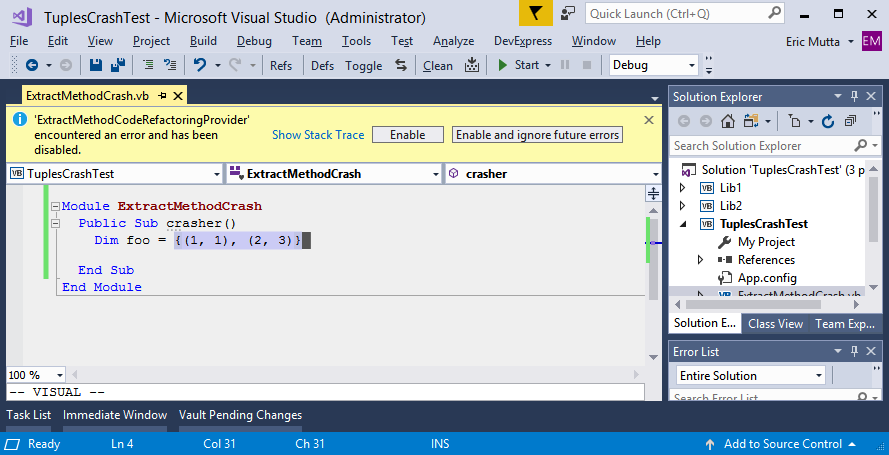
Now highlight the expression {(1, 1), (2, 3)} assigned to foo. The extract method provider runs in the background and crashes immediately:
The stack trace produced is:
System.ArgumentException : elementType
   at Microsoft.CodeAnalysis.VisualBasic.SyntaxFactory.ArrayType(TypeSyntax elementType,SyntaxList`1 rankSpecifiers)
   at Microsoft.CodeAnalysis.VisualBasic.Extensions.TypeSyntaxGeneratorVisitor.VisitArrayType(IArrayTypeSymbol symbol)
   at Microsoft.CodeAnalysis.VisualBasic.Symbols.ArrayTypeSymbol.Accept[TResult](SymbolVisitor`1 visitor)
   at Microsoft.CodeAnalysis.VisualBasic.Extensions.INamespaceOrTypeSymbolExtensions.GenerateTypeSyntax(INamespaceOrTypeSymbol symbol,Boolean addGlobal)
   at Microsoft.CodeAnalysis.VisualBasic.CodeGeneration.MethodGenerator.GenerateAsClause(IMethodSymbol method,Boolean isSub,CodeGenerationOptions options)
   at Microsoft.CodeAnalysis.VisualBasic.CodeGeneration.MethodGenerator.GenerateMethodDeclarationWorker(IMethodSymbol method,CodeGenerationDestination destination,CodeGenerationOptions options)
   at Microsoft.CodeAnalysis.VisualBasic.CodeGeneration.MethodGenerator.GenerateMethodDeclaration(IMethodSymbol method,CodeGenerationDestination destination,CodeGenerationOptions options)
   at Microsoft.CodeAnalysis.VisualBasic.CodeGeneration.MethodGenerator.AddMethodTo(TypeBlockSyntax destination,IMethodSymbol method,CodeGenerationOptions options,IList`1 availableIndices)
   at Microsoft.CodeAnalysis.VisualBasic.CodeGeneration.VisualBasicCodeGenerationService.AddMethod[TDeclarationNode](TDeclarationNode destination,IMethodSymbol method,CodeGenerationOptions options,IList`1 availableIndices)
   at Microsoft.CodeAnalysis.CodeGeneration.AbstractCodeGenerationService.AddMethod[TDeclarationNode](TDeclarationNode destination,IMethodSymbol method,CodeGenerationOptions options,CancellationToken cancellationToken)
   at async Microsoft.CodeAnalysis.ExtractMethod.MethodExtractor.CodeGenerator`3.GenerateAsync[TStatement,TExpression,TNodeUnderContainer](<Unknown Parameters>)
   at async Microsoft.CodeAnalysis.VisualBasic.ExtractMethod.VisualBasicMethodExtractor.VisualBasicCodeGenerator.VB$StateMachine_5_GenerateResultAsync(<Unknown Parameters>)
   at async Microsoft.CodeAnalysis.ExtractMethod.MethodExtractor.ExtractMethodAsync(<Unknown Parameters>)
   at async Microsoft.CodeAnalysis.ExtractMethod.AbstractExtractMethodService`3.ExtractMethodAsync[TValidator,TExtractor,TResult](<Unknown Parameters>)
   at async Microsoft.CodeAnalysis.CodeRefactorings.ExtractMethod.ExtractMethodCodeRefactoringProvider.GetCodeActionAsync(<Unknown Parameters>)
   at async Microsoft.CodeAnalysis.CodeRefactorings.ExtractMethod.ExtractMethodCodeRefactoringProvider.ComputeRefactoringsAsync(<Unknown Parameters>)
   at async Microsoft.CodeAnalysis.CodeRefactorings.CodeRefactoringService.GetRefactoringFromProviderAsync(<Unknown Parameters>)
   at Microsoft.VisualStudio.Telemetry.WindowsErrorReporting.WatsonReport.GetClrWatsonExceptionInfo(Exception exceptionObject)
Here is another variation which I think is related to those above because of the stack trace.
Type in the following valid code:
Public Class Foo
  Private mTupleArray As (Value As Integer, Routine As Action)()

  Public Sub New()
    mTupleArray = (
      From a In {1, 2, 3},
           b In {4, 5, 6},
           c In {7, 8, 9}
      Select (a + b + c, New Action(Sub() Console.WriteLine(a + b + c)))
    ).ToArray()
  End Sub
End Class
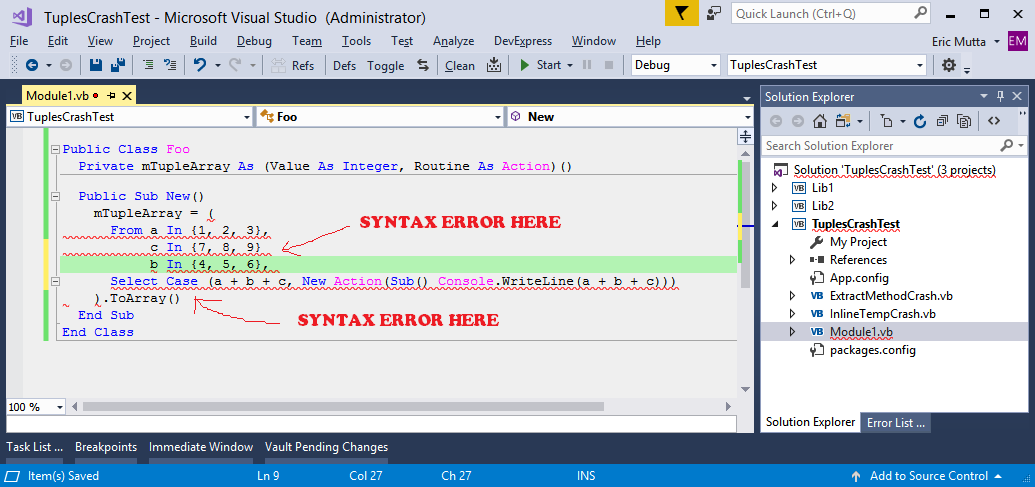
Now let's say you want the expression b In {4, 5, 6}, (note the comma at the end) to appear below the expression c In {7, 8, 9}. So you put the caret on that expression, go to the Edit menu, under Advanced, choose Move Selected Lines Down which the editor does, causing a syntax error due to the missing comma and Case keyword being inserted where it doesn't belong:
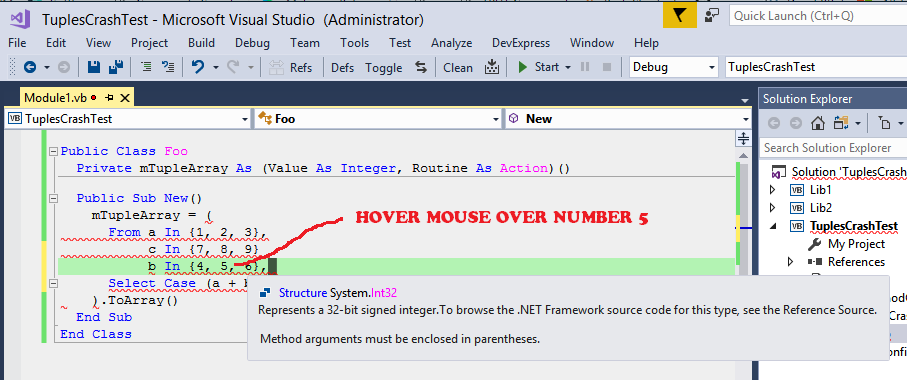
Now in this state you can get the InsertMissingCastCodeFixProvider to crash repeatedly. First hover the mouse over the digit 5 in the expression b In {4, 5, 6}, (note the comma). The IDE displays a tooltip as expected (saying this is instance of type 'System.Int32`):
If you try to hover over the digits in b In {7, 8, 9} or even a In {1, 2, 3}, the tooltip shows but the InsertMissingCastCodeFixProvider is triggered and crashes:
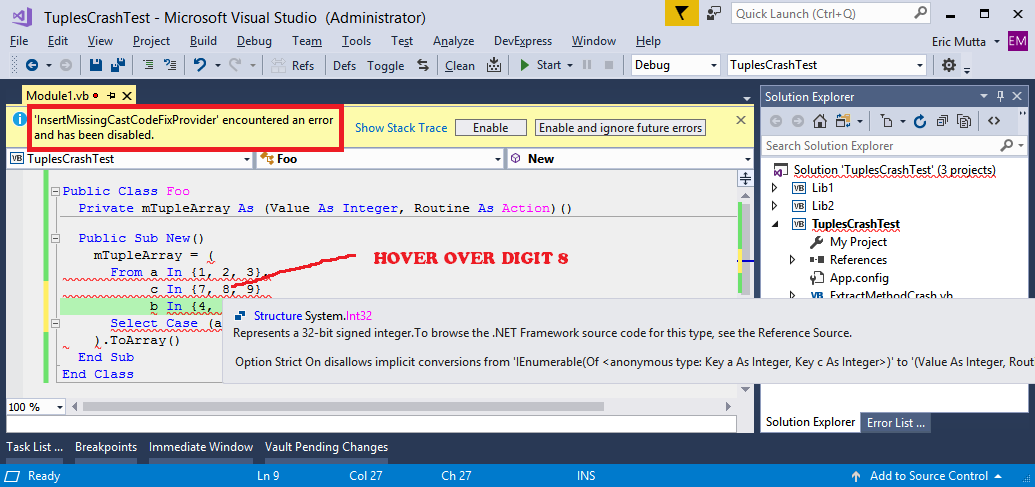
If you click Enable then repeat the process (e.g. hovering over another digit) it keeps crashing. The stack trace produced:
System.ArgumentException : elementType
   at Microsoft.CodeAnalysis.VisualBasic.SyntaxFactory.ArrayType(TypeSyntax elementType,SyntaxList`1 rankSpecifiers)
   at Microsoft.CodeAnalysis.VisualBasic.Extensions.TypeSyntaxGeneratorVisitor.VisitArrayType(IArrayTypeSymbol symbol)
   at Microsoft.CodeAnalysis.VisualBasic.Symbols.ArrayTypeSymbol.Accept[TResult](SymbolVisitor`1 visitor)
   at Microsoft.CodeAnalysis.VisualBasic.Extensions.INamespaceOrTypeSymbolExtensions.GenerateTypeSyntax(INamespaceOrTypeSymbol symbol,Boolean addGlobal)
   at Microsoft.CodeAnalysis.VisualBasic.Extensions.ExpressionSyntaxExtensions.Cast(ExpressionSyntax expression,ITypeSymbol targetType,Boolean& isResultPredefinedCast)
   at async Microsoft.CodeAnalysis.VisualBasic.CodeFixes.InsertMissingCast.InsertMissingCastCodeFixProvider.VB$StateMachine_6_RegisterCodeFixesAsync(<Unknown Parameters>)
   at async Microsoft.CodeAnalysis.Extensions.IExtensionManagerExtensions.PerformActionAsync(<Unknown Parameters>)
   at Microsoft.VisualStudio.Telemetry.WindowsErrorReporting.WatsonReport.GetClrWatsonExceptionInfo(Exception exceptionObject)
The one thing in common with all the above errors in this issue is that all the providers at some point call Microsoft.CodeAnalysis.VisualBasic.Extensions.INamespaceOrTypeSymbolExtensions.GenerateTypeSyntax which then proceeds down the same path to an eventual crash.
@jcouv could these problems be related to #21785 and thus be fixed by #21854?
ericmutta
on 2 Sep 2017
@ericmutta Based on the investigation of #21785 I think they are separate issues, as the stack traces point to different places.
 jcouv
on 2 Sep 2017
jcouv
on 2 Sep 2017
@jcouv thanks for following up. Hopefully these crashes will be assigned to someone to be fixed, because tuples are really useful and they are all over my code now (it's how I keep finding the bugs!).
ericmutta
on 2 Sep 2017
I'll take a look.
jcouv
on 2 Sep 2017
I have a fix. It will go into 15.5.
The bug is that SyntaxFactory.ArrayType doesn't expect and cannot handle an element type which is a tuple syntax.
The same problem exists in SyntaxFactory.NullableType (extracting method on Dim foo As (Integer, Integer) ? = (1, 1) produces a similar analyzer crash)
Filed https://github.com/dotnet/roslyn/issues/21923 along the way (bad formatting on nullable tuple type).
jcouv
on 6 Sep 2017
@jcouv I have a fix. It will go into 15.5.
Many thanks Julien, you are a star! Looking forward to 15.5 👍
ericmutta
on 6 Sep 2017
Related issues
 AceHack
·
3Comments
AceHack
·
3Comments
 binki
·
3Comments
binki
·
3Comments
 dpoeschl
·
3Comments
dpoeschl
·
3Comments
 glennblock
·
3Comments
glennblock
·
3Comments
 joshua-mng
·
3Comments
joshua-mng
·
3Comments