Roslyn: NullRefenceException when saving changes to an MsBuildWorkspace
Version Used:
Microsoft.CodeAnalysis: v.2.3.1
Visual Studio 2017 15.3
Targeting
- .NET Framework 4.7 w/ ToolsVersion 15.0
- .NET Framework 4.7 w/ ToolsVersion 14.0
- .NET Standard 1.6
- .NET Standard 2.0
Steps to Reproduce:
- Create a .NET Framework Console app,
- Create a .NET Framework Class Library
- Write some Roslyn code in the Console app to generate a class in the class library
- Run program
Expected Behavior:
New class appears in the target class library
Actual Behavior:
NullReferenceException
at Microsoft.CodeAnalysis.MSBuild.ProjectFile.AddDocument(string filePath, string logicalPath)
I've attached a sample project to demonstrate the issue. Only .NET Framework 4.7 w/ ToolsVersion 14.0 succeeds. All others fail. While I recognize that .NET Standard projects aren't supported by MsBuildWorkspaces at this time, It was still able to update projects with new files generated by Roslyn.
 whereiskyleb
All 10 comments
After upgrading to VS 15.3 I'm having the same problem. This has broken one of our products completely, Is there any workaround for this?
 ctyar
on 23 Aug 2017
ctyar
on 23 Aug 2017
Version Used:
Microsoft.CodeAnalysis: v.2.3.1
Visual Studio 2017 15.3.2
Targeting
.NET Framework 4.6.1 ToolsVersion 15.0
Steps to Reproduce:
- Clone the
[email protected]:ctyar/RoslynBug.git - Build and run the
Roslyn.sln - Enter the path to
ConsoleApp.slnfile
Expected Behavior:
Readme file gets added to ConsoleApp project
Actual Behavior:
System.NullReferenceException: 'Object reference not set to an instance of an object.' when calling TryApplyChanges.
ctyar
on 23 Aug 2017
Thanks for the excellent repro! One of the key issues with MSBuildWorkspace is that binding redirects are often needed to ensure that the MSBuild assemblies that pulled into your application by MSBuildWorkspace are the same versions that are loaded by various MSBuild tasks that get run when a project is built inproc. You can see the impact of this under the VS debugger by turning on first-chance exceptions and disabling Just My Code. When I do that and run your repro app, I see the following exception:
System.InvalidCastException occurred
  HResult=0x80004002
  Message=Unable to cast object of type 'Microsoft.Build.Tasks.GetReferenceAssemblyPaths' to type 'Microsoft.Build.Framework.ITask'.
  Source=Microsoft.Build
  StackTrace:
   at Microsoft.Build.Shared.TaskLoader.CreateTask(LoadedType loadedType, String taskName, String taskLocation, Int32 taskLine, Int32 taskColumn, LogError logError, AppDomainSetup appDomainSetup, Boolean isOutOfProc, AppDomain& taskAppDomain) in E:\A\_work\23\s\src\Shared\TaskLoader.cs:line 122
This InvalidCastException occurs because the GetReferenceAssemblyPaths task that MSBuild is running was built against a different version of Microsoft.Build than MSBuildWorkspace was built against.
You can get past that exception by adding binding redirects to your app.config. I used the following binding redirects:
<dependentAssembly>
  <assemblyIdentity name="Microsoft.Build.Framework" publicKeyToken="b03f5f7f11d50a3a" culture="neutral"/>
  <bindingRedirect oldVersion="2.0.0.0-99.0.0.0" newVersion="15.1.0.0"/>
</dependentAssembly>
<dependentAssembly>
  <assemblyIdentity name="Microsoft.Build" publicKeyToken="b03f5f7f11d50a3a" culture="neutral"/>
  <bindingRedirect oldVersion="2.0.0.0-99.0.0.0" newVersion="15.1.0.0"/>
</dependentAssembly>
<dependentAssembly>
  <assemblyIdentity name="Microsoft.Build.Tasks.Core" publicKeyToken="b03f5f7f11d50a3a" culture="neutral"/>
  <bindingRedirect oldVersion="2.0.0.0-99.0.0.0" newVersion="15.1.0.0"/>
</dependentAssembly>
<dependentAssembly>
  <assemblyIdentity name="Microsoft.Build.Utilities.Core" publicKeyToken="b03f5f7f11d50a3a" culture="neutral"/>
  <bindingRedirect oldVersion="2.0.0.0-99.0.0.0" newVersion="15.1.0.0"/>
</dependentAssembly>
With this in place, the InvalidCastException is gone. However, there's one more constraint for getting MSBuildWorkspace to work with MSBuild 15. Because MSBuild is no longer as tied to Visual Studio as it was in MSBuild 14 and earlier, it uses hints from the surrounding environment to determine where to locate toolsets from. So, if you run your application by double-clicking the EXE, it won't work because it won't be able to locate toolset "15.0". You either need to load your application in an environment that provides enough information to locate the toolset (for example, try running it from a Visual Studio 2017 Developer Command Prompt), or provide that information in your application. For example, you could set the VSINSTALLDIR environment variable within your application to the location of VS 2017 on your machine (C:\Program Files (x86)\Microsoft Visual Studio\Preview\Enterprise\ on my machine) before creating an MSBuildWorkspace and it _should_ work.
I hope that helps!
 DustinCampbell
on 23 Aug 2017
DustinCampbell
on 23 Aug 2017
Just gave @DustinCampbell's suggestion a try and implementing them both has correctly addressed the issue I was experiencing. Thanks alot!! :+1:
whereiskyleb
on 23 Aug 2017
One further update: If you want to go the route of setting environment variables in your application, you'll also want to set "VisualStudioVersion" to "15.0"
DustinCampbell
on 23 Aug 2017
@DustinCampbell. I seem to have run into the same issue and must be likely missing something .. upon attempting the fix, I see
Cannot evaluate the property expression "$([msbuild]::getmsbuildextensionspath())" found at "C:\Program Files (x86)\Microsoft Visual Studio2017\Enterprise\MSBuild15.0\Bin\MSBuild.exe.config (89)". Invalid static method invocation syntax: "[msbuild]::getmsbuildextensionspath()". Method '[MSBuild]::getmsbuildextensionspath' not found. Static method invocation should be of the form: $([FullTypeName]::Method()), e.g. $([System.IO.Path]::Combine(
a,b)).
What I am trying to do is add a file to the project, this blows up with null reference exception and when looking at the stack trace, I see that the underlying project is not in "loaded state" but rather with the error as above, the AddDocument document however does not explicitly check or anything...
this should be "resolved" by the underlying project being loaded hopefully once the msbuild is located/loaded
 VaclavK
on 7 Sep 2017
VaclavK
on 7 Sep 2017
In this case, I'm betting you might need to reference newer Microsoft.Build, Microsoft.Build.Framework, Microsoft.Build.Tasks.Core, and Microsoft.Build.Utilities.Core packages in your application.
DustinCampbell
on 7 Sep 2017
How can one tell which version of MSBuild to use for a given version of Roslyn? Is that documented anywhere?
 nehmebilal
on 18 Mar 2018
nehmebilal
on 18 Mar 2018
FWIW, there's a better answer for this now. :smile:
When using MSBuildWorkspace, you should ensure that Microsoft.Build, Microsoft.Build.Framework, Microsoft.Build.Tasks.Core, and Microsoft.Build.Utilities.Core are deleted from your build output. The Microsoft.CodeAnalysis.Workspaces.Common package causes these to be pulled into your build output. That will be fixed in the near future with the new Microsoft.CodeAnalysis.Workspaces.MSBuild project (currently available on the Roslyn MyGet feed). However, in the meantime, you can delete these assemblies as a custom build step.
With those assemblies removed, you should use the Microsoft.Build.Locator package to register an instance of MSBuild on your machine. Here's a sample that shows how to do all of this with the current MSBuildWorkspace.
In addition, I'm working on an article that should help you be successful with the new version of MSBuildWorkspace that is currently in beta. Here's a link to the latest revision: https://gist.github.com/DustinCampbell/32cd69d04ea1c08a16ae5c4cd21dd3a3.
DustinCampbell
on 16 Apr 2018
@DustinCampbell , So I tried these 2 steps based upon your last post (since the previous solution did not work for me)
- Added this as the post build event
del $(TargetDir)Microsoft.Build.dll
del $(TargetDir)Microsoft.Build.Framework.dll
del $(TargetDir)Microsoft.Build.Tasks.Core.dll
del $(TargetDir)Microsoft.Build.Utilities.Core.dll
- Added Microsoft.Build.Locator package in the project.
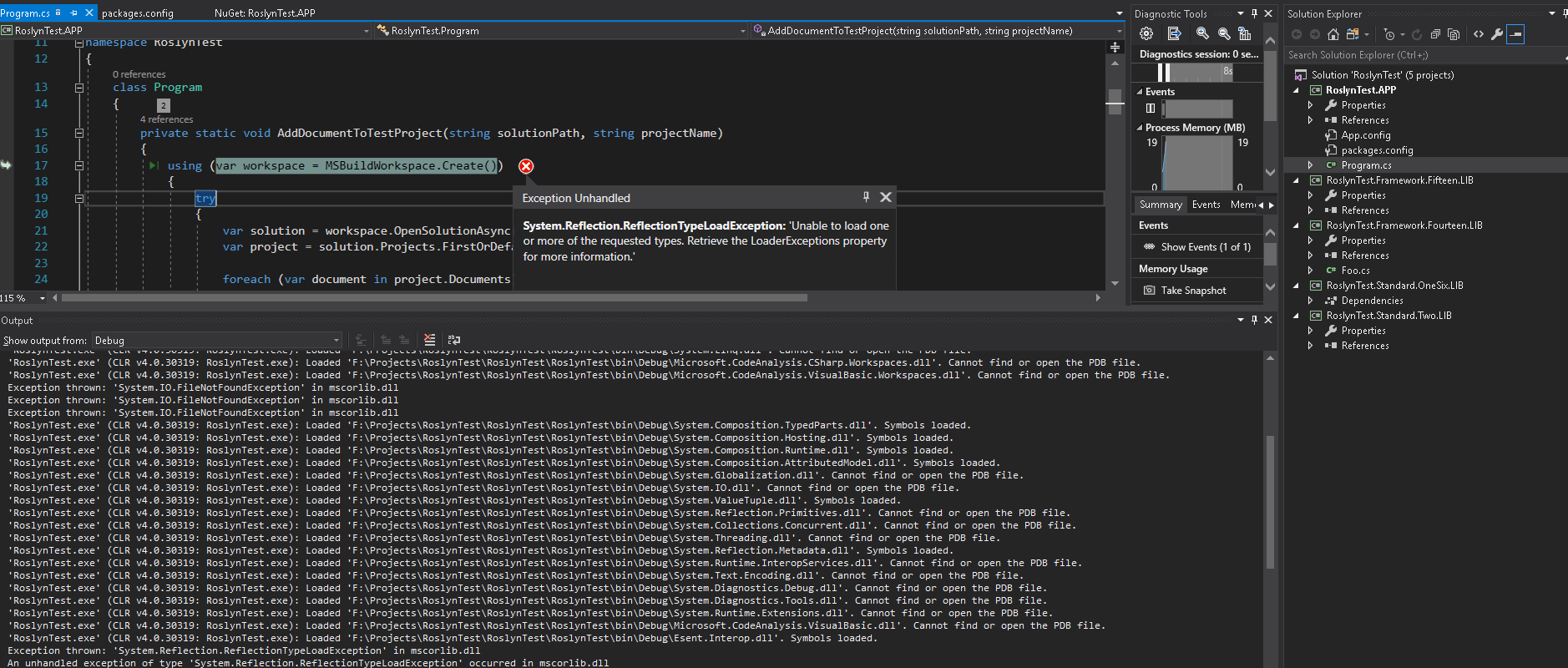
I used the RoslynTest.zip application. It seems I am missing the mscorlib.dll.
Do you know whats happening here ?
 syedadeeliqbal
on 25 Jun 2019
syedadeeliqbal
on 25 Jun 2019
Related issues
 DavidArno
·
3Comments
DavidArno
·
3Comments
 marler8997
·
3Comments
marler8997
·
3Comments
 orthoxerox
·
3Comments
orthoxerox
·
3Comments
 codingonHP
·
3Comments
codingonHP
·
3Comments
 NikChao
·
3Comments
NikChao
·
3Comments
Most helpful comment
FWIW, there's a better answer for this now. :smile:
When using
MSBuildWorkspace, you should ensure thatMicrosoft.Build,Microsoft.Build.Framework,Microsoft.Build.Tasks.Core, andMicrosoft.Build.Utilities.Coreare deleted from your build output. TheMicrosoft.CodeAnalysis.Workspaces.Commonpackage causes these to be pulled into your build output. That will be fixed in the near future with the newMicrosoft.CodeAnalysis.Workspaces.MSBuildproject (currently available on the Roslyn MyGet feed). However, in the meantime, you can delete these assemblies as a custom build step.With those assemblies removed, you should use the
Microsoft.Build.Locatorpackage to register an instance of MSBuild on your machine. Here's a sample that shows how to do all of this with the currentMSBuildWorkspace.MSBuildWorkspaceSample.zip
In addition, I'm working on an article that should help you be successful with the new version of
MSBuildWorkspacethat is currently in beta. Here's a link to the latest revision: https://gist.github.com/DustinCampbell/32cd69d04ea1c08a16ae5c4cd21dd3a3.