Roslyn: Visual Studio only formats if/while(...) when contents of (...) requires formatting
Version Used:
Visual Studio 2015 - 2017 (15.2)
Steps to Reproduce:
- Enter
if(true == false){orwhile(true == false){in the Visual Studio editor.
Expected Behavior:
I'd expect this to be formatted to while (true == false) { }.
Actual Behavior:
It is actually formatted to while(true == false) { }.
(note the missing after the while(.
If you enter while(true==false){, it gets formatted to while (true == false) { as I'd expect. if(true){ also becomes if (true) {.
It's actually different with for(var x=0;x<10;x++){, which becomes for(var x = 0; x < 10; x++) { }. In this case no is inserted in the for( despite the contents of (...) being formatted.
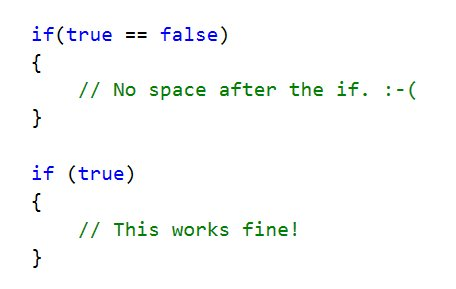
Because this behavior is inconsistent between (true) and (true == false), I'm constantly getting tripped up by it. 😭
See Twitter thread here:
https://twitter.com/jcansdale/status/890186489912545282
 jcansdale
All 15 comments
I can repro this, though only if the braces for the rest of the method exist.
Overtyping the } works as expected - this is something specific to the formatting done during automatic end construct insertion.
 Pilchie
on 26 Jul 2017
Pilchie
on 26 Jul 2017
Overtyping the } works as expected - this is something specific to the formatting done during automatic end construct insertion.
Thanks for the tip! It's funny, I've never used or even tried overtyping the }. I guess because it's inserted on a new line at the end of the method, I just move on to the next thing and never even consider it.
I'll try to get into the habit of typing } to complete the formatting. Old habits die hard though. 😉
jcansdale
on 27 Jul 2017
Here's a case in point:
https://github.com/github/VisualStudio/pull/1082#pullrequestreview-52629890
I got caught out 4 times on this tiny PR. 😉
jcansdale
on 27 Jul 2017
@jcansdale I'm also a fan of just hitting Ctrl+K, Ctrl+D regularly to format the whole document, but I agree this is painful.
In addition to fixing this, we're working on supporting having a diagnostic to let you know that your formatting doesn't match your settings.
Pilchie
on 27 Jul 2017
@Pilchie, thanks for the tip!
I've since installed the FormatdocumentonSave extension, which seems to work well and means I don't have to remember to hit Ctrl+K, Ctrl+D. 😄
https://marketplace.visualstudio.com/items?itemName=mynkow.FormatdocumentonSave
jcansdale
on 17 Aug 2017
@Pilchie @heejaechang I talked to Ravi about this and he was not sure exactly which of the formatting features is supposed to handle this. If you know the answer, could you point me to the relevant test file? I'll try to fix the issue.
 jcouv
on 1 Sep 2017
jcouv
on 1 Sep 2017
looks like issue is when automatic brace complete runs, it doesn't format right range.
 heejaechang
on 7 Sep 2017
heejaechang
on 7 Sep 2017
http://source.roslyn.io/#Microsoft.CodeAnalysis.EditorFeatures/Implementation/AutomaticCompletion/BraceCompletionSessionProvider.cs,4b6593177bea4f70
is our automatic brace completion implementation. I forgot what cause us to format what range... though.
heejaechang
on 7 Sep 2017
I have been able to reproduce the issue using Visual Studio Professional 2019 for Mac 8.2 (build 1105).
Steps taken to reproduce
- Create a new .NET Core 2.2 Console application project.
- Added a dummy function,
MyFunction()to the Program class and entered the if(...) and while(...) into the Visual Studio editor to test the auto-formatting behaviour.
```C#
using System;
namespace roslyn_issue_21138
{
class Program
{
static void Main(string[] args)
{
Console.WriteLine("Hello World!");
}
    void MyFunction()
    {
        if(true == false) { }

        while(true == false) { }

        if (true) { }
    }
}
}
```
The issue was reproduced with the behaviour originally noted by @jcansdale.
What is the next step for this issue?
Could fixing the issue be assigned to a specific future release?
 dickyw71
on 8 Oct 2019
dickyw71
on 8 Oct 2019
@dickyw71 This issue is up for grabs. Once someone fixes the issue, we would review the fix to prepare it for release. 😄
 sharwell
on 8 Oct 2019
sharwell
on 8 Oct 2019
Thanks for the info @sharwell.
So I read this comment by Joseph N. Musser II (@jnm236) on @jcansdale tweet and looking through the dotnet/roslyn code I found:
- The value of the the roslyn .editorconfig file option
csharp_space_after_keywords_in_control_flow_statementsis defaulted totrueinCSharpFormattingOptions.cs > SpaceAfterControlFlowStatementKeyword.
(_BTW: I have not found how to view or change this option using the Visual Studio IDE._)
In SpacingFormattingRule.cs > GetAdjustSpacesOperation I found the if statement that checks for the formatting in question:
```C#
// For Spacing b/n control flow keyword and paren. Parent check not needed.
if (currentKind == SyntaxKind.OpenParenToken &&
(previousKind == SyntaxKind.IfKeyword || previousKind == SyntaxKind.WhileKeyword || previousKind == SyntaxKind.SwitchKeyword ||
previousKind == SyntaxKind.ForKeyword || previousKind == SyntaxKind.ForEachKeyword || previousKind == SyntaxKind.CatchKeyword ||
previousKind == SyntaxKind.UsingKeyword || previousKind == SyntaxKind.WhenKeyword || previousKind == SyntaxKind.LockKeyword ||
previousKind == SyntaxKind.FixedKeyword))
{
return AdjustSpacesOperationZeroOrOne(optionSet, CSharpFormattingOptions.SpaceAfterControlFlowStatementKeyword);
}
So if a `(` is following an `if` or `while` with not ` ` in-between the private class method `AdjustSpacesOperationZeroOrOne` is called a `AdjustSpacesOperation` is returned from `GetAdjustSpacesOperation`

```C#
      private AdjustSpacesOperation AdjustSpacesOperationZeroOrOne(OptionSet optionSet, Option<bool> option, AdjustSpacesOption explicitOption = AdjustSpacesOption.ForceSpacesIfOnSingleLine)
        {
            if (optionSet.GetOption(option))
            {
                return CreateAdjustSpacesOperation(1, explicitOption);
            }
            else
            {
                return CreateAdjustSpacesOperation(0, explicitOption);
            }
        }
Assuming if (optionSet.GetOption(option)) is true then CreateAdjustSpacesOperation(1, explicitOption) is called.
```C#
public static AdjustSpacesOperation CreateAdjustSpacesOperation(int space, AdjustSpacesOption option)
{
if (space == 1 && option == AdjustSpacesOption.DefaultSpacesIfOnSingleLine)
{
return s_defaultOneSpaceIfOnSingleLine;
}
else if (space == 0 && option == AdjustSpacesOption.ForceSpacesIfOnSingleLine)
{
return s_forceZeroSpaceIfOnSingleLine;
}
else if (space == 1 && option == AdjustSpacesOption.ForceSpacesIfOnSingleLine)
{
return s_forceOneSpaceIfOnSingleLine;
}
else if (space == 1 && option == AdjustSpacesOption.ForceSpaces)
{
return s_forceZeroLineUsingSpaceForce;
}
        return new AdjustSpacesOperation(space, option);
    }
``
And returnss_forceOneSpaceIfOnSingleLinewhich is anAdjustSpacesOperation, my next step is to look at the implementation forAdjustSpacesOperation(1, AdjustSpacesOption.ForceSpacesIfOnSingleLine)`
This is as far I have manage to get with this issue at the moment.
dickyw71
on 8 Oct 2019
Thanks for investigating this @dickyw71. It still drives me crazy! 🙂
jcansdale
on 9 Oct 2019
I cannot repro this in 16.6p3 in either scenario:
- When I type the closing brace, the space after
ifgets added. - If I invoke Format, the space after
ifalso gets added.
I'll leave it to @sharwell to verify or close.
jcouv
on 1 Apr 2020
I was definitely able to reproduce this last time I tried. Maybe something changed that we missed. Can try again
sharwell
on 2 Apr 2020
Hi @jcouv 👋
This is definitely still a thing! It could be an artifact of my inefficient use of auto-formatting. 🤔
- When I type
if(true)<Enter>{<Enter>, no space afterifgets added. - When I type
if(true){<Enter>, the space afterifdoes get added. - When I type
if(true == false){<Enter>, _no_ space afterifgets added.
The difference between 2. and 3. is particularly surprising!
jcansdale
on 2 Apr 2020
Related issues
 glennblock
·
3Comments
glennblock
·
3Comments
 orthoxerox
·
3Comments
orthoxerox
·
3Comments
 JesperTreetop
·
3Comments
JesperTreetop
·
3Comments
 vbcodec
·
3Comments
vbcodec
·
3Comments
 codingonHP
·
3Comments
codingonHP
·
3Comments
Most helpful comment
Hi @jcouv 👋
This is definitely still a thing! It could be an artifact of my inefficient use of auto-formatting. 🤔
if(true)<Enter>{<Enter>, no space afterifgets added.if(true){<Enter>, the space afterifdoes get added.if(true == false){<Enter>, _no_ space afterifgets added.The difference between 2. and 3. is particularly surprising!