Roslyn: Diagnostic issues with locations in non-code files do not appear in VS's error list
I have some analyzers which work on non-code files. Everything works as expected except that the reported diagnostics don’t show up in VS’s error list if they have a location in a non-code file.
Here’s a quick sample. Make sure you have at least one ‘additional file’ in any project opened with this analyzer running. Notice that the diagnostic without a location shows up in the error list, but the one with a location in a non-code file does not.
``` C#
using System.Collections.Immutable;
using System.Linq;
using Microsoft.CodeAnalysis;
using Microsoft.CodeAnalysis.Diagnostics;
using Microsoft.CodeAnalysis.Text;
namespace Analyzer1
{
[DiagnosticAnalyzer(LanguageNames.CSharp)]
public class Analyzer1Analyzer : DiagnosticAnalyzer
{
public const string DiagnosticId = "TestCompilationAnalyzer";
    private static readonly LocalizableString Title = "TestAnalyzer";
    private static readonly LocalizableString MessageFormat = "This message should always appear {0}";
    private static DiagnosticDescriptor Rule = new DiagnosticDescriptor(DiagnosticId, Title, MessageFormat, "Test", DiagnosticSeverity.Warning, isEnabledByDefault: true);
    public override ImmutableArray<DiagnosticDescriptor> SupportedDiagnostics { get { return ImmutableArray.Create(Rule); } }

    public override void Initialize(AnalysisContext context)
    {
        context.RegisterCompilationAction(cxt =>
        {
            var file = cxt.Options.AdditionalFiles.FirstOrDefault();
            Location loc = (file?.Path != null) ? Location.Create(file.Path, new TextSpan(0, 1), new LinePositionSpan(new LinePosition(0,0), new LinePosition(0,1))) : Location.None;

            // This does NOT show in VS's error list (but I think it should)
            cxt.ReportDiagnostic(Diagnostic.Create(Rule, loc, "A"));

            // This DOES show in VS's error list (as expected)
            cxt.ReportDiagnostic(Diagnostic.Create(Rule, Location.None, $"B - {loc.ToString()}"));
        });
    }

}
}
```
 mjrousos
All 26 comments
Here are some comments from @heejaechang on this issue:
That probably is happening since we try to find document corresponding to the location (here by document I meant C# or VB document) and filter it out since it doesn’t belong to any of them.
The reason is probably, even if you fix the issue, we do not re-analyze and remove it since additional files, we currently don’t recognize it as part of solution. The reason we don’t recognize it is probably Roslyn does not associate itself to text file that are not C# or VB files. So we can’t track changes.
Supporting it will require us some thinking since we do not want to be loaded for any text file opened in editor.
mjrousos
on 9 Nov 2015
@mjrousos I am confused by your answer. I was told that when I edit my additional File all my Analyzers would run again but you seem to be saying that is not true. I think there is a reason to track changes to Additional Files in the future so that there is some way to not reparse options as discussed in issue #5840 .
 paul1956
on 9 Nov 2015
paul1956
on 9 Nov 2015
@heejaechang can you clarify whether analyzers run when additional files are edited? If they are (as @paul1956 is saying), then I think it should be possible to show diagnostics in them in the error list with a reasonable user experience.
mjrousos
on 9 Nov 2015
@paul1956 @mjrousos when one says a file is changed, it actually can mean 2 things. a file is opened in VS and changed in buffer (memory) (1) or file is changed on disk (2). (2) we will probably pick up since it doesn't involve editor, but not (1).
something that might make things a bit more strange is when the file is opened in VS and changed and saved, even (2) might not work.
 heejaechang
on 9 Nov 2015
heejaechang
on 9 Nov 2015
@paul1956 @mjrousos so I just tested. it looks like we wired up text tracking so opened and closed file text change tracking seems working with additional files. I remember this didn't work before, but I guess since then we fixed those. so now all those working. sorry for confusion.
but, still different part of system seems not fully aligned to support this scenario (where errors showing up in additional files)
what we support now seems showing errors in C#/VB files but allow re-analysis even from changes in additional files.
heejaechang
on 9 Nov 2015
That's great news. If we can re-analyze from changed-additional-files, how much more work needs done to also start showing issues in those files in the error list?
mjrousos
on 9 Nov 2015
@mjrousos I didn't dig enough to know those but, probably not that much for error list. tagger (squiggle) is different story though. (Okay, I shouldn't say, tagger. I should have said editor feature supports such as LB, tagger and etc)
heejaechang
on 9 Nov 2015
That makes sense. I think the error list is definitely the more important part here. Without that, users may never know about non-error diagnostics from non-code analyzers. Not getting the precise line squiggled is lower priority in my mind.
mjrousos
on 9 Nov 2015
I believe this used to work and has regressed. If so, @heejaechang, please add a test as well.
 srivatsn
on 11 Nov 2015
srivatsn
on 11 Nov 2015
@mjrousos I am working on this. and as I work more on this, this becoming more works than expected. also we are not sure how we will make people to suppress errors reported in random external files.
now, we are more toward to saying "this is not supported scenario". Roslyn is in the business of analyzing C#/VB code and additional files are added a way to help showing diagnostic in C#/VB file not the other way around.
we are planning to put this as won't fix or future-feature request and pick this up back once we have an idea on how diagnostic/analyzer works around VS rather than only C#/VB files. (if we have enough push for such support compared to other high priority tasks we have such as moving diagnostic out of proc service)
@srivatsn might have more to day about this.
heejaechang
on 29 Jan 2016
If suppression is a problem, I think it's fine to say that the only way to suppress diagnostics in non-code files is to disable the diagnostic entirely.
I understand that finding issues in non-code files is not a primary Roslyn scenario. Given the extensibility of analyzers, though, it seems nice to leave the door open to analyzing xml or other files in a project (even if some features - like suppression - don't work quite as well).
mjrousos
on 1 Feb 2016
@mjrousos I think problem we are having is we need to open door for both author and user at the same time, we can't open door only for author (let them create an analyzer that will show diagnostics on some random files in VS) and not users and tell users remove the analyzer if they don't want to. or at least we need to make it really easy for users to disable/remove analyzers. such as context menu on error list to remove analyzer with one click.
anyway, I dont think we will put this in update 2.
heejaechang
on 8 Feb 2016
move this to update 3.
heejaechang
on 10 Feb 2016
anyone interested in adding general text analyzer in roslyn, we will appreciate if you leave your opinion on #11097
heejaechang
on 5 May 2016
@srivatsn @mavasani are we going to do this?
heejaechang
on 4 Nov 2016
Has anything changed since this was discussed? 🤞🏻I was really hoping I could report diagnostics for analyzer configuration in AdditionalFiles 🙏🏻
 khellang
on 12 Nov 2019
khellang
on 12 Nov 2019
With generators coming down the pipe and being able to access additional files and produce diagnostics, will this issue finally be looked at? 🤔
From the initial spec:
- Can produce diagnostics. When unable to generate source, the generator can inform the user of the problem.
- May access additional files, that is, non-C# source texts.
// @chsienki
khellang
on 29 Apr 2020
I have a Source Generator myself that needs to show diagnostics within Additional Files. It works in the command line build, and running a build from within VS does get the diagnostic to appear in the error list, but the background compiler doesn't ever add or remove the diagnostic from the error list, so it doesn't show up until a full build, and it doesn't disappear after being resolved without another full build.
Please fix.
 AArnott
on 20 Nov 2020
AArnott
on 20 Nov 2020
@AArnott This is by design - diagnostics with no locations + diagnostics reported by compilation end actions are not reported by the background compiler with default background analysis scope. They are build-only diagnostics in the default scope. These are more expensive to compute, hence require you to explicit switch to "Entire solution" custom analysis scope to enable them in background compiler.
 mavasani
on 20 Nov 2020
mavasani
on 20 Nov 2020
To add more context and clarity here:
- We have added a new analyzer action for non-code files: RegisterAdditionalFileAction. If you report non-code file diagnostics with this action, they will behave similar to source file diagnostics, and work fine in default background analysis scope - diagnostics will be produced and refreshed by live analysis.
- If you instead choose to report these non-code file diagnostics using
RegisterCompilationActionorRegisterCompilationEndActioncallback, default background analysis scope will not refresh this diagnostics in live analysis as noted above. You will need to change to "Entire Solution" background analysis scope OR do an explicit build to refresh the diagnostics.
mavasani
on 20 Nov 2020
I'll close this issue as there is no more work required here in Roslyn. Either the analyzer needs to move to RegisterAdditionalFileAction OR the end user needs to switch to "Entire Solution" background analysis scope.
mavasani
on 20 Nov 2020
@mavasani I _do_ have "entire solution" analysis scope set:
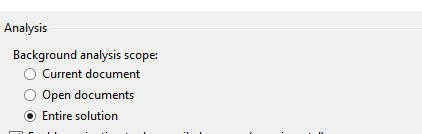
Yet the diagnostics on my Additional File are not shown in the editor nor the error list.
Regarding the Register method calls, this is a source generator scenario and I'm not calling Register _at all_ at the moment. Should I be? All my code is in the ISourceGenerator.Execute method. The GeneratorInitializationContext class doesn't even seem to expose the Register methods you refer to.
AArnott
on 20 Nov 2020
@AArnott How are you reporting diagnostics in non-code files? Analyzers reporting any diagnostics in non-code files should switch to RegisterAdditionalFileAction to support these diagnostics getting refreshed in live analysis.
mavasani
on 20 Nov 2020
@mavasani I'm reporting diagnostics using the API that you put directly in the lap of source generators:
https://github.com/dotnet/pinvoke/blob/bf31a9e6b13ea7a5f0c436705b338e8530b814dd/src/Win32.CodeGen/SourceGenerator.cs#L66
should switch to RegisterAdditionalFileAction
I still need to know: _how_ would I call that from a source generator? There's no object that I can see that has such a method.
AArnott
on 20 Nov 2020
@AArnott Ah, then the issue you are talking about is completely different then tracked by this issue, which is specifically meant for diagnostics reported in non-code files by DiagnosticAnalyzers. I suggest you to open a separate issue for diagnostics reported in non-code files by source generators and tag @chsienki @jasonmalinowski on it.
mavasani
on 20 Nov 2020
AArnott
on 20 Nov 2020
Related issues
 JesperTreetop
·
3Comments
JesperTreetop
·
3Comments
 SolalPirelli
·
3Comments
SolalPirelli
·
3Comments
 ashmind
·
3Comments
ashmind
·
3Comments
 johndog
·
3Comments
johndog
·
3Comments
 NikChao
·
3Comments
NikChao
·
3Comments