Roslyn-analyzers: Disable CA1822 on ASP.Net Startup Classes etc
Classes like ConfigureServices are being marked with CA1822 as a fix. If the method is static it will not work unless I am missing something.
This also occurs in controller methods which don't access any instance data. (Again won't work if you apply the fix)
 juliusfriedman
All 20 comments
Could you let us know the version of the analyzer you are using? We did a couple of updates to the rule to try to have better results for web developpers: https://github.com/dotnet/roslyn-analyzers/blob/master/src/NetAnalyzers/Core/Microsoft.CodeQuality.Analyzers/QualityGuidelines/MarkMembersAsStatic.cs#L255-L272
BTW if you see any missing case please feel free to let us know (ideally with a working example as we are not expert with web dev).
 Evangelink
on 8 Jul 2020
Evangelink
on 8 Jul 2020
I am using the latest:
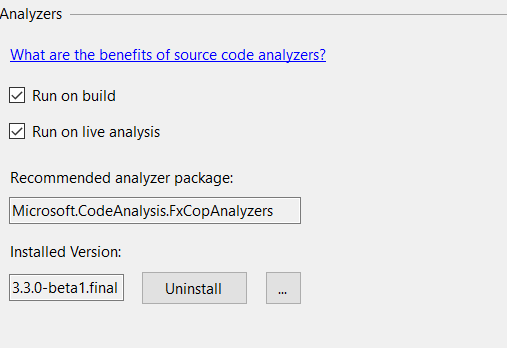
And thank you for the input, if I do notice anything will surely let you know.
juliusfriedman
on 8 Jul 2020
Interesting... Could you confirm that the controller methods you are referring to have one of the attributes I have listed in the other comment?
Regarding the ConfigureServices you are mentioning a class but the doc seems to suggest it is a method on a Startup class (see https://docs.microsoft.com/aspnet/core/fundamentals/startup?view=aspnetcore-3.1). If that's what you are referring to then yes it seems more convention based methods need to be handled for web.
@mavasani We often have FPs for web apps, do you know someone from asp.net team that could help identify all (the main) cases we need to handle? I can try to browse the doc but it seems I am not so good at it.
Evangelink
on 8 Jul 2020
We often have FPs for web apps, do you know someone from asp.net team that could help identify all (the main) cases we need to handle? I can try to browse the doc but it seems I am not so good at it.
Probably @Pilchie can help find a good contact?
 mavasani
on 10 Jul 2020
mavasani
on 10 Jul 2020
@pranavkm ?
 Pilchie
on 10 Jul 2020
Pilchie
on 10 Jul 2020
do you know someone from asp.net team that could help identify all (the main) cases we need to handle
What sort of details do you need from us?
 pranavkm
on 10 Jul 2020
pranavkm
on 10 Jul 2020
You might find this related.
 Youssef1313
on 10 Jul 2020
Youssef1313
on 10 Jul 2020
As a FYI this is also occurring on Entity Framework properties that are marked get; set; with or without [NotMapped] but especially with {
[System.Runtime.CompilerServices.MethodImpl(System.Runtime.CompilerServices.MethodImplOptions.AggressiveInlining)]
get;
[System.Runtime.CompilerServices.MethodImpl(System.Runtime.CompilerServices.MethodImplOptions.AggressiveInlining)]
set;
}
juliusfriedman
on 11 Jul 2020
@pranavkm We'd like to know all methods that should not be marked as static for a web application either because they are convention based methods or because they have some specific attribute on them. In case of the attribute, please could you share the attribute. In case of a convention method, please specify if the method has to be in a specific class (specific name, or class inherits from some base class or something else).
Regarding properties, as I was mentioning in #2834
Lastly, I have some trouble understanding why properties, especially auto-properties, are flagged. It seems quite rare to have static properties compared to methods. I could see the point of flagging a property only returning/dealing with a constant/static value but auto-properties kindda mean I want an instance "object".
Evangelink
on 13 Jul 2020
Startup types may implement the
IStartupinterface although it's not very common to see these. By convention, the type is either namedStartupor has theStartup*prefix: https://docs.microsoft.com/en-us/aspnet/core/fundamentals/environments?view=aspnetcore-3.1#startup-class-conventions.For middlewares, the
InvokeAsyncinstance method is invoked via reflection: https://docs.microsoft.com/en-us/aspnet/core/fundamentals/middleware/write?view=aspnetcore-3.1#middleware-class.Any public method on a controller could be action and invoked via reflection. Here are the conventions to detect if a type is a controller: https://docs.microsoft.com/en-us/aspnet/core/mvc/controllers/actions?view=aspnetcore-3.1#what-is-a-controller. Razor Page handler types are similar but are easier to detect since they must inherit from
PageModel.
ViewComponents, have InvokeAsync methods.
There are a few more with JSInterop APIs, SignalR hub method etc, but the general pattern a lot of APIs in ASP.NET Core is called via reflection. The rule of thumb is that these APIs are public. Are we able to change the analyzer to skip public APIs? It guarantees that the change is non-breaking and you don't have to play whack-a-mole with frameworks that heavily rely on reflection.
pranavkm
on 13 Jul 2020
Tagging @sharwell as well
Are we able to change the analyzer to skip public APIs?
No, the analyzer is designed to flag all non-static APIs that can be made static. We should not change that behavior.
It guarantees that the change is non-breaking and you don't have to play whack-a-mole with frameworks that heavily rely on reflection.
Unfortunately, large bucket of analyzers will lead to false positives on any frameworks that use non-declarative technique for runtime code execution, such as reflection, MEF, etc. It is not feasible to ensure each analyzer handle/special case all scenarios for such frameworks. If there are only a handful of special cases, then we can update the analyzer to handle it. Otherwise, it seems better from a maintainability perspective that each such framework write a special DiagnosticSuppressor that ships with the framework and suppresses false positives that are applicable and special just for the framework.
A classic example for this was https://github.com/dotnet/roslyn/issues/30172, where unused/uninitialized field diagnostic for certain fields are false positives in context of Unity framework that uses reflection to initialize and/or read the field. Unity wrote a bunch of diagnostic suppressors that ship with the framework and now avoid false positives: https://github.com/microsoft/Microsoft.Unity.Analyzers/blob/master/doc/index.md#diagnostic-suppressors. I believe the correct solution here would be a similar set of diagnostic suppressors to ship with ASP.NET core SDK.
mavasani
on 13 Jul 2020
Seems like the suppressors can potentially go here: https://github.com/dotnet/aspnetcore/tree/master/src/Analyzers/Analyzers/src
mavasani
on 13 Jul 2020
@mavasani Shall I start to add some more aspnet related exceptions in the analyzer or do you want to stop exclusions for now?
Evangelink
on 14 Jul 2020
@Evangelink I think it might be better to instead make the analysis conservative by not analyzing public APIs by default as @pranavkm suggested. We can add an option to switch the analyzer to perform public API analysis when user explicitly requests it. This will still generate false positives for the latter case, but they are not as critical as it is not on by default.
mavasani
on 15 Jul 2020
@pranavkm What would be the best way we can detect if a project is an asp.net core project? Say, any MSBuild property or by looking for a specific reference assembly or a well known type? If so, we can just make a more targeted fix to skip public APIs for asp.net core projects.
mavasani
on 15 Jul 2020
The presence of the FrameworkReference would be the most accurate way to detect it for apps targeting 3.1 or newer: https://github.com/dotnet/sdk/blob/master/src/WebSdk/Web/Sdk/Sdk.props#L35. For 2.1, the presence of a package reference to Microsoft.AspNetCore.App would be the way to go about it.
If evaluating ItemGroups is cumbersome, you could wing it and detect the presence of the Web.SDK:
https://github.com/dotnet/sdk/blob/master/src/WebSdk/Web/Sdk/Sdk.props#L17. It should cover the vast majority of projects.
pranavkm
on 15 Jul 2020
Thanks. Seems it would be reasonable to define a new property name UsingMicrosoftNETSdkWeb below: https://github.com/dotnet/roslyn-analyzers/blob/641b5e8b6ddf8ccf095f5ac58a346ed1de546a18/src/Utilities/Compiler/Options/MSBuildPropertyOptionNames.cs#L5-L12
and then use the below API in the analyzer to fetch this option: https://github.com/dotnet/roslyn-analyzers/blob/a7c2ef6fff162581bc3ff55059cb7f8ae05e571c/src/Utilities/Compiler/Options/AnalyzerOptionsExtensions.cs#L505-L511
I will simplify the API above to not require passing in a symbol/syntax tree as it is a compilation level option.
mavasani
on 16 Jul 2020
I have a PR out for this: https://github.com/dotnet/roslyn-analyzers/pull/3875. Verified that the issue is fixed with locally built NuGet package with this change. @Evangelink can you please review?
mavasani
on 16 Jul 2020
As a FYI this is also occurring on Entity Framework properties that are marked get; set; with or without
[NotMapped]but especially with{ [System.Runtime.CompilerServices.MethodImpl(System.Runtime.CompilerServices.MethodImplOptions.AggressiveInlining)] get; [System.Runtime.CompilerServices.MethodImpl(System.Runtime.CompilerServices.MethodImplOptions.AggressiveInlining)] set; }
@mavasani How do you want to handle this comment?
Evangelink
on 17 Jul 2020
@Evangelink Filed https://github.com/dotnet/roslyn-analyzers/issues/3878
mavasani
on 17 Jul 2020
Related issues
 stephentoub
·
3Comments
stephentoub
·
3Comments
 paulomorgado
·
3Comments
paulomorgado
·
3Comments
paulomorgado
·
3Comments
paulomorgado
·
3Comments
 fschlaef
·
4Comments
fschlaef
·
4Comments
 KrisVandermotten
·
3Comments
KrisVandermotten
·
3Comments
Most helpful comment
@Evangelink Filed https://github.com/dotnet/roslyn-analyzers/issues/3878