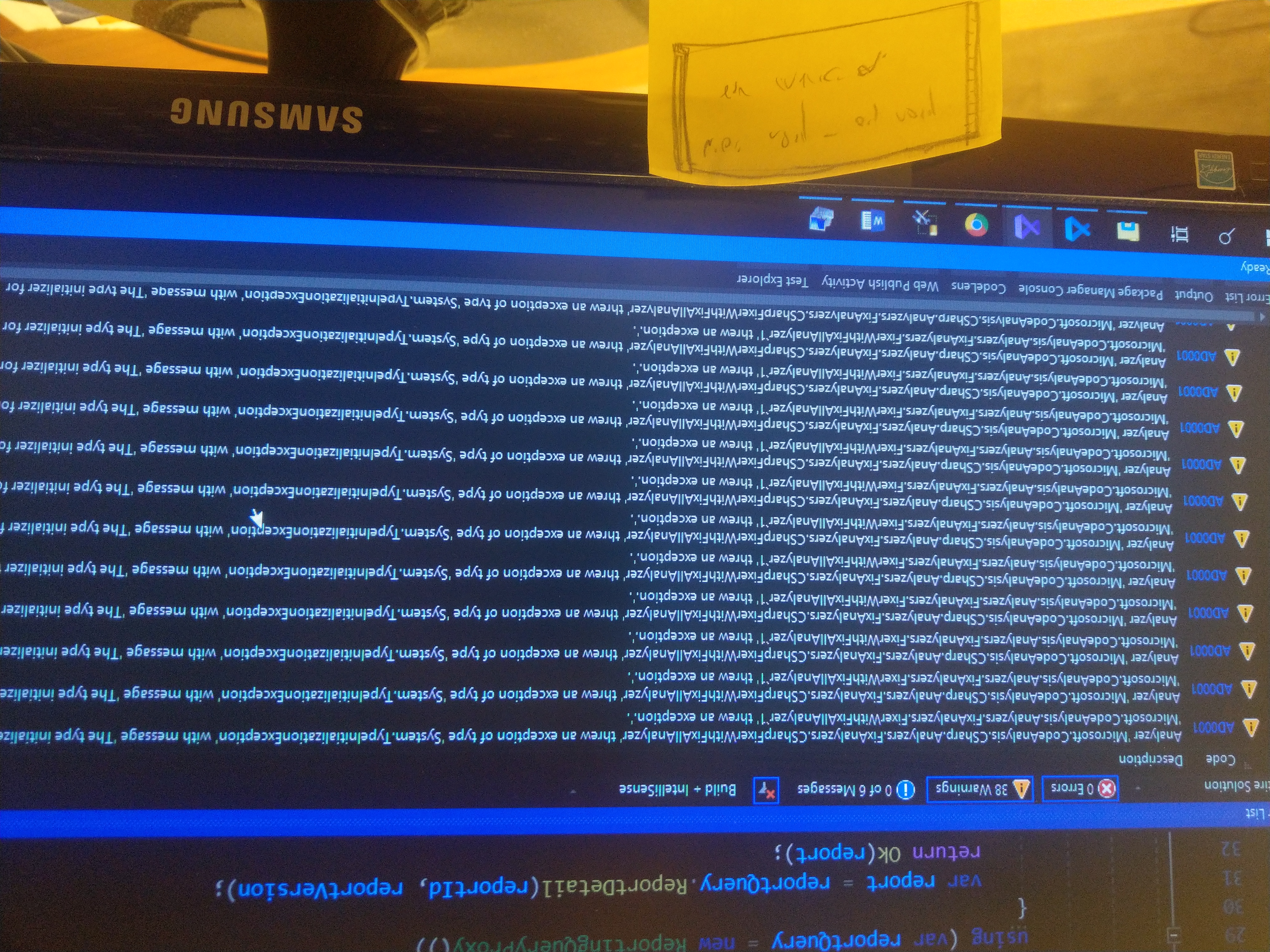
Roslyn-analyzers: AD0001 Analyzer 'Microsoft.CodeAnalysis.CSharp.Analyzers.FixAnalyzers.CSharpFixerWithFixAllAnalyzer' threw an exception of type 'System.TypeInitializationException
Analyzer package
Microsoft.CodeAnalysis.CSharp.Analyzers.FixAnalyzers.CSharpFixerWithFixAllAnalyzer
Package Version
v2.9.8 (Latest)
VS 2019 (16.4.2)
Diagnostic ID
Example: AD0001
Repro steps
i cant post my code since its in a closed network.
but just having VS open shows the warnings in hte title.
Expected behavior
To no have the warning
Actual behavior
seeing many warnings:
AD0001 Analyzer 'Microsoft.CodeAnalysis.CSharp.Analyzers.FixAnalyzers.CSharpFixerWithFixAllAnalyzer' threw an exception of type 'System.TypeInitializationException
 menaheme
All 30 comments
@mavasani @sharwell It would be nice to be able to activate some option to have the full stack trace for AD0001 errors even when the installed analyzer is in release mode. This would help solving this kind of ticket.
 Evangelink
on 14 Jan 2020
Evangelink
on 14 Jan 2020
I believe @sharwell has a PR out to log more exception context information for AD0001 from command line build.
 mavasani
on 14 Jan 2020
mavasani
on 14 Jan 2020
 sharwell
on 14 Jan 2020
sharwell
on 14 Jan 2020
untill then, is there a way to resolve the issue ? uninstall something ?
menaheme
on 14 Jan 2020
I investigated a bit and found that type CSharpFixerWithFixAllAnalyzer was removed from the repo 2 years back with this commit: https://github.com/dotnet/roslyn-analyzers/commit/865043fea45012b82a581a57dc4eddb4e4f95168#diff-b78359de3fec67d14097e5a6e37e394e
None of the packages from 2.6.x onwards have this type. So it seems most likely that when you did a NuGet package upgrade, some old analyzer bits are still present in your restored assets file. Can you try to git clean your repo and try again?
mavasani
on 14 Jan 2020
Do you see the warnings in the error list or only when you build? If you can reproduce the issue under the Record option of Report a Problem, it would capture the exception.
sharwell
on 14 Jan 2020
@sharwell The warnings are present even without building,
As i said the code and vs are in a closed network. Cannot use any online feature you suggested.
@mavasani How do i clean any old bits?
menaheme
on 14 Jan 2020
Just rsalized thst these analyzers might have been pulled in by 3rd party libraries.
menaheme
on 14 Jan 2020
Yeah, I think you possibly have 3rd party library referencing older analyzer package, and your library referencing a newer analyzer package. This is causing Microsoft.CodeAnalysis.Analyzers version 2.9.x referenced by your library to be loaded in VS, and causing an older version of Microsoft.CodeAnalysis.CSharp.Analyzers loaded in VS. This version mismatch is likely causing the type load initialization exception. Can you attach a debugger to your VS instance which shows AD0001 diagnostics and confirm the version and location of the loaded Microsoft.CodeAnalysis.Analyzers.dll and Microsoft.CodeAnalysis.CSharp.Analyzers.dll?
mavasani
on 14 Jan 2020
@mavasani That i can do, will be in front of a pc in about 14 hours or so, will post back then.
Also , posted at the 3rd party provider, asking to remove the dependecy alltogether,
i think it sould be a top level dependency of mine.
whats your view on this, people ? should library providers list analyzers as depedencies at all ?
menaheme
on 14 Jan 2020

menaheme
on 15 Jan 2020
Can you use ildasm and check the version of assemblies at all those paths? I think the fact that you have different projects in your solution referencing different versions of the analyzer package seems to be the likely cause.
mavasani
on 15 Jan 2020
Also the library provider agreed to remove the dependency, and published a new nuget. This however might not be the only reason, since im only using the lib in some projects, but see warnings in others
menaheme
on 15 Jan 2020
Ok, already left work, ill check tomorrow.
Is there a way to completely remove and reinstall them so i don't get
discrepancies?
On Wed, Jan 15, 2020, 6:53 PM Manish Vasani notifications@github.com
wrote:
Can you use ildasm and check the version of assemblies at all those paths?
I think the fact that you have different projects in your solution
referencing different versions of the analyzer package seems to be the
likely cause.—
You are receiving this because you authored the thread.
Reply to this email directly, view it on GitHub
https://github.com/dotnet/roslyn-analyzers/issues/3198?email_source=notifications&email_token=ABLOIH77PV4Y33OXYW5SVETQ545QRA5CNFSM4KFS7HO2YY3PNVWWK3TUL52HS4DFVREXG43VMVBW63LNMVXHJKTDN5WW2ZLOORPWSZGOEJBAJGQ#issuecomment-574751898,
or unsubscribe
https://github.com/notifications/unsubscribe-auth/ABLOIH467LS4UPBKJ5N5BUDQ545QRANCNFSM4KFS7HOQ
.
menaheme
on 15 Jan 2020
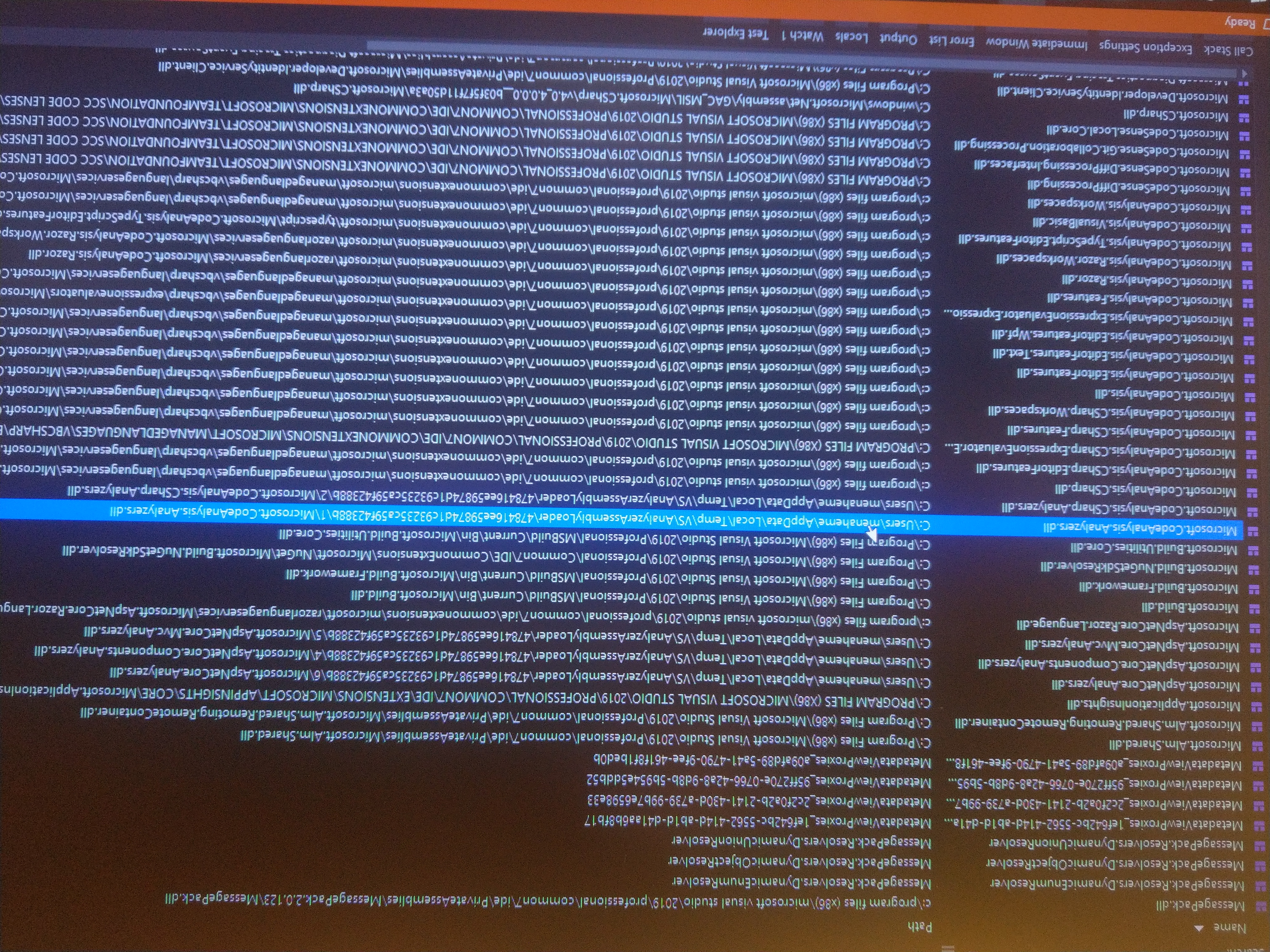
Ok, i updated the 3rd party lib so now theres no reason for conflict.
Heres the module list now
menaheme
on 23 Jan 2020
@menaheme Analyzers are copied to a temporary path and loaded from there. We cannot determine the version of the analyzer from the path, so you'll need to open the file at that location in a tool like ILSpy to see the assembly version.
sharwell
on 23 Jan 2020
@sharwell, @mavasani Heres the manifest for Microsoft.CodeAnalysis.CSharp.Analyzers.dll
``` // Metadata version: v4.0.30319
.assembly extern System.Runtime
{ .publickeytoken = (B0 3F 5F 7F 11 D5 0A 3A ) // .?_....: .ver 4:0:0:0 }
.assembly extern Microsoft.CodeAnalysis
{ .publickeytoken = (31 BF 38 56 AD 36 4E 35 ) // 1.8V.6N5 .ver 1:0:0:0 }
.assembly extern Microsoft.CodeAnalysis.Analyzers
{ .publickeytoken = (31 BF 38 56 AD 36 4E 35 ) // 1.8V.6N5 .ver 1:0:0:0 }
.assembly extern Microsoft.CodeAnalysis.CSharp
{ .publickeytoken = (31 BF 38 56 AD 36 4E 35 ) // 1.8V.6N5 .ver 1:0:0:0 }
.assembly extern System.Collections.Immutable
{ .publickeytoken = (B0 3F 5F 7F 11 D5 0A 3A ) // .?_....: .ver 1:1:36:0 }
.assembly extern Microsoft.CodeAnalysis.Workspaces
{ .publickeytoken = (31 BF 38 56 AD 36 4E 35 ) // 1.8V.6N5 .ver 1:0:0:0 }
.assembly extern System.Composition.AttributedModel
{ .publickeytoken = (B0 3F 5F 7F 11 D5 0A 3A ) // .?_....: .ver 1:0:27:0 }
.assembly extern System.Threading.Tasks
{ .publickeytoken = (B0 3F 5F 7F 11 D5 0A 3A ) // .?_....: .ver 4:0:0:0 }
.assembly extern System.Linq
{ .publickeytoken = (B0 3F 5F 7F 11 D5 0A 3A ) // .?_....: .ver 4:0:0:0 }
.assembly Microsoft.CodeAnalysis.CSharp.Analyzers
{ .custom instance void [System.Runtime]System.Runtime.CompilerServices.CompilationRelaxationsAttribute::.ctor(int32) = ( 01 00 08 00 00 00 00 00 ) .custom instance void [System.Runtime]System.Runtime.CompilerServices.RuntimeCompatibilityAttribute::.ctor() = ( 01 00 01 00 54 02 16 57 72 61 70 4E 6F 6E 45 78 // ....T..WrapNonEx 63 65 70 74 69 6F 6E 54 68 72 6F 77 73 01 ) // ceptionThrows. // --- The following custom attribute is added automatically, do not uncomment ------- // .custom instance void [System.Runtime]System.Diagnostics.DebuggableAttribute::.ctor(valuetype [System.Runtime]System.Diagnostics.DebuggableAttribute/DebuggingModes) = ( 01 00 02 00 00 00 00 00 ) .custom instance void [System.Runtime]System.Runtime.Versioning.TargetFrameworkAttribute::.ctor(string) = ( 01 00 2A 2E 4E 45 54 50 6F 72 74 61 62 6C 65 2C // ..*.NETPortable, 56 65 72 73 69 6F 6E 3D 76 34 2E 35 2C 50 72 6F // Version=v4.5,Pro 66 69 6C 65 3D 50 72 6F 66 69 6C 65 37 01 00 54 // file=Profile7..T 0E 14 46 72 61 6D 65 77 6F 72 6B 44 69 73 70 6C // ..FrameworkDispl 61 79 4E 61 6D 65 14 2E 4E 45 54 20 50 6F 72 74 // ayName..NET Port 61 62 6C 65 20 53 75 62 73 65 74 ) // able Subset
.custom instance void [System.Runtime]System.Reflection.AssemblyCompanyAttribute::.ctor(string) = ( 01 00 15 4D 69 63 72 6F 73 6F 66 74 20 43 6F 72 // ...Microsoft Cor 70 6F 72 61 74 69 6F 6E 00 00 ) // poration.. .custom instance void [System.Runtime]System.Reflection.AssemblyCopyrightAttribute::.ctor(string) = ( 01 00 2E C2 A9 20 4D 69 63 72 6F 73 6F 66 74 20 // ..... Microsoft 43 6F 72 70 6F 72 61 74 69 6F 6E 2E 20 41 6C 6C // Corporation. All 20 72 69 67 68 74 73 20 72 65 73 65 72 76 65 64 // rights reserved 2E 00 00 ) // ... .
custom instance void [System.Runtime]System.Reflection.AssemblyFileVersionAttribute::.ctor(string) = ( 01 00 0B 31 2E 30 2E 30 2E 35 30 36 31 38 00 00 ) // ...1.0.0.50618..
.custom instance void [System.Runtime]System.Reflection.AssemblyInformationalVersionAttribute::.ctor(string) = ( 01 00 0B 31 2E 30 2E 30 2E 35 30 36 31 38 00 00 ) // ...1.0.0.50618..
.publickey = (00 24 00 00 04 80 00 00 94 00 00 00 06 02 00 00 // .$.............. 00 24 00 00 52 53 41 31 00 04 00 00 01 00 01 00 // .$..RSA1........ B5 FC 90 E7 02 7F 67 87 1E 77 3A 8F DE 89 38 C8 // ......g..w:...8. 1D D4 02 BA 65 B9 20 1D 60 59 3E 96 C4 92 65 1E // ....e. .Y>...e. 88 9C C1 3F 14 15 EB B5 3F AC 11 31 AE 0B D3 33 // ...?....?..1...3 C5 EE 60 21 67 2D 97 18 EA 31 A8 AE BD 0D A0 07 // ..!g-...1...... 2F 25 D8 7D BA 6F C9 0F FD 59 8E D4 DA 35 E4 4C // /%.}
.o...Y...5.L
39 8C 45 43 07 E8 E3 3B 84 26 14 3D AE C9 F5 96 // 9.EC...;.&.=....
83 6F 97 C8 F7 47 50 E5 97 5C 64 E2 18 9F 45 DE // .o...GP..\d...E.
F4 6B 2A 2B 12 47 AD C3 65 2B F5 C3 08 05 5D A9 ) // .k*.G..e....].
.hash algorithm 0x00008004
.ver 1:0:0:0
}
.module Microsoft.CodeAnalysis.CSharp.Analyzers.dll
// MVID: {1C197560-CCD7-47B5-8EFF-1A69B9C52C46}
.imagebase 0x10000000
.file alignment 0x00000200
.stackreserve 0x00100000
.subsystem 0x0003 // WINDOWS_CUI
.corflags 0x00000009 // ILONLY
// Image base: 0x06FB0000
```
menaheme
on 26 Jan 2020
Anyone out there?
menaheme
on 29 Jan 2020
The issue is still a problem, is there a way around it?
menaheme
on 16 Feb 2020
@mavasani @sharwell Any idea on how we could move forward here?
Evangelink
on 11 Jun 2020
For some reason the build is using the 1.x release of the analyzers instead of the one mentioned above.
@menaheme You mentioned that this is using the 2.9.8 release. Can you confirm that your project has this line?
<PackageReference Include="Microsoft.CodeAnalysis.Analyzers" Version="2.9.8" PrivateAssets="all" />
Ping @menaheme
Evangelink
on 20 Jul 2020
Sorry,
I do not have this package ref in my csproj files.
I do not have any direct reference to analyzers
menaheme
on 20 Jul 2020
@menaheme Could you also look into your packages.config file?
Evangelink
on 20 Jul 2020
There is no package.config, its package ref project file
menaheme
on 20 Jul 2020
Ok so to sum up, you don't have the Code Analysis visual studio extension installed and you don't have the analyzer installed on your project (neither in PackageReference nor in packages.config). How do you know that the third-party is using the analyzer version 2.9.8? As pointed out by @sharwell the manifest you have published is mentioning version 1 of the analyzer.
Evangelink
on 20 Jul 2020
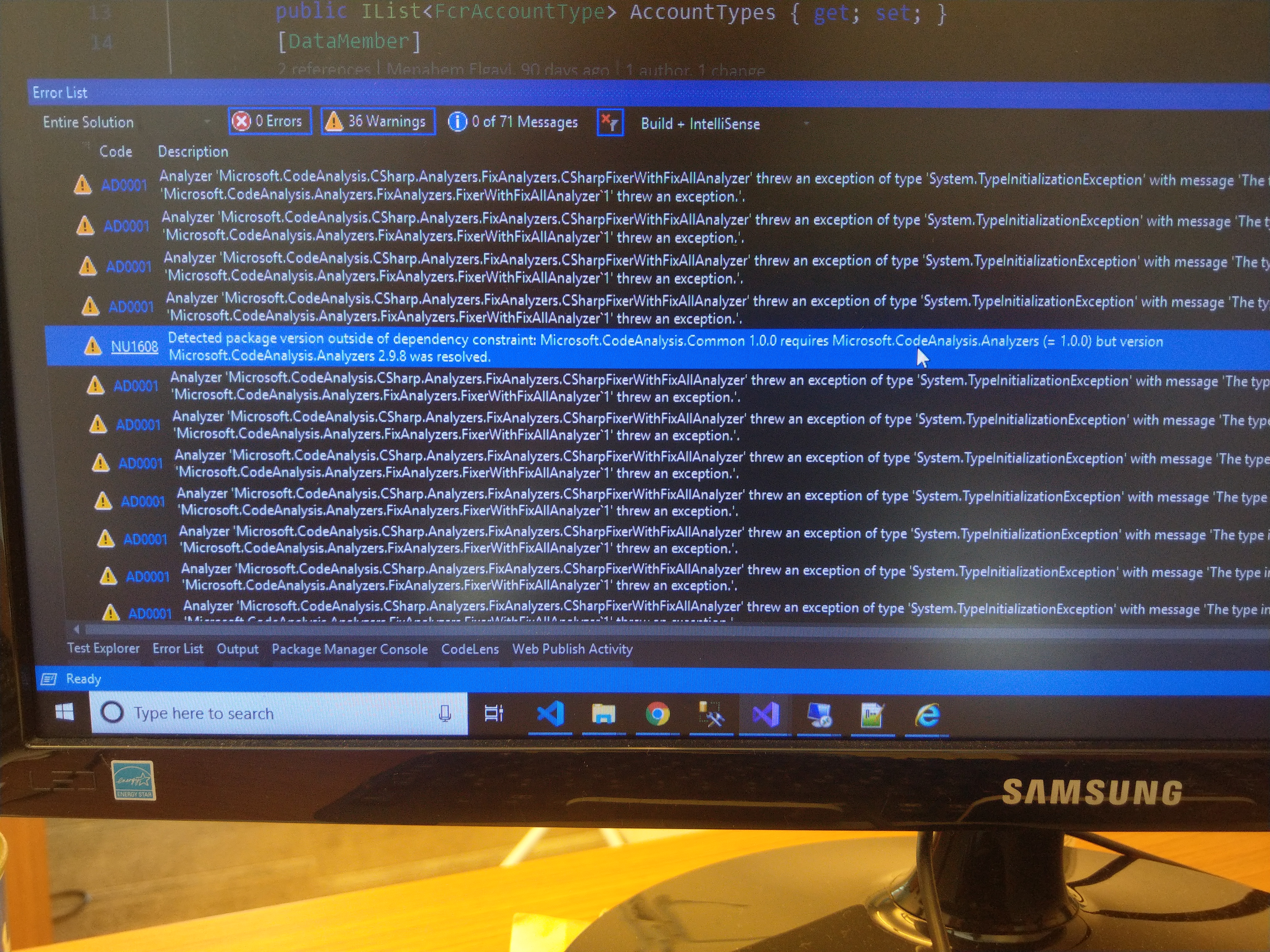
@menaheme The analyzers are likely getting included via an indirect package reference. You should explicitly add the line above to force your project to use a newer version than the minimum inherited from a package, since the older version has known bugs.
sharwell
on 20 Jul 2020
Added the line, getting a different warning now.
menaheme
on 21 Jul 2020
@menaheme Have you managed to solve your issue? Have you tried explicitly adding the reference?
Evangelink
on 22 Sep 2020
I installed the latest Microsoft.CodeAnalysis.Analyzers (3.3.0) in all projects in the solution - and the issue is resolved.
Thank you all.
menaheme
on 22 Sep 2020
Related issues
 Grauenwolf
·
3Comments
Grauenwolf
·
3Comments
 paulomorgado
·
3Comments
paulomorgado
·
3Comments
paulomorgado
·
3Comments
paulomorgado
·
3Comments
paulomorgado
·
3Comments
paulomorgado
·
3Comments
 SixFive7
·
4Comments
SixFive7
·
4Comments