Rocksdb: UnsatisfiedLinkError when RocksDB.loadLibrary()
package a;

import org.rocksdb.RocksDB;

/**
 * @author z72069
 */
public class Main {
    public static void main(String[] args) {
        RocksDB.loadLibrary();
    }
}
Exception in thread "main" java.lang.UnsatisfiedLinkError: C:\Users\z72069\AppData\Local\Temp\librocksdbjni1453993472684985674.dll: P勋
    at java.lang.ClassLoader$NativeLibrary.load(Native Method)
    at java.lang.ClassLoader.loadLibrary0(ClassLoader.java:1941)
    at java.lang.ClassLoader.loadLibrary(ClassLoader.java:1824)
    at java.lang.Runtime.load0(Runtime.java:809)
    at java.lang.System.load(System.java:1086)
    at org.rocksdb.NativeLibraryLoader.loadLibraryFromJar(NativeLibraryLoader.java:78)
    at org.rocksdb.NativeLibraryLoader.loadLibrary(NativeLibraryLoader.java:56)
    at org.rocksdb.RocksDB.loadLibrary(RocksDB.java:64)
    at org.rocksdb.RocksDB.<clinit>(RocksDB.java:35)
    at a.Main.main(Main.java:20)
    at sun.reflect.NativeMethodAccessorImpl.invoke0(Native Method)
    at sun.reflect.NativeMethodAccessorImpl.invoke(NativeMethodAccessorImpl.java:62)
    at sun.reflect.DelegatingMethodAccessorImpl.invoke(DelegatingMethodAccessorImpl.java:43)
    at java.lang.reflect.Method.invoke(Method.java:498)
It's different from #1715 , VC Redist 2015 x64 had been installed.
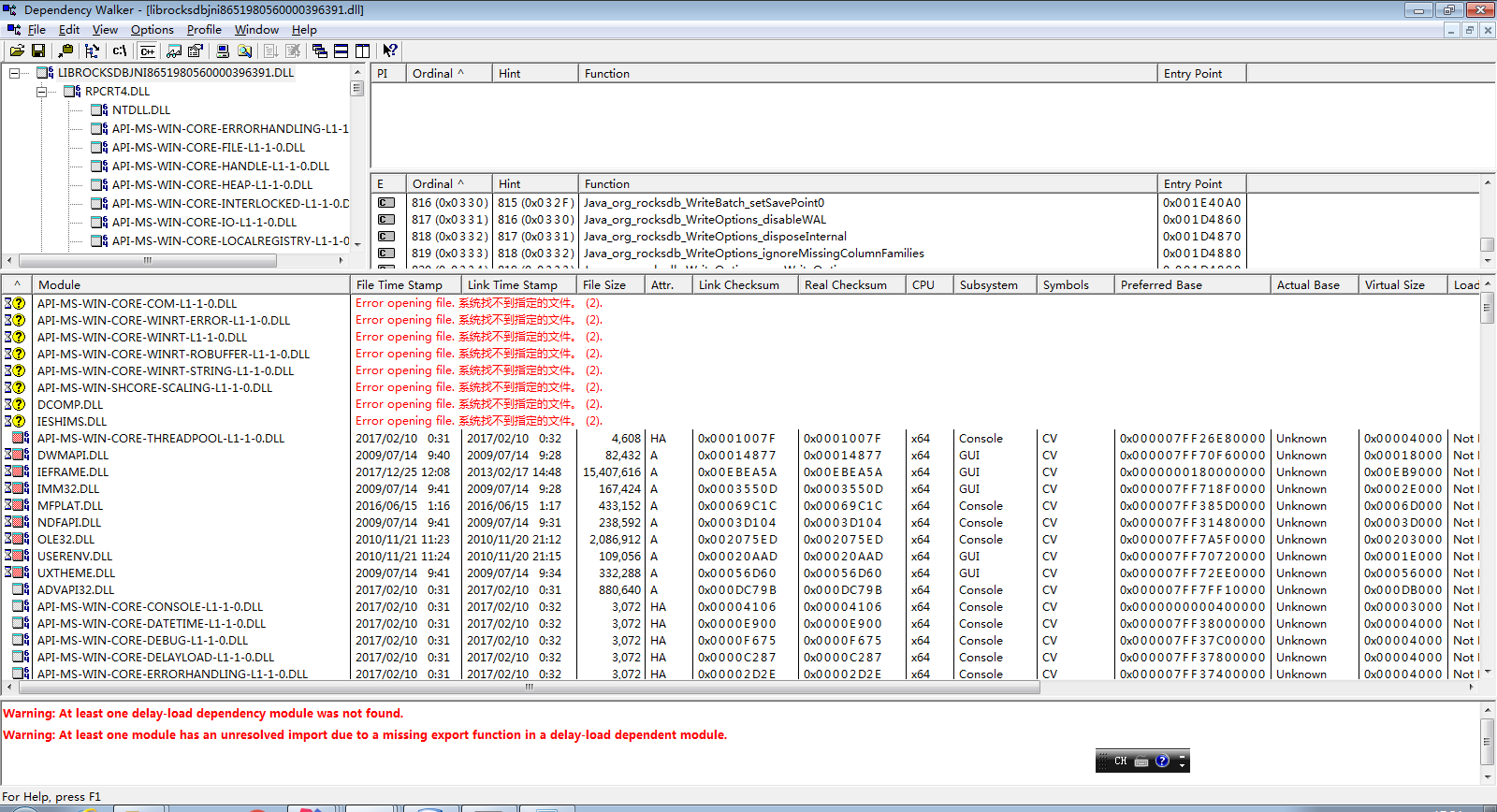
Version 5.5.1, 5.7.3, 5.8.6 have the problem. Version 5.0.1 is ok.
OS: Windows 7(6.1.7601)
JDK: jdk7u80, jdk8u121
VC redist 2015 x64, VC redist 2008, .Net Framework 4.0,4.5 installed.
 sjmind
All 23 comments
I have the same problem.
Trying to run IOTA-IRI, which uses RocksDB 5.7.3
My system also Win7, Java8 u151, VC 2015 redist (and some older) installed, .Net 4.6
 frankbenoit
on 2 Jan 2018
frankbenoit
on 2 Jan 2018
Can you please try v5.9.2 (it will be available on Maven Central in the next 2 hours). I resolved some cross-linking version between JDK 7 and JDK 8 on Windows. Please note that RocksJava is compiled for JDK 1.7.
 adamretter
on 3 Jan 2018
adamretter
on 3 Jan 2018
I still got the same exception after updating to 5.9.2.
Exception in thread "main" java.lang.UnsatisfiedLinkError: C:\Users\z72069\AppData\Local\Temp\librocksdbjni7411412820428572402.dll: ?#藎
    at java.lang.ClassLoader$NativeLibrary.load(Native Method)
    at java.lang.ClassLoader.loadLibrary1(ClassLoader.java:1965)
    at java.lang.ClassLoader.loadLibrary0(ClassLoader.java:1890)
    at java.lang.ClassLoader.loadLibrary(ClassLoader.java:1851)
    at java.lang.Runtime.load0(Runtime.java:795)
    at java.lang.System.load(System.java:1062)
    at org.rocksdb.NativeLibraryLoader.loadLibraryFromJar(NativeLibraryLoader.java:78)
    at org.rocksdb.NativeLibraryLoader.loadLibrary(NativeLibraryLoader.java:56)
    at org.rocksdb.RocksDB.loadLibrary(RocksDB.java:64)
    at org.rocksdb.RocksDB.<clinit>(RocksDB.java:35)
    at com.cmbchina.ccd.pluto.tv.rocksdb.Main.main(Main.java:20)
Tested on jdk7 and 8
sjmind
on 4 Jan 2018
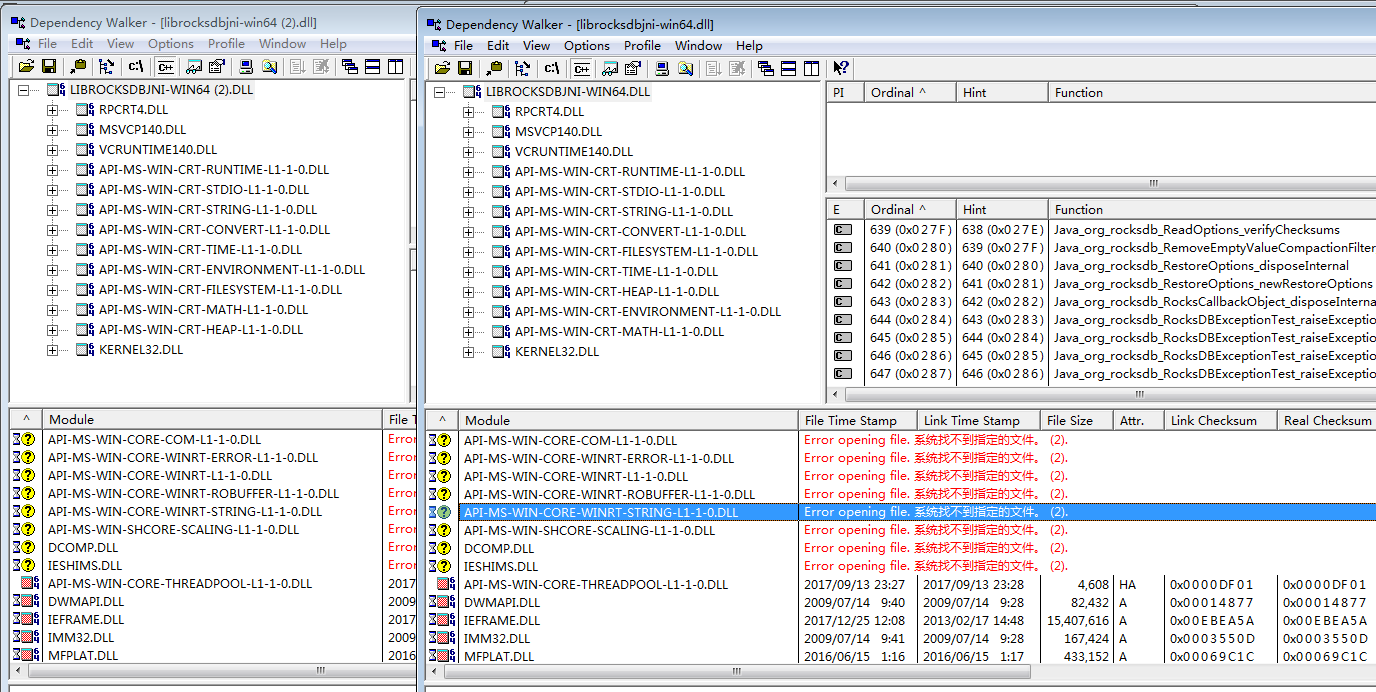
The dependencies of the dll in 5.0.1 and 5.9.2 are the same.
Since 5.0.1 runs ok.
It seems the dll itself meets some problem while linking.
sjmind
on 4 Jan 2018
Was anyone able to fix this problem? We have the same setup at work - Win7, JDK8 and I'm getting the same results from dept walker. I have all VS C++ redists installed from 2008 through to 2017
 FilKarnicki
on 25 Jan 2018
FilKarnicki
on 25 Jan 2018
So RocksJava is built using VS 2015 and JDK 1.7 on Windows 10. I have now managed to get a Windows 7 machine too, so I will try later today and see if I can reproduce/resolve your issues on Windows 7.
adamretter
on 26 Jan 2018
Okay so using RocksDB 5.9.2 I have no problems on Windows 7.
I have literally started with a clean VM, and then only installed the following:
- Microsoft Windows 7 Professional x64 en. Version 6.1.7601 Service Pack 1 Build 7601.
- Visual Studio Community 2015. Version 14.0.25431.01 Update 3.
- Oracle Java JDK 7u80 x64.
- IntelliJ IDEA Community Edition 2017.3.2
I then started a new Maven project in IntelliJ and pasted in the code described by @sjmind at the top of this issue. I was able to compile and run it without any problem.
So I guess I need better steps to reproduce the problem you are seeing. Otherwise someone needs to be able to determine what dependencies they are missing.
If I check the Programs and Features in the Control Panel, I see the following C++ redistributables are installed:
- Microsoft Visual C++ 2012 Redistributable (x64) - 11.0.60610
- Microsoft Visual C++ 2012 Redistributable (x86) - 11.0.60610
- Microsoft Visual C++ 2013 Redistributable (x64) - 12.0.21005
- Microsoft Visual C++ 2013 Redistributable (x86) - 12.0.21005
- Microsoft Visual C++ 2015 Redistributable (x64) - 14.0.24215
- Microsoft Visual C++ 2015 Redistributable (x64) - 12.0.24215
@sjmind Do you have all of the above installed?
adamretter
on 26 Jan 2018
The same problem with my configuration. Starts failing between versions 5.3.6 and 5.4.5
May be some problem with DLL init code?
 Nashatyrev
on 22 Feb 2018
Nashatyrev
on 22 Feb 2018
Doesn't work neither with jdk1.7.0_79x64 nor with jdk1.8.0_60x64.
sxstrace.exe didn't report any problems when loading .DLL
I have all of those installed:
    Microsoft Visual C++ 2012 Redistributable (x64) - 11.0.60610
    Microsoft Visual C++ 2012 Redistributable (x86) - 11.0.60610
    Microsoft Visual C++ 2013 Redistributable (x64) - 12.0.21005
    Microsoft Visual C++ 2013 Redistributable (x86) - 12.0.21005
    Microsoft Visual C++ 2015 Redistributable (x64) - 14.0.24215
    Microsoft Visual C++ 2015 Redistributable (x64) - 12.0.24215
Also tried on a fresh Win10 (within Oracle VBox). After installing VC 2015 redist, the loadLib fails in the same manner.
Tried to debug the issue:
> gflags.exe -i java.exe +sls
> cdb.exe D:\jdk1.8.0_45x64\bin\java.exe -cp build/classes/main;rocksdbjni-5.9.2.jar  com.ethercamp.RocksDbTest
Attaching output.
win7.log
Win10.log
As suspected the issue seems to be lying somewhere in the DLL init code:
15f4:15d4 @ 68193218 - LdrpInitializeNode - INFO: Calling init routine 00007FF86AF287D4 for DLL "C:\Users\Anton\AppData\Local\Temp\librocksdbjni3565746440670274141.dll"
15f4:15d4 @ 68193218 - LdrpCallTlsInitializers - INFO: Calling TLS callback 00007FF86AECA3E0 for DLL "C:\Users\Anton\AppData\Local\Temp\librocksdbjni3565746440670274141.dll" at 00007FF86AB20000
15f4:15d4 @ 68193218 - LdrGetDllHandleEx - ENTER: DLL name: kernel32.dll
15f4:15d4 @ 68193218 - LdrpFindLoadedDllInternal - RETURN: Status: 0x00000000
15f4:15d4 @ 68193218 - LdrGetDllHandleEx - RETURN: Status: 0x00000000
15f4:15d4 @ 68193218 - LdrpGetProcedureAddress - INFO: Locating procedure "InitializeConditionVariable" by name
15f4:15d4 @ 68193218 - LdrpLoadDllInternal - ENTER: DLL name: NTDLL.DLL
15f4:15d4 @ 68193218 - LdrpLoadDllInternal - RETURN: Status: 0x00000000
15f4:15d4 @ 68193218 - LdrpGetProcedureAddress - INFO: Locating procedure "RtlInitializeConditionVariable" by name
15f4:15d4 @ 68193218 - LdrpGetProcedureAddress - INFO: Locating procedure "SleepConditionVariableCS" by name
15f4:15d4 @ 68193218 - LdrpPreprocessDllName - INFO: DLL api-ms-win-core-synch-l1-1-0 was redirected to C:\Windows\SYSTEM32\kernelbase.dll by API set
15f4:15d4 @ 68193218 - LdrpLoadDllInternal - ENTER: DLL name: C:\Windows\SYSTEM32\kernelbase.dll
15f4:15d4 @ 68193218 - LdrpLoadDllInternal - RETURN: Status: 0x00000000
15f4:15d4 @ 68193218 - LdrpGetProcedureAddress - INFO: Locating procedure "SleepConditionVariableCS" by name
15f4:15d4 @ 68193218 - LdrpGetProcedureAddress - INFO: Locating procedure "WakeAllConditionVariable" by name
15f4:15d4 @ 68193218 - LdrpLoadDllInternal - ENTER: DLL name: NTDLL.DLL
15f4:15d4 @ 68193218 - LdrpLoadDllInternal - RETURN: Status: 0x00000000
15f4:15d4 @ 68193218 - LdrpGetProcedureAddress - INFO: Locating procedure "RtlWakeAllConditionVariable" by name
(15f4.15d4): Illegal instruction - code c000001d (first chance)
(15f4.15d4): Illegal instruction - code c000001d (!!! second chance !!!)
*** WARNING: Unable to verify checksum for C:\Users\Anton\AppData\Local\Temp\librocksdbjni3565746440670274141.dll
*** ERROR: Symbol file could not be found.  Defaulted to export symbols for C:\Users\Anton\AppData\Local\Temp\librocksdbjni3565746440670274141.dll -
librocksdbjni3565746440670274141!Java_org_rocksdb_WriteBatchWithIndex_setSavePoint0+0x266eb:
00007ff8`6ada0eab c4e261f7c0      shlx    eax,eax,ebx
BTW, works fine on my Laptop Win10.
Guys, how do you make Windows builds?
Can it be the case you are setting some kind of /arch:AVX2 compiler flag? In that case your library would work only on newest processors.
BTW my laptop has Haswell family CPU which started AVX2 support.
Nashatyrev
on 23 Feb 2018
@Nashatyrev The Windows build process if documented here -
https://github.com/facebook/rocksdb/wiki/Building-on-Windows
adamretter
on 23 Feb 2018
Here it is:
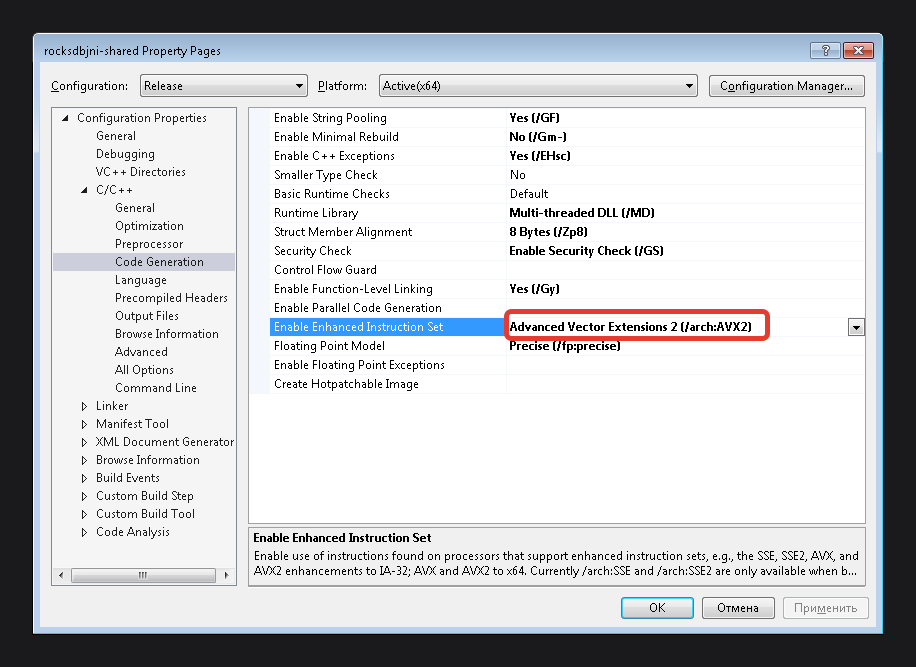
Is that intentionally or just by chance?
I mean are you really targeting this library for CPUs >= Haswell ?
Nashatyrev
on 23 Feb 2018
@Nashatyrev for the non-Windows platforms we build the release using Make and we set PORTABLE=1.
For Windows, the release build is completely different as we use CMake. I suspect if you are on the right track then something changed in our CMakeLists.
Perhaps @siying could comment on what our target architecture for portable builds should be?
adamretter
on 23 Feb 2018
Just in case if anyone else suffers from this issue you may try our custom build from here:
https://bintray.com/ethereum/maven/download_file?file_path=org%2Fethereum%2Frocksdbjni%2F5.9.2%2Frocksdbjni-5.9.2.jar
Though it lacks:
- Snappy compression: didn't manage to link it statically
- XPRESS compression: as I understand it is supported only starting from Win8, and results in
Cabinet.dlllinkage error on Win7
Nashatyrev
on 11 Mar 2018
@Nashatyrev What changes did you make for your custom build? Did you disable some CPU specific features?
adamretter
on 15 Mar 2018
Some users of our software reported the same error, and it was narrowed down to the lack of AVX2 instruction set (I personally reproduced it too by disallowing the AVX2 instruction set using the bcdedit command: https://docs.microsoft.com/en-us/windows-hardware/drivers/devtest/bcdedit--set)
 laurentgo
on 16 Apr 2018
laurentgo
on 16 Apr 2018
thenanox commented on 4 May •
I've been checking around on rocksdb and this bug is something related to the physical CPU you have in your computer. If you have >= Haswell intel processors (4xxx) propably works for you. In case you are using previous CPU, then it won't work with 5.7.3 rocksdbjni.
This happens because of the way rocksdb build for windows the package rocksdbjni. In some point after 5.3.6 they started to include AVX2 flag on build, that is an extension of cpu instructions for Haswell => CPUs (more in here also for AMD users https://en.wikipedia.org/wiki/Advanced_Vector_Extensions#Advanced_Vector_Extensions_2)
The issue in rocksdb is here:
facebook/rocksdb#3307
Solutions:
One solution for IRI is to use 5.3.6 dependency on pom.xml for rocksdbjni, but i dont know if IRI uses any funcionality from 5.7.3. This solution will be backwards compatibility for old cpu users.
The other solution is to create an iota build from sources using this instructions https://github.com/facebook/rocksdb/wiki/Building-on-Windows and upload to mvnrepository so everybody can use it. (ethereum have this https://mvnrepository.com/artifact/org.ethereum/rocksdbjni)
 solracor
on 24 Jun 2018
solracor
on 24 Jun 2018
Okay so I have taken a look into this. It seems that we can set -DPORTABLE=1 as part of the CMake generation of the MSBuild files and that will cause the /arch:AVX2 flag not to be set. I will make sure that the next release of RocksJava has this flag set.
adamretter
on 24 Jun 2018
I will make sure that the next release of RocksJava has this flag set.
Hi @adamretter ,
Any idea of when the new release is coming out?
Cheers!
 lucassaldanha
on 3 Oct 2018
lucassaldanha
on 3 Oct 2018
@lucassaldanha I actually tried the latest on maven central, and it has been working fine on non-avx2 machine.
laurentgo
on 3 Oct 2018
@laurentgo I’ve tried the latest as well and, unfortunately, it didn’t work. I’m trying to build from scratch (following the process on the docs). I’ll update this thread with what I can find.
lucassaldanha
on 3 Oct 2018
Ok, it looks like my problem is the one described on #3788
I'm testing previous versions trying to identify when this started (or if it ever worked).
I'll continue the discussion on #3788
lucassaldanha
on 3 Oct 2018
Related issues
 BusyJay
·
7Comments
BusyJay
·
7Comments
 jay-zhuang
·
6Comments
jay-zhuang
·
6Comments
 sihuazhou
·
3Comments
sihuazhou
·
3Comments
 pkubaj
·
9Comments
pkubaj
·
9Comments
 pmg1991
·
5Comments
pmg1991
·
5Comments
Most helpful comment
BTW, works fine on my Laptop Win10.
Guys, how do you make Windows builds?
Can it be the case you are setting some kind of
/arch:AVX2compiler flag? In that case your library would work only on newest processors.BTW my laptop has Haswell family CPU which started AVX2 support.