Rocketmq: No route info of this topic problem
clinet exception:
org.apache.rocketmq.client.exception.MQClientException: No route info of this topic, ffff
See http://rocketmq.apache.org/docs/faq/ for further details.
    at org.apache.rocketmq.client.impl.producer.DefaultMQProducerImpl.sendDefaultImpl(DefaultMQProducerImpl.java:634)
    at org.apache.rocketmq.client.impl.producer.DefaultMQProducerImpl.send(DefaultMQProducerImpl.java:1253)
    at org.apache.rocketmq.client.impl.producer.DefaultMQProducerImpl.send(DefaultMQProducerImpl.java:1203)
    at org.apache.rocketmq.client.producer.DefaultMQProducer.send(DefaultMQProducer.java:214)
    at com.xx.rmq.Producer.main(Producer.java:55)
rocketmq server config:
autoCreateTopicEnable=true
问题:
我们手动在rokcetmq中创建topic时,客户端访问时正常的,如果不提前手动创建将会出现上面的异常,如果需要让服务端自动创建topic,应该如何设置
 yuanyaosmile
All 36 comments
服务端版本与客户端版本要对应。防火墙要关。
yuanyaosmile
on 25 Oct 2018
sure?为啥我有时候可以自动创建,有时候不行呢?
 love-jay
on 25 Oct 2018
love-jay
on 25 Oct 2018
sure?为啥我有时候可以自动创建,有时候不行呢?
不行有报错吗?log中有啥?
yuanyaosmile
on 26 Oct 2018
和你上述的报错信息一模一样。
love-jay
on 26 Oct 2018
有人说是差了fastJson的包?不知道有没有这回事。
love-jay
on 26 Oct 2018
服务端自动创建topic,设置autoCreateTopicEnable=true就行了。
FAQ中有解答,http://rocketmq.apache.org/docs/faq/
报No route info of this topic这个错,可能是请求nameserver失败。
代码在DefaultMQProducerImpl#tryToFindTopicPublishInfo,里面逻辑并不是很多,自己debug一下就清楚了。
 ymwneu
on 1 Nov 2018
ymwneu
on 1 Nov 2018
还真是fastJson的问题。刚debug了源码。发现如果 在MQClientAPIImpl这个类中,会向服务端请求是否自动创建topic,会创建RemotingCommand请求对象,去请求服务端,序列化的type是fastJson,如果项目没有,请求都发不出去,抛了异常,自然无法创建topic。感谢指点!
love-jay
on 1 Nov 2018
我并没有引入fastJson这个包,在版本不一致的时候,服务端已经加了autoCreateTopicEnable=true。版本一致就好了。这个包是根因嘛?
yuanyaosmile
on 1 Nov 2018
There is still an improvement for this exception in RocketMQ. @yuanyaosmile
I would appreciate your engagement in the community if you could raise your question in the user email list. Issue is not the correct place for your request, please read the issue template, looking forward to your question in the email list:-
 vongosling
on 2 Nov 2018
vongosling
on 2 Nov 2018
我是4.4的最新版本,WIN10下,依然运行官方例子,报这个错误,以前都启动NAMESERVER,和BROKER成功了,为什么呢?
 jackyrong
on 7 Apr 2019
jackyrong
on 7 Apr 2019
也已经用了:
mqbroker.exe -n localhost:9876 autoCreateTopicEnable=true
jackyrong
on 7 Apr 2019
历时一天终于跑起来了,回顾官网起步教程中存在的各种坑:
坑爹 # 1
启动 Broker
nohup sh bin/mqbroker -n localhost:9876 &
tail -f ~/logs/rocketmqlogs/broker.log
The broker[%s, 172.30.30.233:10911] boot success...
很遗憾,上述方式直接忽略指定 Name Server 的步骤,导致 Name Server 不知道 Broker 的存在。
解决方案
编辑 conf/broker.conf
namesrvAddr = YOUR_NAME_SERVER_IP:PORT
使用以下指令启动 Broker
nohup sh bin/mqnamesrv -c conf/broker.conf &
tail -f ~/logs/rocketmqlogs/namesrv.log
The broker[broker-a, 192.168.3.211:10911] boot success. serializeType=JSON and name server is 192.168.3.211:9876 (我自己的输出结果,应该跟你的有出入)
坑爹 No route info of this topic # 2
RocketMQ 并不会自动创建 TopicTest,因此你必须手动创建该 Topic。
解决方案
bin\mqadmin updateTopic -n YOUR_NAME_SERVER_IP:PORT -b YOUR_BROKER_IP:PORT -c DefaulCluster -o true -p 6 -r 8 -s true -t TopicTest -w 8
坑爹 No route info of this topic # 3
还是遇到这个错误?! 你是不是参考了以下官方示例?
public class AsyncProducer {
    public static void main(String[] args) throws Exception {
        //Instantiate with a producer group name.
        DefaultMQProducer producer = new DefaultMQProducer("please_rename_unique_group_name");
        // Specify name server addresses.
        producer.setNamesrvAddr("localhost:9876");
        //Launch the instance.
        producer.start();
        producer.setRetryTimesWhenSendAsyncFailed(0);
        for (int i = 0; i < 100; i++) {
                final int index = i;
                //Create a message instance, specifying topic, tag and message body.
                Message msg = new Message("TopicTest",
                    "TagA",
                    "OrderID188",
                    "Hello world".getBytes(RemotingHelper.DEFAULT_CHARSET));
                producer.send(msg, new SendCallback() {
                    @Override
                    public void onSuccess(SendResult sendResult) {
                        System.out.printf("%-10d OK %s %n", index,
                            sendResult.getMsgId());
                    }
                    @Override
                    public void onException(Throwable e) {
                        System.out.printf("%-10d Exception %s %n", index, e);
                        e.printStackTrace();
                    }
                });
        }
        //Shut down once the producer instance is not longer in use.
        producer.shutdown();
    }
}
以上代码创建完成 Producer 之后,立即调用 shutdown(),导致异步操作失败,最终抛出一个风马牛不相及的异常 No route info of this topic:
org.apache.rocketmq.client.exception.MQClientException: No route info of this topic, TopicTest
解决方案
注释掉 producer.shutdown(); 即可。
坑爹 # 4
RocketMQ 内部代码一行注释看不到,我也是服气了。
 JerryChin
on 9 Jul 2019
JerryChin
on 9 Jul 2019
强烈建议重开此 issue。
JerryChin
on 9 Jul 2019
@JerryChin Thanks for your summary for this issue, and we will reopen it for more users can pay more attention to this problem, and as you described, RocketMQ still has a high threshold for use. so would you like to optimize it together? It would be nice if you can polish the quickstart shell script and add some documentation. We will continue to track this issue with you.
 duhenglucky
on 9 Jul 2019
duhenglucky
on 9 Jul 2019
关于官网的``可以参考这里:https://exception.site/question/101
producer.setNamesrvAddr("localhost:9876");
居然是没有添加 Name Server 的地址导致的。同问官网的demo都没有自己运行吗?
 Shellbye
on 6 Aug 2019
Shellbye
on 6 Aug 2019
hi~ @duhenglucky
i am new to rocketmq. RocketMQ is cool and become more and more popular, so i'd like to help you guys to make the quick start more friendly to newbies like me. If there are some errors in my statement, please point out.
here we go, after some investigation, these are what i find:
- the Start Broker part is fine, because parameter
-n locolhost:9876set the name server.As that's a quick start, if you can put that in configuration file by default, that will be really nice. No route info of this topic problemerror. If i use the same 4.3.0 version client as the official site Simple Example page suggests, the broker(version 4.4.0) won't create topic automatically. however 4.4.0 version client works! My suggestions are:
- modify the official site simple example page, modify the client version to 4.4.0
- As that's a quick start for newbie like me, add the
autoCreateTopicEnable = trueto broker config file by default - maybe you can check the code and find the real cause for this bug
- all quick start examples should set name server by default,add some code like
producer.setNamesrvAddr("localhost:9876") - default broker jvm memory configuration is
-Xms8g -Xmx8g -Xmn4g, that's almost kill my poor computer..... i think you can make it smaller for our poor personal computer~ The professional company guys will configure that option by themselves.
 jimgreen2013
on 29 Aug 2019
jimgreen2013
on 29 Aug 2019
I will pin this issue util someone gives us some feedback for this improvement. Details see https://github.com/apache/rocketmq/pull/1415
vongosling
on 29 Aug 2019
hi~ @RongtongJin
your code have been merged to branch develop, i'd like to test your improvement with client version 4.3.0 and see what will happen.
but i don't know how can i compile from the source and get the broker up. can you help me?
i tried something like:
mvn compileis okmvn installis not ok, because some test failmvn install -DskipTestsis ok and will generate some jar files, then how can i start the name server and broker?
if i ask some stupid questions, please forgive me! i am really new to rocketmq. p.s I am big fan of redis and except i can test the latest rocketmq code very easily with a few command like redis~
jimgreen2013
on 30 Aug 2019
hi~ @jimgreen2013
- As far as I know, if broker does not set
autoCreateTopicEnable = true, the new modification will still returnNo route info of this topic. My improvement is mainly for "No route info of tihis topic" caused by some network problem. - You can refer to quick start on the official website to start name server and broker.
 RongtongJin
on 30 Aug 2019
RongtongJin
on 30 Aug 2019
hi~ @RongtongJin @vongosling @duhenglucky
thanks for your help~ I have do some tests
Here is the result:
test case1
- broker version: build from lastest develop branch code
- configuration:
autoCreateTopicEnable = true - client version: 4.3.0
- result:
No route info of this topicerror
test case2
- broker version: build from lastest develop branch code
- configuration:
autoCreateTopicEnable = true - client version: 4.4.0
- result: everything is ok
test case3
- broker version: 4.3.0
- configuration:
autoCreateTopicEnable = true - client version: 4.3.0
- result: everything is ok
Maybe i guess the new broker version isn't backward with old client version 4.3.0
jimgreen2013
on 30 Aug 2019
@jimgreen2013 yep, RocketMQ 4.3.0 version changed the default "TBW102" value, this will lead to some compatibility issues and it is recommended to test with the latest version 4.5.2.
duhenglucky
on 30 Aug 2019
@jimgreen2013 The pr#1415 does not modify the code of broker, but the code of client. So you should test with the newest client code in develop branch.
RongtongJin
on 30 Aug 2019
@yuanyaosmile @jimgreen2013 Could you help to verify the preview version for this improvement, just redo it as @RongtongJin suggestion.
vongosling
on 3 Sep 2019
我使用的最新4.5.2的master分支源代码 eclipse java启动,报错“No route info of this topic, TopicTest”
我的步骤如下:
第一步启动Namesrv main方法-->org.apache.rocketmq.namesrv.NamesrvStartup.java
public static void main(String[] args) {
main0(args);
}
public static NamesrvController main0(String[] args) {
try {
NamesrvController controller = createNamesrvController(args);
controller.getNettyServerConfig().setListenPort(8888);
start(controller);
String tip = "The Name Server boot success. serializeType=" + RemotingCommand.getSerializeTypeConfigInThisServer();
log.info(tip);
System.out.printf("%s%n", tip);
return controller;
} catch (Throwable e) {
e.printStackTrace();
System.exit(-1);
}
return null;
}
控制台输出:The Name Server boot success. serializeType=ROCKETMQ
第二步启动Broker的main方法--->org.apache.rocketmq.broker.BrokerStartup.java
并用代码设置setAutoCreateTopicEnable=true,如下
public static void main(String[] args) {
start(createBrokerController(args));
}
public static BrokerController start(BrokerController controller) {
try {
controller.getBrokerConfig().setNamesrvAddr("localhost:8888");
controller.getBrokerConfig().setAutoCreateTopicEnable(true);
//controller.getBrokerConfig().setBrokerTopicEnable(true);
controller.getBrokerConfig().setBrokerIP1("localhost");
System.err.println(controller.getBrokerAddr());
controller.start();
String tip = "The broker[" + controller.getBrokerConfig().getBrokerName() + ", "
+ controller.getBrokerAddr() + "] boot success. serializeType=" + RemotingCommand.getSerializeTypeConfigInThisServer();
if (null != controller.getBrokerConfig().getNamesrvAddr()) {
tip += " and name server is " + controller.getBrokerConfig().getNamesrvAddr();
}
log.info(tip);
System.err.println(String.valueOf(controller.getBrokerConfig().isAutoCreateTopicEnable()));
System.out.printf("%s%n", tip);
return controller;
} catch (Throwable e) {
e.printStackTrace();
System.exit(-1);
}
return null;
}
控制台输出:
localhost:10911
true
The broker[WIN-FMHILLP1PVS, localhost:10911] boot success. serializeType=ROCKETMQ and name server is localhost:8888
第三步,启动官方自带simaple中的org.apache.rocketmq.example.ordermessage.Producer.java
public static void main(String[] args) throws MQClientException, InterruptedException {
DefaultMQProducer producer = new DefaultMQProducer("please_rename_unique_group_name");
producer.setNamesrvAddr("localhost:8888");
producer.start();
for (int i = 0; i < 1000; i++) {
try {
Message msg = new Message("TopicTest" , "TagA",
("Hello RocketMQ " + i).getBytes(RemotingHelper.DEFAULT_CHARSET)
);
SendResult sendResult = producer.send(msg);
System.out.printf("%s%n", sendResult);
} catch (Exception e) {
e.printStackTrace();
Thread.sleep(1000);
}
}
//producer.shutdown();
}
控制台输出:
org.apache.rocketmq.client.exception.MQClientException: No route info of this topic, TopicTest
See http://rocketmq.apache.org/docs/faq/ for further details.
at org.apache.rocketmq.client.impl.producer.DefaultMQProducerImpl.sendDefaultImpl(DefaultMQProducerImpl.java:657)
at org.apache.rocketmq.client.impl.producer.DefaultMQProducerImpl.send(DefaultMQProducerImpl.java:1280)
at org.apache.rocketmq.client.impl.producer.DefaultMQProducerImpl.send(DefaultMQProducerImpl.java:1226)
at org.apache.rocketmq.client.producer.DefaultMQProducer.send(DefaultMQProducer.java:283)
at org.apache.rocketmq.example.quickstart.Producer.main(Producer.java:40)
问题分析:
用的最新4.5.2官方源代码,我已经全部设置为localhost,且都设置对了namesrv的端口和地址,rpc协议无论是ROCKETMQ还是JSON,都会报No route info of this topic, TopicTest的异常。。
 beijing-penguin
on 1 Oct 2019
beijing-penguin
on 1 Oct 2019
@beijing-penguin
当前已经有一个PR提交到develop分支,还未被合入主分支,你可以尝试一下develop分支的客户端代码,如果是下面第一个原因导致的no route info of this topic,会直接抛出相应的错误。
对于修改之前的版本,建议你检查一下客户端的日志,日志中会有更加详细的异常信息,在控制台上只能看到抛出异常。
此外,根据no route info of this topic出现的原因,建议你从以下几个方面排查。
- 确保producer能连接上nameserver并且能从nameserver中获取topic的元数据信息。
检查方法:通过查看日志、调试等方法进行检查,在最新的develop分支中该原因导致会直接抛出对应的异常。
可能的原因:客户端没有设置nameserver,防火墙等网络问题。 - 确保nameserver中包含了需要发送的topic的路由。
检查方法:通过admin工具或rocketmq web console进行检查。
可能的原因:
(1)Topic不存在且Broker禁止自动创建Topic(autoCreateTopicEnable=false),且没有通过手工方式创建Topic。
(2)Broker没有正确连接到NameServer(broker能定期向nameserver发送心跳) - 其他原因:Netty版本问题,fastjson问题,topic权限问题(权限至少可写)
检查方法:需要通过查日志,调试等方法综合进行检查。
期待你能告诉我最后的原因。
RongtongJin
on 1 Oct 2019
@beijing-penguin
当前已经有一个PR提交到develop分支,还未被合入主分支,你可以尝试一下develop分支的客户端代码,如果是下面第一个原因导致的no route info of this topic,会直接抛出相应的错误。对于修改之前的版本,建议你检查一下客户端的日志,日志中会有更加详细的异常信息,在控制台上只能看到抛出异常。
此外,根据no route info of this topic出现的原因,建议你从以下几个方面排查。
- 确保producer能连接上nameserver并且能从nameserver中获取topic的元数据信息。
检查方法:通过查看日志、调试等方法进行检查,在最新的develop分支中该原因导致会直接抛出对应的异常。
可能的原因:客户端没有设置nameserver,防火墙等网络问题。- 确保nameserver中包含了需要发送的topic的路由。
检查方法:通过admin工具或rocketmq web console进行检查。
可能的原因:
(1)Topic不存在且Broker禁止自动创建Topic(autoCreateTopicEnable=false),且没有通过手工方式创建Topic。
(2)Broker没有正确连接到NameServer(broker能定期向nameserver发送心跳)- 其他原因:Netty版本问题,fastjson问题,topic权限问题(权限至少可写)
检查方法:需要通过查日志,调试等方法综合进行检查。期待你能告诉我最后的原因。
一、我切换到了develop分支,也尝试默认不设置,或者设置不同的namesrv端口

二,我是用eclipse本地启动,并且关闭了本地防火墙
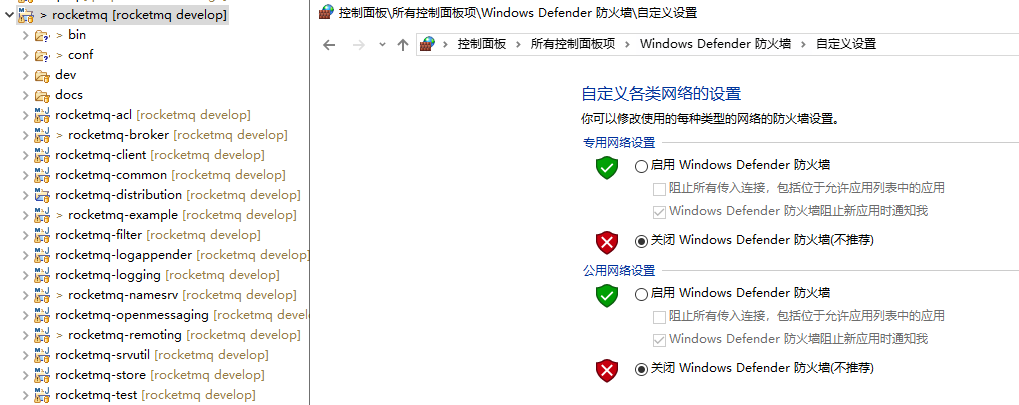
三、我使用的是官方源代码,fastjson,netty等版本全部使用官方pom配置文件构建。。启动流程如下
①启动namesrv,设置端口为8888 (尝试过不设置端口,默认使用9876,也会报异常)

②启动broker,并设置controller.getBrokerConfig().setAutoCreateTopicEnable(true);

③设置producer.setNamesrvAddr("localhost:8888"); 运行生产者

四、查看namesrv.log文件。抛出了一个奇怪的错误,exceptionCaught 127.0.0.1:49195 提示中的端口49195,是从来没设置过的这种端口。。。

我的其他信息
broker.conf
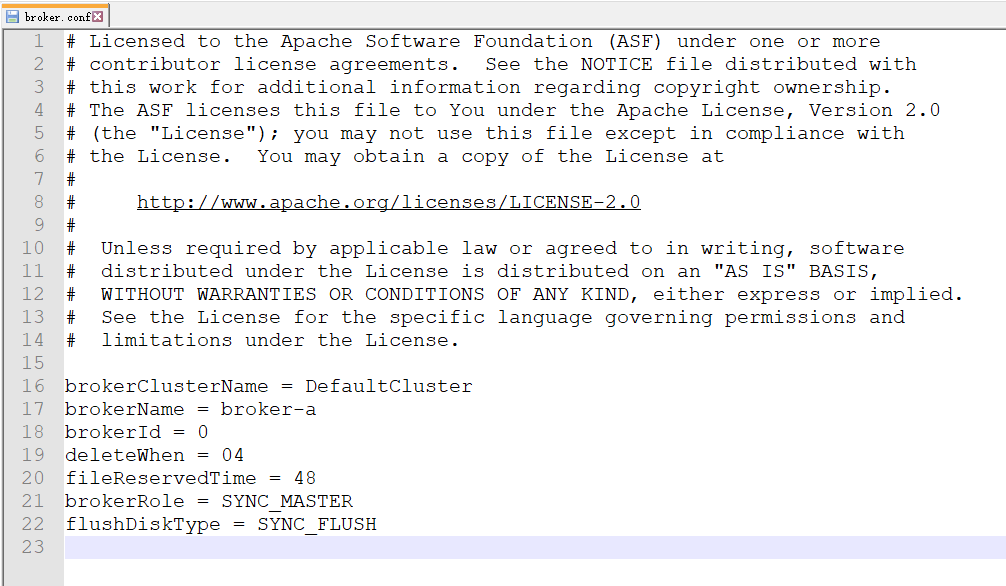
broker.log

beijing-penguin
on 1 Oct 2019
@beijing-penguin 客户端的日志(rocketmq_client.log)是否更加详细信息,这个更重要。另外nameserver日志中(namesrv.log)是否存在“new broker registered...“,如果不存在很可能是broker没有注册成功。
RongtongJin
on 1 Oct 2019
@beijing-penguin 客户端的日志(rocketmq_client.log)是否更加详细信息,这个更重要。另外nameserver日志中(namesrv.log)是否存在“new broker registered...“,如果不存在很可能是broker没有注册成功。
namesrv.log 不存在new broker registered 这些关键字
这是rocketmq_client.log客户端的日志。

beijing-penguin
on 2 Oct 2019
@beijing-penguin 引起no route info的主要原因是因为Broker没有正确连接到NameServer。我发现你在代码中设置namesever地址,如果设置nameserver要起作用,则设置代码须在controller.initialize()之前。另外推荐你采用其他方式配置nameserver,比如设置eclipse中设置broker程序参数 -n localhost:8888,可以看下nameserver的最佳实践。
RongtongJin
on 2 Oct 2019
@beijing-penguin 引起no route info的主要原因是因为Broker没有正确连接到NameServer。我发现你在代码中设置namesever地址,如果设置nameserver要起作用,则设置代码须在controller.initialize()之前。另外推荐你采用其他方式配置nameserver,比如设置eclipse中设置broker程序参数 -n localhost:8888,可以看下nameserver的最佳实践。
非常感谢您的专业解答,确实 是broker main方法中设置controller应该在initialize()之前。我模拟命令行,再次用代码设置 args = new String[] {"-n","127.0.0.1:9876","autoCreateTopicEnable=true"};入参的方法,问题得到解决。。再次感谢。
public static void main(String[] args) {
args = new String[] {"-n","127.0.0.1:9876","autoCreateTopicEnable=true"};
start(createBrokerController(args));
}
public static BrokerController start(BrokerController controller) {
try {
//controller.getBrokerConfig().setBrokerIP1("localhost");
//controller.getBrokerConfig().setNamesrvAddr("localhost:8888");
//controller.getBrokerConfig().setAutoCreateTopicEnable(true);
controller.start();
String tip = "The broker[" + controller.getBrokerConfig().getBrokerName() + ", "
+ controller.getBrokerAddr() + "] boot success. serializeType=" + RemotingCommand.getSerializeTypeConfigInThisServer();
if (null != controller.getBrokerConfig().getNamesrvAddr()) {
tip += " and name server is " + controller.getBrokerConfig().getNamesrvAddr();
}
log.info(tip);
System.out.printf("%s%n", tip);
return controller;
} catch (Throwable e) {
e.printStackTrace();
System.exit(-1);
}
return null;
}
The polishment will be released in 4.6.0, and relative PR has been merged, so someone else if has other questions, please feel free to reopen it as it indeed is a hot issue.
duhenglucky
on 11 Nov 2019
Any feedback from the community. There is an important improvement in 4.6.0. I really want to hear some news about the new version. This issue will be unpinned one month later:-)
vongosling
on 6 Dec 2019
坑爹 No route info of this topic # 3
还是遇到这个错误?! 你是不是参考了以下官方示例?
public class AsyncProducer {
    public static void main(String[] args) throws Exception {
        //Instantiate with a producer group name.
        DefaultMQProducer producer = new DefaultMQProducer("please_rename_unique_group_name");
        // Specify name server addresses.
        producer.setNamesrvAddr("localhost:9876");
        //Launch the instance.
        producer.start();
        producer.setRetryTimesWhenSendAsyncFailed(0);
        for (int i = 0; i < 100; i++) {
                final int index = i;
                //Create a message instance, specifying topic, tag and message body.
                Message msg = new Message("TopicTest",
                    "TagA",
                    "OrderID188",
                    "Hello world".getBytes(RemotingHelper.DEFAULT_CHARSET));
                producer.send(msg, new SendCallback() {
                    @Override
                    public void onSuccess(SendResult sendResult) {
                        System.out.printf("%-10d OK %s %n", index,
                            sendResult.getMsgId());
                    }
                    @Override
                    public void onException(Throwable e) {
                        System.out.printf("%-10d Exception %s %n", index, e);
                        e.printStackTrace();
                    }
                });
        }
        //Shut down once the producer instance is not longer in use.
        producer.shutdown();
    }
}
以上代码创建完成 Producer 之后,立即调用 shutdown(),导致异步操作失败,最终抛出一个风马牛不相及的异常
No route info of this topic:org.apache.rocketmq.client.exception.MQClientException: No route info of this topic, TopicTest解决方案
注释掉
producer.shutdown();即可。
这个真是醉了。官网的演示代码自己都不运行一遍的吗?
 knightingal
on 27 Dec 2019
knightingal
on 27 Dec 2019
用阿里云服务器的同学,如果rocketmq和你的微服务不在一台阿里云服务器上,那很有可能是阿里云使用内网IP的缘故导致No route info of this topic, TopicTest不能自动创建topic,把rocketmq和微服务放一台服务器就好了,这问题真·排到怀疑人生= =
 ming444
on 28 Dec 2019
ming444
on 28 Dec 2019
用阿里云服务器的同学,如果rocketmq和你的微服务不在一台阿里云服务器上,那很有可能是阿里云使用内网IP的缘故导致
No route info of this topic, TopicTest不能自动创建topic,把rocketmq和微服务放一台服务器就好了,这问题真·排到怀疑人生= =
如果rocketmq必须和微服务在不同的服务器,检查以下设置:
- 在
broker.conf设置:
brokerIP1=rocketmq服务器外部IP
autoCreateTopicEnable=true
比如阿里云服务器就注意不要用阿里云内部IP;
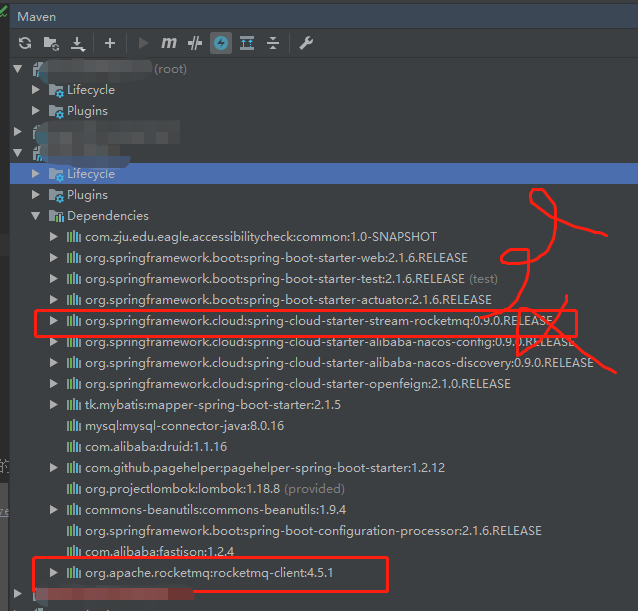
- 客户端rocketmq-client是否与服务器端rocketmq是相同版本,版本一定要匹配;
- 在版本匹配的基础上,须写入正确的dependency,我就是其他都对,结果多了一个依赖就死活不行,如下图,第一个红框的依赖是不需要,反正我有这个依赖就报
No route info of this topic,第二个红框是保证和客户端和服务器端版本一致。
ming444
on 30 Dec 2019
@beijing-penguin 引起no route info的主要原因是因为Broker没有正确连接到NameServer。我发现你在代码中设置namesever地址,如果设置nameserver要起作用,则设置代码须在controller.initialize()之前。另外推荐你采用其他方式配置nameserver,比如设置eclipse中设置broker程序参数 -n localhost:8888,可以看下nameserver的最佳实践。
非常感谢您的专业解答,确实 是broker main方法中设置controller应该在initialize()之前。我模拟命令行,再次用代码设置 args = new String[] {"-n","127.0.0.1:9876","autoCreateTopicEnable=true"};入参的方法,问题得到解决。。再次感谢。
public static void main(String[] args) {
        args = new String[] {"-n","127.0.0.1:9876","autoCreateTopicEnable=true"};
        start(createBrokerController(args));
    }

    public static BrokerController start(BrokerController controller) {
        try {
            //controller.getBrokerConfig().setBrokerIP1("localhost");
            //controller.getBrokerConfig().setNamesrvAddr("localhost:8888");
            //controller.getBrokerConfig().setAutoCreateTopicEnable(true);
            controller.start();

            String tip = "The broker[" + controller.getBrokerConfig().getBrokerName() + ", "
                + controller.getBrokerAddr() + "] boot success. serializeType=" + RemotingCommand.getSerializeTypeConfigInThisServer();

            if (null != controller.getBrokerConfig().getNamesrvAddr()) {
                tip += " and name server is " + controller.getBrokerConfig().getNamesrvAddr();
            }

            log.info(tip);
            System.out.printf("%s%n", tip);
            return controller;
        } catch (Throwable e) {
            e.printStackTrace();
            System.exit(-1);
        }

        return null;
    }
谢谢你的示例,我也成功运行了
 bigdogiloveyou
on 5 Jun 2020
bigdogiloveyou
on 5 Jun 2020
Related issues
 xxd763795151
·
6Comments
xxd763795151
·
6Comments
xxd763795151
·
6Comments
xxd763795151
·
6Comments
 baihezhuo
·
3Comments
baihezhuo
·
3Comments
 jiangxinlingdu
·
3Comments
jiangxinlingdu
·
3Comments
 xingzheone
·
4Comments
xingzheone
·
4Comments
Most helpful comment
历时一天终于跑起来了,回顾官网起步教程中存在的各种坑:
坑爹 # 1
启动 Broker
很遗憾,上述方式直接忽略指定 Name Server 的步骤,导致 Name Server 不知道 Broker 的存在。
解决方案
编辑
conf/broker.conf使用以下指令启动 Broker
坑爹 No route info of this topic # 2
RocketMQ 并不会自动创建 TopicTest,因此你必须手动创建该 Topic。
解决方案
坑爹 No route info of this topic # 3
还是遇到这个错误?! 你是不是参考了以下官方示例?
以上代码创建完成 Producer 之后,立即调用 shutdown(),导致异步操作失败,最终抛出一个风马牛不相及的异常
No route info of this topic:解决方案
注释掉
producer.shutdown();即可。坑爹 # 4
RocketMQ 内部代码一行注释看不到,我也是服气了。