Rocket.chat: "Hide roles" not working
Description:
Setting "Hide roles" in user preferences to "True" is not working.
Steps to reproduce:
- Add roles to users
- Go into user preferences and set "Hide roles" to "True"
Expected behavior:
Roles should be hidden in the chat window.
Actual behavior:
Roles are shown, same as if "Hide roles" would be disabled.
Server Setup Information:
- Version of Rocket.Chat Server: 2.3.0
- Operating System: Debian 9.11
- Deployment Method: tar
- Number of Running Instances: 1
- DB Replicaset Oplog:
- NodeJS Version: v8.11.3
- MongoDB Version: 3.6.16
Client Setup Information
- Desktop App or Browser Version: Desktop and Firefox
- Operating System: Arch / Ubuntu
Relevant logs:
No errors are logged about this issue.
 Perflyst
All 9 comments
Hi! I would like to work on this.
 aashaypalliwar
on 6 Dec 2019
aashaypalliwar
on 6 Dec 2019
Can I work on this? I already made some progress.
 sairajsawant
on 8 Dec 2019
sairajsawant
on 8 Dec 2019
@ggazzo can you please review my PR?
sairajsawant
on 9 Dec 2019
@Perflyst the hide roles setting will affect the messages rendering only since it's under the message's section in the user's preference panel.
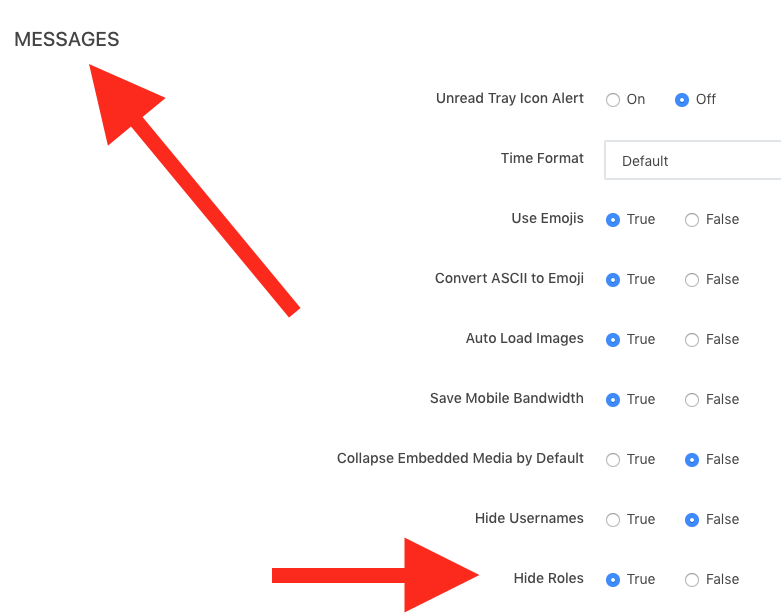
Is this issue related to a but where the roles are still be shown in messages, or you expect to hide the roles in other parts of the application?
 rodrigok
on 9 Dec 2019
rodrigok
on 9 Dec 2019
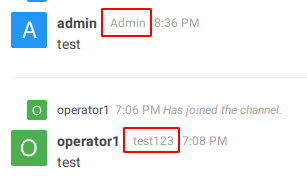
The roles are shown behind the name in the chat window (group, private message etc)
This was not the case before the update to latest version.
On December 9, 2019 12:19:03 PM UTC, Rodrigo Nascimento notifications@github.com wrote:
@Perflyst the hide roles setting will affect the messages rendering
only since it's under the message's section in the user's
preference panel.
Is this issue related to a but where the roles are still be shown in
messages, or you expect to hide the roles in other parts of the
application?--
You are receiving this because you were mentioned.
Reply to this email directly or view it on GitHub:
https://github.com/RocketChat/Rocket.Chat/issues/15931#issuecomment-563212870
Perflyst
on 9 Dec 2019
@Perflyst can you add a screenshot here demonstrating the issue?
rodrigok
on 10 Dec 2019
Of course, see the screenshot below
Perflyst
on 14 Dec 2019
Can anybody explain to me what is the real issue here? I have tested it and the behavior I came up with was:
- when
hide rolesis true for a user (say user1 role1) then he can't see anybody's role in the chat area but he can see the roles of other users (say user2 role2)in the side panel. - But again in side-panel, strange behavior is, he can't see the role of himself i.e. role2 but can see other's role role1.
 subham103
on 5 Feb 2020
subham103
on 5 Feb 2020
This issue appears to be fixed after updating to 2.4.1
The issue was that if "Hide roles" in user settings was set to "True" all the roles behind a username were still shown. It looked the same, doesnt matter if this user settings was set to True or False.
Perflyst
on 6 Feb 2020
Related issues
 danpospisil
·
3Comments
danpospisil
·
3Comments
 lunitic
·
3Comments
lunitic
·
3Comments
 zeigerpuppy
·
3Comments
zeigerpuppy
·
3Comments
 djeber
·
3Comments
djeber
·
3Comments
 Buzzele
·
3Comments
Buzzele
·
3Comments