Rocket.chat: [BUG] Rocket chat will always set header Access-Control-Allow-Origin
Description:
Comes from: DocsIssues 1155
If you embed RocketChat in a second web, lets call it https://domain2.com
There is a problem:
You cant specify more than 1 url in 'Access-Control-Allow-Origin'.
RFC says Yes (delimited by comas ",") but most major browsers still say No and will throw a error.
The big problem is that RocketChat server will always include 'Access-Control-Allow-Origin' ignoring the option in Administration -> General -> Rest-Api (see image)
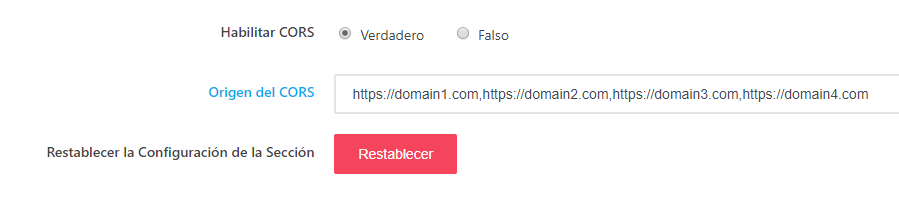
It doesn't matter if you set it to True or False. It will always include 'Access-Control-Allow-Origin'.
The thing is that this way you can not do websocket, Rest-Api or RealTimeApi request. They will fail when Authentication is needed and a preflight OPTION needs to be passed to RocketChat Server. Browser will deny it.
You should allow 'Access-Control-Allow-Origin' to be specified in the Apache2 virtualhost, Nginx or whatever everyone else is using.
If you try to include 'Access-Control-Allow-Origin' in the virtualhost file you get a error for duplicate, and it throws it with both True and False option selected.
Remember that in authenticated request you cant specify "*" and even if you could its a security breach if you do it.
Steps to reproduce:
- Embed RocketChat in a first domain. For example: https://domain1.com
- If you want Authenticated Request across CORS you have to go to: https://my.Rocket.Chat.Url/ -> Administration -> General -> Rest-Api -> Enable CORS and in CORS Origin write https://domain1.com (like in image)
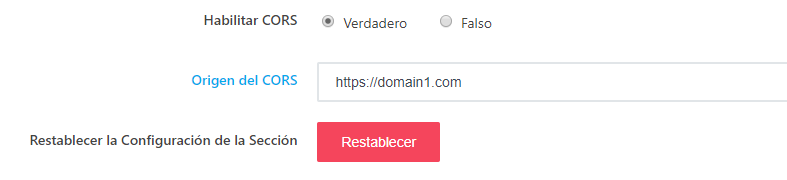
- Till now all good.
- Now embed RocketChat in a second domain. For example: https://domain2.com
- Again, if you want Authenticated Request across CORS you have to go to: https://my.Rocket.Chat.Url/ -> Administration -> General -> Rest-Api -> Enable CORS and in CORS Origin write https://domain2.com (but we dont want to deny access to: https://domain1.com, so we add our second domain at the end, like in image)

Expected behavior:
domain1 and domain2 should be allowed to perform CORS request.
Actual behavior:
Browser says NO:
The 'Access-Control-Allow-Origin' header contains multiple values 'https://domain1.com,https://comain2.com', but only one is allowed. Origin 'https://domain2.com' is therefore not allowed access.
The easy way should be (under Apache2):
- Create a subdomain called chat.domain2.com
- Edit the virtualhost config file adding:
'Header always set Access-Control-Allow-Origin https://domain2.com'
(plus additional config specified in DocsIssues 1155 )
- But for now you cant specify 'Access-Control-Allow-Origin' parameter because it will throw a duplicate error.
Server Setup Information:
Version of Rocket.Chat Server: 0.74.2
Operating System: Linux x64, Ubuntu 18.04
Deployment Method: snap
Number of Running Instances: 1
NodeJS Version: v8.11.4
 fasttrackhost
All 10 comments
 MarcosSpessatto
Thank you for the reply,
CORS is not the problem, we already embedded RocketChat in a Iframe, Auto Login working well, and authenticated requests can be made too, see 1155.
Please also have a look at bug #13859
The problem is:
'Header always set Access-Control-Allow-Origin https://domain1.com'
As explained, the Header parameter Access-Control-Allow-Origin is set by RocketChat Server and that is wrong, because if we want to embed RocketChat in a Iframe on a second domain Authenticated CORS will not be posible on both domain1 and domain2, because with authenticated CORS request you cant set Access-Control-Allow-Origin to "*" neither to more than 1 domain "https://domain1.com, https://domain2.com"
What we want is: RocketChat Server must stop setting the header Access-Control-Allow-Origin when In Administration -> General -> Iframe -> CORS is set to False.
fasttrackhost
on 28 Mar 2019
this is a security threat .how can we resolve it ?
 iconist
on 2 Apr 2019
iconist
on 2 Apr 2019
I don't think just removing necessarily solves
But.. if multiple are provided we could simply check to see if among the ones allowed and if so respond with just that host instead of the raw string with both values. This is how typically done.
So if set to: https://domain1.com, https://domain2.com
You request with https://domain1.com Access-Control-Allow-Origin: https://domain1.com
And you request with https://domain2.com Access-Control-Allow-Origin: https://domain2.com
 geekgonecrazy
on 24 Apr 2019
geekgonecrazy
on 24 Apr 2019
I'm sorry but #14815 has nothing to do with the Rest API or the iframe login, I believe it was wrongly referenced and closed.
 serviceman
on 17 Jun 2019
serviceman
on 17 Jun 2019
I agree, this is still happening.
How do we whitelist multiple domains without using * and allowing every origin?
I also tried using a regex https?://(localhost:1337|my-other.dev-domain) but that gets errored as an "invalid value".
 humancatfood
on 16 Sep 2019
humancatfood
on 16 Sep 2019
Any update on this? Is this a bug with Rocket Chat?
 johnmikel
on 23 May 2020
johnmikel
on 23 May 2020
Experiencing the same problem. In my case i adjusted nginx to detect the allowed domains and add a Access-Control-Allow-Origin directive to that domain only, but if i let CORS enabled on Rocketchat it will add another domain (or *) and request will fail due to multiple domains, if i disable CORS it still overrides the nginx setup and request also fails.
I like the idea of setting multiple domains on RocketChat so that it checks if the origin is within the list and only add that domain to the Access-Control-Allow-Origin directive
 helders
on 9 Jun 2020
helders
on 9 Jun 2020
Even I am facing this issue
 cryptoe
on 23 Jul 2020
cryptoe
on 23 Jul 2020
Any update about this one?
We have the same issue...
 galshiff
on 31 Aug 2020
galshiff
on 31 Aug 2020
Related issues
 antn89
·
3Comments
antn89
·
3Comments
 Buzzele
·
3Comments
Buzzele
·
3Comments
 karlprieb
·
3Comments
karlprieb
·
3Comments
 zeigerpuppy
·
3Comments
zeigerpuppy
·
3Comments
 mddvul22
·
3Comments
mddvul22
·
3Comments
Most helpful comment
I don't think just removing necessarily solves
But.. if multiple are provided we could simply check to see if among the ones allowed and if so respond with just that host instead of the raw string with both values. This is how typically done.
So if set to: https://domain1.com, https://domain2.com
You request with https://domain1.com Access-Control-Allow-Origin: https://domain1.com
And you request with https://domain2.com Access-Control-Allow-Origin: https://domain2.com