Rocket.chat: Twitter URL expansion
Our instance does not unfurl Twitter URLs at all. What could be the matter here and where do I point our admins to fix this?
 alper
alper
All 25 comments
Could You fill Bug report template? Right now it is hard to understand what is the problem.
 piotrkochan
on 12 Dec 2018
piotrkochan
on 12 Dec 2018
Something like this? I'm looking for pointers as to what could cause this because I understand that RocketChat should do some link expansion at least.
Description:
Twitter links are not expanded.
Steps to reproduce:
- Go to a private group
- Paste a twitter link in the channel
- The channel displays only the text of the URL
Expected behavior:
I expect the body of the tweet with the text to be rendered below the URL to the tweet in question.
alper
on 12 Dec 2018
It should work, at least it works on my RC instance:

Please verify that Message -> Embed Link Previews option is enabled, also try Clear Cache Now button.
piotrkochan
on 12 Dec 2018
You can also add the "Search" app from the marketplace to display the latest status messages from any Twitter user.
 wreiske
on 13 Dec 2018
wreiske
on 13 Dec 2018
@wreiske Maybe he wanted to say to actually embed the tweet in the message. I am trying to embed the tweet.
 fliptrail
on 11 Mar 2019
fliptrail
on 11 Mar 2019
Here it's not working too. Server version: 2.1.1
Embed Link previews it's an admin configuration?
 lucianomlima
on 13 Nov 2019
lucianomlima
on 13 Nov 2019
Embed Link previewsit's an admin configuration?
As above:
Admin: Message -> Embed Link Previews
 reetp
on 13 Nov 2019
reetp
on 13 Nov 2019
Thanks!
lucianomlima
on 14 Nov 2019
We've got Embed Link Previews enabled but still don't see previews for Twitter.
 baurmatt
on 9 Apr 2020
baurmatt
on 9 Apr 2020
We are experiencing the same issue, Embed Link Previews is enabled but the tweets are not expanded.
 sjoerdmaessen
on 15 May 2020
sjoerdmaessen
on 15 May 2020
We are also experiencing this issue in version 3.3.0. Embed Link Previews is enabled.
Most pages works just fine, the problem seems to be with Twitter.
 danielfariati
on 5 Jun 2020
danielfariati
on 5 Jun 2020
Can also confirm this issue in 3.3.0, simply paste a link to a tweet and no embed :(
I'm not that familiar with how the embed process works, but I could possibly investigate with some guidance. Does anyone know if Twitter embeds fall under the umbrella of oembed? If so, I wonder if Twitter needs a Provider registered in this file compatible with their oembed API:
Otherwise it seems like the problem may be somewhere in here:
https://github.com/RocketChat/Rocket.Chat/blob/4a2bdffd400d65e592abf8a9427a938c65d3ea10/app/oembed/server/server.js
Also note that this seems to be a resurgence of the following issue, which may have existed for quite some time: https://github.com/RocketChat/Rocket.Chat/issues/15144
 Cleod9
on 16 Jun 2020
Cleod9
on 16 Jun 2020
Just opened a PR 🙂
https://github.com/RocketChat/Rocket.Chat/pull/17954
Cleod9
on 18 Jun 2020
So some good news on this front - not only were my changes just merged to fix the problem, but I also discovered that the embed can be enhanced further by including Twitter's official widget in your Rocket.Chat instance's Custom Scripts:
After the update with the fix is released you'd simply place the script Twitter provides there as a "Custom Script for Logged in Users" (excluding the <script> tags) and it should work like so:
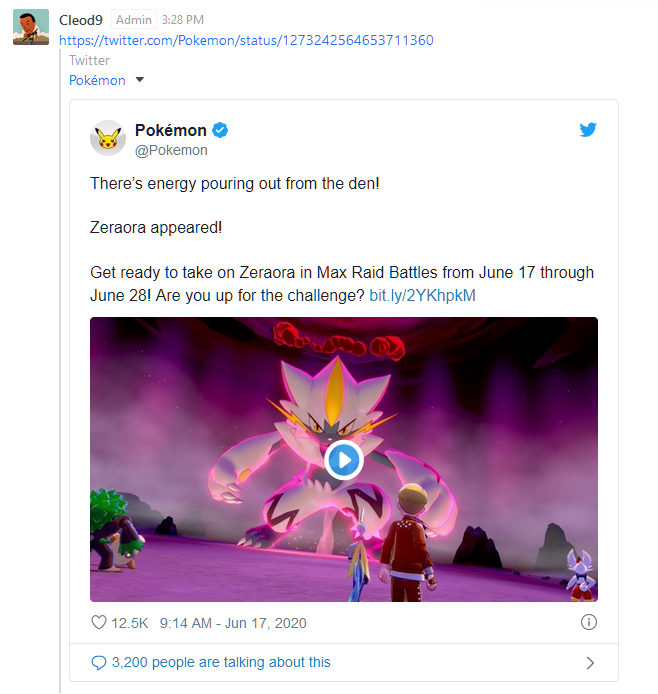
I'm not sure if this is something that should be baked into Rocket Chat or not necessarily since it wouldn't be cached via this approach, but it's nice that this will be possible in an upcoming release regardless 😉
Cleod9
on 19 Jun 2020
Good job working on this!
lucianomlima
on 20 Jun 2020
closed by #17954 :)
 ggazzo
on 20 Jun 2020
ggazzo
on 20 Jun 2020
So some good news on this front - not only were my changes just merged to fix the problem, but I also discovered that the embed can be enhanced further by including Twitter's official widget in your Rocket.Chat instance's Custom Scripts:
After the update with the fix is released you'd simply place the script Twitter provides there as a "Custom Script for Logged in Users" (excluding the
<script>tags) and it should work like so:
I'm not sure if this is something that should be baked into Rocket Chat or not necessarily since it wouldn't be cached via this approach, but it's nice that this will be possible in an upcoming release regardless 😉
@Cleod9 were you able to get it to render in the mobile apps? Using the rocketchatctl method of installing, I am able to get Twitter links to fully render with graphic in the desktop browser. I am able to get the Twitter links to partially render without graphic in mobile browsers like my mobile Safari or chrome and I get nothing at all but a gray box with the Twitter handle in both the iOS and android apps
 mosi1276
on 20 Jul 2020
mosi1276
on 20 Jul 2020
@mosi1276 Sorry unfortunately not, the mobile app is a different beast since it has a different method of rendering. I can't speak too much to it since I'm not familiar with mobile app programming, but it seems likely that it's drawing its UI using native mobile components rather than a webview, so the HTML code that the Twitter Oembed API returns wouldn't be usable like it is on the desktop and mobile internet browsers.
Cleod9
on 21 Jul 2020
Thanks again for the reply @Cleod9 and I also appreciate all the work you have already put in to the fix for the desktop and browser versions. Hopefully as the move to a single code base comes along, this issue and ones like it will start to resolve either on their own or with a little help from the team and/or community
mosi1276
on 21 Jul 2020
Can someone please tell us if this is being resolved. If we can't have twitter previews, we have to find another solution. Is this working now, with the script tags suggested? What about mobile?
 shoqvalue
on 17 Sep 2020
shoqvalue
on 17 Sep 2020
@shoqvalue I can't speak for the team's status on this, but I can provide the code i used to get the the stylized Twitter oembed to show up on Desktop:
https://gist.github.com/Cleod9/3c96eab11555a787d28b495988d60545
If replace Line 4 with Twitter's widget.js and paste the Gist into your Custom Script for Logged In Users (under your Layout Settings) you will see oembeds similar to the one i screenshotted above whenever you select a new channel. You can also tweak this of course by modifying my JS code
If you do this you may also want to add this in your Custom Script for Logout Flow to ensure the events are cleared up upon logging out:
clearInterval(window.__tweetOembedCheck);
This will not work for mobile unfortunately, i don't believe there is a custom Javascript capability for mobile so this would have to be handled on the backend I assume.
Cleod9
on 18 Sep 2020
Ok, so I stumbled on this (https://github.com/RocketChat/Rocket.Chat/issues/12924#issuecomment-646759538) and added Twitter's script as discussed in the #12924 comment above. That seemed to do the right thing. It should just be rolled into Rocket.Chat as a configurable default IMHO. This is too much work for expected behavior (as we see in virtually any collaboration package today).
 rzaSF
on 2 Oct 2020
rzaSF
on 2 Oct 2020
Seems like this has really just been a long term issue, off & on... (i.e. #314)
rzaSF
on 3 Oct 2020
The unfortunate part about this solution (https://github.com/RocketChat/Rocket.Chat/issues/12924#issuecomment-646759538), existing Tweets in the chat history are only rendered inline when first joining or loading the channel. Navigate away to another channel with Tweets in chat history, and those do not render inline. The solution above is a bit of a "tease" of the expected behavior though does not provide a consistent experience.
rzaSF
on 3 Oct 2020
@rzaSF That's true, I stopped my solution at the point I did for efficiency reasons. The way it works it will detect new tweets on channel load, in addition to as you scroll upwards since it checks for the oldest post id in the currently loaded channel at the specified interval. But it doesn't bother checking if the latest id has changed which would include recent posts. The reason for that is because I'm not entirely sure how Rocket Chat's pagination works, so it would be a bit risky to just assume the latest post id in the channel is the latest and not just something that was pulled in because the user was scrolling upward. I'm sure it probably wouldn't take too much to get it checking for newer posts as well, though this is something that wasn't necessary for my use case
Cleod9
on 3 Oct 2020
Related issues
 Buzzele
·
3Comments
Buzzele
·
3Comments
 lunitic
·
3Comments
lunitic
·
3Comments
 antn89
·
3Comments
antn89
·
3Comments
 karlprieb
·
3Comments
karlprieb
·
3Comments
 mddvul22
·
3Comments
mddvul22
·
3Comments