Rocket.chat: [Marked MD Parser] Line break in messages
Description:
Line break is not working as expected. I have chose Marked from the Markdown parser options through settings. This works with Original option. After going through the code I figured out that the line breaks \n are removed and messages are rendered inside p tag by below code from file package/rocketchat-markedown/parser/marked/marked.js.
msg.html = _marked(s.unescapeHTML(msg.html), {
        gfm,
        tables,
        breaks,
        pedantic,
        smartLists,
        smartypants,
        renderer,
        sanitize: true,
        highlight
    });
Just wanted to confirm that whether is intentional or not? In addition, the sub options under Marked
Enable Marked Breaks setting is not affecting anything in the view either you chose true or false.
Since p tag is used to render these message, is this UI bug?
Steps to reproduce:
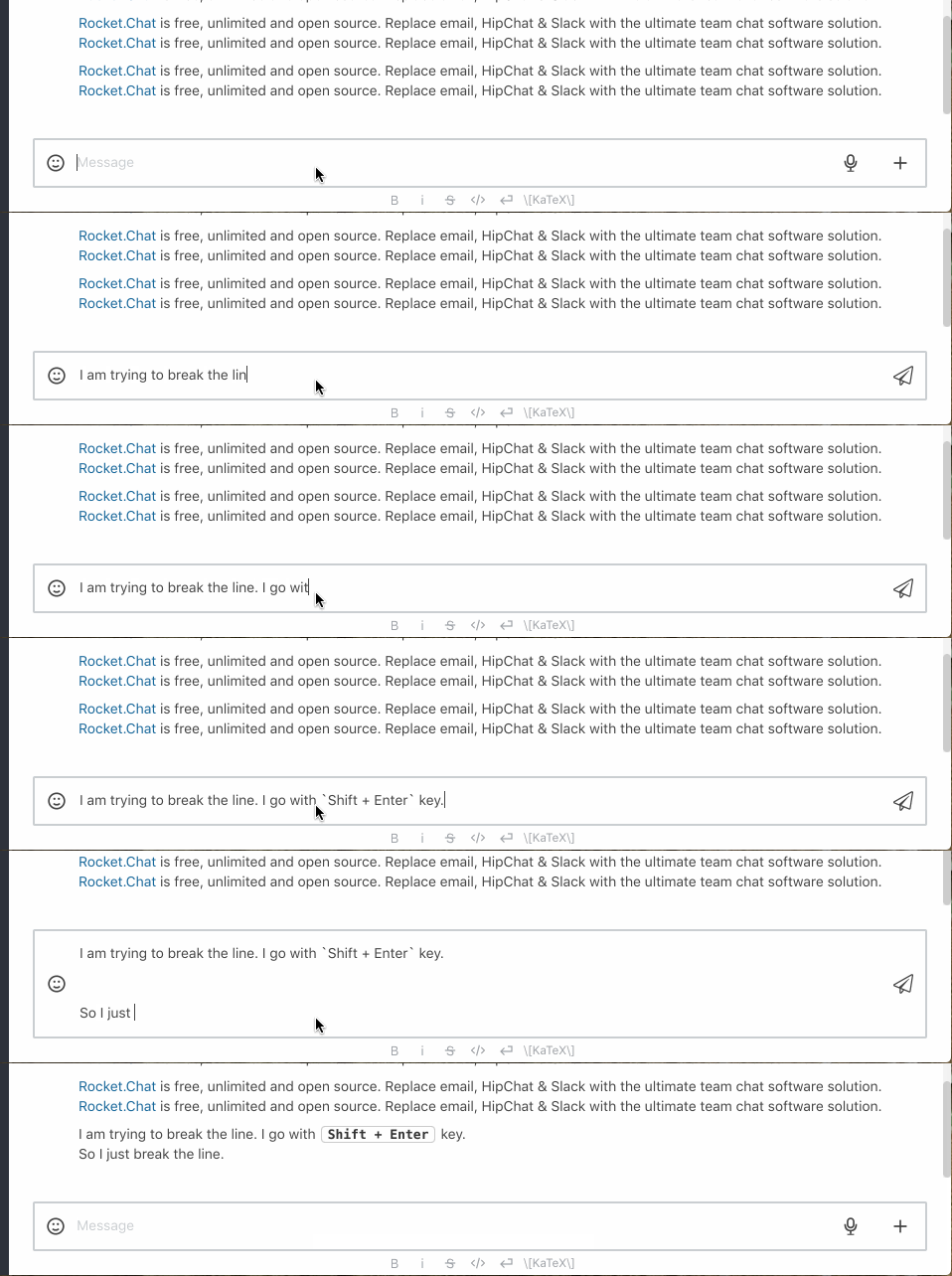
- Go to any channel and type your message with line breaks using
ShiftplusEnterkey.
Expected behavior:
The line break should have actually separated the messages.
Actual behavior:
The line break is not separating the messages.
Server Setup Information:
- Version of Rocket.Chat Server: 0.63.3
- Operating System: Darwin
- Deployment Method:
- Number of Running Instances: 1
- DB Replicaset Oplog: Enabled
- NodeJS Version: v8.11.1
- MongoDB Version:
Additional context
Screenshot
 a5his
a5his
All 15 comments
This is a real problem. And it does not allow to work well.
 felixmind
on 25 Oct 2018
felixmind
on 25 Oct 2018
Yes; this is an issue.
 naiaokami
on 5 Mar 2019
naiaokami
on 5 Mar 2019
Hello team,
just to verify, is there no way to insert a line break into a message at the moment?
 horstepipe
on 19 Sep 2019
horstepipe
on 19 Sep 2019
As far as I am aware this was fixed ages ago and probably should be closed.
Seems to work perfectly at open.rocket.chat
Please test and advise.
 reetp
on 19 Sep 2019
reetp
on 19 Sep 2019
no this doesn't work when you set markdown to "marked". open.rocket.chat seems to have it set to "original", there the line breaks work, but most other markdowns don't work when you have set it to "original".
horstepipe
on 19 Sep 2019
So even a simple list like
`
- list item 1
- list item 2
`
is not being rendered properly when you set it to "original"
horstepipe
on 19 Sep 2019
Still happens 3.0.0-develop
 gabriellsh
on 7 Feb 2020
gabriellsh
on 7 Feb 2020
Indeed, this is a very painful bug. Really need a fix on this.
It can only be solved at the cost of losing major markdown features. That doesn't seem acceptable.
 sst2010
on 27 Apr 2020
sst2010
on 27 Apr 2020
Edit:
- The solution below improved the output of the headings rendered by markdown. ( They appear too congested when Markdown renderer is selected as
Marked. )- You can also add CSS to make line breaks work partially by adding the CSS here: https://github.com/RocketChat/Rocket.Chat/issues/11675#issuecomment-620114907
- It works partially because irrespective of the number of line breaks you enter, only 1 line break will appear.
- It's still a pretty good workaround.
Hey guys, I just found a workaround, a very simple one indeed.
P.S.: You'll need to have access to the Administration settings to apply the workaround.
Step 1: Open Custom CSS
- Open this link: https://chat.incendia.in/admin/Layout
- Replace the domain
https://chat.incendia.inwith your chat site's URL ( e.g., http://localhost:3000/ ).
- Replace the domain
OR
- Click on the
3 dotsin the top-right of the left-panel. - Open
Administrationsettings. - Scroll down to find
Layoutsettings.
Step 2: Add the CSS
- Expand the
Custom CSSsection. - Add the below code below any existing code in the section:
h1 {
margin-top: 0.5em !important;
margin-bottom: 0.5em !important;
padding-top: 0.5em !important;
padding-bottom: 0.5em !important;
border-bottom: 2px solid #ddd !important;
}
h2 {
margin-top: 0.5em !important;
margin-bottom: 0.5em !important;
padding-top: 0.5em !important;
padding-bottom: 0.5em !important;
border-bottom: 2px solid #ddd !important;
}
h3 {
margin-top: 0.5em !important;
margin-bottom: 0.5em !important;
padding-top: 0.5em !important;
padding-bottom: 0.5em !important;
border-bottom: 1px solid #ddd !important;
}
h4 {
margin-top: 0.5em !important;
margin-bottom: 0.5em !important;
padding-top: 0.5em !important;
padding-bottom: 0.5em !important;
border-bottom: 1px solid #ddd !important;
}
h5 {
margin-top: 0.5em !important;
margin-bottom: 0.5em !important;
padding-top: 0.5em !important;
padding-bottom: 0.5em !important;
border-bottom: 2px solid #ddd !important;
}
h6 {
margin-top: 0.5em !important;
margin-bottom: 0.5em !important;
padding-top: 0.5em !important;
padding-bottom: 0.5em !important;
border-bottom: 2px solid #ddd !important;
}
- The
border-bottom: ...lines are a little add-on I tried & liked. 😅 - If you don't like the border below headings in the updated UI, remove those lines. 😃
Have a great day !!
sst2010
on 27 Apr 2020
Thanks for reminding me of the custom css option!
I'm not sure what your CSS has to do with line breaks though.
I'm now using
p + p {
  margin-top: 1em;
}
And that works like a charm
 ulope
on 27 Apr 2020
ulope
on 27 Apr 2020
Thanks for reminding me of the custom css option!
I'm not sure what your CSS has to do with line breaks though.
I'm now usingp + p { margin-top: 1em; }And that works like a charm
Thats great, @ulope .
I apologize for the confusion. I was actually playing around to improve the output of rendered markdown. I've edited my comment to specify the same.
Thanks for bringing it to my attention.
sst2010
on 27 Apr 2020
margin-top: 1em;
@ulope Consider updating this to margin-top: 1em !important;.
This will prevent the custom CSS from being overridden by any CSS of Rocket.Chat.
sst2010
on 27 Apr 2020
thank you both, these are good workarounds!
horstepipe
on 28 Apr 2020
Update: it does work. Requires client restart to enable the changes.
Hope this will be fixed in main source tree sooner, rather than latter.
Doesn't work for me =(
Tried both p + p & headers custom CSS, but it doesn't apply.
Version 3.3.3
Apps Engine Version 1.15.0
Any considerations?
Switched to Marked (from Original) to make sure it looks and feels right to our users after Slack, and now it doesn't work as expected, which is a pretty much damn thing.
 alexander-potemkin
on 18 Jun 2020
alexander-potemkin
on 18 Jun 2020
None of these fixes worked for me.
 keldian
on 14 Oct 2020
keldian
on 14 Oct 2020
Related issues
 royalaid
·
3Comments
royalaid
·
3Comments
 lunitic
·
3Comments
lunitic
·
3Comments
 Buzzele
·
3Comments
Buzzele
·
3Comments
 karlprieb
·
3Comments
karlprieb
·
3Comments
 mddvul22
·
3Comments
mddvul22
·
3Comments
Most helpful comment
Thanks for reminding me of the custom css option!
I'm not sure what your CSS has to do with line breaks though.
I'm now using
And that works like a charm