Rocket.chat: [Bug] Avatars with transparent background get background after upload
Description:
Users can upload pngs with transparent backgrounds as avatars. In the past, the transparency was displayed correctly. Currently, a transparent background is converted in a black one after upload.
Steps to reproduce:
- Upload any png with transparent background / elements as avatar
Expected behavior:
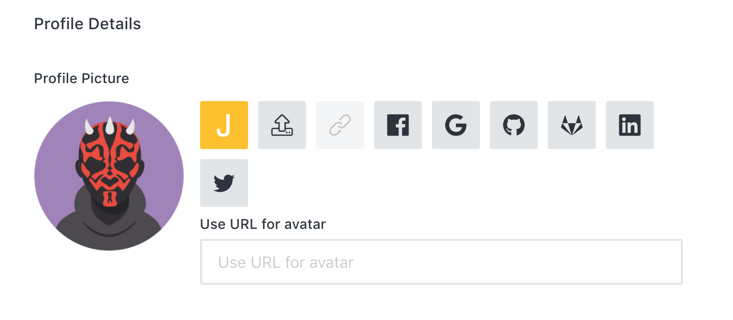
Actual behavior:
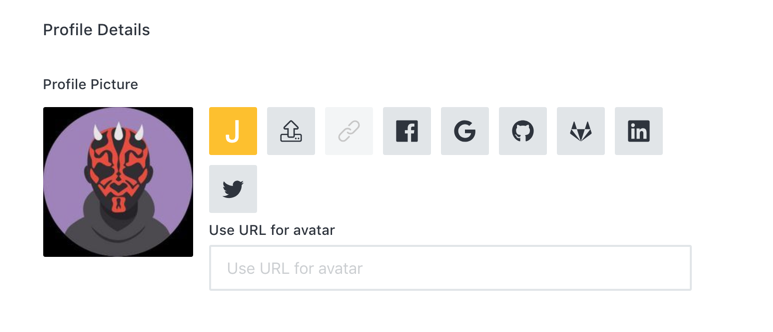
Server Setup Information:
- Version of Rocket.Chat Server: 0.66.0-rc.1 (open.rocket.chat)
Tested with Chrome.
 janrudolph
All 14 comments
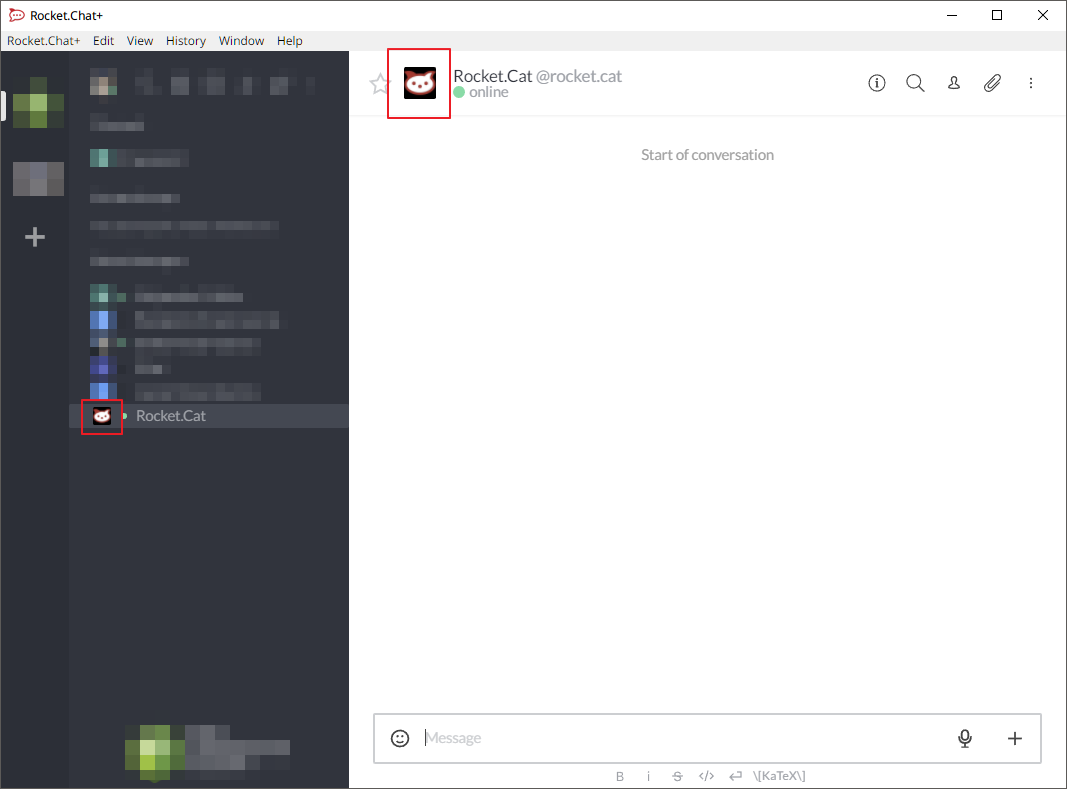
Same issue here with all transparent avatars, including stock (not only uploaded):
Server:
Rocket.Chat
| Version | 0.67.0-develop |
| ----------------------- | --------------------------------------------------------- |
| Database Migration | 129 |
| Database Migration Date | Tue Jul 03 2018 21:11:13 GMT-0500 (Central Daylight Time) |
| Installed at | Tue Jul 03 2018 10:28:32 GMT-0500 (Central Daylight Time) |
| Uptime | 14 hours, 49 minutes, 50 seconds |
| Deployment ID | wecGmPkstnsm2e7ge |
| PID | 1 |
| Running Instances | 1 |
| OpLog | Enabled |
Commit
| Hash | c37a90aabea2ca986219dd12b67d61df2e2d867e |
| ------- | ------------------------------------------------------------ |
| Date | Tue Jul 3 17:39:29 2018 -0300 |
| Branch | develop |
| Tag | 0.66.0 |
| Author | Tasso Evangelista |
| Subject | [IMPROVE] Setup Wizard username validation, step progress and optin/optout (#11254) |
Runtime Environment
| OS Type | Linux |
| --------------- | --------------------------------------- |
| OS Platform | linux |
| OS Arch | x64 |
| OS Release | 4.15.0-24-generic |
| Node Version | v8.11.3 |
| OS Uptime | 1 days, 2 hours, 11 minutes, 23 seconds |
| OS Load Average | 0.08, 0.04, 0.01 |
| OS Total Memory | 3.85 GB |
| OS Free Memory | 273.31 MB |
| OS CPU Count | 4 |
Build Environment
| OS Platform | linux |
| ------------ | -------------------- |
| OS Arch | x64 |
| OS Release | 4.4.0-128-generic |
| Node Version | v8.11.3 |
| Date | July 3, 2018 3:52 PM |
 bkraul
on 4 Jul 2018
bkraul
on 4 Jul 2018
Nothing important , but just FYI i encounter the same issue with v:0.72 (fresh install ).
Info
Rocket.Chat
Version 0.72.0
ID de déploiement mAeri37RcW9Stweiy
PID 11543
Exécution d'instances 1
OpLog Désactivé
Commit
Hachage abe1f41202375641f2213afd29314e0fb6f22113
Date Tue Nov 27 23:21:18 2018 -0200
Branche HEAD
Tag 0.72.0
Auteur Rodrigo Nascimento
Sujet Release 0.72.0 (#12742)
Runtime
Type Système d'exploitation Linux
Plate-forme linux
Architecture x64
Version 4.19.3-300.fc29.x86_64
Version de Node v8.11.3
Build Env
Plate-forme linux
Architecture x64
Version 4.4.0-139-generic
Version de Node v8.11.4
 iMowgli
on 3 Dec 2018
iMowgli
on 3 Dec 2018
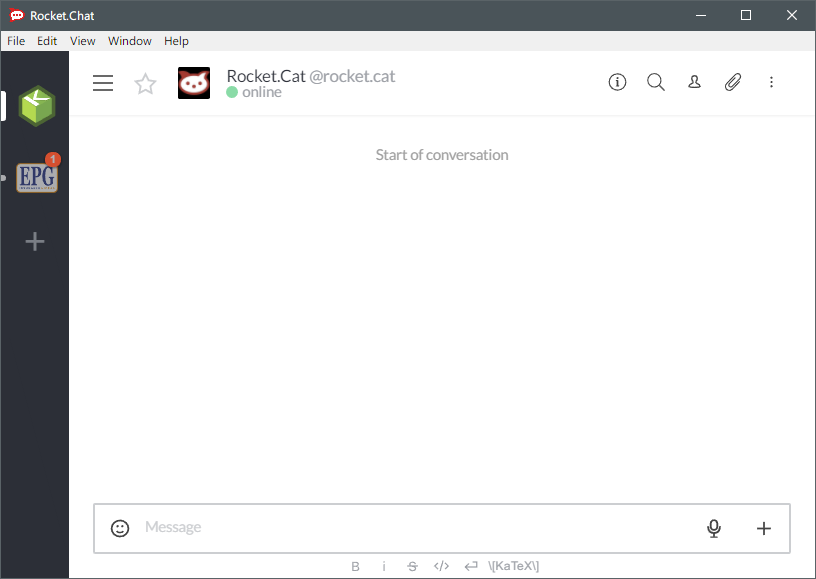
Was the commit supposed to correct this? I have just pulled dc2005b76d8f4e315ebed6e06126102148672e0e, and the problem seems to persist:
bkraul
on 19 Jan 2019
@bkraul unfortunately no, the FIX does not fix the avatars already uploaded, just for new ones. The ones already uploaded lost their transparency to a black background, so it's impossible to convert back and we can't revert the Rocket.Cat one cuz some installations may have changed the Rocket.Cat's avatar. In this case you will need to reupload the Rocket.Cat's avatar manually.
 rodrigok
on 19 Jan 2019
rodrigok
on 19 Jan 2019
@rodrigok, I see...however, this being stock Rocket.Cat avatar, where would one find the original stock Rocket.Cat logo in order to re-upload?
bkraul
on 19 Jan 2019
Found it. For anyone who needs it, it is here:
https://github.com/RocketChat/Rocket.Chat.Artwork/blob/master/Logos/rocketcat.png
bkraul
on 19 Jan 2019
@rodrigok, I just realized...how do I re-upload the Rocket.cat avatar, since uploading avatars require you log in as the acccount you want to change the avatar for? If I set a password for the Rocket.cat bot, will that break its bot functionality? Apologize for the many questions.
bkraul
on 19 Jan 2019
@bkraul It will not break the bot functionality, unfortunately the only way now to change the Rocket.Cat's avatar is doing what you described, logging in using the Rocket.Cat account.
rodrigok
on 19 Jan 2019
Thanks. So I re-uploaded. I took the time to read through your commit code and see that this is not really transparency, only exchanging the black background for a white background. This would cause issues with dark style themes, but I don't have those at the moment so I am good. Thanks for the help!
bkraul
on 19 Jan 2019
@bkraul We have plans to start accepting PNG as well in the near future, but right now I'm just fixing the black background 😄
rodrigok
on 19 Jan 2019
so you removed PNG functionality
which caused all pngs to get a black background
people complained about the black background
what does the rc dev do?
1) be logical and revert the force-jpeg code
2) be logical and revert the force-jpeg code
3) be logical and revert the force-jpeg code
4) be logical and revert the force-jpeg code
5) be logical and revert the force-jpeg code
6) be logical and revert the force-jpeg code
7) be logical and revert the force-jpeg code
8) just change the black to white lol nobody will notice
dark themes exist
we have two on our instance
with the black bg it was at least tolerable
:disappointed_relieved: please reopen
 ghost
on 8 Feb 2019
ghost
on 8 Feb 2019
Hi, I am another person with an rc instance.
Like most people who don't like having their eyes hurt, we use a dark theme.
Consider adding a toggle switch or something if you cant be bothered to fix the png issue, would be a dumb fix, but it would at least be a fix... or something close to one. (Even better: just let the admin set a custom color. Not everyone uses #000 or #FFF for a background color. Or even even better: Just fix the png issue entirely.)
 jacwib
on 8 Feb 2019
jacwib
on 8 Feb 2019
Sharp seems to support gif resize now https://github.com/lovell/sharp/issues/245#issuecomment-462131448
rodrigok
on 8 Aug 2019
We will work to keep GIFs and PNGs as they are, convert SVGs to PNGs and everything else will be converted to JPG.
 engelgabriel
on 8 Aug 2019
engelgabriel
on 8 Aug 2019
Related issues
 marceloschmidt
·
3Comments
marceloschmidt
·
3Comments
 mddvul22
·
3Comments
mddvul22
·
3Comments
 danpospisil
·
3Comments
danpospisil
·
3Comments
 karlprieb
·
3Comments
karlprieb
·
3Comments
 mattlin
·
3Comments
mattlin
·
3Comments
Most helpful comment
We will work to keep GIFs and PNGs as they are, convert SVGs to PNGs and everything else will be converted to JPG.