Rocket.chat: [Bug] Guests do not see channels in the left sidebar
Description:
Teams can invite guests in order to collaborate with non-team members. In the past, this works pretty fine. Since 0.61 guests do not see their channels in the left sidebar anymore (web app). In mobile it works as expected.
Server Setup Information:
- Version of Rocket.Chat Server: 0.61
Steps to Reproduce:
- Add user and assign
guestrole - Invite guest to new channel
- Login as guest user. In the web interface you do not find the channel in the channel list.
Expected behavior:
Mobile:
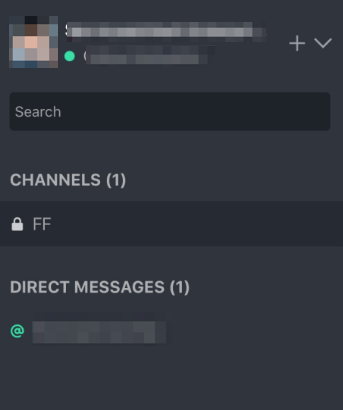
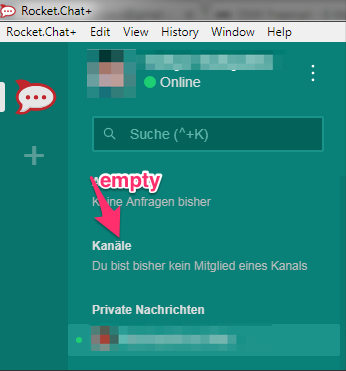
Actual behavior:
Web:
 janrudolph
All 10 comments
@janrudolph Could you test this against the latest version, since we had a lot of changes on the sidebar on version 0.62. Thanks!
 MartinSchoeler
on 2 Mar 2018
MartinSchoeler
on 2 Mar 2018
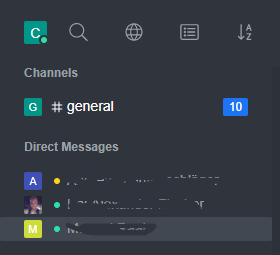
I can't reproduce the error in 0.62.0.
 kaiiiiiiiii
on 2 Mar 2018
kaiiiiiiiii
on 2 Mar 2018
@janrudolph also you should check your permissions page, see if the guest has the appropriate view permissions
MartinSchoeler
on 2 Mar 2018
@MartinSchoeler @kaiiiiiiiii
I launched a plain Rocket.Chat 0.62 server and tested it again. Result: _This kind of error occurs just with private channels._ Please find details below:
Test-setup:
1) Launch new server
2) Add two users: "jan" = admin, "peter" = guest
3) jan created a new private channel (aka group) and invited peter.
4) peter does not find the channel in the left sidebar. If peter opens the channel by pasting the URL in the browser address field, he can access the room. But the room is not listed in the sidebar, see screenshot attached.
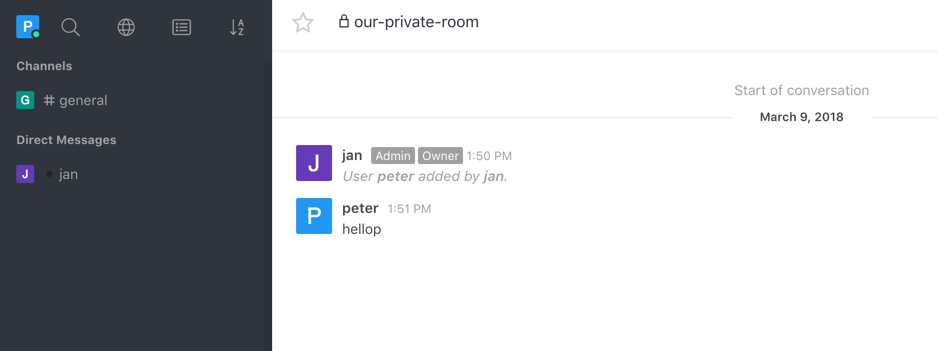
I tested it again with public channels: Channels of this type are listed.
janrudolph
on 9 Mar 2018
This is temporarily solved by searching for the private channel (or promptly clicking on a received notification) and then marking it as favorite.
 mommi84
on 3 May 2018
mommi84
on 3 May 2018
+1
 arteislt
on 29 May 2018
arteislt
on 29 May 2018
@MartinSchoeler - we are experiencing this issue as well on 0.65.1
 danpospisil
on 15 Jun 2018
danpospisil
on 15 Jun 2018
In order for private channels to be visible by guests they have to have _View private room_ view-p-room permission added to their role.
 marek-ciazynski
on 21 Feb 2019
marek-ciazynski
on 21 Feb 2019
Still, I think if they cannot view private channels in sidebar they also shouldn't be able to search for such channels.
marek-ciazynski
on 21 Feb 2019
Our client are having the same issues. They don't see the private groups they are part of. No notification badge or anything. They can search, but when they are part of multiple groups gets annoying. For us is a big problem.
 roura356a
on 11 Mar 2019
roura356a
on 11 Mar 2019
Related issues
 mddvul22
·
3Comments
mddvul22
·
3Comments
 royalaid
·
3Comments
royalaid
·
3Comments
 mattlin
·
3Comments
mattlin
·
3Comments
 ghost
·
3Comments
ghost
·
3Comments
 lunitic
·
3Comments
lunitic
·
3Comments