Rocket.chat: Segoe UI: character descender not correctly rendered
Description:
While using the font Segoe UI, the characters descender (the part of a character (g, j, p, q, y) that descends below the baseline) are not correctly rendered: they are "cut", as you can see on the screenshot below.
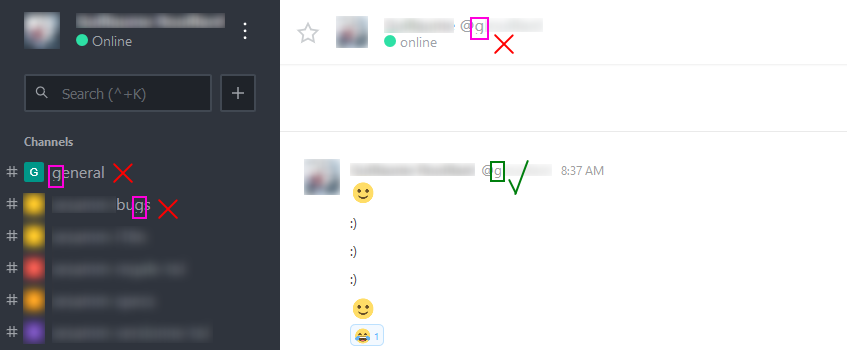
It happens on the left sidebar, the top header bar, the login page form, the administration left sidebar...
Server Setup Information:
- Version of Rocket.Chat Server: 0.61.0
- Operating System: Windows 10 Pro
Steps to Reproduce:
- Set Segoe UI as first font under Administration → Layout → Fonts
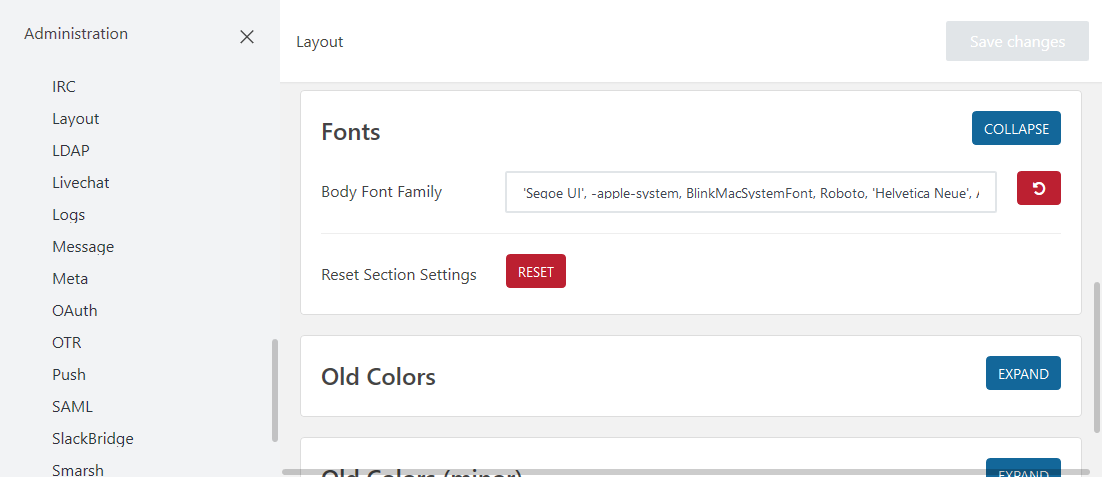
- Observe
Expected behavior:
Characters with descender (g, j, p, q, y) correctly rendered.
Actual behavior:
The descender of the characters g, j, p, q, y are "cut".
 Otiel
Otiel
All 6 comments
Referencing #8129, #8289 and #9151 for historical context.
 TwizzyDizzy
on 26 Feb 2018
TwizzyDizzy
on 26 Feb 2018
Shall I work on this issue?
 vishwakperera
on 6 Mar 2018
vishwakperera
on 6 Mar 2018
This is fixed in v0.62.1.
Otiel
on 7 Mar 2018
This bug is back since a few versions on the top header bar title and description:

I have the issue with v0.65.1.
Left sidebar, login page and administration left sidebar are fine though.
Otiel
on 4 Jun 2018
@Otiel A reference is good, yet I would still vote for a separate issue as this is not exactly identical. Just my 2 cents though.
Cheers
Thomas
TwizzyDizzy
on 4 Jun 2018
@TwizzyDizzy You are right. New issue created: #10992.
I'm closing this one.
Otiel
on 4 Jun 2018
Related issues
 marceloschmidt
·
3Comments
marceloschmidt
·
3Comments
 danpospisil
·
3Comments
danpospisil
·
3Comments
 brendanheywood
·
3Comments
brendanheywood
·
3Comments
 antn89
·
3Comments
antn89
·
3Comments
 neha1deshmukh
·
3Comments
neha1deshmukh
·
3Comments