Rocket.chat: @mentions, @all broken since 0.59.3
Description:
@mentions and @all highlights are boken since update to 0.59.3
Server Setup Information:
- Version of Rocket.Chat Server: 0.59.3, 0.59.4
- Operating System: Linux Debian 8
- Deployment Method(snap/docker/tar/etc): tar bundle
- Number of Running Instances: 1
- DB Replicaset Oplog: Disabled
- Node Version: 4.5.0 - x64
Steps to Reproduce:
- Try to @mention someone or try to highlight all users with @all
- The selection popups is shown but after hitting enter the mention is just normal text and no highlight is sent to other users.
Expected behavior:
@someone should highlight "someone" and @all should highlight all users currently present within the channel
Actual behavior:
Nothing happens. The @-mention is interpreted as normal text
Relevant logs:
No log output regarding warnings or errors.
 Flauschbaellchen
All 10 comments
Hi there,
I just tried to reproduce your issue and cannot confirm this behaviour. I'm on 0.59.4 and @mentions work as expected.
You might wanna add additional information (e.g. browser version) to help other to further debug this.
Cheers
Thomas
 TwizzyDizzy
on 1 Dec 2017
TwizzyDizzy
on 1 Dec 2017
Hi Thomas :)
I'm using Firefox Version 57.0 on Ubuntu 16.06.3. Same error on Chromium 62.0.3202.94.
@-mentions on open.rocket.chat are working as expected with the same browsers.
Loading the history from a channel does not show older @-mentions as highlights but as normal text, too.
Node packages:
root@rocketchat:/home/rocketchat/rocket-chat-0.59.4/programs/server# npm list
[email protected] /home/rocketchat/rocket-chat-0.59.4/programs/server
├── [email protected]
├── [email protected]
├── [email protected]
├── [email protected]
├── [email protected]
├── [email protected]
├── [email protected]
├── [email protected]
├── [email protected]
├── [email protected]
├── [email protected]
├── [email protected]
├── [email protected]
├── [email protected]
├── UNMET DEPENDENCY [email protected]
├── UNMET DEPENDENCY [email protected]
├── [email protected]
├── [email protected]
├── [email protected]
├── [email protected]
├── [email protected]
├── [email protected]
├── [email protected]
├── [email protected]
├── [email protected]
├── [email protected]
├── [email protected]
├── [email protected]
├── [email protected]
├── [email protected]
├── [email protected]
└── [email protected]

npm ERR! missing: [email protected], required by [email protected]
npm ERR! missing: [email protected], required by [email protected]
root@rocketchat:/home/rocketchat/rocket-chat-0.59.4/programs/server# npm install
npm WARN package.json [email protected] No description
npm WARN package.json [email protected] No repository field.
npm WARN package.json [email protected] No README data
npm WARN package.json [email protected] No license field.
npm WARN cannot run in wd [email protected] node npm-rebuild.js (wd=/home/rocketchat/rocket-chat-0.59.4/programs/server)
Flauschbaellchen
on 1 Dec 2017
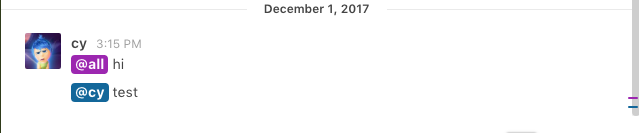
works for me too on 0.59.3
 cy4n
on 1 Dec 2017
cy4n
on 1 Dec 2017
@Flauschbaellchen is it vanilla rocket.chat or have you modified it somehow? do you have any custom CSS? you might want to inspect the element and see what CSS is overwriting the default (and working) one
 sampaiodiego
on 1 Dec 2017
sampaiodiego
on 1 Dec 2017
It's a vanilla installation downloaded from https://download.rocket.chat/build/rocket.chat-0.59.4.tgz without any modifications.
After the npm install I'm starting the server with:
export ROOT_URL=https://chat.example.com # this is not the real domain, of course :)
export PORT=80 # nginx proxy with 80 -> 443 and SSL-certs
export MONGO_URL=mongodb://localhost:27017/rocketchat

cd /home/rocketchat/rocket-chat-0.59.4 && node main.js
The HTML inspection shows the following:
<div class="body color-primary-font-color " dir="auto" data-unread-text="Unread Messages">
  @user <span class="copyonly">*</span><strong>this is a test</strong><span class="copyonly">*</span>
</div>
Thus the a-tag is missing, e.g.
<a class="mention-link " data-username="user" title="">@user</a>
instead of old plain @user
Additionally the other user does not receive any notifications. This cannot be a css-style-only problem?
Flauschbaellchen
on 1 Dec 2017
I'm assuming @user in your test is valid username.. is it right?
I did the same test as you described and this is what I got:
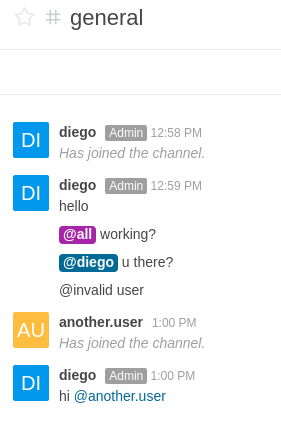
this is the expected behavior
sampaiodiego
on 1 Dec 2017
Yes, this is a valid user... maybe the server just thinks that this is an invalid one? Maybe a database corruption after the update?
Is there a way I can check this (e.g. login to the database and query the list of users available within a channel?)
However, even @all does not work and this is not a valid "user".
All users I tried to @-mention are listed within the userlist of the right side and were active right before I tried it.
Further tests:
- I mentioned an user currently available within a channel.
- User does not get a notification
- User left the channel
- When clicking on the username the profile on the right side still says "remove from room" (maybe another bug?)
- User rejoins the channel
- I retry to @-mention him, but still no notifications
Flauschbaellchen
on 1 Dec 2017
Retested it with the new packaged 0.59.6 stable release downloaded from the webpage.
However, no changes so far as it has been wrongly packaged and includes the 0.59.4 release.
Flauschbaellchen
on 5 Dec 2017
@Flauschbaellchen We had the same problem with our rocketchat installation but some option in /admin/General Subsection UTF8 fixed it... What are your Settings there?
Ohh, and the stable version you just downloaded is in fact 0.59.6. They just forgot to label it correctly
 archang3l-media
on 5 Dec 2017
archang3l-media
on 5 Dec 2017
@archang3l-media wow, thanks, that was the right hint.
The setting has been changed to "[^u0000-u007F]+" while upgrading from 0.59.2 to 0.59.3.
I reset it back to the default value "[0-9a-zA-Z-_.]+" and now the highlighting is working again.
Thanks for the help and support!
Flauschbaellchen
on 5 Dec 2017
Related issues
 amayer5125
·
3Comments
amayer5125
·
3Comments
 marceloschmidt
·
3Comments
marceloschmidt
·
3Comments
 engelgabriel
·
3Comments
engelgabriel
·
3Comments
 brendanheywood
·
3Comments
brendanheywood
·
3Comments
 royalaid
·
3Comments
royalaid
·
3Comments
Most helpful comment
@Flauschbaellchen We had the same problem with our rocketchat installation but some option in /admin/General Subsection UTF8 fixed it... What are your Settings there?
Ohh, and the stable version you just downloaded is in fact 0.59.6. They just forgot to label it correctly