Rocket.chat.reactnative: [BUG] Mentions autocomplete does not work on the mobile app.
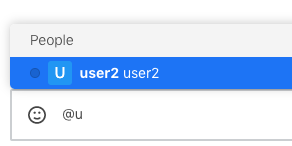
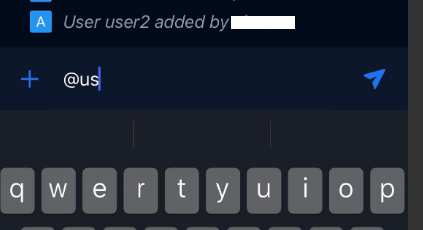
Mention autocomplete which allows the user to see a list of users in the current channel after typing @... does not pop up the users list on mobile devices, it works fine for the same user on desktop app / native web browser.
It does work on mobile only if the user has the view-d-room & view-outside-room permission but then he can see all the users on the server not only the users in the relevant channel.
How to reproduce, verify your user does not have the view-d-room & view-outside-room permission, join a channel and try to mention other users by typing @ + first letter
On desktop app/web it works as expected
Try the same on mobile, does not work
 alonzzz
All 13 comments
I can confirm this for version 4.2.3 on iOS. The selection menu appears only after I enter @ plus one additional letter, which is different from the web app, where the menu appears right after entering @.
 marians
on 19 Jan 2020
marians
on 19 Jan 2020
I would like to work on this issue!
 sarthakpranesh
on 6 Feb 2020
sarthakpranesh
on 6 Feb 2020
@sarthakpranesh You don't have to ask. Just do it and open a PR if you were able to fix it. Thanks.
 diegolmello
on 6 Feb 2020
diegolmello
on 6 Feb 2020
@diegolmello just wanted to make sure no one else is working on it.
I understood the bug and it is not just restricted to @, but it is the same case with # and : too.
sarthakpranesh
on 6 Feb 2020
Confirming issue. Looking forward for the correction.
 alexander-potemkin
on 26 Jun 2020
alexander-potemkin
on 26 Jun 2020
by the way, @diegolmello , can't help understanding why are permissions not preventing user from seeing other users in the channel, prevents from mentioning him/her?
alexander-potemkin
on 8 Jul 2020
@alexander-potemkin Can you give us a reproducible example and/or a video?
I didn't understand what you're talking about exactly.
diegolmello
on 8 Jul 2020
@diegolmello , please, find the video here: https://yadi.sk/i/LpI6ymHhL_BIYA
v4.8.0 from the appstores; same user has no issues on Mac app.
alexander-potemkin
on 13 Jul 2020
@diegolmello , any updates?
alexander-potemkin
on 31 Jul 2020
@alexander-potemkin we've been working on some improvements on the server: https://github.com/RocketChat/Rocket.Chat/pull/18309
We're going to work on them soon on mobile.
Thanks.
diegolmello
on 31 Jul 2020
I see, thank you! Is there happens to be any time estimate?
alexander-potemkin
on 31 Jul 2020
We're still planning next release, so no.
Most probably September.
diegolmello
on 31 Jul 2020
Ok, thank you!
alexander-potemkin
on 31 Jul 2020
Related issues
 sadeghpro
·
5Comments
sadeghpro
·
5Comments
 fbuchmeier-abi
·
3Comments
fbuchmeier-abi
·
3Comments
 monarkh-karina
·
4Comments
monarkh-karina
·
4Comments
 mar-v
·
3Comments
mar-v
·
3Comments
 venkatasubramanis
·
5Comments
venkatasubramanis
·
5Comments