Rocket.chat.electron: [3.0.1] Spell Checker no longer work
- Operating System: Windows 10 version 2004
- App Version: 3.0.1
Installation type: exe
[x] I have tested with the latest version
- [x] I can simulate the issue easily
Description
Spell Checker no longer work since 3.x
I've try to add manually disctionnaries in user env and sys env => same problem
Modifying the file for en_US and fr_FR in "C:UsersjpadminAppDataRoamingRocket.ChatPreferences" => same problem
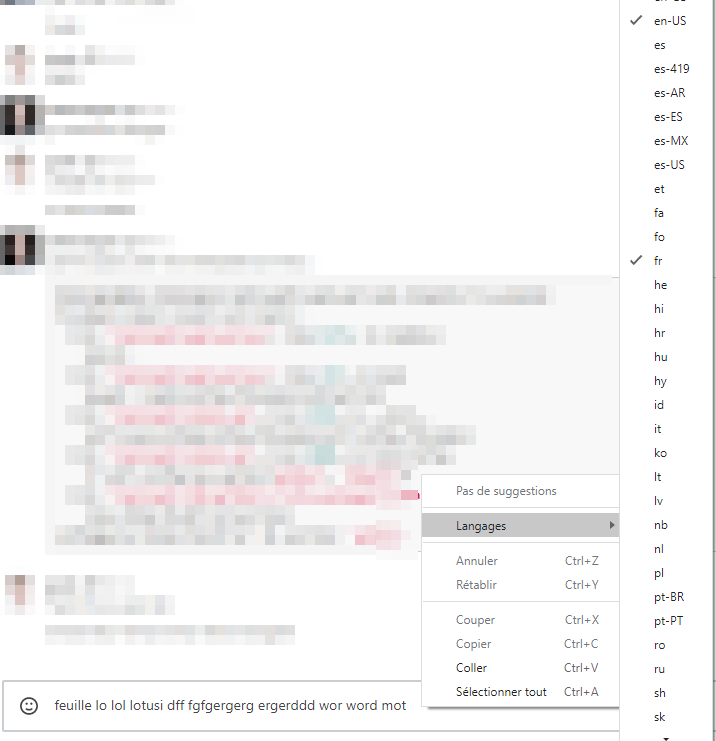
Current Behavior
Option find languages disapear (screen on 2.17.x)
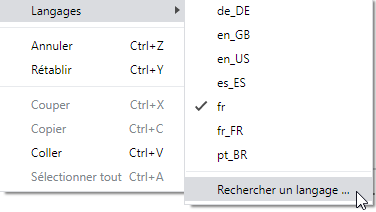
Expected Behavior
Incorrect words should be at least underlined in red.
 jpele-tis
All 11 comments
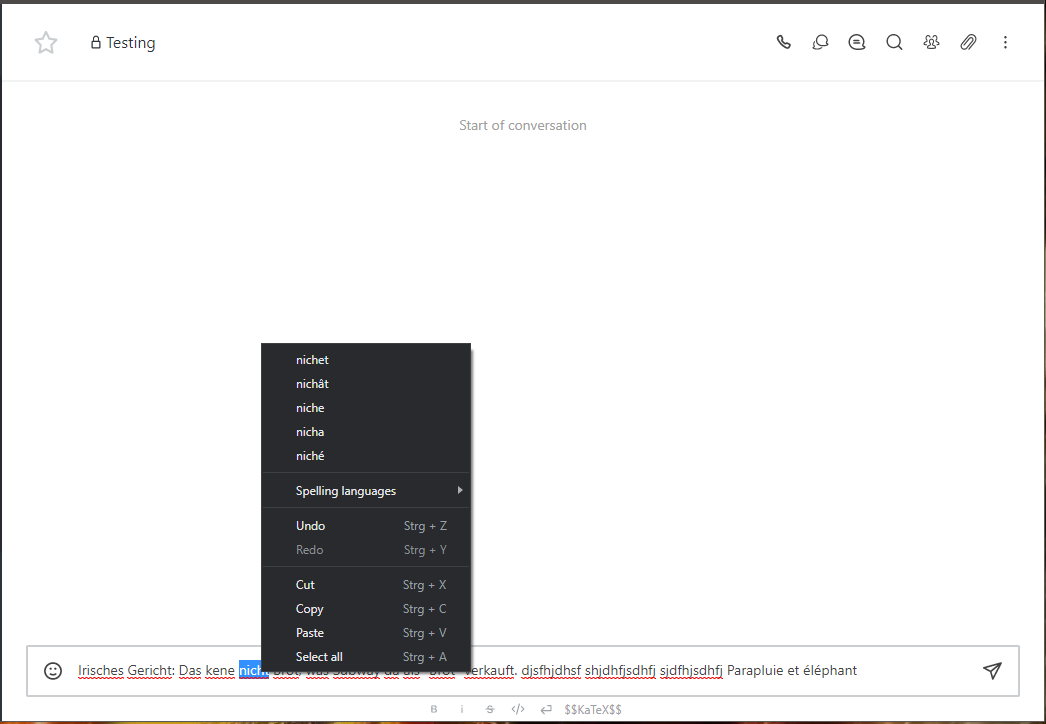
Intresting... same configuration on my end, but it works.: tested with german and french.

 AmatorPhasma
on 2 Oct 2020
AmatorPhasma
on 2 Oct 2020
Try uncheck the langage in the dropdown menu then check it again or do it in another channel ? It worked for me.
 blacklord049
on 2 Oct 2020
blacklord049
on 2 Oct 2020
Try uncheck the langage in the dropdown menu then check it again or do it in another channel ? It worked for me.
Following thoses steps, I've got the same problem on 2 PCs I've tested.
Reinstalling "properly" additionally do not fix the issue.
jpele-tis
on 2 Oct 2020
The dictionaries are downloaded from Google CDN. Is it possible that any download was blocked by some network rule or error?
 tassoevan
on 2 Oct 2020
tassoevan
on 2 Oct 2020
The dictionaries are downloaded from Google CDN. Is it possible that any download was blocked by some network rule or error?
Indeed.
I checked en-US in dictionaries list
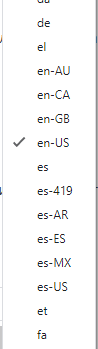
and here what was after

en-US-9-0.bdic file was downloaded to C:Usersankar84AppDataRoamingRocket.ChatDictionariesen-US-9-0.bdic
and copied to C:Usersankar84AppDataRoamingRocket.Chaten-US-9-0.bdic

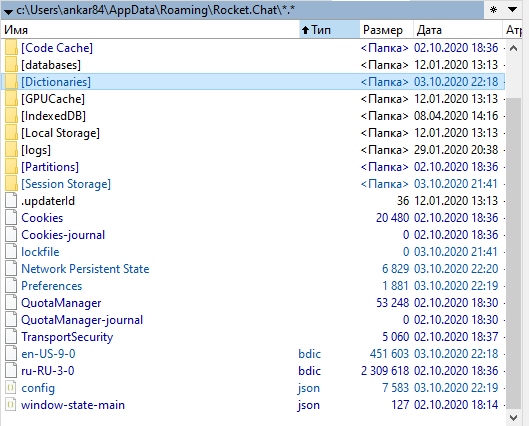
And it works perfect.
No need to do something with dictionaries manually
 ankar84
on 3 Oct 2020
ankar84
on 3 Oct 2020
The dictionaries are downloaded from Google CDN. Is it possible that any download was blocked by some network rule or error?
It is surely blocked by our network, we do not plan to open much for Google, where can we download .bdic files manually? We got a powerful SDT (WAPT) so we're able to place them manually.
Additionnaly, it is planned to add an RC option who block Google background downloads ?
Would you consider implementing bdic files in the RC binary?
jpele-tis
on 5 Oct 2020
Agree with @jpele-tis
Automatic download of selected dictionary it's a really convenient, but there is a lot of companies that block such connections and manual dictionary management it's must have function for such clients.
I believe user need to deal with c:\Users\UserName\AppData\Roaming\Rocket.Chat\Preferences file to configure user dictionaries
{"electron":"spellcheck":{"dictionaries":["ru","en-US"],"dictionary":""}}
And download dictionaries to both folders:
c:\Users\UserName\AppData\Roaming\Rocket.Chat\
c:\Users\UserName\AppData\Roaming\Rocket.Chat\Dictionaries\
ankar84
on 5 Oct 2020
Would you consider impletmenting bdic files in the RC binary?
Not really, as it would increase the bundle size with unused dictionaries.
Automatic download of selected dictionary it's a really convenient, but there is a lot of companies that block such connections and manual dictionary management it's must have function for such clients.
I'll do a double-check in Electron source, but its docs don't state anything about it. For instance, the only option listed is to host your own dictionaries: https://www.electronjs.org/docs/tutorial/spellchecker#does-the-spellchecker-use-any-google-services
tassoevan
on 5 Oct 2020
Not really, as it would increase the bundle size with unused dictionaries.
You're right, 350MB of file size will be really overkill for only dictionnaries.
I managed to find the Google repo, enjoy packaging ;)
git clone https://chromium.googlesource.com/chromium/deps/hunspell_dictionaries
jpele-tis
on 5 Oct 2020
Btw, I've packaged RocketChat with dictionnaries in user env (you need the SDT WAPT)
You can get it here : https://store.wapt.fr/store/tis-rocketchat
jpele-tis
on 28 Oct 2020
So what you plan to do btw @tassoevan ?
 Naworm
on 5 Jan 2021
Naworm
on 5 Jan 2021
Related issues
ankar84
·
4Comments
 AlynxZhou
·
4Comments
AlynxZhou
·
4Comments
 wowansm
·
3Comments
wowansm
·
3Comments
 paulz1
·
3Comments
paulz1
·
3Comments
 bbrendon
·
4Comments
bbrendon
·
4Comments
Most helpful comment
It is surely blocked by our network, we do not plan to open much for Google, where can we download
.bdicfiles manually? We got a powerful SDT (WAPT) so we're able to place them manually.Additionnaly, it is planned to add an RC option who block Google background downloads ?
Would you consider implementing bdic files in the RC binary?