Rocket.chat.electron: Client Auto-Update Does Not Work
My Setup
- Operating System: Windows 10 1909 & 2004 Releases
- App Version: 2.17.10
Installation type: exe
[ ] I have tested with the latest version
- [X] I can simulate the issue easily
Description
Automatic update doesn't work. User is prompted and informed that install will proceed once new client is downloaded. But nothing happens.
Current Behavior
User is notified that there's an update available and clicks on "INSTALL UPDATE"

Dialog pops up letting user know they'll be notified when update is ready to be installed

No notification occurs, no update is installed
Update installer file is downloaded to "C:\Users[username]\AppData\Local\rocket-chat-updater\pending"
File is called "temp-rocketchat-setup-2.17.11.exe

After file is downloaded it disappears
Expected Behavior
- After updated is downloaded, the installer is started and the user is notified
Additional Info
This issue has been around a very long time. At least since I've been using Rocket.Chat which was 3 years ago now. As updates have been coming out we've been instructing users to update manually by downloading the releases through github, but this is tedious as some users don't want to take the time to do it and others don't feel comfortable installing software. It also causes confusion for people who do try, but are constantly prompted that there's an update still every time they launch the client.
 canuckbrian
All 27 comments
Looks like a (nicely documented) duplicate of #1205. We've also observed this issue too going back at least several months in successive version.
 inovari
on 25 Jul 2020
inovari
on 25 Jul 2020
This also appears to be similar to issue #1300
A new bit of info that I hadn't seen in the others. This _may_ be caused by Windows Smart Screen interfering and not posting a pop-up. I manually downloaded .11 for the update and when I went to install I received a smart filter alert that Windows Defender had prevented it from running as seen below.

So, maybe this is a false positive and breaking the install process, or the binary off github has somehow been posted with malicious content?
 torrycrass
on 1 Aug 2020
torrycrass
on 1 Aug 2020
I have had this problem for years. It silently fails, I guess--nothing happens at all except when I reboot, it again reminds me that I need to update, I tell it fine, and it tells me it will tell me when it's ready. It never is ready, apparently...
I think the background downloading is doing a disservice here, especially when it's so unreliable (read: it doesn't work at all, for anyone that I know using it). Instead, download it in the foreground, which should be pretty fast, and when it's done, let the user launch it. Maybe then, they will be able to see what error is occurring, if any.
As of now, users click ok, then forget about it, thinking it will update later, when it won't. I'm not sure why this is so hard to get right.
 adipose
on 12 Aug 2020
adipose
on 12 Aug 2020
Same Issue here. Installer/Updater just disappears.
 Dimitrie23
on 19 Aug 2020
Dimitrie23
on 19 Aug 2020
@canuckbrian @Dimitrie23 I don't know why, but today it worked!
I upgraded from 2.17.9 to 2.17.11 by auto-update feature.
Please check it now.
 ankar84
on 21 Aug 2020
ankar84
on 21 Aug 2020
@ankar84 Just tested it. Did still not work on one of our notebooks.
Edit: Same behaviour as mentioned by OP. Download works but updater disappears without a warning/error.
Dimitrie23
on 21 Aug 2020
I'm guessing it's an asynchronous bug in electron-updater, because I've never been able to reproduce at >= 2.16.*.
@adipose
I think the background downloading is doing a disservice here, especially when it's so unreliable (read: it doesn't work at all, for anyone that I know using it). Instead, download it in the foreground, which should be pretty fast, and when it's done, let the user launch it. Maybe then, they will be able to see what error is occurring, if any.
One workaround I'm trying to code (but I haven't found time to work on it) is make it unobtrusive as Electrons apps as Visual Studio Code do: showing a small badge instead of a modal dialog.
 tassoevan
on 3 Sep 2020
tassoevan
on 3 Sep 2020
I don't get it, are you saying after 2.16 the issue is fixed in some way? That would be great...
adipose
on 3 Sep 2020
Still have this issue for update to 3.0.0.
 combin
on 1 Oct 2020
combin
on 1 Oct 2020
So, I too have finally had a chance to test this again, and my 2.17.7 is failing the auto-update to 3.0. So, no fix has occurred.
What steps were taken to fix it before, because it doesn't seem to be working!
adipose
on 1 Oct 2020
Same here from 2.17.11 to 3.0.1. It will be downloaded locally as mentioned above but the installer/updater never appears.
 seppultra
on 2 Oct 2020
seppultra
on 2 Oct 2020
I think it's fixed only in 3.0.0 so don't expect it magic work in 2.17.11
3.0.0 => 3.0.1


ankar84
on 2 Oct 2020
Nope, upgrade 3.0.0 => 3.0.1 does not work for me. I have a per user installation (i.e. in AppData/Local).
 xmedeko
on 2 Oct 2020
xmedeko
on 2 Oct 2020
Nope, upgrade 3.0.0 => 3.0.1 does not work for me. I have a per user installation (i.e. in
AppData/Local).
Mine was system wide installation and required Administrator credentials. But was successful.
ankar84
on 2 Oct 2020
Auto-update of Windows client still does not work. Same symptoms like the original description of this issue.
Attempted: 3.0.1 => 3.0.2.
Windows 10 version: 2004.
System-wide RC client installation.
It seems that this is only an issue on newer Windows 10 builds, hence the appearance that it was fixed (reading the comment of @ankar84 above). I might be wrong, but I suspect that it worked for ankar84 because he is running RC on an older windows version.
Currently to me this is the most annoying RC client bug, for multiple reasons:
- it confuses end-users by promising an update which never takes place;
- it annoys users by repeatedly offering to update on every RC client start (unless choosing to "skip this version");
- most users do not feel comfortable to manually download and run the new installer over the existing installation.
 alc123ng
on 3 Oct 2020
alc123ng
on 3 Oct 2020
I think @alc123ng could be right.
Successful update was not on most modern Windows release (I can clarify version on Monday).
Today I try update 3.0.1 => 3.0.2 on my home laptop on Windows 10 2004 and it was not successful.
Here some details
Update screen and information about update process - that's good
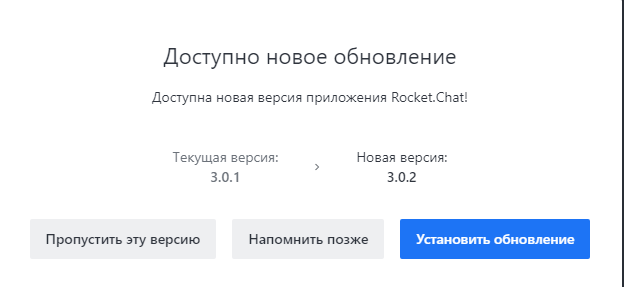

Here is a new file C:\Users\ankar84\AppData\Local\rocketchat-updater\pending\temp-rocketchat-setup-3.0.2.exe for distributive download

After file temp-rocketchat-setup-3.0.2.exe was downloaded system start search prowershell.exe to execute command
powershell.exe -NoProfile -NonInteractive -InputFormat None -Command "Get-AuthenticodeSignature 'C:\Users\ankar84\AppData\Local\rocketchat-updater\pending\temp-rocketchat-setup-3.0.2.exe' | ConvertTo-Json -Compress | ForEach-Object { [Convert]::ToBase64String([System.Text.Encoding]::UTF8.GetBytes($_)) }"
I think that command was successful and issue not here
And here is something not normal

For some reason file temp-rocketchat-setup-3.0.2.exe not transform to file rocketchat-setup-3.0.2.exe but temp file deleted

I try to search Windows Event logs for something strange, but couldn't find anything.
ankar84
on 3 Oct 2020
Windows 10 1803 - Update works perfect


ankar84
on 5 Oct 2020
Same for me. Just tells me 3.0.0 is available, then 3.0.1 now this morning 3.0.2. Give me the option to skip or install. When I select install it does not. I get this error message every morning and I'm on version 2.17.11
 KeithStreeter
on 6 Oct 2020
KeithStreeter
on 6 Oct 2020
3.0.2=>3.0.3 failed on W10 1809


Then it's gone

ankar84
on 14 Oct 2020
Same issue with 3.0.2 -> 3.0.3, Win 10 (64 ) Build 2004.
 fuzsin
on 14 Oct 2020
fuzsin
on 14 Oct 2020
Win 10 (64 ) Build 2004.
Yeap, I think that something in update mechanism is broken since 1809 version
ankar84
on 14 Oct 2020
Just a quick suggestion: if no one seems to be able to fix this annoying issue, why not just point the user to the download page, at least, instead of trying to magically update the app, which doesn't work, ever.
Also, the link to download the Windows version doesn't seem to be updated often. As of now, it's still pointing to version 2.17.11 and the 3.0.4 has been released! We have to click on the "More download options" button to get the latest exe.

 NicolasDionB
on 19 Oct 2020
NicolasDionB
on 19 Oct 2020
I have reported the problem with the web on the Rocket.Chat Forum https://forums.rocket.chat/t/windows-destkop-app-old-link/7325 It has been fixed for 2.17.11, and from release 3.0.0 it's wrong again.
xmedeko
on 19 Oct 2020
Confirming this issue persisting since version 2.7.11. Using Windows 10 x64 Pro 1909&2004. Tested with 3.0.5 to 3.0.6 today. No change in behaviour. Download works but the installer does not work. I suppose as well a problem with windows security. We really hope you will fix this issue soon. Handling 30 employees with RocketChat every update manually is exhausting.
Dimitrie23
on 4 Nov 2020
Tested with 3.0.7. Still same issue.
fuzsin
on 10 Nov 2020
Despite your descriptions, I don't even receive the update executable in AppData.
However, are manual updates via "Help" > "About Rocket.Chat" working for you, guys? Whenever I check for updates, the three progress bubbles start to dance for around a second and then the window show below just disappears.
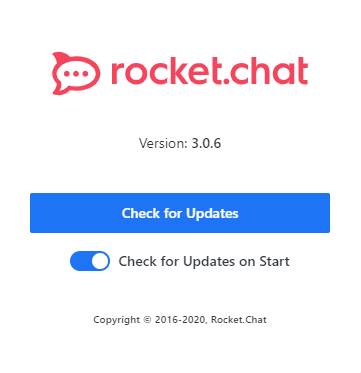
RC App: v 3.0.6
OS: Windows 10 x64 Build 17763
 ckittl
on 11 Nov 2020
ckittl
on 11 Nov 2020
@tassoevan according to this https://github.com/RocketChat/Rocket.Chat.Electron/issues/1670#issuecomment-703348457 and this https://github.com/RocketChat/Rocket.Chat.Electron/issues/1670#issuecomment-708080597 that problem in auto update on Windows start from Windows 10 1809.
Can you check, maybe there is some updated version of tool (electron updater or something?) that used in update process to comply Windows security requirements since 1809?
Edit: I see that you are using latest version https://github.com/RocketChat/Rocket.Chat.Electron/blob/e6e90fd70f4ba68d6f5b6668d50879a9cea34955/package.json#L44
So issue maybe in that packet itself
ankar84
on 11 Nov 2020
Related issues
 SQUIDwarrior
·
3Comments
SQUIDwarrior
·
3Comments
 rgembalik
·
4Comments
rgembalik
·
4Comments
 paulz1
·
3Comments
paulz1
·
3Comments
 Sugaroverdose
·
3Comments
Sugaroverdose
·
3Comments
 Somtozech
·
5Comments
Somtozech
·
5Comments
Most helpful comment
Just a quick suggestion: if no one seems to be able to fix this annoying issue, why not just point the user to the download page, at least, instead of trying to magically update the app, which doesn't work, ever.
Also, the link to download the Windows version doesn't seem to be updated often. As of now, it's still pointing to version 2.17.11 and the 3.0.4 has been released! We have to click on the "More download options" button to get the latest exe.