Rocket.chat.electron: AppCrashes of Rocket.Chat.exe on MS W2K16 XenApp Terminalserver
My Setup
- Operating System: Windows Server 2016
- App Version: Rocket Chat Windows Client 2.17.2
- Installation type: rocketchat-setup-2.17.2.exe
- [x] I have tested with the latest version
- [x] I can simulate the issue easily
Description
Since version 2.16 it is not possible to us to run the RC electron client on a Windows Server 2016 with enabled Terminalserver and XenApp on it. The one, who installs the software can run it. But when I connect as a different terminalserver user the app does not start an crashes immediately. A lot of application errors are then in the eventlog.
The RC Client was installed für "all users on this computer"
The only way to run it is to revert to 2.15.5
Is anybody else experiencing this issue?
Error screenshots
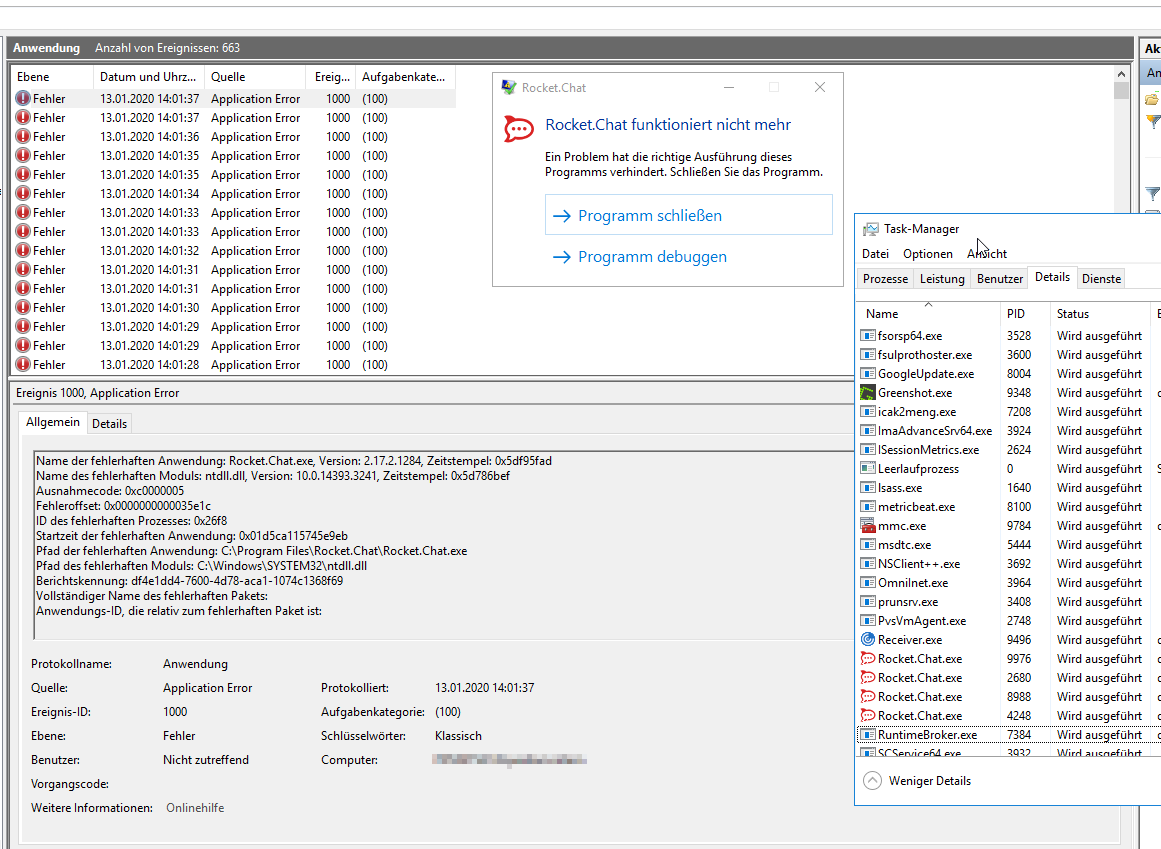
Current Behavior
Application crashes.
Expected Behavior
Application starts.
Thanks for your help
Martin
 mdbertmann
All 10 comments
@mdbertmann Does it happen in latest version?
 tassoevan
on 6 Feb 2020
tassoevan
on 6 Feb 2020
Yes. It also happens with 2.17.5.
mdbertmann
on 7 Feb 2020
This appears also with client version 2.17.7 on Windows Server 2012R2/Citrix environment.
 rcadmin19
on 24 Feb 2020
rcadmin19
on 24 Feb 2020
I got the same Problem on a XenApp/W2k16 environment with Rocket Chat 2.17.7. You found a solution for this problem yet?
 Tjan69
on 2 Mar 2020
Tjan69
on 2 Mar 2020
Same problem with Windows Server 2019 (1809) and Rocket.Chat 2.17.7
 PandaSITT
on 9 Mar 2020
PandaSITT
on 9 Mar 2020
Same problem with Windows Server 2016/Citrix and Rocket.Chat 2.17.7 and 2.17.9
No execute rocket chat desktop
 concellodeponteareas
on 20 Mar 2020
concellodeponteareas
on 31 Mar 2020
concellodeponteareas
on 20 Mar 2020
concellodeponteareas
on 31 Mar 2020
The Registry entry has caused other problems.
It's also a knows bug: https://support.citrix.com/article/CTX220418
PandaSITT
on 1 Apr 2020
Works for me as well with the https://support.citrix.com/article/CTX265011 regkey.
mdbertmann
on 5 May 2020
The Solution from https://support.citrix.com/article/CTX265011 doesn't work for me. I run into the grey screen problem described in https://support.citrix.com/article/CTX220418.
There is a reason why CTX265011 is no longer available and CTX220418 recommends to not use them, the registry keys can cause much more trouble than they solve.
On Windows Server 2016 with enabled terminal server and installed XenApp 7.15 LTSR I still run in the exact same error with Rocket Chat windows client 2.17.11.
Version 2.15.5 works fine.
Any ideas how to solve the problem?
Thanks for your help!
 ohmvdek
on 28 Sep 2020
ohmvdek
on 28 Sep 2020
Related issues
 geekgonecrazy
·
4Comments
geekgonecrazy
·
4Comments
 Sugaroverdose
·
3Comments
Sugaroverdose
·
3Comments
 bbrendon
·
4Comments
bbrendon
·
4Comments
 AlynxZhou
·
4Comments
AlynxZhou
·
4Comments
 tendo256
·
4Comments
tendo256
·
4Comments
Most helpful comment
Solution: https://support.citrix.com/article/CTX265011