Rocket.chat.electron: Can't login with Google OAuth on Windows/Linux/macOS clients with 2.17.2
My Setup
- Operating System: Windows 10
- App Version: 2.17.1 / 2.17.2
- Installation type: exe
- [x] I have tested with the latest version (2.17.2)
- [x] I can simulate the issue easily
Description
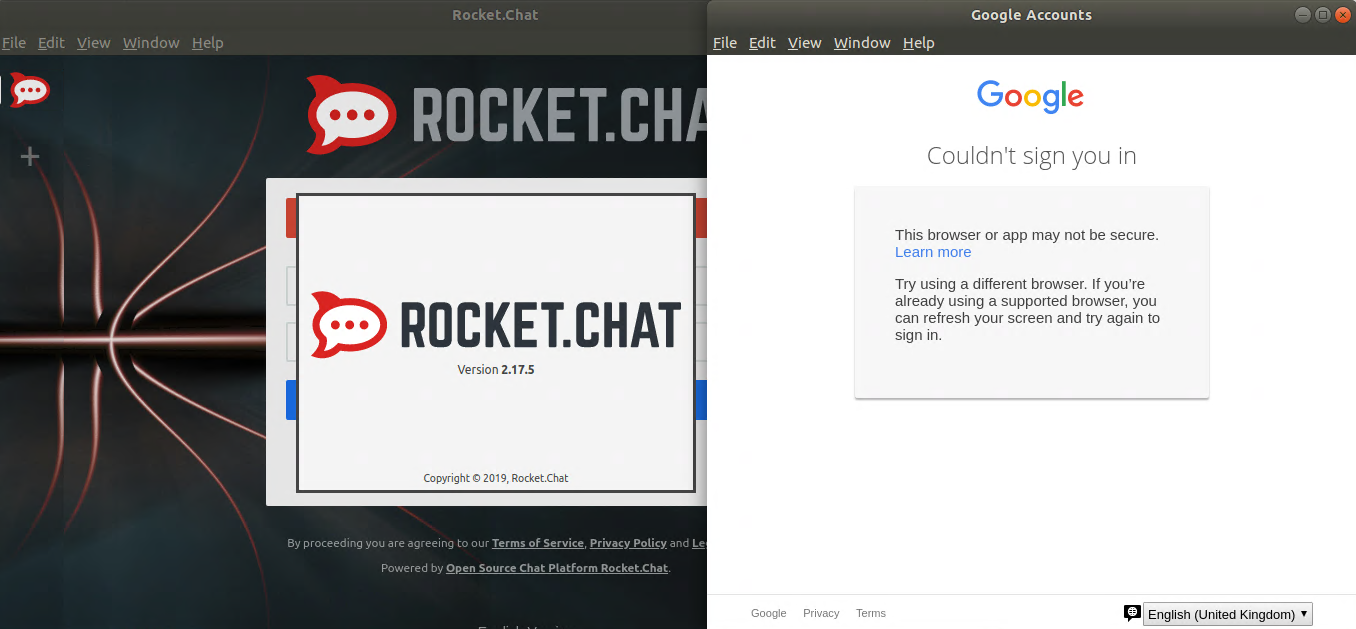
I can't login using Google OAuth. I get an error message (see screenshot: https://ibb.co/Zx5tYtw) and the following link: https://support.google.com/accounts/answer/7675428?hl=en
No issue on MacOS.
To reproduce:
- logout
- and try to login again
Current Behavior
I get an error message when I try to use Google OAuth to login
Expected Behavior
The login process using Google OAuth
 dudognon
All 35 comments
Same issue on Mac Client v2.16.0
 lionel-gattegno
on 7 Jan 2020
lionel-gattegno
on 7 Jan 2020
Same issue ("This browser or app may not be secure.") on 2.17.2 client, macOS 10.15.2, connecting to server 2.4.1

I tried everything that Google suggests (try to allow less secure apps, use app passwords) with no success. I suppose it's the result of their ban of Electron apps (more details on Reddit). The offered solution is to remove "Electron" from User Agent header that is sent by the app.
 Aldekein
on 15 Jan 2020
Aldekein
on 15 Jan 2020
This also occurs on the Linux client
 expired00
on 16 Jan 2020
expired00
on 16 Jan 2020
Confirmed....Linux client broken.
 wicadmin
on 1 Feb 2020
wicadmin
on 1 Feb 2020
So this thread should be renamed to "Can't login with Google OAuth on Windows/Linux/macOS" in some way.
Aldekein
on 5 Feb 2020
I've confirmed changing the user agent on the session resolves this problem in Linux. in src/main.js
const initialize = async () => {
        prepareApp();
        await app.whenReady();
        createMainWindow();
        session.defaultSession.webRequest.onBeforeSendHeaders((details, callback) => {
                details.requestHeaders['User-Agent'] = 'Google Chrome';
                callback({ cancel: false, requestHeaders: details.requestHeaders });
          });
};
expired00
on 5 Feb 2020
Could someone confirm it for version 2.17.5? I didn't have any issue with Google OAuth this week.
 tassoevan
on 6 Feb 2020
tassoevan
on 6 Feb 2020
Same issue, freshly installed from the snap store
expired00
on 6 Feb 2020
One additional question: is 2FA enabled on the account? AFAIK Google blocks non-2FA authentications outside Google Chrome unless "Less secure app access" is checked.
tassoevan
on 6 Feb 2020
2FA is enabled on the account. The above screen appears after typing in the e-mail address and password.
expired00
on 6 Feb 2020
Confirming I'm seeing the same as @expired00 on 2.17.5 Linux and Mac clients.
 DeviaVir
on 7 Feb 2020
DeviaVir
on 7 Feb 2020
Same issue. My gmail account is already configured to allow rocket chat to access, but after upgrading to 2.17.7 I can't login with oauth using the gmail account because I get the error "This browser or app may not be secure. Try using a different browser. If you’re already using a supported browser, you can refresh your screen and try again to sign in."
 SarahBaghdadi
on 15 Feb 2020
SarahBaghdadi
on 15 Feb 2020
After adding the following to src/main.js I was able to remove the message regarding the insecure browser:
const prepareApp = () => {
  setupErrorHandling('main');
+  app.userAgentFallback = app.userAgentFallback.replace('Electron/' + process.versions.electron, 'Electron');
+  app.userAgentFallback = app.userAgentFallback.replace('Chrome/' + process.versions.chrome, 'Chrome');
Which allows for the full sign in and redirect back to the app...but am given the saml error of "No matching login attempt found". Looks like something isn't capturing the creds somewhere along the path...
@tassoevan Hopefully you have something up your sleeve to fix that capturing phase?
 AgentTNT
on 1 Mar 2020
AgentTNT
on 1 Mar 2020
I should add that I was making those changes on the base 2.17.7 tag code on a Mac OSX 10.15.3, with the backend being RC 3.0.2
AgentTNT
on 1 Mar 2020
Any resolution to this?
 tymat
on 13 Mar 2020
tymat
on 13 Mar 2020
@tassoevan I think to solve this we can shift the social logins to browser and then redirect back to the app. Is this approach fine?
 abhigyank
on 28 Mar 2020
abhigyank
on 28 Mar 2020
Would it be possible to just change the User-Agent to something like "Chrome/Rocket.Chat" to avoid this issue? (cf the Reddit thread already linked above)
 rnsc
on 1 Apr 2020
rnsc
on 1 Apr 2020
Would it be possible to just change the User-Agent to something like "Chrome/Rocket.Chat" to avoid this issue? (cf the Reddit thread already linked above)
That's what I've done in my own dev version and it's working fine.
expired00
on 1 Apr 2020
That's what I've done in my own dev version and it's working fine.
Where do we make this change?
wicadmin
on 1 Apr 2020
I've confirmed changing the user agent on the session resolves this problem in Linux. in src/main.js
const initialize = async () => { prepareApp(); await app.whenReady(); createMainWindow(); session.defaultSession.webRequest.onBeforeSendHeaders((details, callback) => { details.requestHeaders['User-Agent'] = 'Google Chrome'; callback({ cancel: false, requestHeaders: details.requestHeaders }); }); };
I mentioned this above in an earlier comment, add the session.defaultSession.webRequest.onBeforeSendHeaders((details, callback) => {
details.requestHeaders['User-Agent'] = 'Google Chrome';
callback({ cancel: false, requestHeaders: details.requestHeaders });
}); to the initialize
expired00
on 1 Apr 2020
t's what I've done in my own dev version and it's working fine.
Doing such in a dev version is fine, doing in an actual product is not fine.
Would it be possible to just change the User-Agent to something like "Chrome/Rocket.Chat" to avoid this issue
Falsifying Rocket.Chat's identity in order to pretend to comply with a security policy can't definitely be a hack that an application of Rocket.Chat's standard can use.
The policy is there for a reason. When you open a browser and see https://google.com in the address bar, you can be confident that you’re talking to Google. When you do this inside an app, there’s no way to know whether the app is stealing your credentials.
Also, I think (not sure) Google has a recourse available against apps that intentionally violate such policies: it could disable Rocket.Chat server's OAuth keys. We don’t want this happening.
abhigyank
on 2 Apr 2020
@abhigyank Indeed, didn't think about that.
But I guess doing this by opening a the social integration through a browser and redirect back to the app is not a trivial thing to implement right?
rnsc
on 2 Apr 2020
Running into this with only 1 user, but not everybody else. 2.17.9, Windows.
 klou
on 11 Apr 2020
klou
on 11 Apr 2020
After adding the following to
src/main.jsI was able to remove the message regarding the insecure browser:const prepareApp = () => { setupErrorHandling('main'); + app.userAgentFallback = app.userAgentFallback.replace('Electron/' + process.versions.electron, 'Electron'); + app.userAgentFallback = app.userAgentFallback.replace('Chrome/' + process.versions.chrome, 'Chrome');Which allows for the full sign in and redirect back to the app...but am given the saml error of "No matching login attempt found". Looks like something isn't capturing the creds somewhere along the path...
@tassoevan Hopefully you have something up your sleeve to fix that capturing phase?
Can confirm that this change resolves the issue.
tymat
on 14 Apr 2020
Just downloaded this software and tried to login with Google...
Unfortunately already created account on the web UI.
Its really inconvenient if users have to download/build source to get this running on their machines (Mac Catalina for me) :/
 zees-dev
on 9 May 2020
zees-dev
on 9 May 2020
No updates on this? Literally preventing users from signing into the app.
expired00
on 6 Jun 2020
No updates on this? Literally preventing users from signing into the app.
Yep, I abandoned this platform.
wicadmin
on 6 Jun 2020
Still same stage - Google OAUTH doesn't work from R.Ch W10 Desktop App
What works is a direct connection to https://open.rocket.chat/ by browser only (Chrome, Edge, Safari, Firefox), then use Google OAUTH within the browser
 juniorUniv
on 20 Jul 2020
juniorUniv
on 20 Jul 2020
Well, after waiting for half a year to solve it, we are estimating a move to the Riot.im Matrix IM.
Aldekein
on 20 Jul 2020
For reference to how Zulip did it - https://github.com/zulip/zulip/pull/14747
abhigyank
on 20 Jul 2020
this still happening on 2.17.11 on xubuntu 20.04.1 .
Works fine on the web interface.
 claenjoy
on 10 Sep 2020
claenjoy
on 10 Sep 2020
the same issue on Xubuntu 20.04.1 with the new version tested both
rocketchat_3.0.1_amd64.deb
Package: rocketchat
Version: 3.0.1-1885
AND
from snap repo :
rocketchat-desktop 3.0.1 196 latest/stable rocketchat✓
claenjoy
on 2 Oct 2020
same issue with Windows version 3.0.2.1680
 igrokit
on 3 Oct 2020
igrokit
on 3 Oct 2020
@tassoevan
Still have the same issue
 dpkg -l | grep rocket
ii  rocketchat                              3.0.3-1919                                                                  amd64

claenjoy
on 14 Oct 2020
Workaround for non-dev versions of Rocket.Chat (package/snap) while we wait for an official fix: Before logging in, open dev tools and follow this guide to set a custom user agent like Chrome on MacOS: https://developers.google.com/web/tools/chrome-devtools/device-mode/override-user-agent
When you are logged in, restore your user agent.
 noproto
on 27 Nov 2020
noproto
on 27 Nov 2020
Related issues
 tendo256
·
4Comments
tendo256
·
4Comments
 geekgonecrazy
·
4Comments
geekgonecrazy
·
4Comments
 jswolf19
·
4Comments
jswolf19
·
4Comments
 rgembalik
·
4Comments
rgembalik
·
4Comments
 agentirons
·
4Comments
agentirons
·
4Comments