Rocket.chat.electron: Rocketchat crash when restoring from tray
My Setup
- Operating System: Windows 10
- App Version: 2.17.0 and 2.17.1
- Installation type: windows exe
- [x] I have tested with the latest version
- [x] I can simulate the issue easily
Description
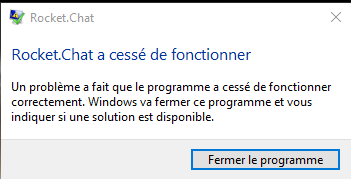
Rocketchat keep crashing after restoration after it has be minimized.
Steps to reproduce:
1/ Open the Rocketchat window
2/ Minimize by clicking on the top-right dash line (minimize button)
3/ Put the mouse on the rocketchat icon until the "No unread messages" popup appears.
3/ Click
The Rocketchat window will not pop up. Another click on the tray icon and the window will be restored... and crash immediately !
Tested with version 2.17.0 and 2.17.1
 cdisabatino
All 28 comments
Wasn't able to replicate on Windows 10 1909.
 Sierra1011
on 11 Dec 2019
Sierra1011
on 11 Dec 2019
Confirm that bug.
Replicated it at Windows 10 1909
Application Logs:
Имя сбойного приложения: Rocket.Chat.exe, версия: 2.17.1.1277, метка времени: 0x5de579fe
Имя сбойного модуля: Rocket.Chat.exe, версия: 2.17.1.1277, метка времени: 0x5de579fe
Код исключения: 0xc0000005
Смещение ошибки: 0x0000000002177a44
Идентификатор сбойного процесса: 0x1244
Время запуска сбойного приложения: 0x01d5b09689ec7255
Путь сбойного приложения: C:\Program Files\Rocket.Chat\Rocket.Chat.exe
Путь сбойного модуля: C:\Program Files\Rocket.Chat\Rocket.Chat.exe
Идентификатор отчета: 883a0f9e-f086-49ab-9cf9-22928bbf5d47
Полное имя сбойного пакета:
Код приложения, связанного со сбойным пакетом:
Контейнер ошибки 1905221252209474781, тип 4
Имя события: APPCRASH
Отклик: Нет данных
Идентификатор CAB: 0
Сигнатура проблемы:
P1: Rocket.Chat.exe
P2: 2.17.1.1277
P3: 5de579fe
P4: Rocket.Chat.exe
P5: 2.17.1.1277
P6: 5de579fe
P7: c0000005
P8: 0000000002177a44
P9:
P10:
Вложенные файлы:
\?\C:\ProgramData\Microsoft\Windows\WER\Temp\WERB7EC.tmp.dmp
\?\C:\ProgramData\Microsoft\Windows\WER\Temp\WERBA6D.tmp.WERInternalMetadata.xml
\?\C:\ProgramData\Microsoft\Windows\WER\Temp\WERBA8D.tmp.xml
\?\C:\ProgramData\Microsoft\Windows\WER\Temp\WERBA8B.tmp.csv
\?\C:\ProgramData\Microsoft\Windows\WER\Temp\WERBAAC.tmp.txt
Эти файлы можно найти здесь:
\?\C:\ProgramData\Microsoft\Windows\WER\ReportArchiveAppCrash_Rocket.Chat.exe_22e89c4c58f407031479cbad05c3fc85d831e1f_53573ca7_6a121da8-0898-4434-9ca9-88be83ebd99d
Символ анализа:
Повторный поиск решения: 0
Идентификатор отчета: 883a0f9e-f086-49ab-9cf9-22928bbf5d47
Состояние отчета: 268435456
Хэшированный контейнер: 8ee1ffe2d5e8e4038a70b4a274787cdd
Идентификатор GUID CAB: 0
Имя сбойного приложения: Rocket.Chat.exe, версия: 2.17.1.1277, метка времени: 0x5de579fe
Имя сбойного модуля: Rocket.Chat.exe, версия: 2.17.1.1277, метка времени: 0x5de579fe
Код исключения: 0xc000041d
Смещение ошибки: 0x0000000002177a44
Идентификатор сбойного процесса: 0x1244
Время запуска сбойного приложения: 0x01d5b09689ec7255
Путь сбойного приложения: C:\Program Files\Rocket.Chat\Rocket.Chat.exe
Путь сбойного модуля: C:\Program Files\Rocket.Chat\Rocket.Chat.exe
Идентификатор отчета: fb386dfd-5a72-494c-97fe-4b06bbe8ba30
Полное имя сбойного пакета:
Код приложения, связанного со сбойным пакетом:
Контейнер ошибки 1470455316813197866, тип 4
Имя события: APPCRASH
Отклик: Нет данных
Идентификатор CAB: 0
Сигнатура проблемы:
P1: Rocket.Chat.exe
P2: 2.17.1.1277
P3: 5de579fe
P4: Rocket.Chat.exe
P5: 2.17.1.1277
P6: 5de579fe
P7: c000041d
P8: 0000000002177a44
P9:
P10:
Вложенные файлы:
\?\C:\ProgramData\Microsoft\Windows\WER\Temp\WERC44F.tmp.dmp
\?\C:\ProgramData\Microsoft\Windows\WER\Temp\WERC51C.tmp.WERInternalMetadata.xml
\?\C:\ProgramData\Microsoft\Windows\WER\Temp\WERC53C.tmp.xml
\?\C:\ProgramData\Microsoft\Windows\WER\Temp\WERC53C.tmp.csv
\?\C:\ProgramData\Microsoft\Windows\WER\Temp\WERC55C.tmp.txt
Эти файлы можно найти здесь:
\?\C:\ProgramData\Microsoft\Windows\WER\ReportArchiveAppCrash_Rocket.Chat.exe_164f317acc56f940601049cbe93a8f9d39495e4e_53573ca7_fb39a24a-2d41-475f-bc42-70fb8ea83523
Символ анализа:
Повторный поиск решения: 0
Идентификатор отчета: fb386dfd-5a72-494c-97fe-4b06bbe8ba30
Состояние отчета: 268435456
Хэшированный контейнер: 39f3237701237ea8a4681b51e0bc322a
Идентификатор GUID CAB: 0
 ankar84
on 12 Dec 2019
ankar84
on 12 Dec 2019
I was able to replicate the issue with latest version (2.17.1)
Env: WIN 10 Pro 1903
 CitizenDev
on 12 Dec 2019
CitizenDev
on 12 Dec 2019
Having same issue on Windows 10 Pro 1909. (2.17.1)
 bkraul
on 13 Dec 2019
bkraul
on 13 Dec 2019
Also happening to me on Windows 10 Pro 10.0.18362
 NathanBeddoeWebDev
on 15 Dec 2019
NathanBeddoeWebDev
on 15 Dec 2019
Win10 1809 crash.
It's quite serious. Hurry to repair.
Thanks.
 cmdares
on 20 Dec 2019
cmdares
on 20 Dec 2019
Same on two clients, only with 2.17.1:
1x Win 10 Pro 1809
1x Win 10 Pro 1903
 zedar187
on 20 Dec 2019
zedar187
on 20 Dec 2019
Happening with 2.17.2 on Windows 10 Pro 1909.
bkraul
on 31 Dec 2019
I got several crashes on Windows 8 since I upgraded to 2.17(.2?). But it only happens in certain cases (a minority of the time).
 Chealer
on 13 Jan 2020
Chealer
on 13 Jan 2020
I am under the impression that this happens only after Rocket.Chat was minimized for some time. I cannot be more precise at this time.
Chealer
on 17 Jan 2020
I still do not know if time from minimization itself is a factor, but I just had another crash less than 15 minutes after I had last closed Rocket.Chat.
Chealer
on 23 Jan 2020
Sounds like this needs attn...
bkraul
on 23 Jan 2020
This is happening at least once a day on multiple client machines in our organization. Someone, please address. It would be a shame that an otherwise great chat solution goes down due to continued stability issues with its client. I am curious, less notable items are assigned and tagged. Why is that not the case with this obviously major issue?
bkraul
on 27 Jan 2020
+1
This client feels like an unwanted child. We've switched from electron client to the browser again. Every release is somehow broken on diverse things. It's a pity. :/
zedar187
on 27 Jan 2020
This is happening at least once a day on multiple client machines in our organization. Someone, please address. It would be a shame that an otherwise great chat solution goes down due to continued stability issues with its client. I am curious, less notable items are assigned and tagged. Why is that not the case with this obviously major issue?
Lack of a reliable reproduction method is always a huge complication.
Chealer
on 27 Jan 2020
Actually, it reproduces quite reliably. I understand that a video would help little though, as the description already points out that it happens when restoring from tray.
bkraul
on 27 Jan 2020
👍 super annoying problem, most of the time the user is unaware that the messages are not delivered becuase the app hangs in the background
 detoxhby
on 29 Jan 2020
detoxhby
on 29 Jan 2020
@detoxhby I'm afraid you're looking at the wrong ticket. This issue is a crash, not a hang.
Chealer
on 29 Jan 2020
@Chealer it crashes at the moment you click on the tray icon, but it hangs in the background till you do that. The client still going to report online status to everyone, and makes the impression that the target person just don't want to anwser, but in fact he/she is not aware of what happening because the app still seems running.
detoxhby
on 29 Jan 2020
That is correct. It happens as @detoxhby reports. You have to hover your mouse over the tray icon a few times for it to finally go away and the program finally terminate. I am curious, chealer, are you a code contributor, or are you just trying to do a service by trying to screen the reports? (I mean no disrespect. I am just trying to establish your involvement).
bkraul
on 29 Jan 2020
@bkraul I am affected by this bug. What @detoxhby says is that Rocket.Chat "hangs" after it crashed. I'll try checking next time I get a crash, but I suppose that's not an actual hang, it's just a systray "artifact" which - I agree - could confuse inexperienced users (I do get the same behavior).
Chealer
on 29 Jan 2020
@Chealer to clarify the situation, it's not just the tray icon being there after the app have died silently.
There are 2 simptons that make me think the app hangs:
- most of the time, clicking on icon brings back the main window which is already in not responding mode, and dies just after this in a few seconds
- the app is running (checked multiple times in task manager) in the background, but there are no notifications/messages presented to user, nothing happens
Based on electron's multi-process architecture, this could happen in a non-native "hang" way, where the whole process stops executing. It's just either part that processes and/or renders the UI.
detoxhby
on 29 Jan 2020
So far, the behavior is no longer happening on 2.17.3. Have had the app installed for the last 3 days, and have constantly clicked the tray icon to restore, with no crashes. About to try the newer versions. Haven't seen any specific work to target the issue, however I know some dependencies have been updated. That's the ray of light...
bkraul
on 4 Feb 2020
I am only on 2.17.2, but it has also been a few days without crashes for me, which is much better than what it used to be.
Chealer
on 4 Feb 2020
With version 2.17.3 the application does not crash anymore.
cdisabatino
on 5 Feb 2020
In version 2.17.3 and 2.17.5 I couldn't reproduce that bug anymore.
I think that bug was fixed in 2.17.3
Thanks @tassoevan
ankar84
on 5 Feb 2020
I got a new crash on 2.17.2. I confirm that in fact Rocket.Chat initially hangs, and after that prompt, it crashes. Yet, 2 Rocket.Chat.exe processes remain after exiting.
If this was fixed in 2.17.3, that was probably unintended, but there's 1 commit which might have fixed: https://github.com/RocketChat/Rocket.Chat.Electron/commit/145c04d45a1c11c3f4d4e1e825748b3f03fa7f91
I just upgraded to 2.17.5 and will report if I experience again.
Chealer
on 10 Feb 2020
I'm having the same problem in 2.17.9 version
 ketanvault
on 30 Apr 2020
ketanvault
on 30 Apr 2020
Related issues
 tendo256
·
4Comments
tendo256
·
4Comments
 bbrendon
·
4Comments
ankar84
·
4Comments
bbrendon
·
4Comments
ankar84
·
4Comments
 rgembalik
·
4Comments
rgembalik
·
4Comments
 thehutman
·
4Comments
thehutman
·
4Comments